
A Backup You’ve Never Restored Is a Guess, Not a Plan
Every DBA can point to a backup schedule. Far fewer can point to proof that any of those backups actually restore. A backup job finishing green tells you the file was written, not that it’s usable, not that the process works end to end, and not that anyone on the team actually knows how to run it under pressure. The only way to know a restore genuinely works is to have run one, and msdb.dbo.restorehistory is the honest record of whether that’s ever happened.
Get-LastRestoreHistory pulls the most recent restore per database: when it happened, from which backup and how old that backup was at the time, who ran it, and whether it went in WITH RECOVERY or left for further log restores. It’s the script that answers “when did we last prove this actually works” instead of “when did the backup job last succeed”.
Why Last Restore History Matters
- A green backup job is not a tested restore. The two are unrelated failure modes: a backup can succeed for months while the restore path is broken (wrong permissions, missing files, a corrupted backup set) and nobody finds out until a real incident.
backup_age_at_restore_daystells you how stale the tested backup was, which matters for judging whether your actual RPO has ever been validated, not just assumed.user_nameshows who’s actually run a restore. If it’s always the same one person, that’s a bus-factor problem worth knowing about before it becomes urgent.- Zero restores is itself the finding, and the script now says so. On an instance where
msdb.dbo.restorehistoryis empty, it returns an explicitNO RESTORE HISTORYrow rather than a blank grid, so the gap it exists to surface cannot be mistaken for a script that found nothing to say.
When to Run This Script
- As part of a DR/backup-strategy audit, to check the restore side of the story, not just the backup side
- After any restore test or drill, to confirm it actually landed in
msdb.dbo.restorehistorythe way you expect - When inheriting a server, to find out whether restore testing has ever actually happened here
- Before signing off on an RPO/RTO number to anyone outside the team, since an untested restore is a promise, not a fact
The Script
Run the following script against your SQL Server instance.
- Tested on: SQL Server 2025 (RTM CU8), Windows lab instance
- Last verified: 2026-08-30 (saved output from a real run, Get-LastRestoreHistory-20260830-122153.csv)
- Permissions: msdb access (db_datareader on msdb or sysadmin)
- Safety: read-only, impact low
/*
Script Name : Get-LastRestoreHistory
Category    : backups
Purpose     : Full restore history from msdb — when each database was last restored, from which backup, and by whom. Use to verify DR restore tests have actually been run.
Author      : Peter Whyte (https://sqldba.blog/dba-scripts-get-last-restore-history/)
Requires    : msdb access (db_datareader on msdb or sysadmin)
Notes       : A database only appears here if it has ever been restored. An instance with no
              restore history returns an explicit NO RESTORE HISTORY row rather than an empty
              result set — zero restores is the finding, not a blank screen.
*/
-- SAFE:ReadOnly
-- IMPACT:Low
SET NOCOUNT ON;

/* ── Empty history is the headline finding, so say it, don't return nothing ─ */
IF NOT EXISTS (SELECT 1 FROM msdb.dbo.restorehistory)
BEGIN
    SELECT
        CAST('NO RESTORE HISTORY - no restore has ever been recorded on this instance'
             AS NVARCHAR(128))          AS database_name,
        CAST(NULL AS DATETIME)          AS restore_date,
        CAST(NULL AS INT)               AS days_since_restore,
        CAST(NULL AS NVARCHAR(12))      AS restore_type,
        CAST(NULL AS NVARCHAR(128))     AS source_database,
        CAST(NULL AS DATETIME)          AS backup_taken_date,
        CAST(NULL AS INT)               AS backup_age_at_restore_days,
        CAST(NULL AS NVARCHAR(128))     AS user_name,
        CAST(NULL AS BIT)               AS with_recovery,
        CAST(NULL AS BIT)               AS with_replace;
    RETURN;
END

/* ── Most recent restore per database ────────────────────────────────────── */
;WITH ranked AS (
    SELECT
        rh.restore_history_id,
        rh.destination_database_name,
        rh.restore_date,
        DATEDIFF(DAY, rh.restore_date, GETDATE()) AS days_since_restore,
        CASE rh.restore_type
            WHEN 'D' THEN 'Full'
            WHEN 'I' THEN 'Differential'
            WHEN 'L' THEN 'Log'
            WHEN 'F' THEN 'File'
            WHEN 'P' THEN 'Page'
            WHEN 'R' THEN 'Revert'
            ELSE rh.restore_type
        END AS restore_type,
        bs.database_name AS source_database,
        bs.backup_finish_date AS backup_taken_date,
        DATEDIFF(DAY, bs.backup_finish_date, rh.restore_date) AS backup_age_at_restore_days,
        rh.user_name,
        rh.recovery AS with_recovery,
        rh.replace AS with_replace,
        ROW_NUMBER() OVER (
            PARTITION BY rh.destination_database_name
            ORDER BY rh.restore_date DESC
        ) AS rn
    FROM msdb.dbo.restorehistory rh
    LEFT JOIN msdb.dbo.backupset bs ON bs.backup_set_id = rh.backup_set_id
)
SELECT
    destination_database_name AS database_name,
    restore_date,
    days_since_restore,
    restore_type,
    source_database,
    backup_taken_date,
    backup_age_at_restore_days,
    user_name,
    with_recovery,
    with_replace
FROM ranked
WHERE rn = 1
ORDER BY restore_date DESC;
Ranks every row in msdb.dbo.restorehistory per destination database by restore date, joins back to msdb.dbo.backupset to find the source database and how old the backup was, and returns only the most recent restore per database, newest first.
How To Run From The Repo
Clone DBA Tools, initialize and run the script:
# Clone dba-tools repo:
git clone https://github.com/peterwhyte-lgtm/dba-tools

# Initialize environment:
cd dba-tools
.\Initialize-Environment.ps1

# Most recent restore per database, from msdb history:
.\run.ps1 Get-LastRestoreHistory

# To run against a remote sql server:
.\run.ps1 Get-LastRestoreHistory -ServerInstance SQLSERVER01
This script lives in the repo at:
Example Output
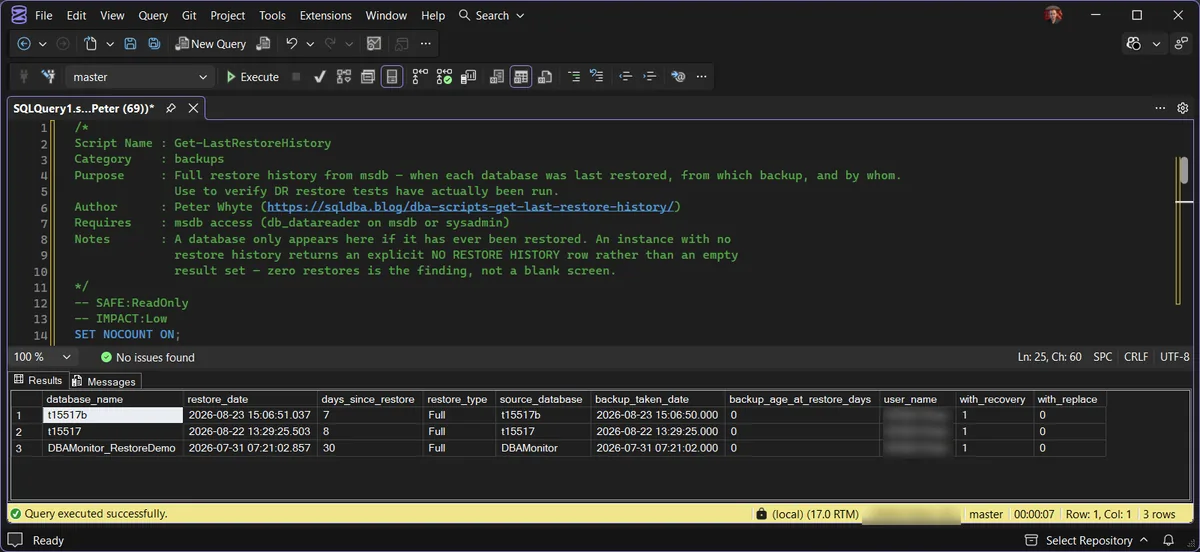
One row per database that has ever been restored on this instance, newest first: the restore date, how many days ago that was, the backup it came from and how old that backup was when it was used. A list that keeps growing is what healthy looks like. A single NO RESTORE HISTORY row is the other finding, and the more important one.
Understanding the Results
A fresh instance, or one where nobody has ever tested a restore, returns the single NO RESTORE HISTORY row. That is deliberate: an empty grid looks like a script problem, a named row says what it means. An instance can run backups reliably for months while restore capability has never once been verified, and this is the script that says so.
That’s not a contrived example. It’s the exact gap this script is built to catch: an instance can run backups reliably for months while restore capability has never once been verified. If you run this script against a real server and get the NO RESTORE HISTORY row, that is the finding, not a script problem.
database_namebackup_taken_datemsdb.dbo.restorehistory is empty: no restore has ever been recorded on this instance. Act when this shows on an instance whose backups you rely on. Restore capability has never been proven here, and that is the headline finding of the whole script.restore_datedays_since_restorebackup_age_at_restore_daysrestore_typesource_databaseuser_namewith_recoveryTrue means the database came fully online, a complete test. False means it was left in NORECOVERY, mid-sequence for further log restores; worth knowing which mode your last test actually exercised.with_replaceTrue means WITH REPLACE overwrote an existing database, the switch most often reached for after error 3154, “the backup set holds a backup of a database other than the existing one”. Routine on a test target; on a production name it deserves a second look.Best Practices
- Treat “backup succeeded” and “restore verified” as two separate, equally necessary facts. This script only answers the second one.
- Schedule restore tests deliberately (monthly or quarterly, depending on how critical the database is) rather than relying on them happening incidentally.
- Restore to a differently-named or isolated target when testing, the way this post’s own example does, so a routine test never risks the production database it’s meant to protect. If a test restore refuses to run at all, start at errors 3013 and 3241, the two most common ways a restore dies.
- If this script returns its
NO RESTORE HISTORYrow, or nothing for a database you consider critical, that is the finding to escalate, not a script limitation to work around.
Microsoft’s reference covers restorehistory and backupset in full.
Related Scripts
You may also find these scripts useful:
- Diff Backup Script / Full Backup Script / Restore Script / T Log Backup Script
- Backup Chain Integrity
- Backup Coverage
- Backup Encryption Status
- Backup Restore Duration Estimate
- Backup Size Trend
- Database Backup History
- Generate Restore With Move Script
- Database Cannot Be Opened, It Is in the Middle of a Restore
- Get Last Database Restore Date and Time
- DBA Scripts: The Complete Guide, the map across every script on this site
Frequently Asked Questions
Why is a database missing from the list?
It only appears if it has been restored on this instance, because msdb.dbo.restorehistory is instance-local. A database that was restored on another server and then attached, detached or migrated here has no row, and neither does one whose history was purged by sp_delete_backuphistory or a maintenance plan cleanup task.
What does the NO RESTORE HISTORY row mean?
That msdb on this instance has never recorded a restore. On a lab that is normal. On a production instance it means no restore has ever been tested here, or the history has been cleaned out, and either way the backups are unproven until someone restores one.
Do log shipping secondaries show up?
Yes. Every RESTORE LOG is recorded, so a log shipping secondary shows a restore every few minutes with restore_type of Log and days_since_restore at 0. That is expected and is not a DR test; look for the Full and Differential restores when you are checking whether backups have been proven.
How far back does the history go?
As far back as msdb has kept it. SQL Server never trims backup and restore history on its own, so on an instance nobody has cleaned up it goes back to the first restore ever run there. If a maintenance plan runs the History Cleanup task, anything older than its retention is gone, which is why an old restore can vanish from this list without anyone restoring anything.
Summary
A backup strategy is only half-verified until the restore half has actually been tested, and msdb.dbo.restorehistory is the only honest record of whether that’s happened. Get-LastRestoreHistory turns that record into a one-glance answer per database: when, from what, how stale, and by whom.
If it answers with its NO RESTORE HISTORY row, or has nothing for something you’d call critical, that’s not a script quirk to shrug off. It’s the same gap this post’s own real output demonstrated: reliable backups and a verified restore path are two different things, and only one of them shows up in a green Agent job.
Leave a Reply