
Allocated vs Used, Split by Data and Log, Every Database, One Pass
A write has just failed and the drive it lives on still shows free space. This script reports how much room is left inside the database files themselves for every online database on the instance, split into data and log, with the tightest database on the top row.
Database Files Detail gives you file-level detail. This script gives you the consolidated view above that: allocated, used and free space per database, in MB, GB or TB, plus a count of the files that cannot grow any further, all in one pass.
The split matters because data and log space behave completely differently: data space fills gradually as rows are added, log space fills based on transaction activity and recovery model, and a database can be nearly out of one while having plenty of the other.
Database Sizes and Free Space answers a related but different question: biggest databases first, user databases only, raw MB throughout. This one covers the system databases too, formats the units, orders by lowest free percentage first and counts the capped files, for triage rather than inventory.
Why Database Free Space Summary Matters
- Free space inside the database files, not on the drive, is what decides whether the next insert or log write completes. A drive with room to spare does not help if the file is not allowed to grow into it, and
Capped Filesis the column that tells you which case you are in - Separating data free space from log free space stops one from hiding a problem in the other, a database can look “healthy” on total free space while its log is nearly full
- Free % is the number that scales, comparing raw MB across databases of wildly different sizes doesn’t tell you which one needs attention first, free % does
- This reads system metadata and one
DBCC SQLPERF(LOGSPACE)call, not a per-database scan, safe to run on a busy production instance
When to Run This Script
- The moment a write fails with error 1105 or 9002, to see whether the database has run out of room inside its own files or the volume underneath has run out. Disk Is Full or the Log Will Not Truncate is the wider playbook
- Routine capacity and storage reviews, across every database in one pass
- Investigating disk space pressure, to see which specific database and which specific file type (data or log) is actually consuming it
- Before a maintenance window that might grow files, to confirm the starting baseline
- Alongside Database Growth Risk and Forecast when planning ahead rather than just checking the current state
The Script
- Tested on: SQL Server 2025 (RTM CU8) 17.0.4075.5, Windows lab instance
- Last verified: 2026-10-04 (saved output from a real run across 18 databases, Get-DatabaseFreeSpaceSummary-20261004-001123.csv)
- Permissions: VIEW SERVER STATE, plus CONNECT in each database to be reported
- Safety: read-only, impact low
/*
Script Name : Get-DatabaseFreeSpaceSummary
Category    : monitoring
Purpose     : Allocated, used, and free space for every online database, split into data and log,
              ordered by lowest total free percentage first so the tightest database is the top row.
              Capped Files counts the data and log files that cannot grow any further, which is
              what decides whether a low free percentage is an outage waiting to happen.
Author      : Peter Whyte (https://sqldba.blog/dba-scripts-get-database-free-space-summary/)
Requires    : VIEW SERVER STATE, plus CONNECT in each database to be reported
Notes       : VIEW SERVER STATE is for DBCC SQLPERF(LOGSPACE) and the script fails outright
              without it (Msg 297) rather than reporting every log as empty.
              Databases the caller cannot enter, and databases that are not ONLINE, are skipped
              with no row and no warning, so a smaller row count is the only symptom.
              FILESTREAM and memory-optimized data containers (type_desc FILESTREAM) are counted
              in no column, so a database using them allocates more on disk than this reports.
              Free space here is space inside the existing files, not space on the volume.
*/
-- SAFE:ReadOnly
-- IMPACT:Low
SET NOCOUNT ON;
SET QUOTED_IDENTIFIER ON;

/* Set to 1 to hide master/model/msdb/tempdb */
DECLARE @ExcludeSystemDBs BIT = 0;

/* ── Temp tables ─────────────────────────────────────────────────────────── */
IF OBJECT_ID('tempdb..#SpaceInfo') IS NOT NULL DROP TABLE #SpaceInfo;
CREATE TABLE #SpaceInfo (
    DatabaseName NVARCHAR(128) NOT NULL,
    DataAllocMB DECIMAL(20,2) NOT NULL DEFAULT 0,
    DataUsedMB DECIMAL(20,2) NOT NULL DEFAULT 0,
    LogAllocMB DECIMAL(20,2) NOT NULL DEFAULT 0,
    LogUsedMB DECIMAL(20,2) NOT NULL DEFAULT 0,
    CappedFiles INT NOT NULL DEFAULT 0
);

IF OBJECT_ID('tempdb..#LogSpace') IS NOT NULL DROP TABLE #LogSpace;
CREATE TABLE #LogSpace (
    DatabaseName NVARCHAR(128),
    LogSizeMB FLOAT,
    LogUsedPct FLOAT,
    [Status] TINYINT
);

/* ── Capture log space from DBCC SQLPERF (one call for all DBs) ─────────── */
INSERT INTO #LogSpace
EXEC ('DBCC SQLPERF(LOGSPACE) WITH NO_INFOMSGS');

/* ── Cursor: collect data-file sizes via per-database context switch ──────── */
DECLARE @db NVARCHAR(128);
DECLARE @sql NVARCHAR(MAX);

DECLARE db_cur CURSOR FAST_FORWARD FOR
    SELECT name
    FROM sys.databases
    WHERE state_desc = 'ONLINE'
      AND HAS_DBACCESS(name) = 1
      AND (@ExcludeSystemDBs = 0 OR database_id > 4)
    ORDER BY name;

OPEN db_cur;
FETCH NEXT FROM db_cur INTO @db;

WHILE @@FETCH_STATUS = 0
BEGIN
    SET @sql = N'
        USE ' + QUOTENAME(@db) + N';
        INSERT INTO #SpaceInfo (DatabaseName, DataAllocMB, DataUsedMB, LogAllocMB, LogUsedMB, CappedFiles)
        SELECT
            DB_NAME(),
            SUM(CASE WHEN type_desc = ''ROWS''
                     THEN CAST(size AS BIGINT) * 8.0 / 1024
                     ELSE 0 END),
            SUM(CASE WHEN type_desc = ''ROWS''
                     THEN CAST(COALESCE(FILEPROPERTY(name, ''SpaceUsed''), 0) AS BIGINT) * 8.0 / 1024
                     ELSE 0 END),
            SUM(CASE WHEN type_desc = ''LOG''
                     THEN CAST(size AS BIGINT) * 8.0 / 1024
                     ELSE 0 END),
            0,
            /* a file is capped when autogrowth is off, or it has already reached max_size */
            SUM(CASE WHEN type_desc IN (''ROWS'', ''LOG'')
                          AND (growth = 0 OR max_size = 0
                               OR (max_size > 0 AND size >= max_size))
                     THEN 1 ELSE 0 END)
        FROM sys.database_files;
    ';

    BEGIN TRY
        EXEC sp_executesql @sql;
    END TRY
    BEGIN CATCH
        /* Skip databases that are inaccessible mid-run */
    END CATCH;

    FETCH NEXT FROM db_cur INTO @db;
END;

CLOSE db_cur;
DEALLOCATE db_cur;

/* ── Merge log-used percentages from DBCC SQLPERF ───────────────────────── */
UPDATE s
SET s.LogUsedMB = CAST(l.LogSizeMB * l.LogUsedPct / 100.0 AS DECIMAL(20,2))
FROM #SpaceInfo s
JOIN #LogSpace l ON l.DatabaseName = s.DatabaseName;

/* ── Final report ────────────────────────────────────────────────────────── */
;WITH calc AS (
    SELECT
        DatabaseName,
        DataAllocMB,
        DataUsedMB,
        CASE WHEN DataAllocMB - DataUsedMB > 0
             THEN DataAllocMB - DataUsedMB ELSE 0 END AS DataFreeMB,
        LogAllocMB,
        LogUsedMB,
        CASE WHEN LogAllocMB - LogUsedMB > 0
             THEN LogAllocMB - LogUsedMB ELSE 0 END AS LogFreeMB,
        CappedFiles,
        DataAllocMB + LogAllocMB AS TotalAllocMB,
        DataUsedMB + LogUsedMB AS TotalUsedMB,
          CASE WHEN DataAllocMB - DataUsedMB > 0 THEN DataAllocMB - DataUsedMB ELSE 0 END
        + CASE WHEN LogAllocMB - LogUsedMB > 0 THEN LogAllocMB - LogUsedMB ELSE 0 END AS TotalFreeMB
    FROM #SpaceInfo
)
SELECT
    DatabaseName,

    /* ── Totals ──────────────────────────────────────────────────────────── */
    CASE WHEN TotalAllocMB >= 1048576 THEN CAST(CAST(TotalAllocMB / 1048576.0 AS DECIMAL(10,2)) AS VARCHAR) + ' TB'
         WHEN TotalAllocMB >= 1024 THEN CAST(CAST(TotalAllocMB / 1024.0 AS DECIMAL(10,2)) AS VARCHAR) + ' GB'
         ELSE CAST(CAST(TotalAllocMB AS DECIMAL(10,2)) AS VARCHAR) + ' MB'
    END AS [Total Allocated],

    CASE WHEN TotalUsedMB >= 1048576 THEN CAST(CAST(TotalUsedMB / 1048576.0 AS DECIMAL(10,2)) AS VARCHAR) + ' TB'
         WHEN TotalUsedMB >= 1024 THEN CAST(CAST(TotalUsedMB / 1024.0 AS DECIMAL(10,2)) AS VARCHAR) + ' GB'
         ELSE CAST(CAST(TotalUsedMB AS DECIMAL(10,2)) AS VARCHAR) + ' MB'
    END AS [Total Used],

    CASE WHEN TotalFreeMB >= 1048576 THEN CAST(CAST(TotalFreeMB / 1048576.0 AS DECIMAL(10,2)) AS VARCHAR) + ' TB'
         WHEN TotalFreeMB >= 1024 THEN CAST(CAST(TotalFreeMB / 1024.0 AS DECIMAL(10,2)) AS VARCHAR) + ' GB'
         ELSE CAST(CAST(TotalFreeMB AS DECIMAL(10,2)) AS VARCHAR) + ' MB'
    END AS [Total Free],

    CAST(
        CASE WHEN TotalAllocMB > 0
             THEN TotalFreeMB * 100.0 / TotalAllocMB
             ELSE 0
        END AS DECIMAL(5,2)) AS [Free %],

    CappedFiles AS [Capped Files],

    /* ── Data files ──────────────────────────────────────────────────────── */
    CASE WHEN DataAllocMB >= 1048576 THEN CAST(CAST(DataAllocMB / 1048576.0 AS DECIMAL(10,2)) AS VARCHAR) + ' TB'
         WHEN DataAllocMB >= 1024 THEN CAST(CAST(DataAllocMB / 1024.0 AS DECIMAL(10,2)) AS VARCHAR) + ' GB'
         ELSE CAST(CAST(DataAllocMB AS DECIMAL(10,2)) AS VARCHAR) + ' MB'
    END AS [Data Allocated],

    CASE WHEN DataUsedMB >= 1048576 THEN CAST(CAST(DataUsedMB / 1048576.0 AS DECIMAL(10,2)) AS VARCHAR) + ' TB'
         WHEN DataUsedMB >= 1024 THEN CAST(CAST(DataUsedMB / 1024.0 AS DECIMAL(10,2)) AS VARCHAR) + ' GB'
         ELSE CAST(CAST(DataUsedMB AS DECIMAL(10,2)) AS VARCHAR) + ' MB'
    END AS [Data Used],

    CASE WHEN DataFreeMB >= 1048576 THEN CAST(CAST(DataFreeMB / 1048576.0 AS DECIMAL(10,2)) AS VARCHAR) + ' TB'
         WHEN DataFreeMB >= 1024 THEN CAST(CAST(DataFreeMB / 1024.0 AS DECIMAL(10,2)) AS VARCHAR) + ' GB'
         ELSE CAST(CAST(DataFreeMB AS DECIMAL(10,2)) AS VARCHAR) + ' MB'
    END AS [Data Free],

    /* ── Log files ───────────────────────────────────────────────────────── */
    CASE WHEN LogAllocMB >= 1048576 THEN CAST(CAST(LogAllocMB / 1048576.0 AS DECIMAL(10,2)) AS VARCHAR) + ' TB'
         WHEN LogAllocMB >= 1024 THEN CAST(CAST(LogAllocMB / 1024.0 AS DECIMAL(10,2)) AS VARCHAR) + ' GB'
         ELSE CAST(CAST(LogAllocMB AS DECIMAL(10,2)) AS VARCHAR) + ' MB'
    END AS [Log Allocated],

    CASE WHEN LogUsedMB >= 1048576 THEN CAST(CAST(LogUsedMB / 1048576.0 AS DECIMAL(10,2)) AS VARCHAR) + ' TB'
         WHEN LogUsedMB >= 1024 THEN CAST(CAST(LogUsedMB / 1024.0 AS DECIMAL(10,2)) AS VARCHAR) + ' GB'
         ELSE CAST(CAST(LogUsedMB AS DECIMAL(10,2)) AS VARCHAR) + ' MB'
    END AS [Log Used],

    CASE WHEN LogFreeMB >= 1048576 THEN CAST(CAST(LogFreeMB / 1048576.0 AS DECIMAL(10,2)) AS VARCHAR) + ' TB'
         WHEN LogFreeMB >= 1024 THEN CAST(CAST(LogFreeMB / 1024.0 AS DECIMAL(10,2)) AS VARCHAR) + ' GB'
         ELSE CAST(CAST(LogFreeMB AS DECIMAL(10,2)) AS VARCHAR) + ' MB'
    END AS [Log Free],

    /* ── Raw MB columns for charting ─────────────────────────────────────── */
    TotalAllocMB,
    TotalUsedMB,
    TotalFreeMB

FROM calc
ORDER BY [Free %] ASC, DatabaseName ASC;

/* ── Cleanup ─────────────────────────────────────────────────────────────── */
IF OBJECT_ID('tempdb..#SpaceInfo') IS NOT NULL DROP TABLE #SpaceInfo;
IF OBJECT_ID('tempdb..#LogSpace') IS NOT NULL DROP TABLE #LogSpace;
How To Run From The Repo
Clone DBA Tools, initialize and run the script:
# Clone dba-tools repo:
git clone https://github.com/peterwhyte-lgtm/dba-tools

# Initialize environment:
cd dba-tools
.\Initialize-Environment.ps1

# Allocated, used, and free space for every database, split by data and log:
.\run.ps1 Get-DatabaseFreeSpaceSummary

# To run against a remote sql server:
.\run.ps1 Get-DatabaseFreeSpaceSummary -ServerInstance SQLSERVER01
This script lives in the repo at:
Example Output
One run against the lab instance, 21 databases, ordered as the script orders them: lowest free percentage first.
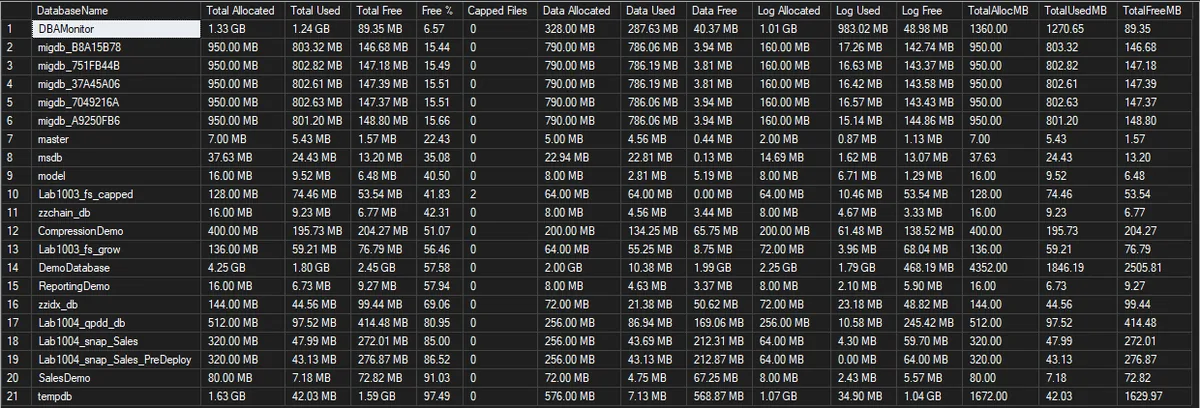
DBAMonitor is the top row at 6.57% free, and it is the one a capacity review would act on. migdb_B8A15B78 is the split picture the data and log columns exist for: 15.44% free overall, 142.74 MB of that sitting in the log and 3.94 MB in the data files, so the action there is a data file, not a log action.
The row worth reading twice is Lab1003_fs_capped. Free % reads 41.83, which looks comfortable, and the database is out of room: Capped Files is 2 and Data Free is 0.00 MB. Its data file had reached its MAXSIZE, so the next insert came back as error 1105 while that grid still showed nearly half the database free. Lab1003_fs_grow is the same database with autogrowth left on, 64 MB allocated and 8.75 MB of Data Free in this capture, and when the same insert ran against it the data file grew to 128 MB and the insert succeeded.
Understanding the Results
DatabaseNameTotal AllocatedTotal UsedTotal FreeFree %Capped FilesMAXSIZE. This is the column that turns a percentage into a verdict: free space that tops itself up automatically is not the same problem as free space that cannot.Act when this reads anything other than 0. Those files hold all of that database’s remaining headroom, and when it runs out the write fails with error 1105 or 9002.Data AllocatedData UsedData FreeROWS files only. Data space fills gradually as rows are added, so this is the half that trends.Act when Data Free is small while Total Free looks healthy. The log is carrying the total and the data files are the ones in trouble.Log AllocatedLog UsedLog FreeLOG files. Log used comes from DBCC SQLPERF(LOGSPACE) rather than from the file size, so it is the real used figure, and it moves with transaction activity and the recovery model rather than with row count.Act when Log Free is small and stays small after a log backup. That is a truncation problem, not a sizing problem, and Log Reuse Waits names what is holding it.TotalAllocMBTotalUsedMBTotalFreeMBBest Practices
- Run this instance-wide as a routine capacity check, the data/log split surfaces problems a single free-space number would hide
- Read
Capped Filesbefore reacting toFree %. A low percentage on files that can still grow is a note for the capacity plan; any non-zero count is a file with nowhere left to go - Pair it with Disk Space, which reads the volumes. This script cannot see whether the drive holds the room that the autogrowth it is relying on will need
- Cross-reference low Free % findings with Database Growth Risk and Forecast to see whether it’s trending toward a real problem or already stable
- Re-run after any planned file grow or shrink to confirm the change had the intended effect
MS Docs: DBCC SQLPERF · sys.database_files · FILEPROPERTY · sys.databases
Frequently Asked Questions
Why does this need to switch database context with a cursor instead of one cross-database query?
FILEPROPERTY(name, 'SpaceUsed') only resolves correctly against the database it’s actually running in, there’s no single system view that reports accurate used-space-per-file across every database from one context. The cursor-and-sp_executesql pattern is the standard, reliable way to collect this cross-database.
Does a high Free % always mean a database is over-provisioned?
Not necessarily, some free space headroom is intentional, avoiding frequent autogrowth events during peak load. The concern is a database trending toward 0% free rather than one sitting comfortably at 40-60%.
Free % looks healthy but inserts are failing with error 1105. What am I missing?
Read Capped Files and Data Free on that row rather than the total. Free % blends data and log, so a database with an empty log and a full data file still reads mid-range. On the lab run above, the database that returned 1105 was showing 41.83% free, with Data Free at 0.00 MB and 2 capped files.
The fix is on the file, not the database: raise or remove MAXSIZE, turn autogrowth back on, or add a file to the filegroup, having checked that the volume has the room first.
Why does it return fewer databases than the instance has?
2 filters, both silent. Databases that are not ONLINE are excluded by the cursor, and databases the login cannot enter fail HAS_DBACCESS and are skipped. Measured on the lab: as sysadmin the script returned 18 rows, and as a login holding VIEW SERVER STATE plus a user in one database it returned 4, with no error and no warning either time.
Permission filtering gives you fewer rows, not a failure, so a short row count is the only symptom there is. Count the rows against sys.databases before trusting a clean-looking report.
Are FILESTREAM and In-Memory OLTP files counted?
No. Both arrive in sys.database_files as type_desc = 'FILESTREAM', and the script sums only ROWS and LOG, so their allocation lands in no column. Measured on the lab: a database carrying a 105 MB memory-optimized container reported 200 MB allocated against 305 MB actually on disk.
There is no used-space figure to report for those containers either, because FILEPROPERTY(name, 'SpaceUsed') returns NULL for them. For a database using either feature, read the volume with Disk Space as well.
Why does it need VIEW SERVER STATE, and what happens without it?
DBCC SQLPERF(LOGSPACE) is where the log used figure comes from, and it needs VIEW SERVER STATE. Without it the script stops with Msg 297, “The user does not have permission to perform this action”, and returns nothing at all. That is the right outcome: with no log used figure every log would be reported as empty, which is worse than no answer.
The data half needs no server-level permission beyond being a user in the database. A plain user with no VIEW DATABASE STATE reads sys.database_files and FILEPROPERTY correctly for its own database, which is why that permission is no longer named in the script header.
Summary
Total free space alone hides more than it reveals, a database can look fine on one number while its log or its data files are individually close to full. This script splits the picture cleanly across every database in one pass, human-readable and ready for a routine capacity review.
Run it instance-wide as a standing check. The top row is the tightest database, and Capped Files is the column that separates a database that is merely full from one that has nowhere left to grow.
Related Scripts
You may also find these scripts useful:
- Storage and Capacity (hub)
- Database Files Detail
- Filegroup Space
- Disk Space
- Autogrowth History
- Transaction Log Size and Usage
- Database Growth Risk and Forecast
- DBA Scripts: The Complete Guide, the map across every script on this site
Leave a Reply