
Two Plain Inventories Every Migration Plan Needs
Permissions and Role Membership and SQL Agent and Jobs cover the deep dive. These two are the plain inventory underneath both:
- Get-LoginInventory: the logins a migration has to recreate, by type and status. No permission detail.
- Get-JobInventory: every SQL Agent job with its owner. No schedule or run history.
The login list leaves out the engine’s own principals, the ## certificate logins and the NT AUTHORITY and NT SERVICE accounts. The install creates those on the target, so they are not yours to carry over.
Both exist for the same reason: a migration or login-script generator needs a clean list to work from, not a full security or health audit.
Why Login and Job Inventory Matter
- A migration plan starts with knowing exactly what logins and jobs need to exist on the target server, this is the checklist, not the analysis
- A disabled login or job sitting in the list is worth a second look, whether it’s safe to leave behind or needs to move too
- Job ownership under a specific login (rather than
saor a service account) is a common migration gap, if that login doesn’t move, the job’sEXECUTE AScontext breaks silently on the new server - Both scripts are read-only inventories on purpose, deliberately not overlapping with the deeper permission or job-health scripts, so you can pull a clean list without wading through analysis you don’t need yet
When to Run These Scripts
- Building a migration runbook or login/job creation script for a target server
- Confirming exactly what exists before generating DDL with the Generate-* migration scripts
- Reviewing a server you’ve just inherited, for a fast first-pass list before the deeper Permissions and Role Membership or SQL Agent and Jobs reviews
- Alongside the rest of the Server Inventory cluster when planning a migration
The Scripts
1. Get-LoginInventory: The Logins a Migration Has to Recreate
- Tested on: SQL Server 2025 (RTM CU8), Windows lab instance
- Last verified: 2026-08-30 (all 2 scripts on this page run, saved outputs from real runs)
- Permissions: VIEW ANY DEFINITION (or ALTER ANY LOGIN). A login without it sees only its own row in sys.server_principals, so the result looks empty rather than erroring. · db_datareader on msdb
- Safety: read-only, impact low
/*
Script Name : Get-LoginInventory
Category    : migration
Purpose     : Inventory server logins by type and status for migration and access review.
              Returns the logins a migration has to recreate: SQL logins, Windows logins and
              Windows groups. Deliberately EXCLUDES the engine's own principals (##certificate
              logins, NT AUTHORITY\*, NT SERVICE\*) because those are created by the install
              on the target, not migrated onto it.
Author      : Peter Whyte (https://sqldba.blog/dba-scripts-get-login-and-job-inventory/)
Requires    : VIEW ANY DEFINITION (or ALTER ANY LOGIN). A login without it sees only its own
              row in sys.server_principals, so the result looks empty rather than erroring.
*/
-- SAFE:ReadOnly
-- IMPACT:Low
SET NOCOUNT ON;
SELECT
    sp.name AS login_name,
    sp.type_desc AS login_type,
    CASE WHEN sp.is_disabled = 1 THEN 'Disabled' ELSE 'Enabled' END AS status,
    sp.default_database_name,
    /* The SID is what makes a migrated SQL login match its database users on the target.
       Rendered as the 0x string you can paste straight into CREATE LOGIN ... WITH SID. */
    CONVERT(VARCHAR(256), sp.sid, 1) AS login_sid,
    sp.create_date,
    sp.modify_date
FROM sys.server_principals AS sp
WHERE sp.type IN ('S', 'U', 'G')
  AND sp.name NOT LIKE '##%'
  AND sp.name NOT LIKE 'NT AUTHORITY%'
  AND sp.name NOT LIKE 'NT SERVICE%'
ORDER BY sp.type_desc, sp.name;
2. Get-JobInventory: Every SQL Agent Job, with Owner
/*
Script Name : Get-JobInventory
Category    : migration
Purpose     : Inventory SQL Agent jobs with owner for migration dependency checks.
Author      : Peter Whyte (https://sqldba.blog/dba-scripts-get-login-and-job-inventory/)
Requires    : db_datareader on msdb, plus VIEW ANY DEFINITION to resolve job owner names (the job rows return either way; an owner only resolves if that login is visible to you)
*/
-- SAFE:ReadOnly
-- IMPACT:Low
SET NOCOUNT ON;
SELECT
    j.name AS job_name,
    CASE WHEN j.enabled = 1 THEN 'Enabled' ELSE 'Disabled' END AS status,
    j.description,
    j.date_created,
    j.date_modified,
    ISNULL(sp.name, '(unknown)') AS owner_name,
    j.job_id
FROM msdb.dbo.sysjobs AS j
LEFT JOIN sys.server_principals AS sp
    ON j.owner_sid = sp.sid
ORDER BY j.name;
How To Run From The Repo
Clone DBA Tools, initialize and run whichever script answers your question:
# Clone dba-tools repo:
git clone https://github.com/peterwhyte-lgtm/dba-tools

# Initialize environment:
cd dba-tools
.\Initialize-Environment.ps1

# Logins a migration has to recreate, by type and status:
.\run.ps1 Get-LoginInventory

# Every SQL Agent job, with owner:
.\run.ps1 Get-JobInventory

# Either against a remote sql server:
.\run.ps1 Get-JobInventory -ServerInstance SQLSERVER01
These scripts live in the repo at:
Example Output
1. The logins. Eleven rows, and every one of them something a migration has to account for: mostly named SQL logins, one Windows login, one already disabled. The service and certificate principals are absent by design, which is why the list is short enough to read in one go.
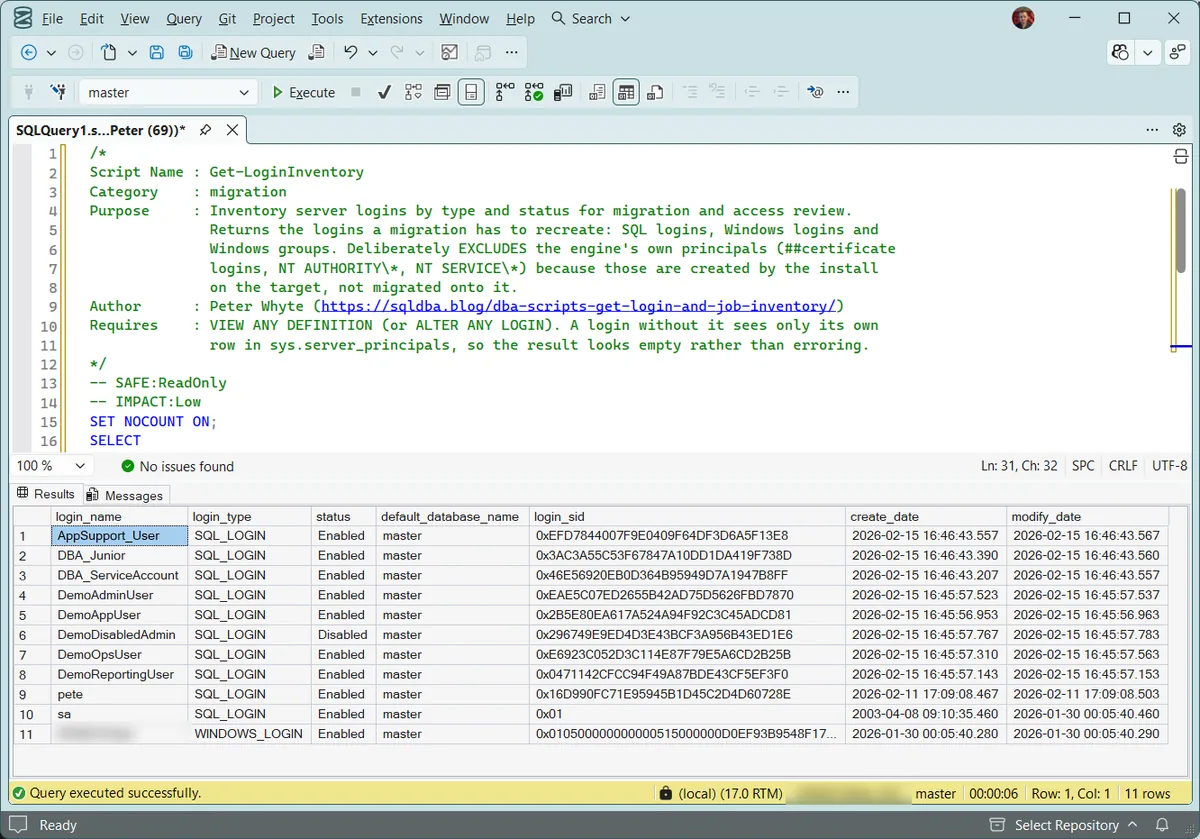
The login_sid column is the one that earns its place. For a SQL login it is the value you carry to the target so the recreated login still matches its database users; without it the login is created successfully and the users it owned are orphaned, which surfaces much later and looks like a permissions problem rather than a migration one.
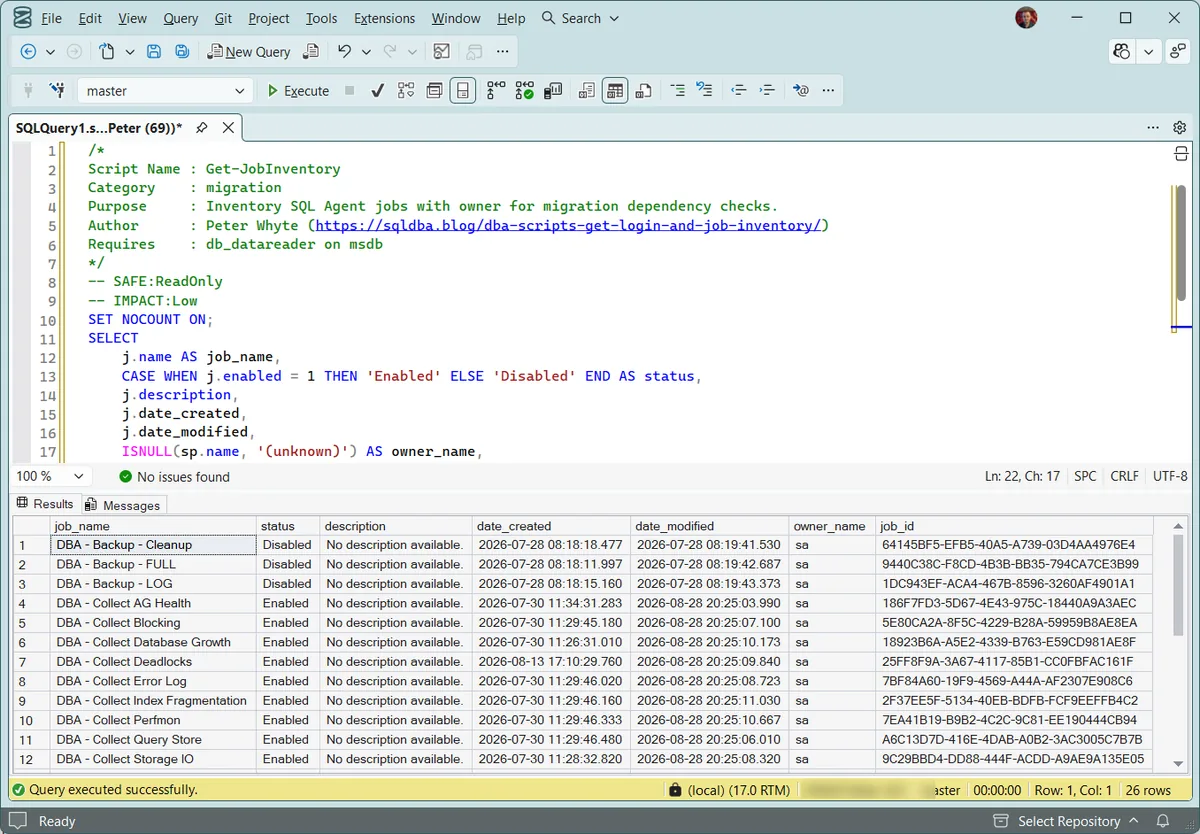
2. The jobs. 26 of them here, all owned by sa, which is the healthy answer: a job owned by a named individual breaks when that login is disabled or dropped. Note the three disabled backup jobs at the top, exactly the kind of thing worth resolving before a migration rather than discovering after one.
Understanding the Results
login_namelogin_typelogin_sid0x string you can paste straight into CREATE LOGIN … WITH SID. Act when you are recreating a SQL login by hand. Miss the SID and the login is created fine, then fails to match its database users on the target, surfacing later as orphaned users rather than as an obvious error.statusDisabled. That is a decision to make, not a row to skip: confirm whether it needs to move to the target too, or is genuinely retired.default_database_namejob_nameowner_namesa or a service account. That login has to be part of the migration plan, or the job’s execution context breaks on the target.Neither script tells you what a login can do, or whether a job is healthy. Those are different questions, answered by Permissions and Role Membership and SQL Agent and Jobs. This pair is the starting checklist, not the analysis.
Best Practices
- Pull both lists early in any migration plan, before the deeper permission or job-health review, so you know the full scope of what needs to move
- Cross-check every non-
sa, non-service-account job owner against the login list to confirm it’s included in the plan - Re-run after the migration on the target server and diff against the source list to confirm nothing was silently missed
- Use alongside the Generate-* scripts for actually creating the logins and jobs on the target
Microsoft’s reference covers sys.server_principals and dbo.sysjobs in full.
Frequently Asked Questions
How is this different from Permissions and Role Membership?
Permissions and Role Membership answers “what can this login actually do,” explicit grants, role memberships, server roles. Get-LoginInventory just answers “what logins exist,” a plain checklist, useful specifically when you need a source list to build a migration script from, not an access audit.
Why does Get-JobInventory show “(unknown)” for some job owners?
A job’s owner_sid no longer matching any current server login, usually because the original owner login was dropped after the job was created. Worth investigating and reassigning to a current login before it becomes a real problem, an unowned job can fail unexpectedly depending on how SQL Agent resolves execution context.
Summary
Before a migration plan gets into permissions and job health, it needs a plain, complete list of what exists. These two scripts are exactly that, logins by type and status, jobs by owner, no analysis, just the checklist a migration script generator or runbook can work from directly.
Pull both early in any migration plan, and re-run on the target afterward to confirm the diff against the source is exactly what you expected.
Related Scripts
You may also find these scripts useful:
- Server Inventory (hub)
- Permissions and Role Membership
- SQL Agent and Jobs (hub)
- Migration Risk Assessment
- Database Inventory
- Database Summary
- Security (hub), the pillar this sits under
- DBA Scripts: The Complete Guide, the map across every script on this site
Leave a Reply