
Every migration has a list of things that will cause a problem if nobody checks for them first: a database in an Availability Group that needs coordinated removal, a linked server dependency that won’t resolve on the target, an owner SID that doesn’t exist anywhere anymore. Discovering these mid-cutover, instead of during planning, turns a scheduled migration window into an incident.
This script scans the instance for the specific risks that actually derail migrations, categorised and severity-ranked, so the risk list exists before the migration starts, not after something breaks.
Why Migration Risk Assessment Matters
A pre-migration checklist that lives only in someone’s head doesn’t scale across an estate, and doesn’t catch what that person forgot to think of:
- HIGH findings (AUTO_SHRINK on, non-ONLINE databases, AG membership, linked server dependencies) are the ones that can actively break a migration if not addressed beforehand
- Database ownership issues are easy to miss until a post-migration job or permission check fails because the expected owner login doesn’t exist on the target
- Recovery model and compatibility level findings shape what testing and rollback options are actually available during the migration window
- One scan covers categories that would otherwise mean checking half a dozen separate things by hand
When to Run This Script
- Migration planning, well before the scheduled cutover window
- Immediately before cutover, to catch anything that changed since planning
- Building a migration runbook or risk register for a server or database move
- Reviewing a server you’ve just inherited, ahead of a planned consolidation or upgrade
The Script
Run the following script against your SQL Server instance.
- Tested on: SQL Server 2025 (RTM CU5), Windows lab instance
- Last verified: 2026-08-13 (saved output from a real run, Get-MigrationRiskAssessment-20260813-184451.csv)
- Permissions: VIEW ANY DATABASE, VIEW SERVER STATE
- Safety: read-only, impact low
/*
Script Name : Get-MigrationRiskAssessment
Category    : migration
Purpose     : Pre-migration risk scan — returns categorised HIGH/MEDIUM/INFO findings for compatibility, database settings, linked server dependencies, and sizing.
Author      : Peter Whyte (https://sqldba.blog/dba-scripts-get-migration-risk-assessment/)
Requires    : VIEW ANY DATABASE, VIEW SERVER STATE
*/
-- SAFE:ReadOnly
-- IMPACT:Low
SET NOCOUNT ON;

DECLARE @instance_compat SMALLINT;
SELECT @instance_compat =
    CASE CAST(SERVERPROPERTY('ProductMajorVersion') AS INT)
        WHEN 17 THEN 170 -- SQL Server 2025
        WHEN 16 THEN 160
        WHEN 15 THEN 150
        WHEN 14 THEN 140
        WHEN 13 THEN 130
        WHEN 12 THEN 120
        WHEN 11 THEN 110
        WHEN 10 THEN 100
        ELSE NULL -- newer than this script knows about; compat findings are skipped rather than guessed
    END;

SELECT
    risk_category,
    risk_level,
    object_name,
    finding,
    recommendation
FROM (

    -- Compatibility level below instance native
    SELECT
        'Compatibility Level' AS risk_category,
        CASE
            WHEN d.compatibility_level < 100 THEN 'HIGH'
            WHEN d.compatibility_level < (@instance_compat - 10) THEN 'MEDIUM'
            ELSE 'INFO'
        END AS risk_level,
        d.name AS object_name,
        'Compat level ' + CAST(d.compatibility_level AS VARCHAR(5)) +
            ' (instance native: ' + CAST(@instance_compat AS VARCHAR(5)) + ')' AS finding,
        'Test on non-prod with target compat level before cutover' AS recommendation
    FROM sys.databases d
    WHERE d.name NOT IN ('master', 'model', 'msdb', 'tempdb')
      AND d.state = 0
      AND d.compatibility_level < @instance_compat

    UNION ALL

    -- Page verification not CHECKSUM
    SELECT
        'Data Integrity',
        'MEDIUM',
        d.name,
        'Page verification: ' + d.page_verify_option_desc COLLATE DATABASE_DEFAULT,
        'Set CHECKSUM: ALTER DATABASE [' + d.name COLLATE DATABASE_DEFAULT + '] SET PAGE_VERIFY CHECKSUM WITH NO_WAIT'
    FROM sys.databases d
    WHERE d.name NOT IN ('master', 'model', 'msdb', 'tempdb')
      AND d.state = 0
      AND d.page_verify_option_desc <> 'CHECKSUM'

    UNION ALL

    -- AUTO_SHRINK
    SELECT
        'Database Settings',
        'HIGH',
        d.name,
        'AUTO_SHRINK is ON',
        'Disable: ALTER DATABASE [' + d.name COLLATE DATABASE_DEFAULT + '] SET AUTO_SHRINK OFF'
    FROM sys.databases d
    WHERE d.is_auto_shrink_on = 1
      AND d.name NOT IN ('master', 'model', 'msdb', 'tempdb')
      AND d.state = 0

    UNION ALL

    -- AUTO_CLOSE
    SELECT
        'Database Settings',
        'MEDIUM',
        d.name,
        'AUTO_CLOSE is ON',
        'Disable: ALTER DATABASE [' + d.name COLLATE DATABASE_DEFAULT + '] SET AUTO_CLOSE OFF'
    FROM sys.databases d
    WHERE d.is_auto_close_on = 1
      AND d.name NOT IN ('master', 'model', 'msdb', 'tempdb')
      AND d.state = 0

    UNION ALL

    -- Databases in non-ONLINE state
    SELECT
        'Database State',
        'HIGH',
        d.name,
        'State: ' + d.state_desc COLLATE DATABASE_DEFAULT,
        'Resolve before migration - cannot migrate non-ONLINE databases'
    FROM sys.databases d
    WHERE d.name NOT IN ('master', 'model', 'msdb', 'tempdb')
      AND d.state <> 0

    UNION ALL

    -- SIMPLE recovery (no log backup chain)
    SELECT
        'Recovery Model',
        'INFO',
        d.name,
        'Recovery model: SIMPLE - no log backup chain',
        'If point-in-time recovery is needed during migration window, switch to FULL and take a full backup first'
    FROM sys.databases d
    WHERE d.recovery_model_desc = 'SIMPLE'
      AND d.name NOT IN ('master', 'model', 'msdb', 'tempdb')
      AND d.state = 0

    UNION ALL

    -- Linked servers
    SELECT
        'External Dependencies',
        'HIGH',
        s.name,
        'Linked server: ' + s.name COLLATE DATABASE_DEFAULT + ' (' + ISNULL(s.product COLLATE DATABASE_DEFAULT, 'unknown product') + ' via ' + ISNULL(s.provider COLLATE DATABASE_DEFAULT, 'unknown provider') + ')',
        'Validate linked server connectivity from target server before cutover'
    FROM sys.servers s
    WHERE s.is_linked = 1

    UNION ALL

    -- Orphaned database owners (SID not resolvable)
    SELECT
        'Database Ownership',
        'MEDIUM',
        d.name,
        'Orphaned owner SID - login does not exist on this instance',
        'Fix: ALTER AUTHORIZATION ON DATABASE::[' + d.name COLLATE DATABASE_DEFAULT + '] TO sa'
    FROM sys.databases d
    WHERE d.name NOT IN ('master', 'model', 'msdb', 'tempdb')
      AND d.state = 0
      AND SUSER_SNAME(d.owner_sid) IS NULL

    UNION ALL

    -- Non-SA database owners (login may not exist on target server)
    SELECT
        'Database Ownership',
        'INFO',
        d.name,
        'Owner: ' + SUSER_SNAME(d.owner_sid) COLLATE DATABASE_DEFAULT,
        'Confirm login [' + SUSER_SNAME(d.owner_sid) COLLATE DATABASE_DEFAULT + '] exists on target server, or re-owner to sa'
    FROM sys.databases d
    WHERE d.name NOT IN ('master', 'model', 'msdb', 'tempdb')
      AND d.state = 0
      AND SUSER_SNAME(d.owner_sid) IS NOT NULL
      AND SUSER_SNAME(d.owner_sid) <> 'sa'

    UNION ALL

    -- Databases in Availability Groups (returns 0 rows on non-AG instances)
    SELECT
        'Availability Groups',
        'HIGH',
        d.name,
        'Database is in an Availability Group',
        'AG migration requires coordinated removal from AG on all replicas - see migration\README.md'
    FROM sys.databases d
    JOIN sys.dm_hadr_database_replica_states hdrs ON d.database_id = hdrs.database_id
    WHERE hdrs.is_local = 1
      AND d.name NOT IN ('master', 'model', 'msdb', 'tempdb')

    UNION ALL

    -- Large databases (> 100 GB data files) — flag for migration window planning
    SELECT
        'Migration Sizing',
        'INFO',
        d.name,
        'Data size: ' + CAST(CAST(SUM(mf.size) * 8.0 / 1048576 AS DECIMAL(10,1)) AS VARCHAR(20)) + ' GB',
        'Estimate backup/restore duration and verify network bandwidth before scheduling window'
    FROM sys.databases d
    JOIN sys.master_files mf ON d.database_id = mf.database_id AND mf.type = 0
    WHERE d.name NOT IN ('master', 'model', 'msdb', 'tempdb')
      AND d.state = 0
    GROUP BY d.name
    HAVING SUM(mf.size) * 8.0 / 1048576 > 100

) r
ORDER BY
    CASE r.risk_level WHEN 'HIGH' THEN 1 WHEN 'MEDIUM' THEN 2 ELSE 3 END,
    r.risk_category,
    r.object_name;
The script runs a series of targeted checks (compatibility level, page verification, database settings, database state, recovery model, linked servers, ownership, Availability Group membership, and data-file sizing) and returns every finding categorised and ranked HIGH, MEDIUM, or INFO, each with a specific recommendation.
How To Run From The Repo
Clone DBA Tools, initialize and run the script:
# Clone dba-tools repo:
git clone https://github.com/peterwhyte-lgtm/dba-tools

# Initialize environment:
cd dba-tools
.\Initialize-Environment.ps1

# Run the full pre-migration risk scan:
.\run.ps1 Get-MigrationRiskAssessment

# To run against a remote sql server:
.\run.ps1 Get-MigrationRiskAssessment -ServerInstance SQLSERVER01
This script lives in the repo at:
sql/migration/Get-MigrationRiskAssessment.sqlpowershell/wrappers/migration/Get-MigrationRiskAssessment.ps1
Example Output
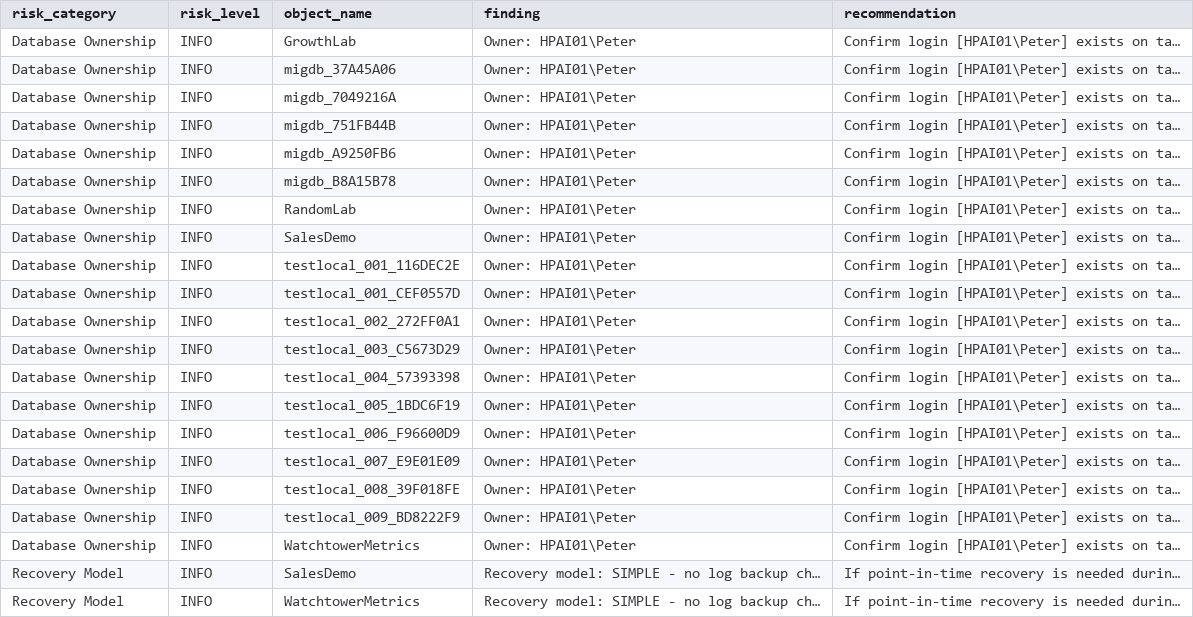
This lab instance came back clean of HIGH and MEDIUM findings, all 21 results were INFO-level ownership and recovery-model notes. That’s a genuinely healthy result, not a placeholder; a real production instance is far more likely to surface at least a few AUTO_SHRINK, non-CHECKSUM, or linked-server findings.
Understanding the Results
- risk_level = HIGH, act before migration: AUTO_SHRINK enabled, a database in a non-ONLINE state, a compatibility level below 100, Availability Group membership requiring coordinated removal, or a linked server dependency to validate on the target.
- risk_level = MEDIUM, worth fixing but rarely migration-blocking on its own: AUTO_CLOSE enabled, non-CHECKSUM page verification, an orphaned database owner, a compatibility level more than one version behind the instance.
- risk_level = INFO, awareness items: database ownership to confirm on the target, a compatibility level one version behind, SIMPLE recovery model implications, large databases worth planning backup/restore duration for.
- recommendation, a specific next step for every finding, not just a description of the problem.
How to Fix Common Findings
-- AUTO_SHRINK and AUTO_CLOSE (HIGH / MEDIUM) — disable both before migration
ALTER DATABASE [YourDatabase] SET AUTO_SHRINK OFF;
ALTER DATABASE [YourDatabase] SET AUTO_CLOSE OFF;

-- Page verification (MEDIUM) — move to CHECKSUM
ALTER DATABASE [YourDatabase] SET PAGE_VERIFY CHECKSUM WITH NO_WAIT;

-- Orphaned database owner (MEDIUM) — re-owner to a login that exists
ALTER AUTHORIZATION ON DATABASE::[YourDatabase] TO sa;
Availability Group membership and linked server dependencies need planning rather than a quick fix; both require coordination beyond a single ALTER statement.
Best Practices
- Run this early in migration planning, not just the week before cutover, so HIGH findings have time to be addressed properly.
- Re-run immediately before cutover; database settings and ownership can drift between planning and execution.
- Track findings in a migration runbook so nothing gets silently dropped between planning and the actual event.
Microsoft Learn: sys.databases · sys.dm_hadr_database_replica_states · sys.servers
Frequently Asked Questions
Does a clean result mean the migration will definitely go smoothly?
It means this specific set of known risk categories is clear, not that nothing can go wrong. It’s a strong risk-reduction step, not a complete guarantee; application-level dependencies and network/connectivity details still need their own validation.
How close to the migration date should this run?
Both early (for planning, so HIGH findings have time to be fixed) and again immediately before cutover, since database settings and ownership can drift in the time between planning and execution.
Summary
Migration risk is easiest to manage when it’s found during planning, not discovered during the cutover window itself. This script turns a checklist that would otherwise live in someone’s head into a repeatable scan.
Run it early in migration planning, and again right before cutover, to catch anything that changed in between.
Related Scripts
You may also find these scripts useful:
- Fix Orphaned Users
- Database Inventory
- Generate Migration Scripts (login, Agent job, user mapping, linked server, and restore-with-move DDL generators)
- Version Upgrade Readiness (compatibility level audit and deprecated features in use)
- Edition Feature Usage
- Migration Login Audit and Post-Migration Validation
- Linked Servers
- DBA Scripts: The Complete Guide, the map across every script on this site
Leave a Reply