
Before You Upgrade: What’s Actually Going to Break
Migration Risk Assessment covers per-database risk findings when moving to different hardware or infrastructure. This post covers a narrower, earlier question: on THIS server, staying on the same infrastructure, what needs attention before a version upgrade?
Three scripts, three angles on the same question:
- Version Upgrade Readiness — the wide instance summary: version, compatibility levels, configuration to review, and sizing.
- Compatibility Level Audit — the focused drill down on just the compatibility question.
- Deprecated Features In Use — has anything actually called a feature that is going away.
They run separately and return their own result sets. Nothing here is a section of anything else.
Why Version Upgrade Readiness Matters
- Databases left on an old compatibility level after an instance upgrade don’t get the new optimizer behavior, silently missing out on improvements the upgrade was partly meant to deliver
- Deprecated feature usage is invisible until something breaks post-upgrade, this is the one honest way to check whether anything’s actually calling a feature scheduled for removal
- Configuration defaults that made sense years ago (cost threshold for parallelism, ad hoc plan caching) are worth revisiting at upgrade time, not left on autopilot forever
- Direct in-place upgrade paths are version-specific and change over time, assuming “it’ll just upgrade” without checking the actual supported path is how upgrades get stuck mid-project
When to Run These Scripts
- Early in any version upgrade planning conversation, before committing to a timeline
- Alongside Migration Risk Assessment when the upgrade also involves new hardware or infrastructure
- Periodically even without a planned upgrade, to catch compat-level drift and deprecated feature usage before they pile up
- Before quoting a migration window to stakeholders, the sizing summary in Version Upgrade Readiness gives real numbers to work from
The Scripts
Get-VersionUpgradeReadiness — The Wide Instance-Level Summary
Returns one sectioned result set covering four areas in one pass: instance summary with supported upgrade paths, a compatibility level check across every database, a configuration review, and a sizing summary for migration window planning. One result set means the output lands cleanly in a single CSV, whether you run it from SSMS or the repo runner.
- Tested on: SQL Server 2025 (RTM CU8), Windows lab instance
- Last verified: 2026-08-30 (all 3 scripts on this page run, saved outputs from real runs)
- Permissions: VIEW ANY DATABASE, VIEW SERVER STATE
- Safety: read-only, impact low
/*
Script Name : Get-VersionUpgradeReadiness
Category    : migration
Purpose     : Pre-upgrade readiness summary for SQL Server version upgrades.
              One result set with a section column: instance summary, per-database
              compatibility levels, configuration items to review, and sizing for
              migration window planning. Run on SOURCE.
              Complements Get-DeprecatedFeaturesInUse.sql (feature detail) and
              Get-MigrationRiskAssessment.sql (per-database risk).
Author      : Peter Whyte (https://sqldba.blog/dba-scripts-get-version-upgrade-readiness/)
Requires    : VIEW ANY DATABASE, VIEW SERVER STATE
*/
-- SAFE:ReadOnly
-- IMPACT:Low
SET NOCOUNT ON;

/*
  DESIGN: A single result set (the repo contract: one script, one CSV) shaped as
  section / item / detail / status:
    1-instance  — current version, edition, and supported direct upgrade paths
    2-compat    — which databases are behind the native compatibility level
    3-config    — sp_configure items worth reviewing before a version move
    4-sizing    — data/log totals per database for migration window planning

  Use alongside:
    Get-DeprecatedFeaturesInUse.sql — deprecated features called since last restart
    Get-MigrationRiskAssessment.sql — per-database risk findings (compat, settings, AG, sizing)
    Get-EditionFeatureUsage.sql — Enterprise-only features (if changing edition at same time)
*/

DECLARE @major INT = CAST(SERVERPROPERTY('ProductMajorVersion') AS INT);
DECLARE @version NVARCHAR(20) = CAST(SERVERPROPERTY('ProductVersion') AS NVARCHAR(20));
DECLARE @level NVARCHAR(20) = CAST(SERVERPROPERTY('ProductLevel') AS NVARCHAR(20));
DECLARE @edition NVARCHAR(128)= CAST(SERVERPROPERTY('Edition') AS NVARCHAR(128));
DECLARE @collation NVARCHAR(128)= CAST(SERVERPROPERTY('Collation') AS NVARCHAR(128));
DECLARE @nativeCompat SMALLINT;
DECLARE @upgradeNote NVARCHAR(400);

SET @nativeCompat =
    CASE @major
        WHEN 17 THEN 170 -- SQL 2025
        WHEN 16 THEN 160 -- SQL 2022
        WHEN 15 THEN 150 -- SQL 2019
        WHEN 14 THEN 140 -- SQL 2017
        WHEN 13 THEN 130 -- SQL 2016
        WHEN 12 THEN 120 -- SQL 2014
        WHEN 11 THEN 110 -- SQL 2012
        WHEN 10 THEN 100 -- SQL 2008/2008R2
        WHEN 9 THEN 90 -- SQL 2005
        ELSE NULL -- newer than this script knows about, or older than SQL 2005
    END;

SET @upgradeNote =
    CASE @major
        WHEN 17 THEN 'SQL 2025 is current GA release. No direct upgrade target beyond this.'
        WHEN 16 THEN 'Direct upgrade supported to: SQL 2025.'
        WHEN 15 THEN 'Direct upgrade supported to: SQL 2022, SQL 2025.'
        WHEN 14 THEN 'Direct upgrade supported to: SQL 2019, SQL 2022, SQL 2025.'
        WHEN 13 THEN 'Direct upgrade supported to: SQL 2017, SQL 2019, SQL 2022, SQL 2025 (2025 requires 2016 SP3 or later; this script does not read the patch level).'
        WHEN 12 THEN 'Direct upgrade supported to: SQL 2016, SQL 2017, SQL 2019, SQL 2022, SQL 2025 (2025 requires 2014 SP3 or later; this script does not read the patch level).'
        WHEN 11 THEN 'Direct upgrade supported to: SQL 2016, SQL 2017, SQL 2019, SQL 2022. Not supported to SQL 2025 - side-by-side for that target.'
        WHEN 10 THEN 'SQL 2016 and SQL 2017 are the newest direct in-place targets (requires 2008 SP4 / 2008 R2 SP3). Not supported to SQL 2019 or later - side-by-side migration for those.'
        WHEN 9 THEN 'Very old version - side-by-side migration strongly recommended. No direct in-place upgrade path to current versions.'
        ELSE 'Newer than this script''s known version table - update Get-VersionUpgradeReadiness.sql with this release before trusting the compat-level and upgrade-path rows.'
    END;

-- ── 1. Instance summary ───────────────────────────────────────────────────────
SELECT section, item, detail, status
FROM (
    SELECT '1-instance' AS section, 'version' AS item,
           @version + ' (' + @level + ')' AS detail, '' AS status, 1 AS ord
    UNION ALL SELECT '1-instance', 'edition', @edition, '', 2
    UNION ALL SELECT '1-instance', 'server_collation', @collation, '', 3
    UNION ALL SELECT '1-instance', 'native_compat_level',
           ISNULL(CAST(@nativeCompat AS NVARCHAR(10)), 'unknown'), '', 4
    UNION ALL SELECT '1-instance', 'max_server_memory_mb',
           CAST((SELECT value_in_use FROM sys.configurations
                 WHERE name = 'max server memory (MB)') AS NVARCHAR(20)), '', 5
    UNION ALL SELECT '1-instance', 'maxdop',
           CAST((SELECT value_in_use FROM sys.configurations
                 WHERE name = 'max degree of parallelism') AS NVARCHAR(20)), '', 6
    UNION ALL SELECT '1-instance', 'last_restart',
           CONVERT(NVARCHAR(20), (SELECT sqlserver_start_time FROM sys.dm_os_sys_info), 120)
           + ' (' + CAST(DATEDIFF(DAY, (SELECT sqlserver_start_time FROM sys.dm_os_sys_info),
                                  GETDATE()) AS NVARCHAR(10)) + ' days ago)', '', 7
    UNION ALL SELECT '1-instance', 'upgrade_paths', @upgradeNote, '', 8

-- ── 2. Compatibility level per database ───────────────────────────────────────
    UNION ALL
    SELECT '2-compat', d.name,
           'compat ' + CAST(d.compatibility_level AS NVARCHAR(10))
           + ' vs native ' + CAST(@nativeCompat AS NVARCHAR(10))
           + ' (gap ' + CAST(@nativeCompat - d.compatibility_level AS NVARCHAR(10)) + ')'
           + ', ' + d.recovery_model_desc + ', ' + d.state_desc,
           CASE
               WHEN d.compatibility_level >= @nativeCompat THEN 'OK - at native level'
               WHEN d.compatibility_level = @nativeCompat - 10 THEN 'INFO - 1 version behind'
               WHEN d.compatibility_level = @nativeCompat - 20 THEN 'WARN - 2 versions behind'
               ELSE 'HIGH - severely behind native level'
           END,
           100 + (@nativeCompat - d.compatibility_level)
    FROM sys.databases d
    WHERE d.database_id > 4

-- ── 3. Configuration items to review for target version ──────────────────────
    UNION ALL
    SELECT '3-config', name, CAST(CAST(value_in_use AS BIGINT) AS NVARCHAR(20)),
           CASE
               WHEN name = 'max server memory (MB)' AND value_in_use >= 2147483647
                   THEN 'HIGH - Unconfigured. Set this before cutover to target to prevent memory pressure.'
               WHEN name = 'max degree of parallelism' AND value_in_use = 0
                   THEN 'INFO - MAXDOP = 0 (uses all CPUs). Set to min(8, CPU count / 2) unless validated.'
               WHEN name = 'cost threshold for parallelism' AND value_in_use <= 5
                   THEN 'INFO - Cost threshold = 5 (default). Consider 50+ on modern hardware to reduce parallelism noise.'
               WHEN name = 'optimize for ad hoc workloads' AND value_in_use = 0
                   THEN 'WARN - Disabled. Enable to reduce single-use plan cache bloat (sp_configure ''optimize for ad hoc workloads'', 1).'
               WHEN name = 'backup checksum default' AND value_in_use = 0
                   THEN 'INFO - Backup checksums off. Enable for stronger backup integrity checks.'
               WHEN name = 'remote query timeout (s)' AND value_in_use = 600
                   THEN 'INFO - Remote query timeout at default 600s. Review if linked servers are in use.'
               /* Settings below were listed but never evaluated, so an instance with
                  xp_cmdshell enabled reported OK. A silent OK on a security setting is
                  worse than not listing it at all. */
               WHEN name = 'xp_cmdshell' AND value_in_use = 1
                   THEN 'HIGH - Enabled. Grants shell access from T-SQL; confirm it is required before carrying it to the target.'
               WHEN name = 'cross db ownership chaining' AND value_in_use = 1
                   THEN 'HIGH - Enabled server-wide. Ownership chains cross database boundaries; prefer enabling per database.'
               WHEN name = 'priority boost' AND value_in_use = 1
                   THEN 'HIGH - Enabled. Microsoft advises against it; it can destabilise the instance and is not carried forward.'
               WHEN name = 'lightweight pooling' AND value_in_use = 1
                   THEN 'WARN - Fiber mode enabled. Blocks CLR and some features; rarely justified on modern builds.'
               WHEN name = 'clr enabled' AND value_in_use = 1
                   THEN 'INFO - CLR enabled. Check assemblies still load under the target version strict security rules.'
               WHEN name = 'Database Mail XPs' AND value_in_use = 1
                   THEN 'INFO - Database Mail enabled. Profiles and accounts do not migrate with the databases.'
               WHEN name = 'backup compression default' AND value_in_use = 0
                   THEN 'INFO - Backup compression off by default. Enabling it shortens the migration backup window.'
               ELSE 'OK'
           END,
           200
    FROM sys.configurations
    WHERE name IN (
        'max server memory (MB)', 'min server memory (MB)',
        'max degree of parallelism', 'cost threshold for parallelism',
        'optimize for ad hoc workloads', 'backup compression default',
        'backup checksum default', 'remote query timeout (s)',
        'remote login timeout (s)', 'lightweight pooling', 'priority boost',
        'clr enabled', 'clr strict security', 'cross db ownership chaining',
        'Database Mail XPs', 'xp_cmdshell')

-- ── 4. Sizing per database, for migration window planning ─────────────────────
--    NOTE: sys.master_files.size is the ALLOCATED file size, not space in use. A 500GB
--    file holding 20GB of data reports 500GB here. That is the right number for disk
--    provisioning on the target, and the wrong one for estimating a backup/restore window.
    UNION ALL
    SELECT '4-sizing', d.name,
           'data ' + CAST(CAST(SUM(CASE WHEN mf.type = 0 THEN mf.size ELSE 0 END) * 8.0 / 1024 / 1024 AS DECIMAL(12,2)) AS NVARCHAR(20))
           + ' GB, log ' + CAST(CAST(SUM(CASE WHEN mf.type = 1 THEN mf.size ELSE 0 END) * 8.0 / 1024 / 1024 AS DECIMAL(12,2)) AS NVARCHAR(20))
           + ' GB, total ' + CAST(CAST(SUM(mf.size) * 8.0 / 1024 / 1024 AS DECIMAL(12,2)) AS NVARCHAR(20)) + ' GB',
           '',
           300 - CAST(SUM(mf.size) / 128 AS INT)
    FROM sys.databases d
    INNER JOIN sys.master_files mf ON d.database_id = mf.database_id
    WHERE d.database_id > 4
    GROUP BY d.name
) readiness
ORDER BY section, ord, item;
Get-CompatibilityLevelAudit — The Focused Compat-Level Drill-Down
/*
Script Name : Get-CompatibilityLevelAudit
Category    : migration
Purpose     : Lists all user databases with current compatibility level, equivalent SQL version name, and the instance's native compatibility level. Use to plan compat level upgrades before or after migration.
Author      : Peter Whyte (https://sqldba.blog/dba-scripts-get-version-upgrade-readiness/)
Requires    : VIEW ANY DATABASE
*/
-- SAFE:ReadOnly
-- IMPACT:Low
SET NOCOUNT ON;

DECLARE @instance_major INT = CAST(SERVERPROPERTY('ProductMajorVersion') AS INT);
DECLARE @instance_compat SMALLINT =
    CASE @instance_major
        WHEN 17 THEN 170 -- SQL Server 2025
        WHEN 16 THEN 160 -- SQL Server 2022
        WHEN 15 THEN 150 -- SQL Server 2019
        WHEN 14 THEN 140 -- SQL Server 2017
        WHEN 13 THEN 130 -- SQL Server 2016
        WHEN 12 THEN 120 -- SQL Server 2014
        WHEN 11 THEN 110 -- SQL Server 2012
        WHEN 10 THEN 100 -- SQL Server 2008/R2
        WHEN 9 THEN 90 -- SQL Server 2005
        ELSE NULL -- newer than this script knows about, or older than SQL 2005
    END;

SELECT
    d.name AS database_name,
    d.compatibility_level AS current_compat,
    CASE d.compatibility_level
        WHEN 170 THEN 'SQL Server 2025'
        WHEN 160 THEN 'SQL Server 2022'
        WHEN 150 THEN 'SQL Server 2019'
        WHEN 140 THEN 'SQL Server 2017'
        WHEN 130 THEN 'SQL Server 2016'
        WHEN 120 THEN 'SQL Server 2014'
        WHEN 110 THEN 'SQL Server 2012'
        WHEN 100 THEN 'SQL Server 2008/2008 R2'
        WHEN 90 THEN 'SQL Server 2005'
        WHEN 80 THEN 'SQL Server 2000'
        ELSE 'Unknown'
    END AS current_compat_version,
    @instance_compat AS instance_native_compat,
    CAST(SERVERPROPERTY('ProductVersion') AS VARCHAR(20)) AS instance_version,
    CASE
        WHEN @instance_compat IS NULL THEN 'UNKNOWN - update this script''s version table'
        WHEN d.compatibility_level < (@instance_compat - 20) THEN 'NEEDS UPGRADE'
        WHEN d.compatibility_level < @instance_compat THEN 'BELOW NATIVE'
        WHEN d.compatibility_level = @instance_compat THEN 'AT NATIVE'
        ELSE 'ABOVE NATIVE'
    END AS compat_status,
    CASE @instance_compat
        WHEN 170 THEN 'See SQL Server 2025 documentation for compat level 170 changes'
        WHEN 160 THEN 'Parameter-sensitive plan optimization, DOP feedback, CE model 160'
        WHEN 150 THEN 'Scalar UDF inlining, table variable deferred compilation, batch mode on rowstore'
        WHEN 140 THEN 'Batch mode memory grant feedback, interleaved execution, adaptive joins'
        WHEN 130 THEN 'Live query statistics, DML with OUTPUT INTO reads inserted'
        ELSE NULL
    END AS features_unlocked_at_native_compat
FROM sys.databases d
WHERE d.name NOT IN ('master', 'model', 'msdb', 'tempdb')
  AND d.state = 0
ORDER BY d.compatibility_level, d.name;
Get-DeprecatedFeaturesInUse — Has Anything Actually Called a Deprecated Feature
/*
Script Name : Get-DeprecatedFeaturesInUse
Category    : migration
Purpose     : Lists deprecated SQL Server features used since the last service restart, ranked by usage count. Zero rows means no deprecated features have been called.
Author      : Peter Whyte (https://sqldba.blog/dba-scripts-get-version-upgrade-readiness/)
Requires    : VIEW SERVER STATE
*/
-- SAFE:ReadOnly
-- IMPACT:Low
SET NOCOUNT ON;

SELECT
    pc.instance_name AS deprecated_feature,
    pc.cntr_value AS usage_count_since_restart,
    CAST(SERVERPROPERTY('ProductVersion') AS VARCHAR(20)) AS instance_version,
    CAST(SERVERPROPERTY('ProductLevel') AS VARCHAR(20)) AS product_level,
    si.sqlserver_start_time AS last_restart,
    DATEDIFF(DAY, si.sqlserver_start_time, GETDATE()) AS days_since_restart
FROM sys.dm_os_performance_counters pc
CROSS JOIN (
    SELECT sqlserver_start_time FROM sys.dm_os_sys_info
) si
WHERE pc.object_name LIKE '%Deprecated Features%'
  AND pc.cntr_value > 0
ORDER BY pc.cntr_value DESC, pc.instance_name;
This reads a performance counter, not a static feature list, so it only ever shows features that have genuinely been called since the last restart, zero rows is a real, honest “nothing deprecated has run” result, not a sign the check didn’t work.
How To Run From The Repo
Clone DBA Tools, initialize and run any of the three:
# Clone dba-tools repo:
git clone https://github.com/peterwhyte-lgtm/dba-tools

# Initialize environment:
cd dba-tools
.\Initialize-Environment.ps1

# Wide instance-level upgrade readiness summary:
.\run.ps1 Get-VersionUpgradeReadiness

# Focused compatibility level audit, every database, one pass:
.\run.ps1 Get-CompatibilityLevelAudit

# Has anything actually called a deprecated feature since the last restart:
.\run.ps1 Get-DeprecatedFeaturesInUse

# To run against a remote sql server:
.\run.ps1 Get-VersionUpgradeReadiness -ServerInstance SQLSERVER01
These scripts live in the repo at:
sql/migration/Get-VersionUpgradeReadiness.sqlsql/migration/Get-CompatibilityLevelAudit.sqlsql/migration/Get-DeprecatedFeaturesInUse.sql
Example Output
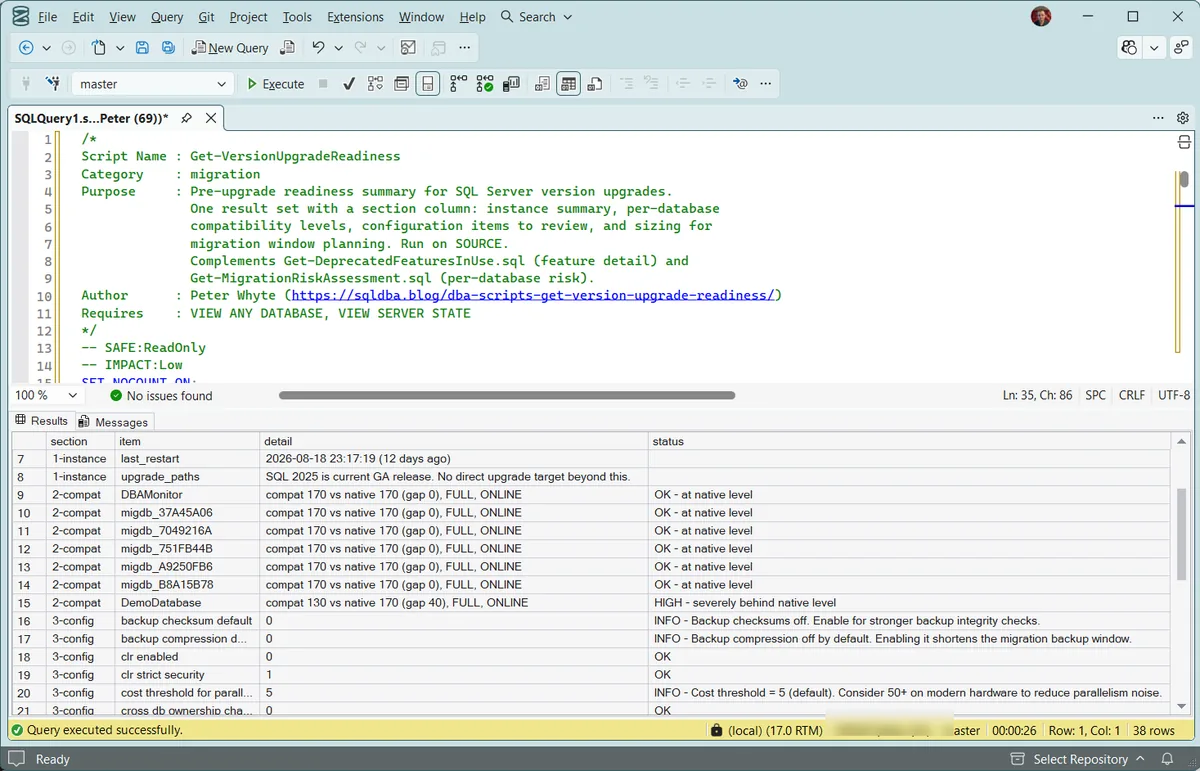
1. The wide summary. One result set, read top to bottom. The instance rows carry the upgrade paths, then every database gets a compatibility verdict, then the configuration review. One database here reads HIGH at compat 130 against a native 170, four versions of optimizer behaviour behind the server it lives on.
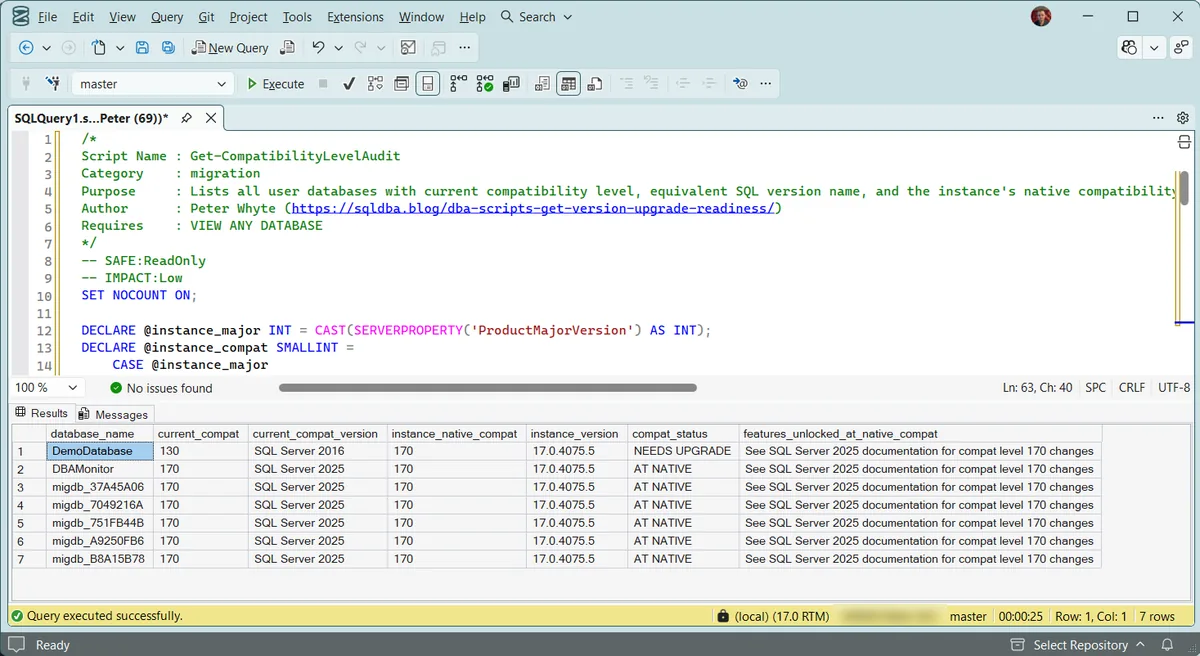
2. The focused compatibility audit. The same question asked on its own, with the version names spelled out so the gap is obvious without doing arithmetic on level numbers.
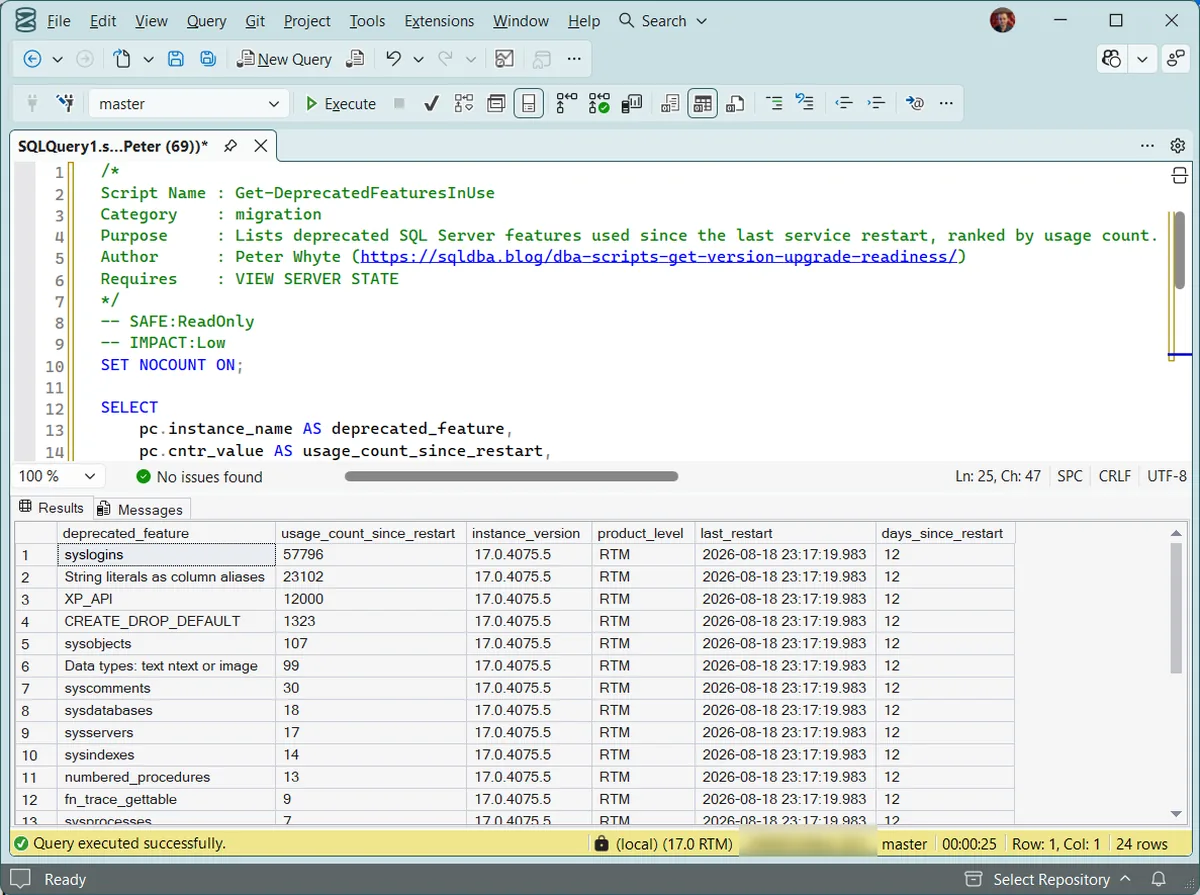
3. What has actually been called. Deprecated features ranked by use since the last restart. The names are the finding; the counts belong to one uptime window and reset when the service does, which is why the run also reports how long the instance has been up.
Understanding the Results
section1-instance, 2-compat, 3-config, 4-sizing. One script, one result set, read in that order.upgrade_pathsstatusOK, INFO, WARN or HIGH, with the reason written into the text rather than left as a code to look up. Act when anything reads HIGH. In the config section that now includes an enabled xp_cmdshell, ownership chaining turned on across the whole server, or priority boost, none of which you want to carry to a new server without deciding to.detail (4-sizing)compat_statusAT NATIVE, BELOW NATIVE, ABOVE NATIVE or NEEDS UPGRADE per database. Act when a database reads ABOVE NATIVE. That should not happen: check whether the instance was downgraded, or the level was set by hand to something the build cannot honour.deprecated_featureBest Practices
- Run all three well before committing to an upgrade date, not during the maintenance window itself
- Fix compat-level drift opportunistically even outside a migration project, a database several versions behind native is missing real optimizer improvements right now
- Treat any deprecated feature usage as a concrete pre-upgrade task: find what’s calling it, and confirm a replacement exists before the target version removes it
- Re-run Deprecated Features In Use after a reasonable production workload window, not immediately after a restart, since it only reflects activity since the last restart
Microsoft’s reference covers sys.dm_os_sys_info, sys.configurations and sys.databases in full.
Related Scripts
You may also find these scripts useful:
- SQL Server Builds and Support Lifecycle, current CU and support state per version when planning the target
- Migration Risk Assessment
- Edition Feature Usage
- Patch Level
- DBA Scripts: Patch SQL Server
- Database Inventory
- DBA Scripts: The Complete Guide, the map across every script on this site
Frequently Asked Questions
Do I need to update compatibility level as part of a version upgrade?
Not automatically, and not required for the upgrade itself to succeed. But leaving databases on an old compat level after upgrading the instance means missing the new optimizer behavior the upgrade was partly meant to deliver. Test at the new compat level in a non-production environment before flipping it in production.
What’s the difference between this and Migration Risk Assessment?
Migration Risk Assessment covers per-database risk when moving to different infrastructure. This post is narrower and earlier: on the same infrastructure, is this instance and its databases ready for a version upgrade specifically, compat level drift, deprecated feature usage, and configuration review.
Summary
A version upgrade fails quietly in a few predictable ways: databases left behind on an old compat level, a deprecated feature nobody knew was still in use, or a configuration default nobody’s reviewed since the last upgrade. These three scripts cover all of it between them: one sectioned result set from the readiness script, plus a run each of the compatibility and deprecated-features checks.
Run all three early in any upgrade conversation, and keep the version-mapping tables in both scripts updated the next time a new SQL Server release ships.
Leave a Reply