
The One Login You Actually Care About Right Now
Off-boarding someone, or asked why one login can read a database it should not? Set @LoginName and run this. It returns one row for the server and one for every database the login can open, with every role it holds there, nested roles and AD groups resolved through SQL Server’s own security token.
Why This Matters
- A domain user’s SQL access is frequently granted through an AD group, not a direct login, and that group can be nested two or three levels deep. Nothing in
sys.database_permissionsorsys.database_role_membersshows that chain directly; you’re reading the login’s face value, not what actually resolved - Off-boarding and access reviews need a per-person answer, not a per-database dump. “What does this specific login have, everywhere” is the actual question being asked, and building that by hand means checking every database one at a time
- Service accounts accumulate access silently as new databases get added to a server. A single login-focused audit catches scope creep that a role-by-role review misses because nobody’s looking from the login’s point of view
sys.login_tokenandsys.user_tokenreturn the same resolved security token SQL Server itself uses to make access decisions. A role nested inside another role shows up as both, which a single read ofsys.database_role_membersmisses
When to Run This Script
- Someone asks “why does this login have access to X”, the fastest way to get a real answer, AD groups included
- Access reviews and off-boarding, checked one login at a time as people join, move, or leave
- Investigating a service account before reusing or retiring it, to see the full footprint before touching it
- After a migration, to confirm a specific login’s access carried over the way it was supposed to, not just that a mapping exists
The Script
- Tested on: SQL Server 2025 (RTM CU8, 17.0.4075.5), Windows lab instance
- Last verified: 2026-10-05 (8 lab logins across 33 lab databases, 3 runs each, every role list matched
sys.database_role_members) - Permissions: sysadmin, or IMPERSONATE on the target login. Without it the script reports the login as not found
- Safety: read-only, impact low
/*
Script Name : Get-UserPermissionsAudit
Category    : security
Purpose     : Audit one login's effective access across the whole instance in a single pass:
              server roles/connection principals, plus per-database role membership,
              resolved through the real security token, so nested AD group membership
              shows up automatically. EDIT @LoginName below before running.
Author      : Peter Whyte (https://sqldba.blog/dba-scripts-get-user-permissions-audit/)
Requires    : sysadmin, or IMPERSONATE permission on the target login plus VIEW ANY DATABASE
*/
-- SAFE:ReadOnly
-- IMPACT:Low
SET NOCOUNT ON;
SET QUOTED_IDENTIFIER ON;   -- the XML .value() below needs it; sqlcmd defaults it OFF

-- EDIT THIS: the login to investigate. Works for SQL logins and Windows users/groups.
DECLARE @LoginName SYSNAME = N'DOMAIN\username';   -- e.g. N'CONTOSO\jsmith' or a SQL login name
DECLARE @IncludeDatabasesWithoutAccess BIT = 0;    -- 1 = also list databases this login can't reach

IF NOT EXISTS (SELECT 1 FROM sys.server_principals WHERE name = @LoginName)
BEGIN
    RAISERROR('Login "%s" not found, or not visible to you (you need sysadmin or IMPERSONATE on it). Check spelling (DOMAIN\name for Windows logins).', 16, 1, @LoginName);
    RETURN;
END;

IF OBJECT_ID('tempdb..#myuser') IS NOT NULL DROP TABLE #myuser;
IF OBJECT_ID('tempdb..#dbs') IS NOT NULL DROP TABLE #dbs;

-- Database list read as the CALLER, before impersonating. Read under the target login instead,
-- a login denied VIEW ANY DATABASE sees no user databases and every row would vanish silently.
SELECT name, state_desc INTO #dbs FROM sys.databases WHERE database_id > 4;   -- skip system databases

CREATE TABLE #myuser (
    server_name  NVARCHAR(128),
    database_name SYSNAME,
    principal_id INT,
    sid          VARBINARY(85),
    name         NVARCHAR(128),
    type         NVARCHAR(128),
    usage_desc   NVARCHAR(128)
);

DECLARE @impersonating BIT = 0;
DECLARE @sql NVARCHAR(MAX);

BEGIN TRY
    EXECUTE AS LOGIN = @LoginName;
    SET @impersonating = 1;

    -- Server-level token, captured before REVERT so it reflects the target login, not the caller.
    INSERT INTO #myuser (server_name, database_name, principal_id, sid, name, type, usage_desc)
    SELECT @@SERVERNAME, N'[CONNECTION]', lt.principal_id, lt.sid, lt.name,
           CASE WHEN lt.type = 'SERVER ROLE' THEN 'ROLE'
                WHEN lt.type = 'WINDOWS GROUP' THEN 'WINDOWS GROUP'
                ELSE 'SQL USER' END,
           lt.usage
    FROM sys.login_token AS lt
    WHERE lt.sid IN (SELECT sid FROM sys.server_principals);

    -- Only databases this login can actually reach (HAS_DBACCESS under impersonation),
    -- otherwise USE on an inaccessible database raises Msg 916 and aborts the whole script.
    SET @sql = N'';
    SELECT @sql = @sql + N'
    USE ' + QUOTENAME(name) + N';
    INSERT INTO #myuser (server_name, database_name, principal_id, sid, name, type, usage_desc)
    SELECT DISTINCT @@SERVERNAME, DB_NAME(), principal_id, sid, name,
           CASE WHEN type = ''ROLE'' THEN ''ROLE''
                WHEN type = ''WINDOWS GROUP'' THEN ''WINDOWS GROUP''
                ELSE ''SQL USER'' END,   -- a Windows user (and dbo owned by one) is WINDOWS LOGIN here
           usage
    FROM sys.user_token
    WHERE sid IN (SELECT sid FROM sys.database_principals)
      AND name <> ''public'';'
    FROM #dbs
    WHERE state_desc = 'ONLINE'
      AND HAS_DBACCESS(name) = 1;

    IF LEN(@sql) > 0
        EXEC (@sql);

    IF @IncludeDatabasesWithoutAccess = 1
    BEGIN
        INSERT INTO #myuser (server_name, database_name, principal_id, sid, name, type, usage_desc)
        SELECT
            @@SERVERNAME,
            d.name,
            NULL,
            NULL,
            CASE WHEN d.state_desc = 'ONLINE' THEN 'MISSING' ELSE d.state_desc END,
            'ROLE',
            'MISSING'
        FROM #dbs AS d
        WHERE (d.state_desc <> 'ONLINE' OR HAS_DBACCESS(d.name) = 0);
    END;

    REVERT;
    SET @impersonating = 0;
END TRY
BEGIN CATCH
    IF @impersonating = 1
    BEGIN
        REVERT;
    END;
    THROW;
END CATCH;

-- One row per scope: [CONNECTION] (server-level) plus one row per database.
SELECT
    x.server_name,
    x.database_name,
    ISNULL(STUFF((
        SELECT ',' + t.name
        FROM #myuser AS t
        WHERE t.type = 'ROLE'
          AND t.server_name = x.server_name
          AND t.database_name = x.database_name
        ORDER BY t.name
        FOR XML PATH(''), TYPE).value('.', 'NVARCHAR(MAX)'), 1, 1, ''), '')                              AS [ROLE],
    ISNULL(STUFF((
        SELECT ',' + t.name
        FROM #myuser AS t
        WHERE t.type = 'WINDOWS GROUP'
          AND t.server_name = x.server_name
          AND t.database_name = x.database_name
        ORDER BY t.name
        FOR XML PATH(''), TYPE).value('.', 'NVARCHAR(MAX)'), 1, 1, ''), '')                              AS [WINDOWS GROUP],
    ISNULL(STUFF((
        SELECT ',' + t.name
        FROM #myuser AS t
        WHERE t.type = 'SQL USER'
          AND t.server_name = x.server_name
          AND t.database_name = x.database_name
        ORDER BY t.name
        FOR XML PATH(''), TYPE).value('.', 'NVARCHAR(MAX)'), 1, 1, ''), '')                              AS [SQL USER]
FROM #myuser AS x
GROUP BY x.server_name, x.database_name
ORDER BY
    CASE WHEN x.database_name = N'[CONNECTION]' THEN 0 ELSE 1 END,
    x.database_name;

DROP TABLE #myuser;
DROP TABLE #dbs;
Edit @LoginName at the top before running, this is a copy/paste-first script, no CLI parameters needed. Set @IncludeDatabasesWithoutAccess = 1 to also list every database the login can’t reach, useful for confirming access was actually removed after an off-boarding change.
What it does not show. The script reads the login’s security token, so it reports server role membership, Windows group membership and database role membership. An explicit grant or deny outside a role, such as GRANT VIEW SERVER STATE at the server, GRANT SELECT on a schema or DENY SELECT on one table, is not in the token and will not appear here; measured on the lab, a login granted VIEW SERVER STATE directly showed no change in its [CONNECTION] row while a server role added to it did. For those grants, Permissions and Role Membership lists every explicit grant and deny.
How To Run From The Repo
Clone DBA Tools, initialize, then edit the login name at the top of the script before running:
# Clone dba-tools repo:
git clone https://github.com/peterwhyte-lgtm/dba-tools

# Initialize environment:
cd dba-tools
.\Initialize-Environment.ps1

# Audit one login's effective access (edit @LoginName in the script first):
.\run.ps1 Get-UserPermissionsAudit

# Against a remote SQL Server:
.\run.ps1 Get-UserPermissionsAudit -ServerInstance SQLSERVER01
This script lives in the repo at:
sql/security/access/Get-UserPermissionsAudit.sqlpowershell/wrappers/security/access/Get-UserPermissionsAudit.ps1
Example Output
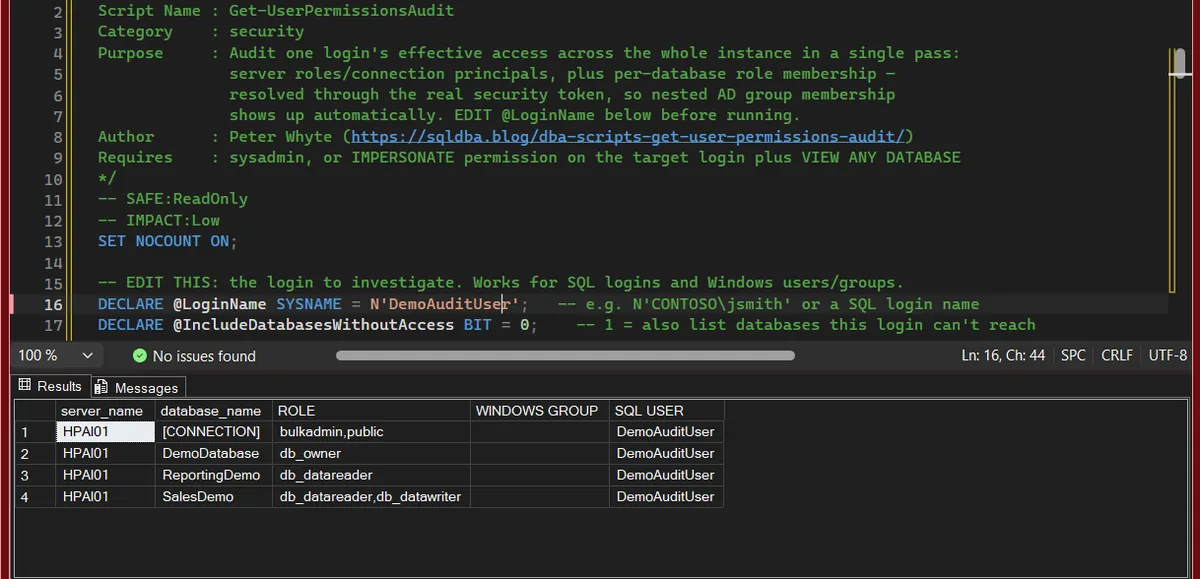
One login, DemoAuditUser. The [CONNECTION] row is the server: the login itself in SQL USER and its server roles in ROLE, here bulkadmin plus the public every login holds. Under it is one row per database the login can open, with its roles there: db_owner in DemoDatabase, db_datareader in ReportingDemo, read and write in SalesDemo. WINDOWS GROUP is empty because this is a SQL login.
Understanding the Results
ROLE[CONNECTION] rowpublic is on every login.Act when sysadmin appears. The login can do anything on the instance, and the database rows below say little about it: a sysadmin enters every database as dbo.WINDOWS GROUP[CONNECTION]) or as a database user (on a database row). This is the group actually granting the access, nested AD membership included.Act when a group grants more than this person’s job needs. The fix is the group, its AD membership or its login, not this person’s login.ROLEdatabase rows
SQL USERdatabase rows
dbo if it owns the database or is sysadmin, guest if it has no user there and the database lets guest in. A member of db_owner still shows its own name.Act when guest shows on a user database. Every login on the instance gets in that way. REVOKE CONNECT FROM guest unless the database needs it.Best Practices
- Run this whenever anyone asks “why does X have access to Y”, it’s faster and more reliable than tracing AD group membership by hand
- Use it as the last step of an off-boarding checklist, with
@IncludeDatabasesWithoutAccess = 1, to confirm access was actually removed everywhere, not just from the databases someone remembered to check - For service accounts specifically, run this before any migration or credential rotation to capture the full footprint first, nothing worse than breaking something whose access you didn’t know existed
- Pair with Sysadmin Members for the reverse direction: that script tells you who has the top privilege server-wide, this one tells you everything about one specific login
MS Docs covers sys.login_token, sys.user_token and sys.server_principals in full.
Related Scripts
You may also find these scripts useful:
- The Server Principal Is Not Able to Access the Database (Error 916), the Error Library entry for Msg 916
- Security (hub)
- Sysadmin Members
- Orphaned Users
- Permissions and Role Membership
- Login Security Audit
- DBA Scripts: The Complete Guide, the map across every script on this site
Frequently Asked Questions
How is this different from Permissions and Role Membership?
Permissions and Role Membership is server-wide: four scripts covering explicit grants, denies, and role membership across every login and every database at once, built for a full audit pass. This script is the opposite shape, deliberately narrow: point it at one login and get everything about that login, AD group resolution included, in one result set.
Can I point it at a Windows group?
No. EXECUTE AS LOGIN (MS Docs) takes a single account, so a group login stops the script with Msg 15406, even for sysadmin. Run it for one member of the group instead: the group shows in that member’s WINDOWS GROUP column. For what the group itself has been granted, use Permissions and Role Membership.
Why does the script need sysadmin or IMPERSONATE permission?
EXECUTE AS LOGIN requires either sysadmin or an explicit IMPERSONATE grant on the target login. That is what lets the script build the target login’s real security token instead of reading your own. Without it, the target login is invisible to you, so the script stops at its first check with “Login not found on this server”, which reads like a typo. VIEW ANY DEFINITION alone does not help: the login becomes visible, then EXECUTE AS fails with Msg 15406.
Why might a database be missing from the results?
The database list is captured before impersonation, so the caller needs sysadmin or VIEW ANY DATABASE to see the full instance list.
Does revoking CONNECT remove a user’s access to a database?
Not for a member of db_owner. On the lab, a db_owner member with CONNECT revoked still opened the database, HAS_DBACCESS (MS Docs) returned 1, and this script still listed the database with db_owner. For off-boarding, drop the user or take it out of db_owner, then re-run this to confirm the row is gone.
Summary
Most permissions tooling answers “what exists”, every grant, every role, every login, all at once. This script answers the question a DBA actually gets asked mid-conversation: what does this login have, right now, including the AD group membership that’s usually the real reason behind it. Run it whenever that question comes up, and as the closing check on any off-boarding or service-account change, so “access removed” means something you’ve actually verified rather than assumed.
Leave a Reply