
Reports and range scans have slowed over weeks, or you have just inherited a server and need to know whether anyone has been maintaining its indexes. This lists every index at 5% fragmentation or more in every online user database, in one result set, worst first across the server, so you can see where the problem sits before you plan a rebuild.
Why Index Fragmentation Matters
Fragmentation comes in two forms. Logical fragmentation means the physical page order no longer matches the logical index order, which hurts range scans and read-ahead. Page density problems mean pages are half empty, so the same data occupies more pages and the buffer pool carries the waste. Both accumulate naturally from inserts, updates and deletes; both are worse on indexes with random key patterns.
Whether fragmentation matters as much as it used to is a fair debate (on SSDs the scan penalty is smaller), but page density always matters, heavily fragmented large indexes still waste memory and I/O, and an instance where nothing has rebuilt indexes for a year almost always has other maintenance gaps too. A fragmentation sweep is as much a maintenance audit as a performance check.
- Range scans and reports slow down as page order degrades
- Half-empty pages inflate memory use and backup sizes
- Fragmentation on big tables is a signal that index maintenance is not running
When to Run This Script
- Routine SQL Server health checks
- Taking over an unfamiliar instance, to audit the state of index maintenance
- Before building or tuning index maintenance jobs, to size the problem
- When reports or range-heavy queries degrade gradually over weeks
- After large data loads, archiving runs, or bulk deletes
The Script
Run the following script against your SQL Server instance.
- Tested on: SQL Server 2025 (RTM CU8) 17.0.4075.5, Windows lab instance
- Last verified: 2026-10-21 (the Example Output is a real run on the lab instance)
- Permissions: sysadmin, or access to every online user database plus VIEW DATABASE STATE and VIEW DEFINITION in each (server-wide: CONNECT ANY DATABASE, VIEW SERVER STATE and VIEW ANY DEFINITION)
- Safety: read-only, impact medium
/*
Script Name : Get-IndexFragmentationAcrossDatabases
Category    : performance-troubleshooting
Purpose     : Check index fragmentation across all user databases in one result set, worst first, for maintenance planning.
Author      : Peter Whyte (https://sqldba.blog/dba-scripts-get-index-fragmentation-across-databases/)
Requires    : VIEW DATABASE STATE and VIEW DEFINITION in each user database (server-wide: CONNECT ANY DATABASE
              + VIEW SERVER STATE + VIEW ANY DEFINITION). Databases you cannot open are skipped and listed
              in the Messages tab, not errored. Without VIEW DEFINITION a database returns no rows and no error.
*/
-- SAFE:ReadOnly
-- IMPACT:Medium
SET NOCOUNT ON;
SET QUOTED_IDENTIFIER ON;

IF OBJECT_ID('tempdb..#Frag') IS NOT NULL DROP TABLE #Frag;

CREATE TABLE #Frag (
    database_name SYSNAME NOT NULL,
    schema_name SYSNAME NOT NULL,
    table_name SYSNAME NOT NULL,
    index_name SYSNAME NULL,
    avg_fragmentation_percent DECIMAL(5,2) NOT NULL,
    page_count BIGINT NOT NULL
);

DECLARE @db SYSNAME;
DECLARE @sql NVARCHAR(MAX);

DECLARE frag_cur CURSOR FAST_FORWARD FOR
    SELECT name FROM sys.databases
    WHERE state_desc = 'ONLINE'
      AND database_id > 4
    ORDER BY name;

OPEN frag_cur; FETCH NEXT FROM frag_cur INTO @db;
WHILE @@FETCH_STATUS = 0
BEGIN
    IF HAS_DBACCESS(@db) = 1
    BEGIN
        SET @sql = N'USE ' + QUOTENAME(@db) + N';
        INSERT INTO #Frag
        SELECT
            DB_NAME(),
            s.name,
            o.name,
            i.name,
            ROUND(ips.avg_fragmentation_in_percent, 2),
            ips.page_count
        FROM sys.dm_db_index_physical_stats(DB_ID(), NULL, NULL, NULL, ''LIMITED'') AS ips
        INNER JOIN sys.indexes AS i
            ON ips.object_id = i.object_id
           AND ips.index_id = i.index_id
        INNER JOIN sys.objects AS o
            ON i.object_id = o.object_id
        INNER JOIN sys.schemas AS s
            ON o.schema_id = s.schema_id
        WHERE o.is_ms_shipped = 0
          AND ips.page_count > 0
          AND ips.alloc_unit_type_desc <> ''INTERNAL''
          AND ips.avg_fragmentation_in_percent >= 5.0;';
        BEGIN TRY EXEC sys.sp_executesql @sql; END TRY
        BEGIN CATCH PRINT 'Skipped ' + @db + ': ' + ERROR_MESSAGE(); END CATCH;
    END
    ELSE
        PRINT 'Skipped ' + @db + ': no access.';
    FETCH NEXT FROM frag_cur INTO @db;
END;
CLOSE frag_cur; DEALLOCATE frag_cur;

SELECT
    database_name,
    schema_name,
    table_name,
    index_name,
    avg_fragmentation_percent,
    page_count
FROM #Frag
ORDER BY avg_fragmentation_percent DESC, page_count DESC;

DROP TABLE #Frag;
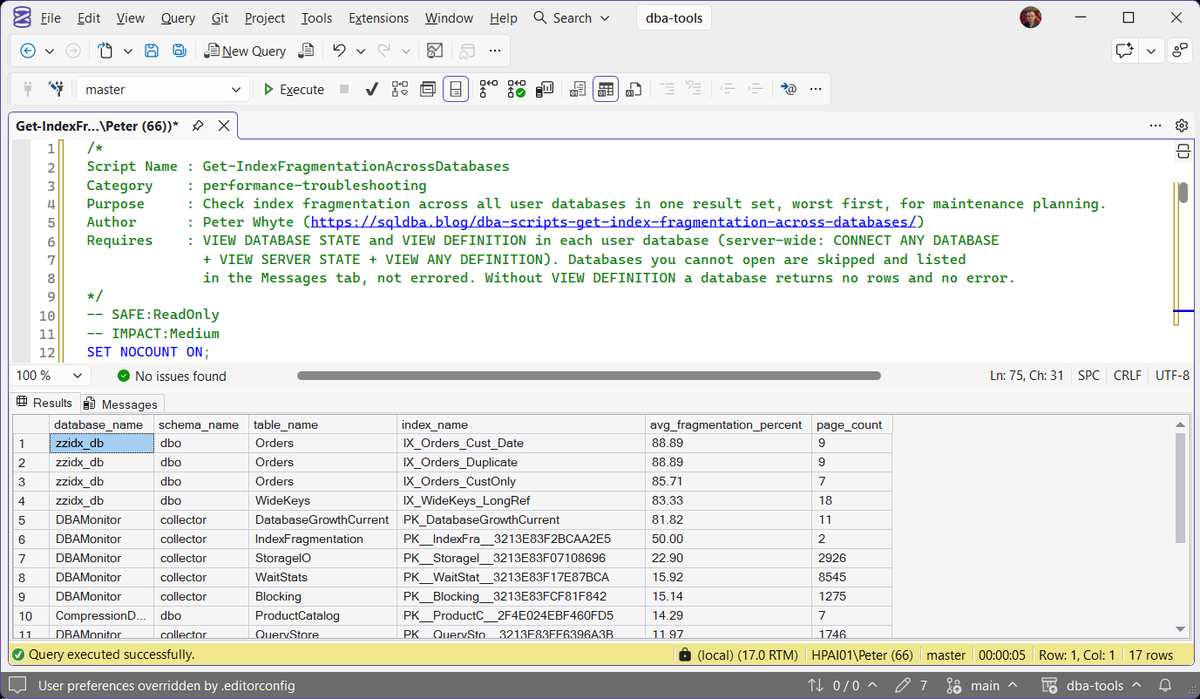
It loops the online user databases with a cursor, collects the rows into a temp table, and returns one result set across every database, sorted by fragmentation and then page count, worst first. A database with nothing at 5% or above adds no rows. OFFLINE databases are skipped; read-only databases are included. A database the login cannot open is skipped and named in the Messages tab (Skipped <database>: ...), so the rest of the sweep still returns.
It reads sys.dm_db_index_physical_stats (MS Docs) in LIMITED mode, which reads only the pages above the leaf level and takes an Intent-Shared table lock, not a scan of the data. Large databases take longer, so time the first run out of hours.
How To Run From The Repo
Clone DBA Tools, initialize and run the script:
# Clone dba-tools repo:
git clone https://github.com/peterwhyte-lgtm/dba-tools

# Initialize environment:
cd dba-tools

.\Initialize-Environment.ps1

# Sweep index fragmentation across all user databases:
.\run.ps1 Get-IndexFragmentationAcrossDatabases

# To run against a remote sql server:
.\run.ps1 Get-IndexFragmentationAcrossDatabases -ServerInstance SQLSERVER01
This script lives in the repo at:
sql/performance/indexes/Get-IndexFragmentationAcrossDatabases.sqlpowershell/wrappers/performance/indexes/Get-IndexFragmentationAcrossDatabases.ps1
Example Output
The whole of one run on the lab instance: 4 rows, all from one lab database, in one grid, worst first.
None of these rows earns a decision: the largest is 18 pages, so the percentages are noise, which is the usual shape of a lab box. On a production server the rows worth a decision are the ones over 1,000 pages: over 30% is the rebuild case, and 5% to 30% is the reorganize case if the queries that scan them have slowed.
The same index name on 2 rows is 2 partitions: the script returns one row per partition and no partition number. Rebuilding a small index rarely clears it either; on an earlier lab run an 8 page index went from 87.5% to 16.67%, still on the list.
Understanding the Results
page_countavg_fragmentation_percentindex_nameNULL is a heap, a table with no clustered index. The same name on 2 rows is 2 partitions of one index.database_nameSkipped.Act when the grid is empty and you expected rows. The DMF needs VIEW DATABASE STATE, but the joins to sys.objects and sys.indexes also need VIEW DEFINITION, so a login without it gets no rows and no error; see metadata visibility (MS Docs).How to Fix Fragmented Indexes
The one-off fix is a reorganize or rebuild of the specific large indexes the sweep surfaces, here 2 lab indexes from an earlier run:
-- 5% to 30%: always online, and stopping it keeps the progress made:
ALTER INDEX [PK_Customers] ON [dbo].[Customers] REORGANIZE;

-- Over 30%: fresh pages at your fill factor (ONLINE = ON needs Enterprise or Developer):
ALTER INDEX [PK_OrderLines] ON [dbo].[OrderLines]
REBUILD WITH (ONLINE = ON, SORT_IN_TEMPDB = ON);
On the lab the reorganize took PK_Customers from 22.28% to 0.42%, and the rebuild took PK_OrderLines from 99.18% to 1.59% and from 1,821 pages to 1,258, because the half-empty pages from the splits were packed back together.
The real fix is scheduled maintenance, so the sweep stops finding surprises: Generate Index Maintenance Jobs builds the Agent jobs. Before scheduling rebuilds, read the index maintenance strategy in MS Docs: a rebuild also updates statistics with a full scan, and much of the speed-up credited to rebuilds comes from that, which UPDATE STATISTICS gives you far more cheaply. Rebuilds are logged operations, so watch transaction log growth on the big ones.
This script is the survey: everything at 5% or more, with no size floor. For a shortlist already filtered to indexes of 1,000 pages or more at 10% or more, with a REORGANIZE or REBUILD column against each row, use Index Fragmentation.
Frequently Asked Questions
What is a good fragmentation percentage for SQL Server indexes?
The traditional starting points are under 5% leave it, 5% to 30% reorganize, and over 30% rebuild, on indexes over roughly 1,000 pages only. MS Docs no longer gives fixed numbers: it says to act when the queries that use the index have slowed, and to try a statistics update before a rebuild.
Does index fragmentation still matter on SSDs?
Less than it did on spinning disks, because out-of-order reads are cheaper. Low page density still matters everywhere though, since half-empty pages waste buffer pool memory and inflate I/O and backups regardless of storage speed.
How often should I check index fragmentation?
A weekly maintenance job with reorganize/rebuild thresholds handles the routine work. The instance-wide sweep earns its keep on new-to-you servers and health checks, where the question is whether maintenance has been happening at all.
Why does it return no rows and no error?
Either nothing is at 5% or more in any database, or the login cannot see the tables. The DMF needs VIEW DATABASE STATE, but the join to sys.objects and sys.indexes also needs VIEW DEFINITION. With VIEW SERVER STATE and CONNECT ANY DATABASE alone the joins see no tables, so every database adds no rows and raises no error; VIEW ANY DEFINITION server-wide fixes it. Check the Messages tab too, since a database the login could not open at all is listed there as Skipped.
What happens to a database the login cannot open?
It is skipped, not fatal. The script checks HAS_DBACCESS before each database and wraps the query in TRY/CATCH, so a database the login cannot open prints Skipped <database>: ... to the Messages tab and the sweep carries on. The grid then covers only the databases it could open, so read the Messages tab before trusting an all-clear. If you get Msg 916 and no rows at all, you are running an older copy of this script that ran every database in one batch.
Summary
One run, every database, worst indexes first: this sweep turns “is fragmentation a problem anywhere on the server” from a per-database chore into one run. The reading skill is simple but essential, always check the page count before reacting to a percentage.
I use it as an audit tool as much as a tuning tool. A long list of large fragmented indexes says the instance’s maintenance regime needs attention, and that finding usually matters more than any individual index in the output.
Related
You may also find these scripts useful:
- SET Options Have Incorrect Settings (Error 1934), why the same query works in SSMS and fails from an Agent job
- Index Maintenance (hub)
- Duplicate Indexes
- Heaps
- Generate Index Maintenance Jobs, the scheduled reorganize, rebuild and statistics jobs
- Index Design Issues
- Index Fragmentation
- Index Usage Stats
- Missing Indexes
- Unused Indexes
- DBA Scripts: The Complete Guide, the map across every script on this site
Leave a Reply