
Heaps in SQL Server Explained
A surprising amount of SQL Server performance pain comes from tables that were never given a clustered index. These heaps often start life as quick prototypes, staging tables, or legacy leftovers, but as data grows, they quietly become one of the most consistent sources of wasted IO inside a production system.
Without a clustered index, SQL Server has no stable physical ordering for the data. Every non‑covering lookup becomes a full table scan. Every update that expands a row creates a forwarded record. Every delete leaves behind space that won’t be reclaimed until you rebuild the structure. Over time, this turns a harmless table into a slow, bloated, IO‑heavy anchor.
This script identifies every heap across all online user databases, highlights the ones with real impact, and gives you the information you need to prioritise fixes.
Why Heaps Matter
A working DBA cares about heaps because they behave differently from “normal” tables (clustered index = ordered structure). The differences show up in IO, CPU, and maintenance overhead:
- Full table scans on non‑covering lookups
- Forwarded records created when updated rows no longer fit in place
- Extra IO from chasing forwarded-record pointers
- Poor delete behaviour, space is not reclaimed until a rebuild
- Unpredictable performance as row counts and page density drift
- Harder troubleshooting because symptoms look like “random IO spikes”
Small, static lookup tables can remain heaps safely. Anything else deserves review.
Common Symptoms
Heaps can contribute to:
- Queries that were fast suddenly become scan‑heavy
- IO spikes during update‑heavy workloads
- Storage growth without matching row growth
- Execution plans showing unexpected table scans
When to Run This Script
- Routine SQL Server health checks
- Before index‑tuning cycles
- After major application releases
- When diagnosing unexplained IO pressure
- When reviewing schema quality in inherited environments
- When storage growth doesn’t match data growth
The Script
Run the following script against your SQL Server instance.
- Tested on: SQL Server 2025 (RTM CU8), Windows lab instance
- Last verified: 2026-09-01 (re-run against the lab instance, build 17.0.4075.5)
- Permissions: VIEW DATABASE STATE (iterates each user database)
- Safety: read-only, impact low
/*
Script Name : Get-Heaps
Category    : performance
Purpose     : Lists tables with no clustered index (heaps) across all online user databases.
            Heaps cause full table scans on every non-covering lookup, accumulate
            forwarded records after row updates (degrading IO), and do not reclaim
            deleted row space without a REBUILD. Common source of hidden IO pressure
            that grows silently as data volumes increase.
Author      : Peter Whyte (https://sqldba.blog/dba-scripts-get-heaps/)
Requires    : VIEW DATABASE STATE (iterates each user database)
Notes       : Small read-only lookup tables as heaps are usually acceptable.
            Prioritise by reserved_mb and forwarded_fetch_count.
            forwarded_fetch_count = how often SQL Server chased a forwarded-record pointer
            since the last restart (IO cost). Counters reset on restart, so a low value on a
            recently restarted instance means "not measured yet", not "no forwarded records".
            has_primary_key = 0 means no PK exists at all — highest priority to fix.
            Fix: add a clustered index on the natural key, or add an identity
            column and cluster on that if no natural candidate exists.
*/
-- SAFE:ReadOnly
-- IMPACT:Low
SET NOCOUNT ON;

CREATE TABLE #heaps (
    database_name           sysname       NOT NULL,
    schema_name             sysname       NOT NULL,
    table_name              sysname       NOT NULL,
    row_count               BIGINT        NOT NULL,
    reserved_mb             DECIMAL(10,2) NOT NULL,
    forwarded_fetch_count  BIGINT        NOT NULL,
    has_primary_key         BIT           NOT NULL
);

DECLARE @sql NVARCHAR(MAX) = N'';

SELECT @sql += N'
USE ' + QUOTENAME(name) + N';
INSERT INTO #heaps (database_name, schema_name, table_name, row_count, reserved_mb, forwarded_fetch_count, has_primary_key)
SELECT
    DB_NAME(),
    s.name,
    t.name,
    SUM(p.rows),
    CAST(SUM(a.total_pages) * 8.0 / 1024 AS DECIMAL(10,2)),
    ISNULL(SUM(ios.forwarded_fetch_count), 0),
    CASE WHEN EXISTS (
        SELECT 1 FROM sys.indexes pk
        WHERE pk.object_id = t.object_id AND pk.is_primary_key = 1
    ) THEN 1 ELSE 0 END
FROM sys.tables        t
JOIN sys.schemas       s   ON  t.schema_id   = s.schema_id
JOIN sys.indexes       i   ON  t.object_id   = i.object_id AND i.type = 0
JOIN sys.partitions    p   ON  i.object_id   = p.object_id AND i.index_id = p.index_id
JOIN sys.allocation_units a ON p.partition_id = a.container_id
LEFT JOIN sys.dm_db_index_operational_stats(DB_ID(), NULL, NULL, NULL) ios
    ON  ios.object_id = i.object_id AND ios.index_id = i.index_id
WHERE t.is_ms_shipped = 0
GROUP BY s.name, t.name, t.object_id
HAVING SUM(p.rows) > 0;
'
FROM sys.databases
WHERE state_desc  = 'ONLINE'
AND database_id > 4;

IF LEN(@sql) > 0
    EXEC sys.sp_executesql @sql;

SELECT
    database_name,
    schema_name,
    table_name,
    row_count,
    reserved_mb,
    forwarded_fetch_count,
    has_primary_key
FROM   #heaps
ORDER BY has_primary_key ASC, reserved_mb DESC;

DROP TABLE #heaps;
It queries every online user database, finds tables with no clustered index, and returns row counts, reserved size, forwarded-record activity, and whether a primary key exists.
How To Run From The Repo
Clone DBA Tools, initialize, and run the script:
# Clone dba-tools repo:
git clone https://github.com/peterwhyte-lgtm/dba-tools

# Initialize environment:
cd dba-tools
.\Initialize-Environment.ps1

# Checks for heaps across all online user databases:
.\run.ps1 Get-Heaps

# To run against a remote SQL Server:
.\run.ps1 Get-Heaps -ServerInstance SQLSERVER01
This script lives in the repo at:
sql/performance/indexes/Get-Heaps.sqlpowershell/wrappers/performance/indexes/Get-Heaps.ps1
Example Output
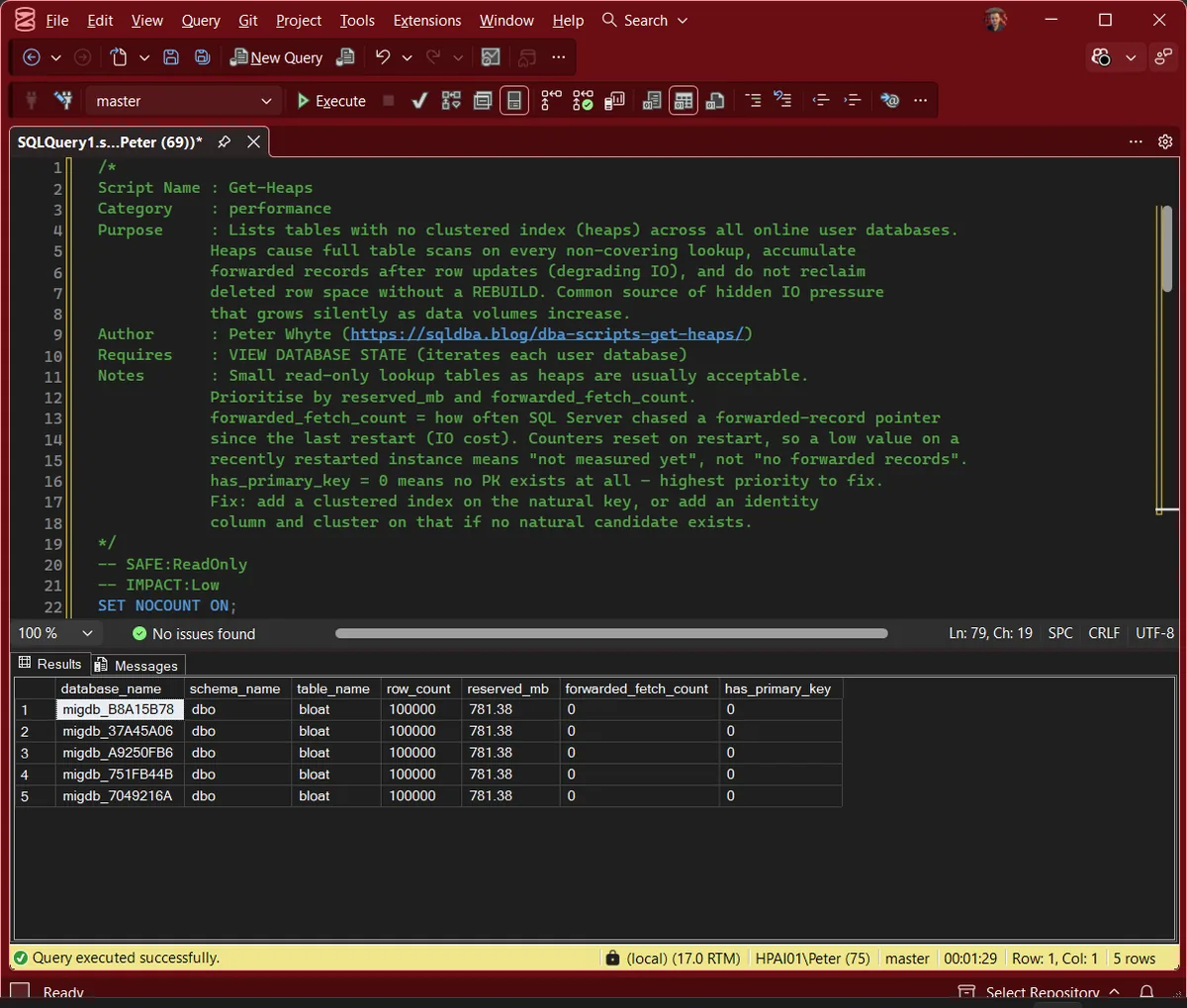
Run against the lab instance. It returns five heaps of roughly 781MB each, and has_primary_key reads 0 on every one of them. Size together with no primary key is the combination worth queueing.
Understanding the Results
database_nameschema_nametable_namedatabase_id > 4, so system databases are out of scope.row_countreserved_mbsys.allocation_units. After has_primary_key this is what the results are sorted by.Act when a large heap is also written to often. Size is what turns a missing clustered index from a schema detail into measurable IO.forwarded_fetch_countsys.dm_db_index_operational_stats, where it is documented as applying to heaps only and is still present in SQL Server 2025 (sys.dm_db_index_operational_stats). The counter is not simply reset at restart: it is zeroed whenever the metadata for the heap is brought into the cache, so a low number can mean not measured rather than not happening.Act when this is high on a heap you update frequently. A rebuild clears the forwarding records; a clustered index stops them being created.has_primary_keyCommon Causes
- Legacy tables created without design review
- ETL staging tables that became permanent
- ORM‑generated schemas
- Rapid prototyping that was never revisited
- “Temporary” tables that grew into production workloads
How to Fix Heaps
If the table has a natural key:
ALTER TABLE dbo.YourTable
ADD CONSTRAINT PK_YourTable PRIMARY KEY CLUSTERED (YourNaturalKey);
If the table has no natural key:
ALTER TABLE dbo.YourTable
ADD YourIdentity BIGINT IDENTITY(1,1);

ALTER TABLE dbo.YourTable
ADD CONSTRAINT PK_YourTable PRIMARY KEY CLUSTERED (YourIdentity);
Rebuilding the table removes forwarded records and reclaims space.
Best Practices
- Always define a clustered index unless you have a deliberate reason not to
- Avoid heaps for OLTP workloads
- Rebuild heaps periodically if they must remain heaps
- Review forwarded-record behaviour during update‑heavy operations
- Treat “no primary key” as a schema smell
Microsoft’s reference covers sys.indexes, sys.tables and sys.partitions in full.
Related Scripts
You may also find these scripts useful:
- Index Maintenance (hub)
- Duplicate Indexes
- Index Design Issues
- Index Fragmentation
- Index Fragmentation Across Databases
- Index Usage Stats
- Missing Indexes
- Unused Indexes
- DBA Scripts: The Complete Guide, the map across every script on this site
Frequently Asked Questions
What is a heap?
A heap is a table without a clustered index. SQL Server stores its rows without any guaranteed order, which leads to full scans, forwarded records, and poor delete behaviour.
Are heaps always bad?
No, tiny, static lookup tables can be heaps safely. Anything large or frequently updated should not be.
Do heaps affect delete performance?
Yes. Deleted space is not reclaimed until a rebuild.
Why do forwarded records matter?
They force SQL Server to perform extra IO to chase pointers, slowing down lookups and scans.
Was forwarded_fetch_count removed in SQL Server 2025?
No. It is still a returned column of sys.dm_db_index_operational_stats, and Microsoft still documents it for SQL Server 2025. Re-running this script against a 2025 RTM CU8 lab instance on 2026-09-01 returned the column with a value of 0 on every heap, which is a real reading rather than a missing column. An earlier version of this page said the column had been removed. That was wrong, and it has been corrected.
Summary
Heaps are one of the most common hidden performance problems in SQL Server environments. They often go unnoticed until data volumes grow or workloads shift, at which point they quietly start consuming IO and slowing down queries. Identifying them early, and fixing the ones that matter, is a simple, high‑impact maintenance win.
Add this script to your regular health‑check routine. It’s quick to run, easy to interpret, and helps keep your storage, IO, and schema quality under control.
Leave a Reply