
Copilot Agent mode in SSMS can read your results grid and execution plans, drive Object Explorer and run T-SQL. This is where its tools, skills and MCP servers live, what is on by default, and which ones can change your server.
check-live-blocking from the built-in sql-tools server. Your own skills and MCP servers are added in the same Tools panel. The sections below show where each one lives and which tools can change things on your server.On this page
Where the Tools and Skills Live
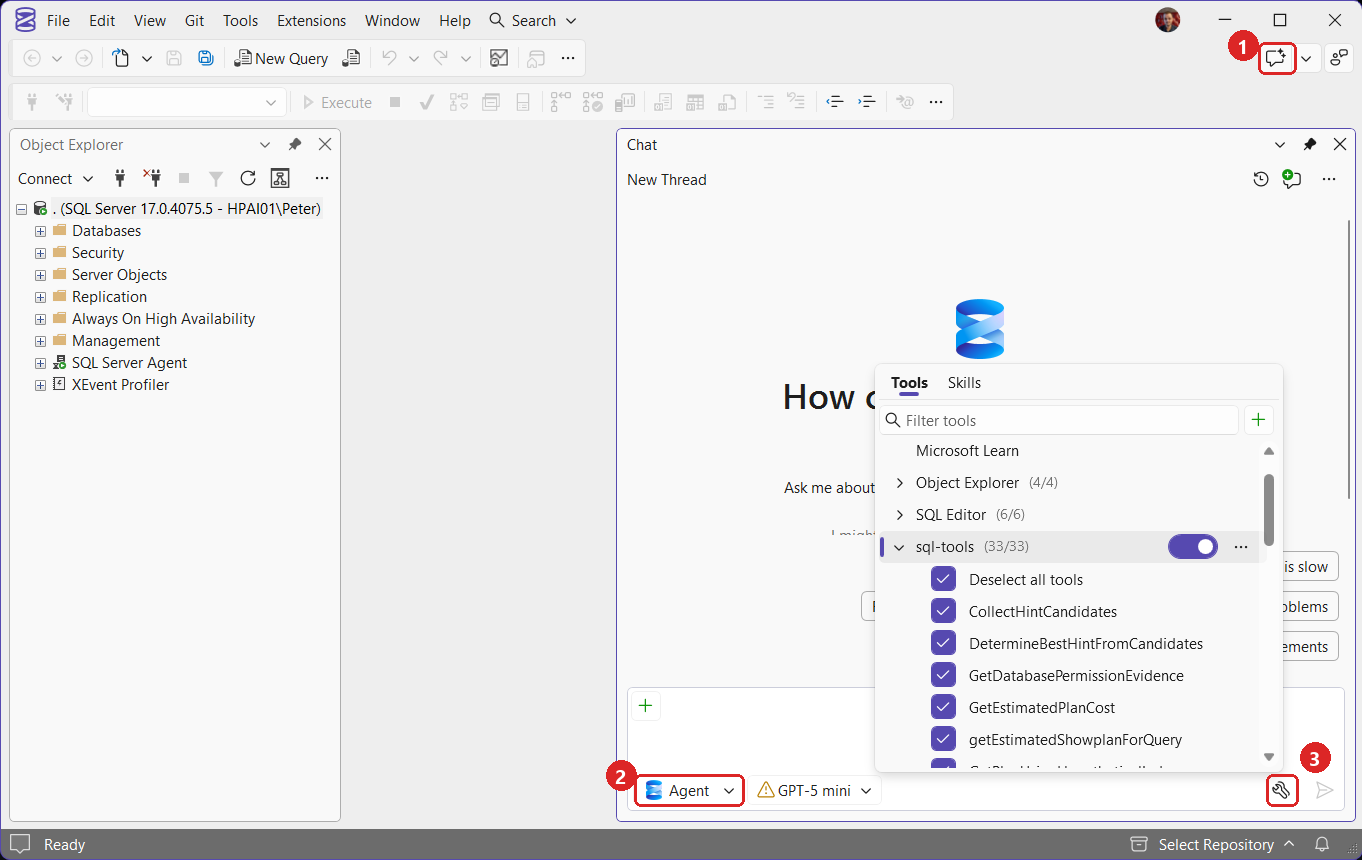
Tools, skills and MCP servers belong to Copilot’s Agent mode; Ask mode answers in one reply and does not use MCP (Agent mode). To open them, follow the numbers in the screenshot:
- Click the Copilot Chat button at the top right of SSMS (or View, GitHub Copilot Chat).
- Set the mode picker under the chat box to Agent.
- Click the spanner icon to the left of the send arrow. The Tools panel opens over the chat.
Up close, the panel lists each built-in tool group:
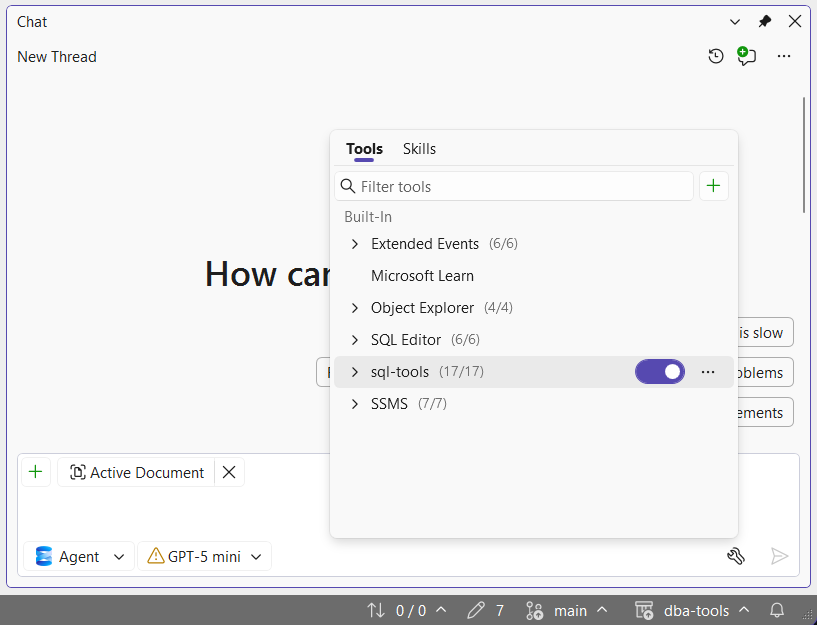
Each group has a toggle and a count of enabled tools, and expanding a group lists its tools with a tick box each. The green + beside the filter box adds MCP servers. The Skills tab next to Tools is for skills you write yourself.
The Built-In Tool Groups
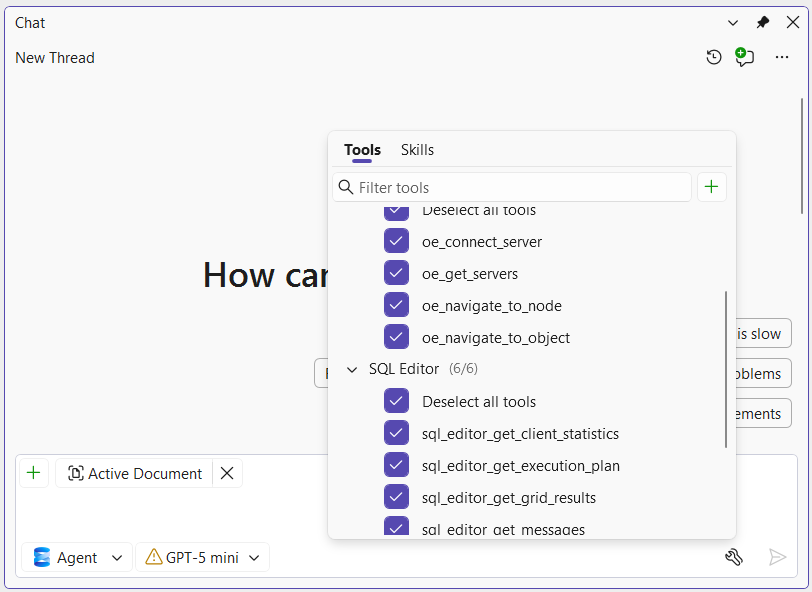
| Group | What it lets Copilot do | Tools worth knowing |
|---|---|---|
| SQL Editor | Read what is in your open query windows | sql_editor_get_grid_results, sql_editor_get_execution_plan, sql_editor_get_messages, sql_editor_get_client_statistics |
| Object Explorer | See and drive Object Explorer | oe_get_servers, oe_connect_server, oe_navigate_to_object |
| Extended Events | Open and read Extended Events viewers, start and stop sessions | xevent_open_viewer, xevent_set_session_state, xevent_get_event_details |
| sql-tools | A built-in MCP server: connect, run T-SQL, check syntax, load skills | mssql_execute_query, mssql_validate_syntax, mssql_backup_verify_file, mssql_list_skills |
| SSMS | Work with files in the solution | read_file, edit_files, create_file, remove_file, file_search, get_errors, get_output_window_logs |
| Microsoft Learn | Search and read Microsoft’s documentation | microsoft_docs_search, microsoft_code_sample_search, microsoft_docs_fetch (not usable from chat on 22.11, see below) |
Microsoft Learn loads its three tools, but on SSMS 22.11 its row has no tick boxes and Copilot never receives them: ask it to search Learn and it replies that it cannot.
Agent mode, MCP servers and skills are all new in SSMS 22, so expect bugs like this while they settle. What’s New in SSMS 22 for DBAs tracks each release, and Developer Community is where to report one.
The quickest way to see the full list is to ask. In a new Agent chat:
List every tool you can call right now, grouped by the group it belongs to, with one line on what each does. Do not call any of them.Copilot answers with every tool name and a line on each, which is quicker than expanding the groups one at a time.
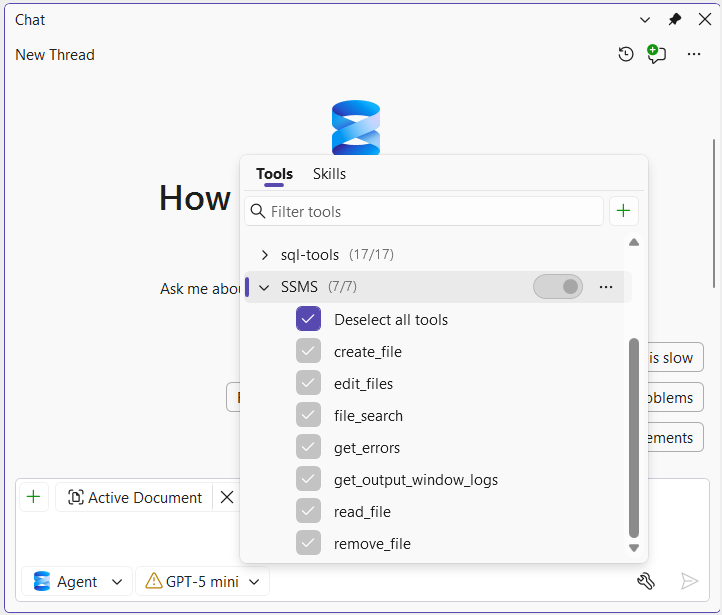
Expanding a group lists its tools with a tick box each. The first row, Deselect all tools, ticks or clears the whole group in one click. It is not a tool:
What Copilot Can Change
Most of the tools are read-only. Three groups can change things:
mssql_execute_queryruns T-SQL “against the current database”.xevent_set_session_statestarts and stops Extended Events sessions on the server.edit_files,create_fileandremove_filechange files in your solution.
- Approval is not a guard. Copilot asks before it runs a query, and Microsoft’s Agent mode page says the mode is read-only by default. On the lab an
UPDATEwent through after one confirmation; only the login’s permissions blocked it. - Limit the login. A query can do whatever the login Copilot connects with can do. Restrict What GitHub Copilot Can Run in SSMS shows how.
- Untick what you never want used. Copilot cannot call a tool that is unticked. The SSMS group cannot be switched off.
Adding MCP Servers
The green + on the Tools tab offers Add from MCP registry and Add custom MCP server. The registry lists published servers you can install in a click; anything else you add by hand with its command or URL, or by editing %USERPROFILE%\.mcp.json. Either way, a new server’s tools start switched off until you tick them (MCP servers).
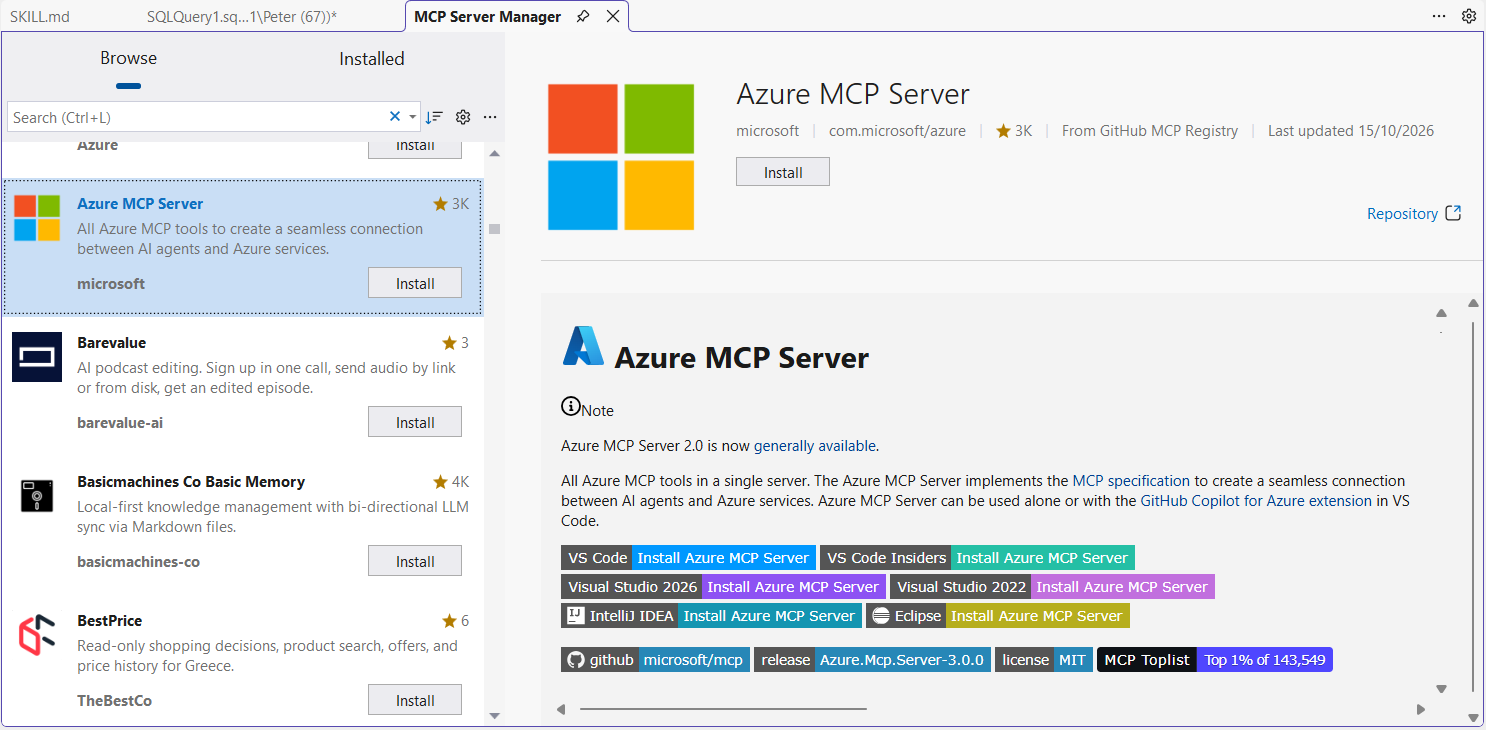
Add from MCP registry opens the MCP Server Manager tab. Its Browse view lists servers from the GitHub MCP Registry with a description, publisher and star count, and clicking one shows its page. Microsoft’s Azure MCP Server, for example, installs from here with one click on Install. The Installed view lists what you have added.
If your organisation uses Copilot Business or Enterprise, an administrator can switch the policy off, which removes Agent mode and MCP together, or allow only listed servers, in which case SSMS blocks any other server with a policy error when it connects (admin controls).
Built-In Skills
sql-tools carries a library of diagnostic skills: step-by-step playbooks with their own reference queries, which Copilot loads when a task needs one. They are not on the Skills tab. They appear in the MCP resources picker, where you can attach one to a chat yourself:
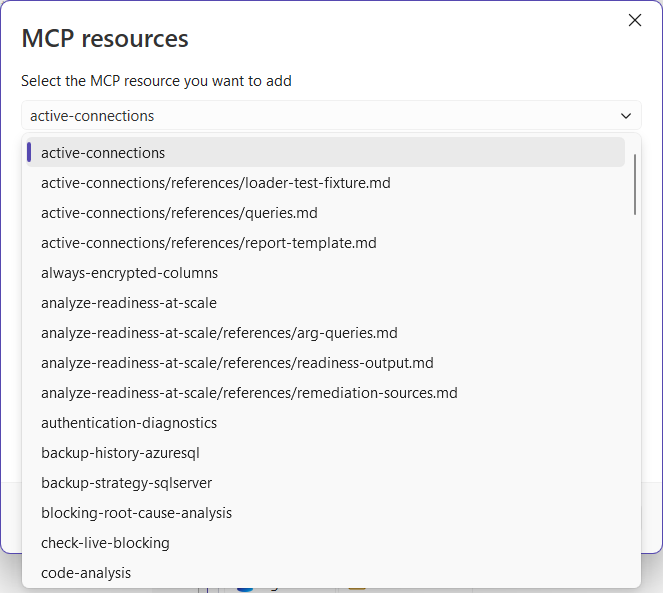
To attach one, click the green + at the bottom left of the chat box and choose MCP resources. The same menu has MCP prompts and the Active document option, which sends whatever query tab you have open along with your message. Pick a skill from the dropdown and click Add Resource:
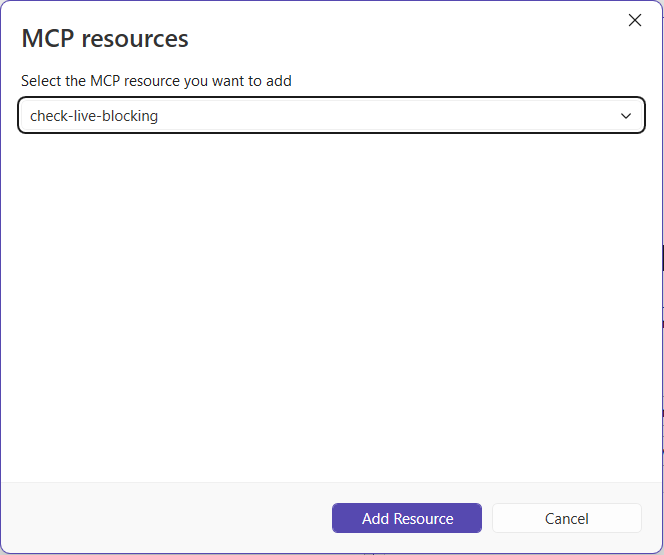
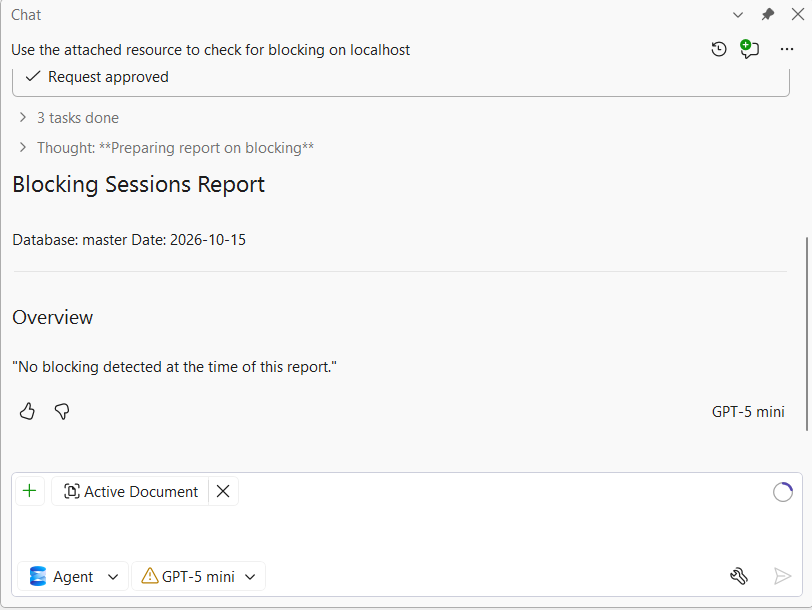
Then ask in plain words. With check-live-blocking attached, “Use the attached resource to check for blocking on localhost” got one approval prompt for its query, ran the skill’s checks and came back with a short Blocking Sessions Report:
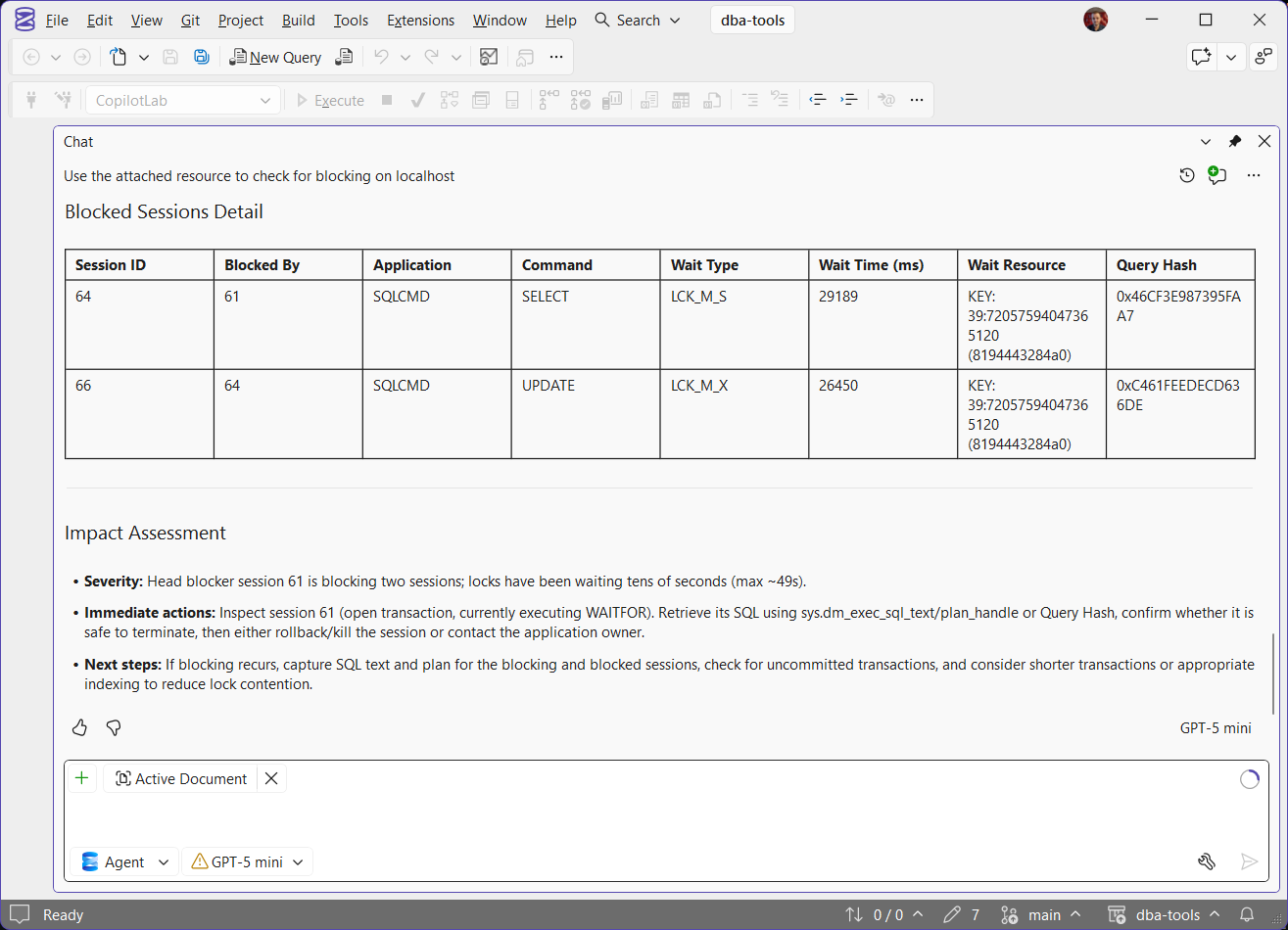
With blocking in place, the same skill finds more. On the lab, an open transaction held a row lock, a SELECT waited on it and an UPDATE queued behind the SELECT. The same question came back with a table of each blocked session, the session blocking it, the wait type and the locked key, then an impact assessment naming the head blocker:
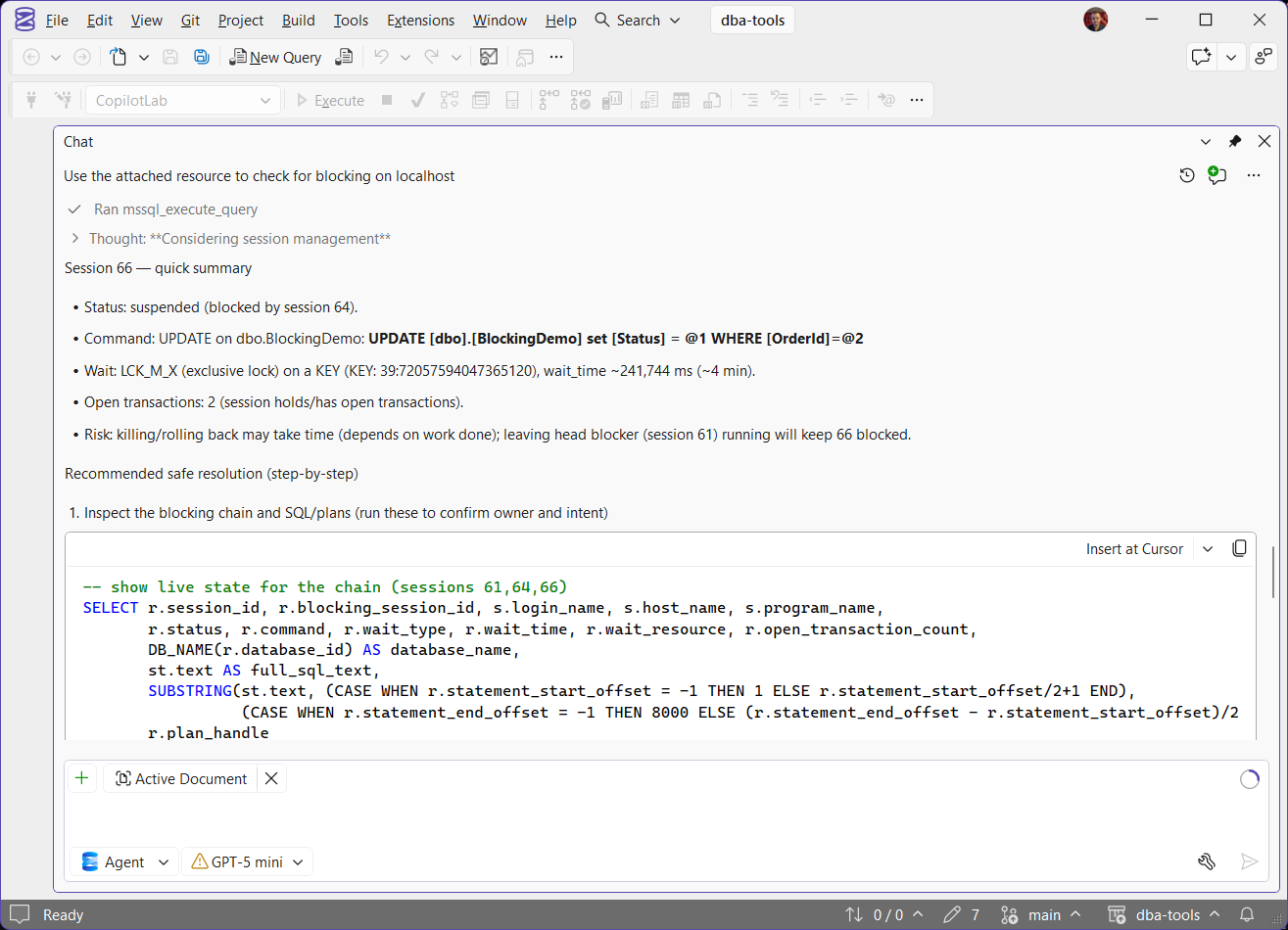
A follow-up in the same chat, asking what one of the blocked sessions was doing and how to resolve it safely, ran one more query and answered step by step. It summarised the session, gave a query to confirm who owns the open transaction before touching anything, and only then covered rolling back or killing the head blocker, with prevention notes at the end:
Your Own Skills
A skill earns its place when it fixes something Copilot gets wrong. Asked why a log would not truncate, Copilot listed every possible cause, offered switching to SIMPLE and invented a table and a column that do not exist. The skill built here makes it check first, answer for the one cause it finds, and rule out a COPY_ONLY log backup, which truncates nothing.
Create the Skill
On the Skills tab, the green + asks for a destination and a name. Global puts the skill in %USERPROFILE%\.claude\skills:
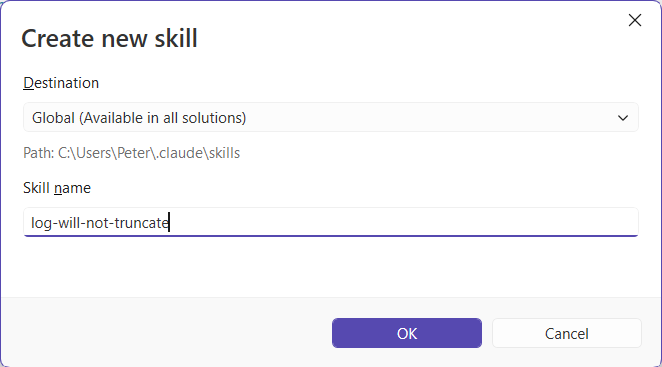
SSMS creates a SKILL.md template and opens it. Replace everything in it with this and save:
Show the skill: SKILL.md (33 lines)
---
name: log-will-not-truncate
description: Use when a SQL Server transaction log is full, keeps growing or will not truncate, including error 9002 and questions about log_reuse_wait_desc.
---

# Transaction log will not truncate

Find out why before changing anything. The log can only be reused once whatever is holding it lets go.

1. If the user has not said, ask whether this is a lab or production server, and which database.
2. Run this read-only check yourself with the query tool (connected to that database), and read `log_reuse_wait_desc`. Do not ask the user to run it:

   ```sql
   SELECT d.name, d.recovery_model_desc, d.log_reuse_wait_desc,
          CAST(u.used_log_space_in_percent AS decimal(5,1)) AS log_used_pct
   FROM sys.databases AS d
   CROSS APPLY sys.dm_db_log_space_usage AS u  -- run in the database being checked
   WHERE d.database_id = DB_ID();
   ```

3. Answer ONLY for the value the check returned: say what it is, what it means and the one fix, in a few lines. Do not list the other values. The list below is for you, not for the answer:
   - **LOG_BACKUP**: take a normal log backup (`BACKUP LOG ... TO DISK`). A `COPY_ONLY` log backup does NOT truncate the log, so never offer it as the fix.
   - **ACTIVE_TRANSACTION**: find the open transaction first (`DBCC OPENTRAN`, then its session in `sys.dm_exec_sessions`). Do not kill it until its owner is known.
   - **REPLICATION**: the Log Reader Agent or CDC capture job is behind or stopped. A backup will not help.
   - **AVAILABILITY_REPLICA**: a secondary is behind on receiving or redoing the log. Check the replica, not the backups.
   - **ACTIVE_BACKUP_OR_RESTORE**: a backup or restore is running. Let it finish.
   - **NOTHING** but the log is still full: the file cannot grow. Check the file's max size and the free space on its drive.
4. Give the fix as T-SQL for the user to run; do not run anything that changes the database yourself.
5. If the log is full right now, the quick relief is more space for the log file (grow it or add a second log file), not a shrink.
6. Never suggest switching to SIMPLE recovery without saying it breaks the log backup chain and that a full backup is needed afterwards.
7. Shrink the log only after the cause is fixed, and only back to a sensible size.

Sources: https://sqldba.blog/sql-server-log-reuse-wait-desc/ and https://sqldba.blog/sql-server-transaction-log-full/ (cite them in the answer).
The skill shows on the Skills tab straight away, with a toggle to switch it off and its description on hover:
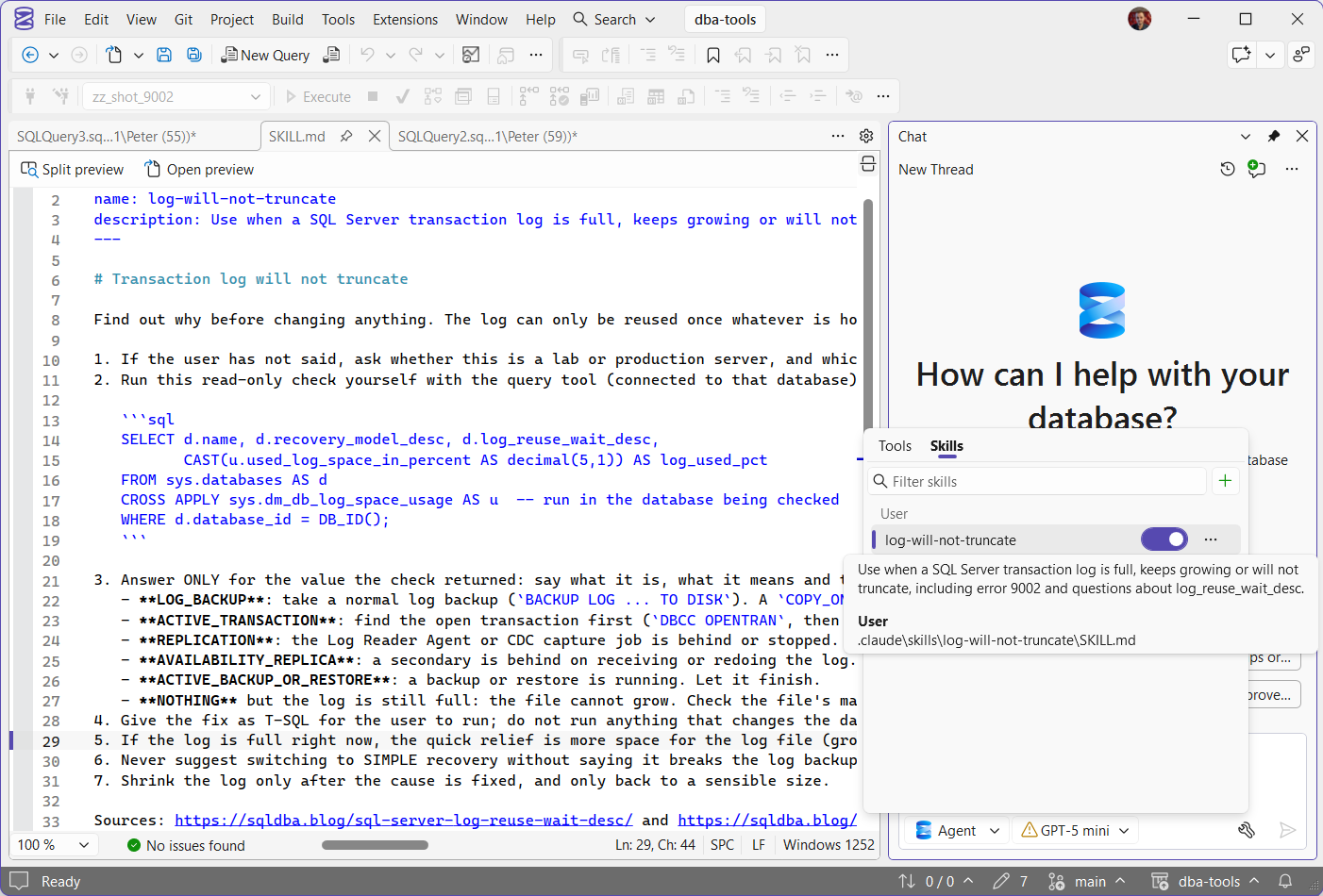
The same folder is Claude Code’s user skills folder, so one skill serves both. Copilot also reads %USERPROFILE%\.copilot\skills and %USERPROFILE%\.agents\skills (Agent skills). Every tool that uses the folder reads what is in it, so keep secrets out.
Test It
Ask the same question in a new chat before and after, on a database whose log is full and waiting on a log backup:
The transaction log on zz_shot_9002 will not truncate. Why, and how do I fix it?| Without the skill | With the skill | |
|---|---|---|
| Asked lab or production | No | Yes, first |
| The check | Six diagnostic queries to run yourself | One read-only query, then it read the result from the grid |
| The answer | Every possible cause, with SIMPLE offered as a fix | The one cause, LOG_BACKUP, and the backup to take |
COPY_ONLY | Not mentioned | Named: it does not truncate the log |
| Invented objects | Two, a table and a column that do not exist | None |
| Sources | None | Both sqldba.blog posts |
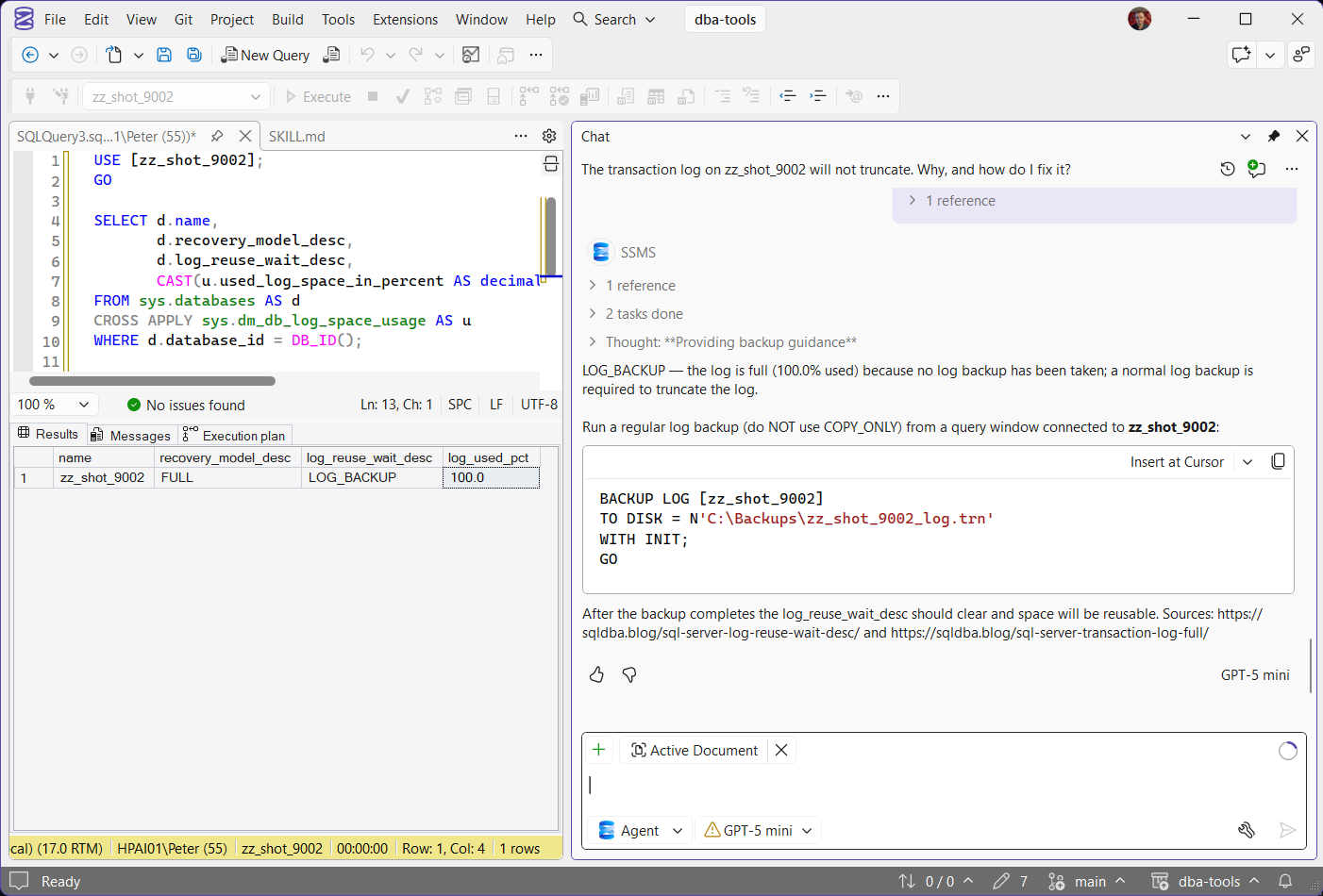
With the skill, the answer is a few lines: the cause, one BACKUP LOG statement, the COPY_ONLY warning and the sources.
Snags
- The skill needs a query tool. With
sql-toolsswitched off, Copilot did not read the skill at all and went back to the generic answer. - Switching a group back on does not re-tick its tools. After Deselect all tools, expand the group and check its tools are ticked again before you ask.
- Copilot connects through your saved connections. A saved server without Trust server certificate fails with “The certificate chain was issued by an authority that is not trusted”, even when Object Explorer is connected: tick it on the saved connection (certificate fix). Or run the check in your own query window and say so: Copilot reads the results grid.
- Copilot decides when to read a skill, from its
description. Write the description in the words people ask with, such as “log is full” and “will not truncate”.
Skill or MCP Server?
Both extend Copilot, in different ways. A skill tells Copilot how to do something with the tools it already has. An MCP server gives it new tools. sql-tools does both: it is an MCP server, and it ships its skills as resources.
| Skill | MCP server | |
|---|---|---|
| What it is | A SKILL.md file of instructions, plus any reference files | A program that gives Copilot new tools, prompts and resources |
| How Copilot uses it | Reads it when its description matches what you asked | Calls its tools, with your approval |
| Can it run anything? | No, it uses the tools Copilot already has | Yes, whatever its tools do |
| Setting it up | Create it on the Skills tab, or copy a folder | Install from the registry, or add its command or URL |
| On SSMS 22.11 | Works | Built-in servers work, and registry servers such as Azure MCP Server install in a click |
| Watch out for | It is guidance, not a guarantee: Copilot can still answer without it | Another program on your machine, running with whatever access you give it |
| Best for | Your team’s way of doing a job: the checks to run first, the fixes to avoid | Something Copilot cannot reach on its own: another system’s data, an API, a new action |
Start with a skill when Copilot can already reach the data and only needs to be told how to use it. Reach for an MCP server when it needs something it cannot get at all.
Frequently Asked Questions
How do I remove a skill?
Delete its folder from %USERPROFILE%\.claude\skills. The Skills tab updates straight away, with no restart. To keep a skill but stop Copilot using it, switch its toggle off on the Skills tab instead.
I switched a tool group back on. Why does Copilot still not use it?
Switching a group on does not re-tick its tools. Expand the group: if its tools are unticked, click the first row to select them all.
Why can I not see any tools?
Copilot Chat is in Ask mode. Switch to Agent mode: that is where the Tools panel, skills and MCP servers are used.
Can I stop Copilot running queries?
Untick mssql_execute_query in the sql-tools group, or connect Copilot with a login that can only read. Unticking stops the tool being offered at all.
Where are my skills stored?
Global skills go in %USERPROFILE%\.claude\skills, one folder per skill with a SKILL.md inside.
Are the built-in skills the same as my skills?
No. Built-in skills come from the sql-tools server and appear in the MCP resources picker. The Skills tab lists only the ones you create.
Related
- GitHub Copilot in SSMS, installing it and what it is good for
- Restrict What GitHub Copilot Can Run in SSMS, limiting what its queries can touch
- sqldba MCP Server, verified SQL Server error, wait and build lookups as MCP tools
- SSMS: The Complete Guide, the hub this post belongs to
Leave a Reply