
GitHub Copilot became generally available in SSMS at 22.4.1, and most of what is written about it is either a sales page or a dismissal. Neither helps you decide what to actually do with an AI assistant inside the tool that holds your production connection strings. This post is the working answer: how to set it up, what it can do, and where I would draw the lines on anything production-shaped.
The short version of the lines: drafting, explaining and documenting T-SQL, yes. Anything executing against production without a human reading it first, no. The good news is that the defaults mostly agree.
Setup
You need SSMS 22 or later, and a GitHub account. A free Copilot tier exists, so trying it costs nothing.
- Copilot installs as the separate AI Assistance workload in the Visual Studio Installer. If it is missing, select Install Copilot from the Copilot badge in the upper-right of SSMS, or modify the SSMS install to add the workload.
- Select the GitHub Copilot badge, then Open Chat Window to Sign In, and sign in with your GitHub account (or sign up for Copilot Free from the same prompt).
- Done. The chat window works against whatever server and database the query editor is connected to, and each response states which server and database it was generated for.
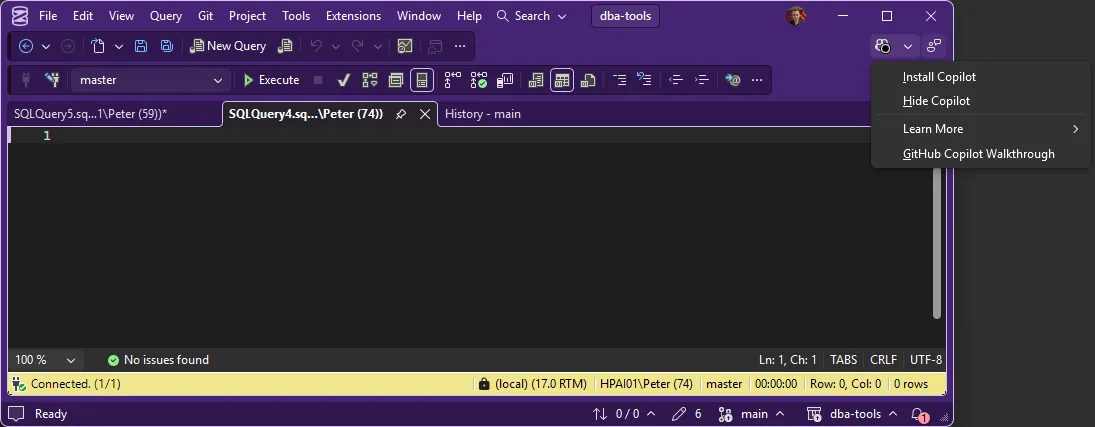
Because it is a separate workload, it is opt-in per machine. It does not arrive silently with an SSMS update, which is exactly what you want on locked-down estates.
What It Can Do
- Chat: questions about the connected database, generating and editing T-SQL, and since 22.5 it can discuss the results pane, execution plan, messages and client statistics included.
- Code completions: inline suggestions as you type. These ship disabled by default since 22.5.2; enable them under Tools > Options > Text Editor > Inline Suggestions if you want them.
- Right-click assistance: Document, Explain, Fix and Optimize on selected code.
- Instructions: user-level custom instructions, plus database instructions stored in the database itself, so context like naming rules travels with the database.
- Agent Mode (preview): since 22.7, a plan-and-execute mode that gained DBA-shaped skills in 22.8, wait category analysis, slow-query investigation, IO pressure, memory issues and more.
The Governance Lines
The defaults are the right way round, and worth knowing explicitly:
- Ask mode cannot execute arbitrary queries against the connected server as of 22.9. It drafts; you run. That is the correct division of labour, do not look for ways around it.
- Completions are off by default. Turn them on for a dev box if you like them; leaving them off on a production jump host is a defensible choice, not paranoia.
- Agent Mode is a preview, treat it like one. Its diagnostic skills are genuinely interesting on a dev or test instance. Pointing an autonomous plan-and-execute loop at production while it is in preview is a decision you would have to defend in an incident review, so make it deliberately or not at all.
- Know your data path. Copilot chat goes to GitHub’s service; that is a governance conversation for regulated estates, and GitHub’s Copilot Trust Center documents the specifics. Have that conversation before the rollout, not after.
The habit that makes all of this safe is the same one that predates AI: read what you run. Copilot writing the first draft changes nothing about whose name is on the execute.
Where a Checked Reference Fits
A drafting assistant and a verified reference are different tools. Copilot generates; when the question is a specific error number, wait type or build level, generated answers can be plausible rather than checked. That is the gap the sqldba MCP server covers for AI assistants, hand-verified reference data with a source URL on every answer. The two compose well: let the assistant draft, and let its facts come from something checkable.
Frequently Asked Questions
Does Copilot in SSMS cost anything?
A free tier exists and works in SSMS. Paid GitHub Copilot plans lift the usage limits and open up model selection; the 22.1 release notes list Claude as the default model for paid subscriptions.
Can I choose or bring my own model?
Yes, model selection within chat arrived in 22.0 and bring-your-own-model in 22.1.
Can Copilot run queries against my server?
Ask mode cannot execute arbitrary queries as of 22.9; you execute what it drafts. Agent Mode (preview) is the mode designed to act, which is exactly why it deserves the production caution above.
Related
- SSMS: The Complete Guide, the hub this post belongs to
- What’s New in SSMS 22 for DBAs
- The sqldba MCP Server, the checked-reference side of AI-assisted DBA work
- Install and Update SSMS
Summary
Copilot in SSMS is opt-in, free to try, and shipped with sensible defaults: completions off, Ask mode drafting rather than executing, Agent Mode clearly labelled preview. Used as a drafting and explaining tool with a human on the execute button, it earns its place. The lines to hold are the ones the defaults already draw, and the oldest rule in the job still applies: read what you run.
Leave a Reply