
N'...', the parameters are positional only, and sp_readerrorlog stops at four of them. Examples to copy, the parameter cheat sheet, and why generated versions fail.Something has gone wrong on the instance and the answer is in the error log. xp_readerrorlog searches that log from a query window, and this is the command to start with, every error in the current log, newest first:
EXEC xp_readerrorlog 0, 1, N'Error', NULL, NULL, NULL, N'desc';Copy-Paste Examples That Work
Read the current log, oldest line first:
EXEC xp_readerrorlog 0;Search one term, newest first. Failed logins in the current log. The state number sits on the Error: 18456 line logged just before each one, and Login Failed for User (Error 18456) decodes it:
EXEC xp_readerrorlog 0, 1, N'Login failed', NULL, NULL, NULL, N'desc';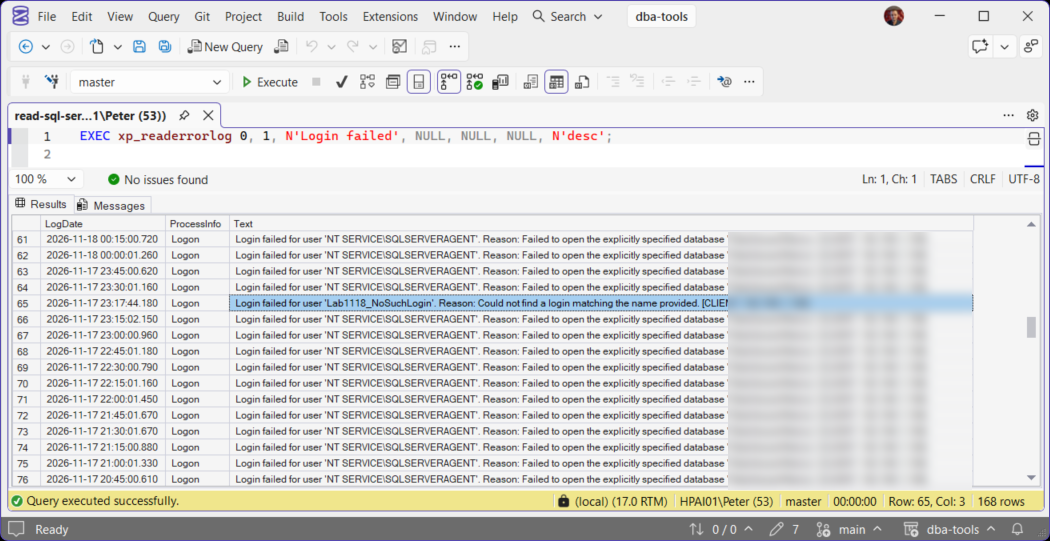
Two terms (AND). A line must contain both, so this finds failed logins for one account only:
EXEC xp_readerrorlog 0, 1, N'Login failed', N'AppUser';A date range, newest first. Errors between a start and an end timestamp, written as 'yyyy-mm-dd hh:mm'. N'' or NULL in the second search slot means no second term. The second command takes the last 2 hours from datetime variables instead:
EXEC xp_readerrorlog 0, 1, N'Error', N'', N'2026-11-18 00:00', N'2026-11-18 23:59', N'desc';

DECLARE @start datetime = DATEADD(HOUR, -2, GETDATE()), @end datetime = GETDATE();
EXEC xp_readerrorlog 0, 1, N'Error', N'', @start, @end, N'desc';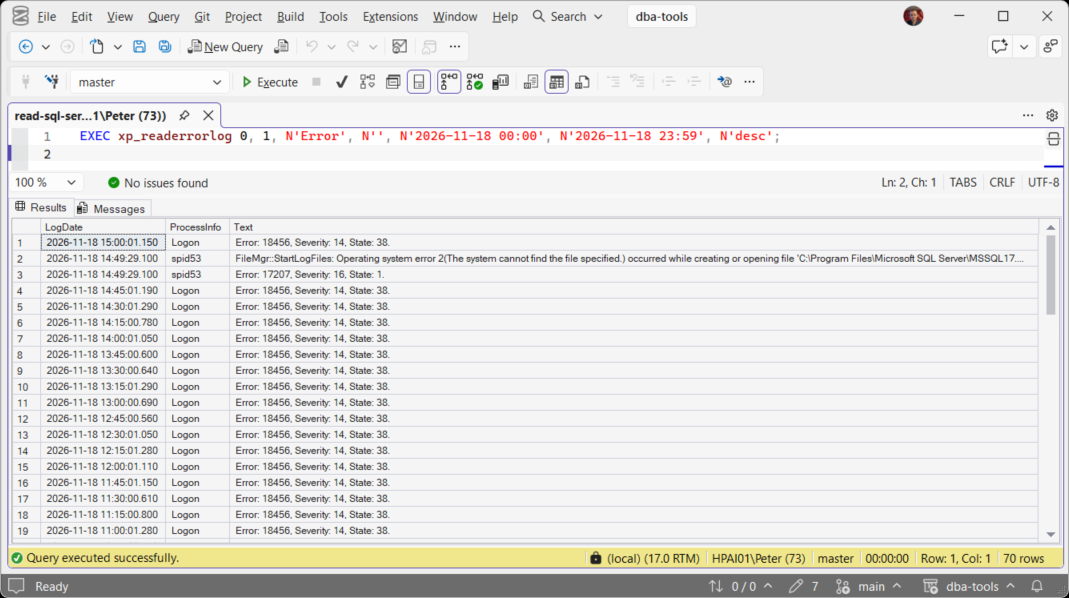
The SQL Server Agent log is log type 2. If Agent will not start at all, SQL Server Agent Will Not Start has the rest:
EXEC xp_readerrorlog 0, 2;An older log. Each restart, and each sp_cycle_errorlog, starts a new file. List the archives with their dates, then pass the archive number as the first parameter:
EXEC xp_enumerrorlogs;
EXEC xp_readerrorlog 1, 1, N'Starting up database';
Into a temp table, to filter with WHERE. xp_readerrorlog cannot sit in a FROM clause, so INSERT ... EXEC is the way in. This keeps the last 24 hours of lines that mention an error or a failure:
CREATE TABLE #log (LogDate datetime, ProcessInfo nvarchar(64), [Text] nvarchar(max));

INSERT INTO #log (LogDate, ProcessInfo, [Text])
EXEC xp_readerrorlog 0, 1;

SELECT LogDate, ProcessInfo, [Text]
FROM #log
WHERE LogDate >= DATEADD(HOUR, -24, GETDATE())
  AND ([Text] LIKE N'%error%' OR [Text] LIKE N'%fail%')
ORDER BY LogDate DESC;

DROP TABLE #log;
For a regular look rather than a one-off search, Get Recent Error Log Entries reads the last few days with the noise filtered out, and Get Error Log Patterns groups repeated messages so the one new line stands out. When the instance will not start, SELECT SERVERPROPERTY('ErrorLogFileName'); gives the file to open in Notepad.
Parameter Cheat Sheet
All seven are positional. Leave trailing ones out and they take their defaults. To set a later one, fill the ones before it with NULL.
| # | Parameter | Example | Note |
|---|---|---|---|
| 1 | Log number (int) | 0 | 0 is the current log, 1 the one before it, up to the archives xp_enumerrorlogs lists |
| 2 | Log type (int) | 1 | 1 or NULL for the SQL Server error log, 2 for the SQL Server Agent log |
| 3 | Search text 1 (nvarchar) | N'Login failed' | Needs N'...'. Not case sensitive, no wildcards. NULL or N'' for no search |
| 4 | Search text 2 (nvarchar) | N'AppUser' | Needs N'...'. AND with search text 1, not OR |
| 5 | Start time (datetime) | N'2026-11-18 00:00' | A 'yyyy-mm-dd hh:mm' string or a datetime variable |
| 6 | End time (datetime) | N'2026-11-18 23:59' | Same forms as the start time |
| 7 | Sort order (nvarchar) | N'desc' | N'asc' (the default) or N'desc' for newest first, either case |
sp_readerrorlog, the documented wrapper in master, passes the first four straight through to xp_readerrorlog and has no others. For a time window or a sort order, call xp_readerrorlog directly.
Why Generated Versions Fail
This is the version AI assistants often write: plain quotes, seven arguments to the wrapper, or parameter names that read well and do not exist. Each one fails with its own message:
EXEC xp_readerrorlog 0, 1, 'Login failed';
-- Msg 22004: Error executing extended stored procedure: Invalid Parameter Type

EXEC sp_readerrorlog 0, 1, N'Login failed', NULL, NULL, NULL, N'desc';
-- Msg 8144: Procedure or function sp_readerrorlog has too many arguments specified.

EXEC sp_readerrorlog @LogNumber = 0, @LogType = 1, @SearchString1 = N'Login failed';
-- Msg 8145: @LogNumber is not a parameter for procedure sp_readerrorlog.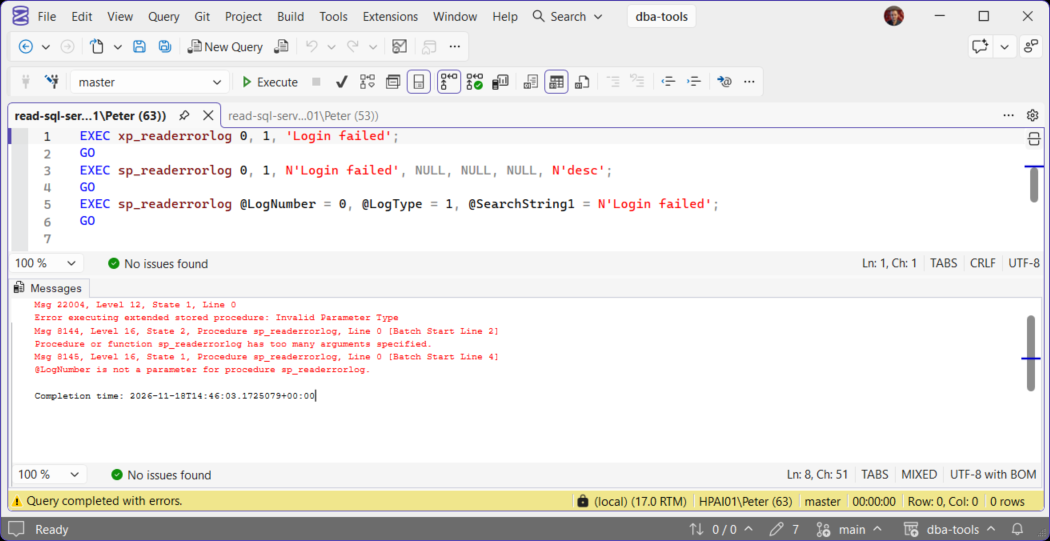
- Plain quotes: add the
N.sp_readerrorlogconverts plain quotes for you, so a search copied from a wrapper example breaks the moment it moves toxp_readerrorlog. - Too many arguments:
sp_readerrorlogtakes four. Switch toxp_readerrorlogfor the time window and sort order. - Named parameters: drop the names and pass the values by position.
Three more fail more quietly. Wildcards are searched for literally, so the first line returns nothing while N'Login failed' finds the rows. It is not a function, so it cannot be selected from. And an archive number past the ones kept fails with a file error:
EXEC xp_readerrorlog 0, 1, N'%Login%failed%';
-- no rows

SELECT * FROM xp_readerrorlog(0, 1);
-- Msg 208: Invalid object name 'xp_readerrorlog'.

EXEC xp_readerrorlog 99;
-- xp_readerrorlog() returned error 2, 'The system cannot find the file specified.'
Permissions: sp_readerrorlog Works Without Sysadmin
A sysadmin can run everything on this page. Anyone else is refused xp_readerrorlog, even with VIEW ANY ERROR LOG granted or as a member of securityadmin:
The same login reads the log through sp_readerrorlog, with its four parameters. Grant VIEW ANY ERROR LOG (SQL Server 2022 and later) rather than adding the login to securityadmin, which can grant server permissions and is close to sysadmin in practice. Microsoft’s sp_readerrorlog page has the permission list:
GRANT VIEW ANY ERROR LOG TO [YourMonitoringLogin];

-- then, as that login
EXEC sp_readerrorlog 0, 1, N'Login failed';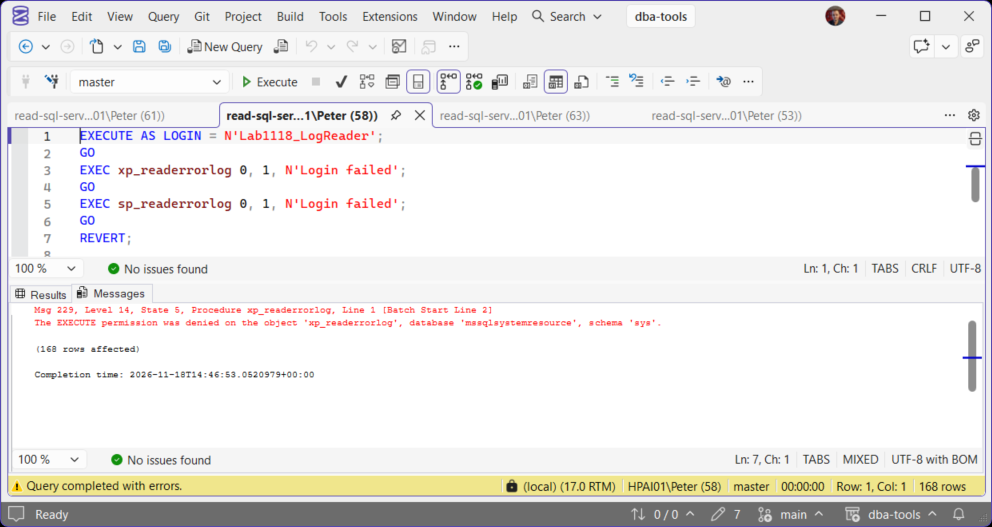
Frequently Asked Questions
What is the difference between xp_readerrorlog and sp_readerrorlog?
sp_readerrorlog is a wrapper that calls xp_readerrorlog with the first four parameters. Use xp_readerrorlog when you need the time window or the sort order.Why do I get EXECUTE permission denied on xp_readerrorlog?
sp_readerrorlog with VIEW ANY ERROR LOG granted, as in the permissions section above.Can I search for one term OR another?
LIKE ... OR LIKE ..., as in the table example above.Why does my search return nothing?
xp_enumerrorlogs and search the archive from before the last restart.Is xp_readerrorlog supported?
sp_readerrorlog is documented, xp_readerrorlog is not, so Microsoft can change the extended procedure without notice. It has kept the same seven parameters across many versions, and everything on this page was checked on SQL Server 2025.Related
- Get Recent Error Log Entries, the last few days of the log with the routine lines filtered out
- Get Error Log Patterns, repeated messages grouped and counted
- Get Failed Login Summary, every failed login grouped by account and reason
- Login Failed for User (Error 18456), what the state number on the line means
- SQL Agent Job Failed, when the Agent log points at a job
- SQL Server Errors: The Complete Guide, the error library
Leave a Reply