
A large restore has been running for 20 minutes. Is it about to finish, or is it barely a quarter done? SSMS won’t tell you unless you started it interactively and left that session open, and a restore kicked off from a script, a job, or someone else’s session gives you nothing to watch by default.
The same question applies to a full backup of a multi-terabyte database running during a maintenance window with a hard deadline. You need to know whether it will finish in time, not just that it’s “still running.”
This script queries SQL Server’s own progress tracking for active backup and restore operations and turns it into a running time, an estimated time remaining, and an estimated completion clock time, so you’re not guessing.
This is for a backup or restore that is already running. To work out how long one should take before you start it, from your own throughput history, use Get Backup and Restore Duration Estimate.
Why Backup Restore Progress Matters
SQL Server tracks percent_complete for backup and restore operations internally, in sys.dm_exec_requests, but it’s not visible anywhere unless you go looking for it:
- A restore during a disaster recovery scenario is exactly the moment you most need an accurate time estimate, and exactly the moment guessing is most costly
- A backup running up against a maintenance window deadline needs a real answer to “will this finish in time,” not a hopeful one
- A long
DBCC SHRINKFILEorDBCC SHRINKDATABASEsurfaces here too, reported asDbccFilesCompact - Anyone who didn’t personally start the operation, an on-call DBA picking up someone else’s restore mid-flight, has no other easy way to see how far along it is
Without this, the honest answer to “how much longer” is often “I don’t know,” which is a bad thing to tell someone during an incident.
When to Run This Script
- During a live restore, to get a real time estimate instead of guessing
- During a large full backup running close to a maintenance window deadline
- When picking up an in-progress operation someone else started
- As a quick check before deciding whether to wait or escalate
The Script
Run the following script against your SQL Server instance.
- Tested on: SQL Server 2025 (RTM CU8) 17.0.4075.5, Windows lab instance
- Last verified: 2026-10-21 (live backup on the lab; the restore output is a saved run from 2026-10-04, Get-BackupRestoreProgress-20261004-222657.csv)
- Permissions: VIEW SERVER STATE, or VIEW SERVER PERFORMANCE STATE on SQL Server 2022 and later. Without either, it returns no rows rather than an error
- Safety: read-only, impact low
/*
Script Name : Get-BackupRestoreProgress
Category    : performance-troubleshooting
Purpose     : Show active backup/restore progress and estimated completion for long-running operations.
Author      : Peter Whyte (https://sqldba.blog/dba-scripts-get-backup-restore-progress/)
Requires    : VIEW SERVER STATE (VIEW SERVER PERFORMANCE STATE is enough on SQL Server 2022 and later)
Notes       : At 100 percent and 0 sec remaining a RESTORE can still be running recovery (redo
              and undo) under the same command name; the ERRORLOG reports that phase.
              Without the permission the DMV shows only your own session, so a restore started
              by someone else returns no rows, not an error. DBCC CHECKDB reports as
              DBCC ALLOC CHECK then DBCC TABLE CHECK and is not included.
*/
-- SAFE:ReadOnly
-- IMPACT:Low
SET NOCOUNT ON;

SELECT
    er.command AS command,
    est.text AS sql_text,
    er.start_time AS start_time,
    er.percent_complete AS percent_complete,
    CAST(((DATEDIFF(SECOND, er.start_time, GETDATE())) / 3600) AS VARCHAR)
        + ' hour(s), '
        + CAST((DATEDIFF(SECOND, er.start_time, GETDATE()) % 3600) / 60 AS VARCHAR)
        + ' min, '
        + CAST((DATEDIFF(SECOND, er.start_time, GETDATE()) % 60) AS VARCHAR)
        + ' sec' AS running_time,
    CAST((er.estimated_completion_time / 3600000) AS VARCHAR)
        + ' hour(s), '
        + CAST((er.estimated_completion_time % 3600000) / 60000 AS VARCHAR)
        + ' min, '
        + CAST((er.estimated_completion_time % 60000) / 1000 AS VARCHAR)
        + ' sec' AS estimated_time_remaining,
    DATEADD(SECOND, er.estimated_completion_time / 1000, GETDATE()) AS estimated_completion_time
FROM sys.dm_exec_requests er
CROSS APPLY sys.dm_exec_sql_text(er.sql_handle) est
WHERE er.command LIKE 'BACKUP%'     -- BACKUP DATABASE, BACKUP LOG
   OR er.command LIKE 'RESTORE%'    -- RESTORE DATABASE, RESTORE LOG; RESTORE VERIFYONLY reports as RESTORE HEADERONLY
   OR er.command IN ('DbccSpaceReclaim', 'DbccFilesCompact');  -- DBCC SHRINKFILE and SHRINKDATABASE both report DbccFilesCompact
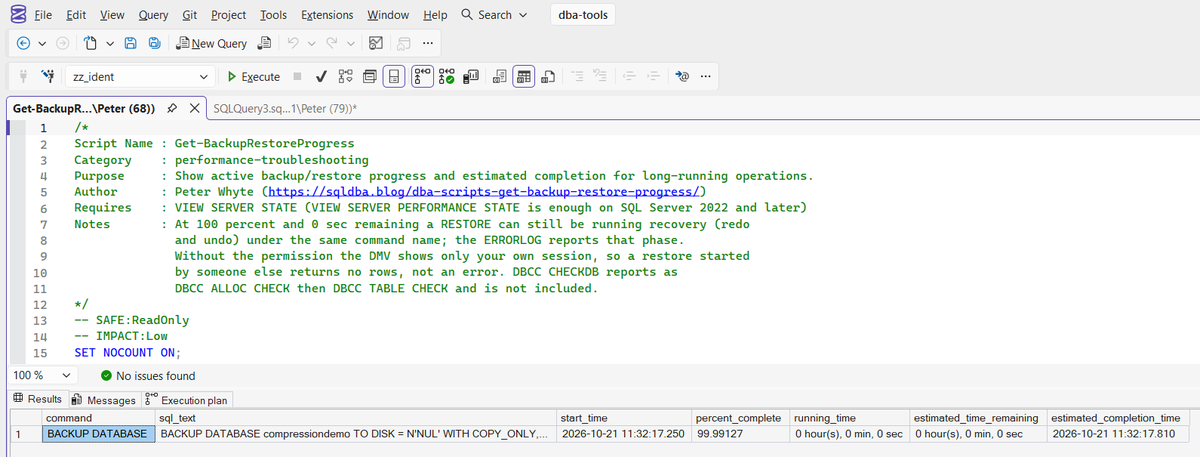
The script returns one row per active backup, restore, or DBCC space-reclaim operation, with a live percent complete and estimated completion time. It returns no rows when nothing matching is currently running.
How To Run From The Repo
Clone DBA Tools, initialize and run the script:
# Clone dba-tools repo:
git clone https://github.com/peterwhyte-lgtm/dba-tools

# Initialize environment:
cd dba-tools
.\Initialize-Environment.ps1

# Check progress of any active backup or restore operation:
.\run.ps1 Get-BackupRestoreProgress

# To run against a remote sql server:
.\run.ps1 Get-BackupRestoreProgress -ServerInstance SQLSERVER01
This script lives in the repo at:
sql/performance/Get-BackupRestoreProgress.sqlpowershell/wrappers/performance/Get-BackupRestoreProgress.ps1
Example Output
A full backup caught on the lab instance just before it finished: 99.99% complete, 0 seconds remaining, and sql_text naming the database.
A restore reads the same way. This one was caught 40 seconds in. 6 of the 7 columns are shown: sql_text held the full RESTORE DATABASE statement, which is the column that names the database.
The restore was 62% through and projected to finish at 22:27:18. The data copy reached 100% at 22:27:24, then the row stayed at 100 with 0 sec remaining for another 127 seconds while recovery ran, and the database came online at 22:29:31.
Understanding the Results
commandBACKUP DATABASE, BACKUP LOG, RESTORE DATABASE, RESTORE LOG, or DbccFilesCompact for a shrink. A restore keeps the RESTORE DATABASE name through recovery, it never becomes a separate row. RESTORE VERIFYONLY reports as RESTORE HEADERONLY and DBCC CHECKDB as DBCC ALLOC CHECK then DBCC TABLE CHECK, so the new filter includes RESTORE HEADERONLY, but not the DBCC commands.sql_textstart_timeRESTORE DATABASE then RESTORE LOG in one batch keeps the first start time for both.percent_completeBACKUP LOG and RESTORE LOG included.Act when it reads 100 and the row is still here. The restore is in recovery, which this column does not measure. Read the ERRORLOG for the real figure, see the FAQ below.running_timestart_time. For the second statement in a batch it includes the first, so a RESTORE LOG can read a minute in at 4%.estimated_time_remainingestimated_completion_time in sys.dm_exec_requests, which MS Docs documents as internal only. It covers the copy phase and reads 0 sec through recovery.estimated_completion_timeBest Practices
- Run this on demand during an active operation, not as part of a scheduled health check; an empty result most of the time is expected, not a finding
- Re-run it periodically during a long operation rather than once, since the estimate can shift as the operation progresses
- Use it before deciding whether to wait out a long-running restore or escalate, rather than guessing from elapsed time alone
- Treat 100 with 0 sec remaining as recovery, not a hang, and read its progress from the ERRORLOG. If
percent_completestops moving below 100, cross-check blocking and waits with Get Blocking Chains
MS Docs covers sys.dm_exec_requests and sys.dm_exec_sql_text in full.
Frequently Asked Questions
Why does this script sometimes return no rows?
Because nothing matching the tracked commands is currently running. That’s the normal, expected state most of the time. This script only returns rows while a backup, restore, or DBCC space-reclaim operation is actively in progress.
Is SQL Server’s percent_complete accurate?
It’s SQL Server’s own figure for the copy phase, generally reliable for a steady-state operation. It can shift if the operation’s speed changes partway through, and the time remaining is built from a column MS Docs documents as internal only, so treat the estimated completion time as a working projection, not a guarantee.
Can I use this to check restore progress from a different session or job?
Yes, if you have VIEW SERVER STATE, or VIEW SERVER PERFORMANCE STATE on SQL Server 2022 and later. Without it the DMV shows only your own session, so a restore someone else started returns no rows and no error, which looks exactly like nothing running.
The restore shows 100 percent and 0 sec remaining but is still running. Is it stuck?
Usually not. A restore copies the data first, then runs recovery under the same row, and this script shows 100 and 0 sec for the whole of recovery. A backup taken with a long transaction open makes that phase long, because the restore has to roll it back.
The ERRORLOG has the real progress, in lines like Recovery of database 'Lab1004_brp_M1' (23) is 55% complete (approximately 49 seconds remain). Phase 2 of 3. Read them with EXEC sp_readerrorlog 0, 1, N'Recovery of database'; and the restore is done at Restore is complete on database.
Why does RESTORE VERIFYONLY appear, but DBCC CHECKDB does not?
They report under other command names: DBCC CHECKDB as DBCC ALLOC CHECK then DBCC TABLE CHECK, and RESTORE VERIFYONLY as RESTORE HEADERONLY. Both fill in percent_complete, so the filter now includes RESTORE HEADERONLY but not DBCC CHECKDB in the WHERE filter.
Summary
The gap between “it’s still running” and “it’ll be done in 8 seconds” matters most during exactly the situations where guessing is worst: a live restore, a backup racing a maintenance window, an operation someone else started that you’ve just inherited. This script closes that gap using SQL Server’s own progress tracking.
Keep it on hand for the moments that actually need it. An empty result most of the time is normal; a live percent complete and an honest time estimate is what you want the moment it isn’t.
Related
You may also find these scripts useful:
- Backups and Recovery (hub)
- Database I/O Usage
- Table Sizes
- Wait Statistics
- Backup and Restore Duration Estimate
- SQL Server Backup Failed or the Restore Is Stuck, the router when the operation has stopped moving
- Why Is the Database in In Recovery Mode, the phase this script reads as 100%
- Database Cannot Be Opened, It Is in the Middle of a Restore
- Get Last Database Restore Date and Time, when the last restore of each database finished, from msdb
- DBA Scripts: The Complete Guide, the map across every script on this site
Leave a Reply