
TDE (Transparent Data Encryption) and backup encryption are two different things that get confused constantly. TDE encrypts the data and log files at rest, and a backup of a TDE database is encrypted too, with the same database encryption key (MS Docs). What TDE does not do is record that backup in msdb as an encrypted backup set, so anything that reads the backup history sees it as unencrypted.
A database can have TDE on and still show no backup encryption anywhere in msdb, which matters when your compliance scope includes “backups in transit and at rest” and nobody actually checked whether the backup step itself uses encryption.
This script cross-references TDE state per database against what backupset actually recorded for the most recent full backup, and flags the mismatch: TDE without encrypted backups, encrypted backups without TDE, or neither.
Why Backup Encryption Status Matters
TDE and native backup encryption (BACKUP ... WITH ENCRYPTION) are separate SQL Server features that happen to both use the word encryption:
- TDE encrypts data and log files on disk. It’s transparent to applications and doesn’t require any change to backup or restore commands.
- Native backup encryption is applied at backup time, using a certificate or asymmetric key in
master. It protects the backup file itself: a copied .bak cannot be read or restored on any server that does not hold that certificate and its private key. Backing up a database with encryption walks through the setup. - Each encrypted backup is recorded in
msdb.dbo.backupsetin three columns:key_algorithm,encryptor_thumbprintandencryptor_type(backupset on MS Docs). On the SQL Server 2025 lab an AES 256 backup recordedaes_256andCERTIFICATE_OAEP_256, and an unencrypted backup left all three NULL, which is what the script tests for. - A TDE-enabled database’s backup file is not automatically flagged as an encrypted backup set in
msdb, because that’s a different mechanism entirely. - Enabling TDE on any user database also encrypts tempdb, since tempdb can contain data from any database on the instance. That’s a side effect worth knowing about before you turn TDE on somewhere you didn’t expect a change.
For anyone answering a compliance question like “are backups encrypted,” the honest answer requires checking both mechanisms, not assuming one implies the other.
When to Run This Script
- Routine security and compliance reviews
- Before an audit that asks about encryption at rest and encryption of backup media
- After enabling TDE on any database, to confirm backups reflect the change you expect
- When backup files are stored or transmitted somewhere outside your normal, already-secured environment
The Script
Run the following script against your SQL Server instance.
- Tested on: SQL Server 2025 (RTM CU5), Windows lab instance
- Last verified: 2026-10-23 (run on the lab against three databases built for the TDE, backup-encryption and no-encryption states)
- Permissions: VIEW DATABASE STATE; VIEW SERVER STATE for sys.dm_database_encryption_keys
- Safety: read-only, impact low
/*
Script Name : Get-BackupEncryptionStatus
Category    : backups
Purpose     : Shows TDE status and backup encryption coverage per database. Identifies
              databases with no recent full backup, and databases where neither TDE
              nor backup encryption protects the backup files.
Author      : Peter Whyte (https://sqldba.blog/dba-scripts-get-backup-encryption-status/)
Requires    : VIEW DATABASE STATE; VIEW SERVER STATE for sys.dm_database_encryption_keys
*/
-- SAFE:ReadOnly
-- IMPACT:Low
SET NOCOUNT ON;

/*
  DESIGN: Joins sys.databases → sys.dm_database_encryption_keys (TDE state) →
  msdb.dbo.backupset (last 30 days). The key_algorithm and encryptor_thumbprint columns
  in backupset are populated when backup encryption was used (SQL 2014+).
  A database can have TDE without encrypted backups, or encrypted backups without TDE.
  Neither is automatically wrong — the report surfaces the combination so you can assess.
*/

SELECT
    d.name AS database_name,
    d.recovery_model_desc,
    CASE d.is_encrypted WHEN 1 THEN 'Yes' ELSE 'No' END AS tde_enabled,
    dek.encryption_state_desc AS tde_state,
    dek.encryptor_type AS tde_encryptor_type,
    -- Most recent full backup (last 30 days)
    MAX(CASE bs.type WHEN 'D' THEN bs.backup_finish_date END) AS last_full_backup,
    -- Was the most recent full backup encrypted?
    MAX(CASE bs.type WHEN 'D' THEN bs.key_algorithm END) AS backup_encryption_algorithm,
    MAX(CASE bs.type WHEN 'D'
         THEN SUBSTRING(CONVERT(varchar(max), bs.encryptor_thumbprint, 2), 1, 16)
         ELSE NULL END) AS backup_encryptor_thumbprint_prefix,
    -- Assessment. A TDE database's backup files are encrypted by its TDE key, so TDE without backup encryption is
    -- covered, not a gap; the risk is losing the TDE certificate. The missing-backup check comes first so a TDE
    -- database with no recent backup is reported as that.
    CASE
        WHEN MAX(CASE bs.type WHEN 'D' THEN bs.backup_finish_date END) IS NULL
            THEN 'WARN - no full backup in last 30 days'
        WHEN d.is_encrypted = 1
             AND MAX(CASE bs.type WHEN 'D' THEN bs.key_algorithm END) IS NOT NULL
            THEN 'OK - TDE and backup encryption'
        WHEN d.is_encrypted = 1
            THEN 'OK - TDE (backup file encrypted by the TDE key)'
        WHEN MAX(CASE bs.type WHEN 'D' THEN bs.key_algorithm END) IS NOT NULL
            THEN 'OK - backup encryption (data files not TDE)'
        ELSE 'INFO - no TDE or backup encryption'
    END AS encryption_status
FROM sys.databases d
LEFT JOIN sys.dm_database_encryption_keys dek
    ON dek.database_id = d.database_id
LEFT JOIN msdb.dbo.backupset bs
    ON bs.database_name = d.name
   AND bs.backup_finish_date >= DATEADD(DAY, -30, GETDATE())
WHERE d.database_id > 4
  AND d.state_desc = 'ONLINE'
GROUP BY
    d.name,
    d.recovery_model_desc,
    d.is_encrypted,
    dek.encryption_state_desc,
    dek.encryptor_type
ORDER BY
    CASE
        WHEN d.is_encrypted = 1
             AND MAX(CASE bs.type WHEN 'D' THEN bs.key_algorithm END) IS NULL THEN 1
        ELSE 2
    END,
    d.name;
The script joins each database’s TDE state against its most recent full backup in msdb, and flags any mismatch between the two.
How To Run From The Repo
Clone DBA Tools, initialize and run the script:
# Clone dba-tools repo:
git clone https://github.com/peterwhyte-lgtm/dba-tools

# Initialize environment:
cd dba-tools
.\Initialize-Environment.ps1

# Check TDE and backup encryption status across all user databases:
.\run.ps1 Get-BackupEncryptionStatus

# To run against a remote sql server:
.\run.ps1 Get-BackupEncryptionStatus -ServerInstance SQLSERVER01
This script lives in the repo at:
sql/backups/Get-BackupEncryptionStatus.sqlpowershell/wrappers/backups/Get-BackupEncryptionStatus.ps1
Example Output
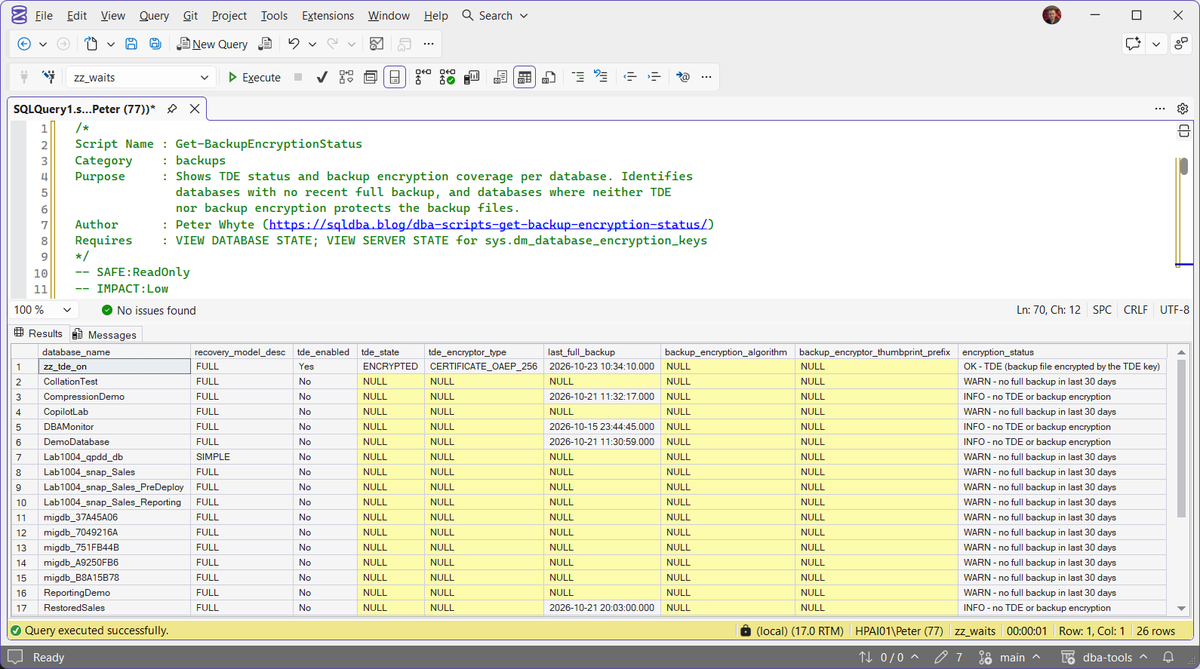
Real output from the lab. The TDE database reads OK, because its backup files carry the TDE encryption. A database with no full backup in the last 30 days is reported as that first, whatever its encryption, and the rest show INFO. The recovery_model_desc column is there because a recovery model decides which backups a database needs at all.
Understanding the Results
The encryption_status column is the summary. Everything else in the row supports it.
msdb records no encryptor for the backup, so an audit that asks for encrypted backups by name gets no evidence from the backup history, and the backup’s protection rests entirely on that one certificate.Common Causes
- TDE turned on for compliance without anyone updating the backup process to match
- Backup encryption configured once, then taken out of the job when its certificate expired (one year after creation by default) and new encrypted backups started failing
- A database migrated or restored from a source where TDE was enabled, but the target’s backup jobs were never adjusted
- Compliance requirements changed after the original backup strategy was designed, and encryption was never revisited
How to Fix Missing Backup Encryption
If TDE is enabled but backups aren’t encrypted, add backup encryption to the job. It requires a certificate or asymmetric key in master, with its private key protected by the database master key:
-- One-time setup: master key + certificate (skip if you already have one)
USE master;
IF NOT EXISTS (SELECT 1 FROM sys.symmetric_keys WHERE name = '##MS_DatabaseMasterKey##')
    CREATE MASTER KEY ENCRYPTION BY PASSWORD = '<StrongPassword>';

-- Without EXPIRY_DATE the certificate expires one year after creation
CREATE CERTIFICATE BackupEncryptionCert
WITH SUBJECT = 'Backup encryption certificate',
     EXPIRY_DATE = '20301231';

-- Back this certificate up immediately and store it somewhere separate from the
-- database backups it protects. Without it, an encrypted backup is unrestorable.
BACKUP CERTIFICATE BackupEncryptionCert
TO FILE = 'D:\SQL-Backups\BackupEncryptionCert.cer'
WITH PRIVATE KEY (
    FILE = 'D:\SQL-Backups\BackupEncryptionCert.pvk',
    ENCRYPTION BY PASSWORD = '<AnotherStrongPassword>'
);

-- Then encrypt backups going forward:
BACKUP DATABASE [YourDatabase]
TO DISK = N'D:\SQL-Backups\YourDatabase_FULL.bak'
WITH COMPRESSION, CHECKSUM,
     ENCRYPTION (ALGORITHM = AES_256, SERVER CERTIFICATE = BackupEncryptionCert);
A few things about that block:
- AES_256 is the algorithm to pick. AES_128, AES_192 and TRIPLE_DES_3KEY are also accepted, and there is no reason to choose them for a new job.
- Encryption and compression work together. On the lab, a 16 MB test database compressed to 0.75 MB with or without encryption, and the encrypted backup without compression stayed at 16 MB.
- The certificate’s expiry date matters more than it does for TDE. Once it passes, SQL Server refuses new encrypted backups with it, while restores with it still work (CREATE CERTIFICATE on MS Docs). Don’t renew or replace it in place either: the restore matches the backup to the certificate by thumbprint, so create a new certificate for new backups and keep the old one for as long as its backups are kept.
- If the certificate has never been backed up, the encrypted backup still succeeds, with only a warning in the Messages tab telling you to back up the certificate and private key.
If a database needs TDE and doesn’t have it, enabling it is a separate step (its own certificate, CREATE DATABASE ENCRYPTION KEY, then ALTER DATABASE ... SET ENCRYPTION ON), and worth its own careful change rather than bolting it on alongside a backup encryption fix.
The trap to avoid: losing the certificate or its private key. Without it, an encrypted backup cannot be restored, on this server or any other. Back up the certificate and private key the moment you create them, and store that backup somewhere separate from the database backups it protects, with the password kept somewhere else again. How to back up a SQL Server certificate and its private key covers the .cer and .pvk pair, the PFX form and getting the files off the server.
Restoring an Encrypted Backup on Another Server
A restore takes no encryption options. It only needs the certificate that encrypted the backup to exist in master on the server you are restoring to, with its private key, and the restoring login needs VIEW DEFINITION on it (Backup encryption on MS Docs). Without it, this is what you get:
It is followed by Msg 3013, and the thumbprint names the certificate the backup needs. Unlike a TDE backup, where RESTORE HEADERONLY still reads the header, an encrypted backup failed RESTORE HEADERONLY, RESTORE VERIFYONLY and RESTORE DATABASE with this same error on the lab. The fix is the same as for TDE: create a master key in master on the target if there isn’t one, create the certificate from its .cer and .pvk files, then rerun the restore unchanged. Cannot find server certificate (error 33111) walks through each step.
The backup_encryptor_thumbprint_prefix column in the script is the first 16 hex characters of that thumbprint, so you can find the certificate a backup depends on before you need it:
-- Paste the prefix from the script output
SELECT name, expiry_date, pvt_key_last_backup_date
FROM master.sys.certificates
WHERE CONVERT(varchar(40), thumbprint, 2) LIKE '1B3FFDE8F82EDC1D%';
A NULL pvt_key_last_backup_date means the private key has never been exported to a .pvk file, so that is the certificate to check first (a PFX export does not set the column).
Best Practices
- Treat TDE and backup encryption as two separate checkboxes, not one
- Back up every certificate and its private key immediately after creation, before you rely on it for anything
- Store certificate backups separately from the database backups they protect
- On a TDE database, use a different certificate for backup encryption than the one protecting the database encryption key
- Set an expiry date on backup encryption certificates that you will notice, and plan the switch to a new certificate before it arrives
- Re-verify encryption status after any migration or restore, since certificates don’t always travel with the database automatically
- Include this check in routine security reviews, not just at audit time
Microsoft Learn: sys.dm_database_encryption_keys · sys.databases · sys.symmetric_keys · BACKUP CERTIFICATE
Frequently Asked Questions
Does TDE encrypt my SQL Server backups?
Not in a way msdb tracks as an encrypted backup set. TDE encrypts the data and log files, and a backup taken from a TDE-enabled database inherits that encryption, but native backup encryption is a separate feature with its own certificate and its own record in backupset.
Does enabling TDE affect tempdb?
Yes. Once TDE is enabled on any user database, tempdb is automatically encrypted too, since it can contain data from every database on the instance. This happens without any extra configuration and often surprises people who only intended to encrypt one database.
Do I need both TDE and backup encryption?
It depends on your compliance requirements. Some frameworks only require encryption at rest for live data (TDE covers that). Others explicitly require backup media to be encrypted too, which TDE alone doesn’t provide. Check what’s actually being asked for before assuming one covers the other.
What happens if I lose the certificate used for backup encryption?
The backup becomes permanently unrestorable. There’s no recovery path without the certificate and its private key. Back both up immediately after creation and store that backup separately from the data it protects. Certificates, Keys and TDE Status lists what exists on the instance and when each certificate expires.
Summary
TDE and backup encryption answer different questions, and treating them as interchangeable is how a database ends up passing one encryption question and failing the next. This script checks both at once and tells you exactly which combination each database actually has.
Run it as part of routine security reviews, and treat any WARN as a real finding, not a formality. A database in the wrong state here usually got there because encryption was configured for one requirement and nobody circled back to check whether it also satisfied the next one.
Related
You may also find these useful:
- Generate Backup and Restore Scripts
- Get Backup Chain Integrity
- Get Backup Coverage
- Get Backup Restore Duration Estimate
- Get Backup Size Trend
- Get Database Backup History
- Get Last Database Backup Times
- Get Last Restore History
- DBA Scripts: Security, the pillar this sits under
- DBA Scripts: The Complete Guide, the map across every script on this site
Leave a Reply