
SELECT sql_memory_model_desc FROM sys.dm_os_sys_info; first. CONVENTIONAL means the service account does not hold the Windows Lock pages in memory right. Then check whether Windows is paging SQL Server out, set max server memory, and grant the right and restart.Get-OsConfigurationChecks flagged lpim_status at WARN, or the error log keeps telling you SQL Server process memory has been paged out.
Both point at the same Windows user right, Lock Pages in Memory (LPIM), which lets SQL Server hold memory that Windows cannot page out to disk. It is granted in Windows policy, outside SQL Server, which is why so many builds miss it.
It is a good default on a dedicated SQL Server box, but set max server memory first. That order is the part people get wrong, and when not to turn it on matters as much as how.
Check the Memory Model
One column tells you which memory model the instance started with. It is available from SQL Server 2016 SP1 (and 2012 SP4), and needs VIEW SERVER STATE (VIEW SERVER PERFORMANCE STATE on SQL Server 2022 and later):
SELECT sql_memory_model_desc
FROM sys.dm_os_sys_info;Get-OsConfigurationChecks reads the same column and turns it into a verdict. These are the values it returns:
| sql_memory_model_desc | lpim_status | What it means |
|---|---|---|
CONVENTIONAL | WARN - LPIM not active; OS can page out SQL buffer pool under memory pressure | The service account did not hold Lock pages in memory when SQL Server started |
LOCK_PAGES | OK - Lock Pages in Memory is active | The right was held at startup and SQL Server is using locked pages |
LARGE_PAGES | OK - Large Pages active (implies LPIM) | Locked pages plus trace flag 834, Enterprise only, covered below |
The model is fixed when the service starts. Granting the right changes nothing until the next restart, and a WARN that survives a restart usually means the grant went to the wrong account.
On this page
Is Windows Paging SQL Server Out?
CONVENTIONAL on its own is a hardening gap, not an incident. The incident is error 17890, which SQL Server writes to the error log when Windows has trimmed a large part of its working set. This is the newest one on the lab instance, a SQL Server 2025 instance running CONVENTIONAL:
Read it as a ratio. SQL Server had about 472 MB committed and only about 143 MB of it in physical memory, the 30% at the end of the line, so most of what it had committed had been paged out. Any of those pages it needs again has to be faulted back in first, and the duration says the condition had lasted an hour. Microsoft’s guidance in Server Memory Configuration Options is that LPIM should be used when there are signs the sqlservr process is being paged out, and names 17890 as that sign.
Search the current log for it, newest first, and read the process memory figures next to it:
EXEC xp_readerrorlog 0, 1, N'paged out', NULL, NULL, NULL, N'desc';

SELECT
    physical_memory_in_use_kb / 1024 AS working_set_mb,
    memory_utilization_percentage,
    process_physical_memory_low,
    locked_page_allocations_kb / 1024 AS locked_pages_mb
FROM sys.dm_os_process_memory;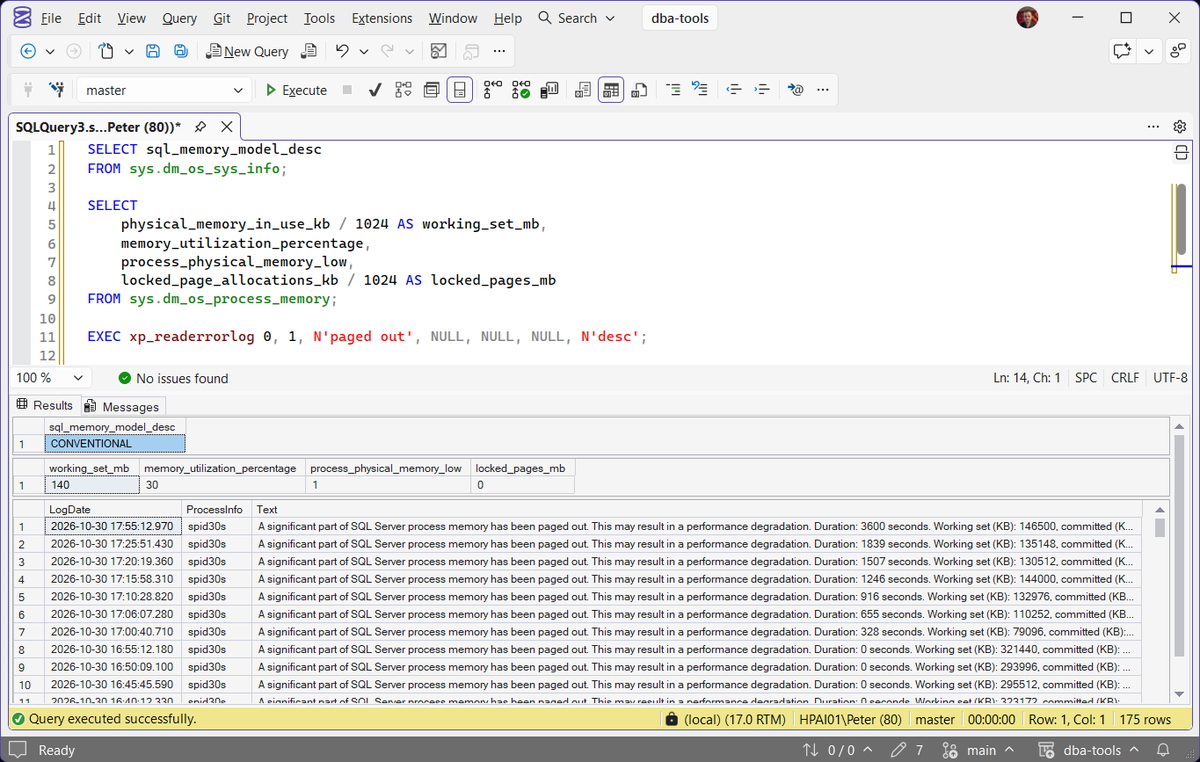
memory_utilization_percentage is the share of committed memory that is in the working set, so 100 is healthy and anything well below it is the same story as the 17890 line. process_physical_memory_low = 1 means SQL Server is responding to a low physical memory notice from Windows. locked_pages_mb stays at 0 while the model is CONVENTIONAL. On the lab they read 30, 1 and 0.
One 17890 after a large file copy on the server is a different problem from a log with one every few minutes. The lab log had 175 of them in a single day. If you only find old ones, grant LPIM as hardening at the next maintenance window. If they are current and repeating, something on the box is fighting SQL Server for memory, and you want to know what before you lock pages, because locking them moves the pressure onto whatever that is. Get Recent Error Log Entries gives you the rest of the log around them.
Set Max Server Memory Before You Grant It
This is the order that matters. With LPIM, memory SQL Server allocates as locked pages cannot be paged out by Windows, so if max server memory (MB) is still at the default of 2,147,483,647 there is nothing Windows can do to take that memory back if SQL Server is slow to give it up. Microsoft says it plainly: with the right granted, set max server memory to a specific value rather than leaving the default, and an incorrect value that does not account for other memory consumers might cause instability.
SELECT name, value_in_use
FROM sys.configurations
WHERE name IN (N'max server memory (MB)', N'min server memory (MB)');
Get-OsConfigurationChecks returns max_server_memory_mb and a recommended_max_mem_mb starting point next to lpim_status, which is physical memory less 4 GB above 16 GB, less 2 GB above 4 GB, otherwise less 1 GB. On the lab’s 7.78 GB that is 5920 MB. Treat it as a floor for the conversation, not the answer: Microsoft’s own sizing subtracts thread stack memory and then a further 25% for allocations max server memory does not control, and anything else running on the box comes off the top as well. Get Memory Configuration and Usage shows the configured limits next to what SQL Server is actually using, and has the sp_configure change.
My rule is simple: no LPIM on an instance that still has the default max server memory. Fix the cap, watch it for a while, then grant the right.
Grant Lock Pages in Memory
First find the account the Database Engine runs as:
SELECT servicename, service_account
FROM sys.dm_server_services
WHERE servicename LIKE N'SQL Server (%';
Then grant the right, following Enable the Lock Pages in Memory Option (Windows):
- Open User Rights Assignment. Run
gpedit.mscon the server and go to Computer Configuration › Windows Settings › Security Settings › Local Policies › User Rights Assignment. - Open Lock pages in memory. Select Add User or Group.
- Add the service SID.
NT SERVICE\MSSQLSERVERon a default instance orNT SERVICE\MSSQL$InstanceNameon a named one, or the service account itself. - Restart the SQL Server service. The right is read at startup, so nothing changes until you do.
The same Microsoft page says SQL Server Configuration Manager can also grant it on SQL Server 2019 and later, and the restart is still needed. Grant it to the service SID where you can. Microsoft recommends it because the grant then survives a change of service account, and a grant made to a named account is quietly lost when the service moves to a different one. If User Rights Assignment on your servers is managed by a domain Group Policy, make the change there, or the next policy refresh puts the local setting back.
Confirm It Took Effect
After the restart, check the model, the locked allocations and the startup line in the error log:
SELECT sql_memory_model_desc
FROM sys.dm_os_sys_info;

SELECT locked_page_allocations_kb / 1024 AS locked_pages_mb
FROM sys.dm_os_process_memory;

EXEC xp_readerrorlog 0, 1, N'memory manager';
You want LOCK_PAGES, a non-zero locked_pages_mb, and Using locked pages in the memory manager at startup. Before the grant the same search returns Using conventional memory in the memory manager., which is what the lab log shows today. Run Get-OsConfigurationChecks again and lpim_status reads OK - Lock Pages in Memory is active.
Locked pages cover the memory SQL Server’s memory manager allocates, nothing else. The 17890 page on Microsoft Learn notes that thread stacks, the EXE and DLL images, heap and CLR memory can still be paged out, and 17890 is not logged when they are. A quiet error log after the grant is not proof the box has stopped running short.
When Not to Turn It On
- Max server memory is still at the default. Covered above, and it is the classic way LPIM hurts a server instead of helping it.
- The cap does not account for everything else on the box. SSAS, SSRS, a second instance, an application or a heavy agent all need memory, and Windows can no longer reclaim it from SQL Server by paging it out. If you cannot size max server memory around them, leave LPIM off until you can.
- As the fix for a server that is simply too small. LPIM decides who loses when memory runs out. It does not add any. If 17890 is constant because the box is short of RAM for what it runs, locking SQL Server’s pages pushes the paging onto Windows and everything else, and the real fix is more memory or less on the server.
On a VM, locked pages stop Windows inside the guest paging SQL Server out, but not the host taking memory back from the VM. If the hypervisor uses dynamic memory or a balloon driver, get the VM a memory reservation or static memory first. Set min server memory as well as max: Microsoft calls it essential in a virtualized environment, so host pressure cannot shrink the buffer pool below what the workload needs. Its checklist for SQL Server on Azure VMs lists both a max server memory limit and lock pages in memory.
Standard Edition, Large Pages and Trace Flag 834
Locked pages work in Standard edition and higher once the service account holds the right. Trace flag 845, which older posts still tell you to add for Standard edition, has not been needed since SQL Server 2012, and the trace flags page says it must not be used.
LARGE_PAGES is a different, Enterprise-only mode that needs the same right plus trace flag 834 at startup. Microsoft calls it an advanced configuration that is not recommended for most environments, and it is not what a WARN on lpim_status is asking for. Get Trace Flags and Resource Governor Configuration shows whether 834 is set on an instance you have inherited. The meaning of each sql_memory_model_desc value is in sys.dm_os_sys_info.
Tested on SQL Server 2025 (17.0.4075.5).
Frequently Asked Questions
Does Lock Pages in Memory need a restart?
sql_memory_model_desc stays CONVENTIONAL until the next restart.Will SQL Server still give memory back with LPIM on?
I granted it and it still says CONVENTIONAL. Why?
service_account in sys.dm_server_services shows, or a domain Group Policy replaced the local grant.Does Standard edition need trace flag 845?
When does SQL Server write error 17890?
Why does an instance nobody configured show LOCK_PAGES?
CONVENTIONAL at the next restart unless you grant it.Do I grant it on every node of a cluster or availability group?
sql_memory_model_desc after a failover, or the instance runs CONVENTIONAL on the node that missed it.How do I turn it off?
Related
- Instant File Initialization: What It Actually Does and How to Enable It, the other WARN on the same check
- RESOURCE_SEMAPHORE When SQL Server Is Nowhere Near Its Memory Cap, when low Windows memory has shrunk the grant pool
- Insufficient System Memory and Memory Grant Timeouts (Errors 701 and 8645)
- SOS_PHYS_PAGE_CACHE Wait Type in SQL Server, a wait that only appears with locked pages
- DBA Scripts: Install and Configure SQL Server, where max server memory gets set at build time
- DBA Scripts: Run a Full SQL Server Health Check
- DBA Scripts: The Complete Guide, the full pillar index
Leave a Reply