
What a Previous DBA Might Have Set and Never Told You
Trace flags and Resource Governor are both instance-wide behavior changes that don’t show up in sp_configure at a glance, don’t appear in the database, and can sit silently in place for years, inherited from whoever configured the server before you. Both can also be completely invisible until they matter: a trace flag changes locking or query-plan behavior only in specific conditions, and Resource Governor only throttles a session once its classifier function actually routes it into a constrained pool.
Get-TraceFlags lists every active global and session trace flag, what it does, and whether it still does anything on a modern build. Get-ResourceGovernorConfig shows whether Resource Governor is even enabled, what pools and workload groups exist, and whether the classifier function is actually in place, since RG configuration without a classifier does nothing at all.
Why Trace Flags and Resource Governor Matter
- An active trace flag changes real SQL Server behavior, from deadlock reporting format to identity caching to autogrowth allocation, and it’s easy to inherit one without knowing why it was set
- Error 1204 is not trace flag 1204. If you arrived holding the error, SQL Server Cannot Obtain a LOCK Resource at This Time (Error 1204) is the page for it: same number, unrelated problem
- Roughly half the flags in this script do nothing on SQL Server 2016 and later. The behavior they controlled became the default, or moved to a database scoped configuration or a query hint. DBCC TRACESTATUS still reports them as ON, so an inherited flag list flatters itself: it looks like tuning and is often just sediment
- Why a flag was set is never recorded. Who set a runtime flag, and when, is recorded in the error log and the default trace, but few people look. Where Each Flag Came From shows both
- Resource Governor enabled with no classifier function does nothing except sit there. Every session lands in the default pool regardless of intent, a common half-finished configuration
- A Resource Governor pool that IS actively classifying sessions can silently cap CPU or memory for a workload the DBA didn’t realize was constrained. Worth knowing before you troubleshoot a performance issue that Resource Governor itself is causing
When to Run These Scripts
- First review of any inherited server, alongside the rest of the Server Inventory cluster, to know what non-default behavior is already in place
- Before troubleshooting unexpected locking, deadlock, or autogrowth behavior, an active trace flag is a common, overlooked explanation. Pair it with Deadlock Summary or Autogrowth History depending on which behavior looks wrong
- When performance looks artificially capped for one workload but not another, check whether Resource Governor is actually classifying and constraining it
- After a migration or upgrade, to confirm inherited trace flags are still relevant on the new version. This is where the
current_statuscolumn earns its place, and where what a compatibility level change actually does is worth reading alongside it
The Scripts
Get-TraceFlags: Active Trace Flags with Descriptions
- Tested on: SQL Server 2025 (RTM CU8, 17.0.4075.5), Windows lab instance
- Last verified: 2026-10-27 (both scripts and both origin queries run on the lab instance)
- Permissions: VIEW SERVER STATE
- Safety: read-only, impact low
/*
Script Name : Get-TraceFlags
Category    : monitoring
Purpose     : Active global and session trace flags, what each one does, and whether it still
              does anything on a modern instance. Reveals undocumented tuning decisions and
              flags inherited from previous DBAs.
Author      : Peter Whyte (https://sqldba.blog/dba-scripts-get-trace-flags-and-resource-governor/)
Requires    : VIEW SERVER STATE
Notes       : current_status is the column that matters on an inherited server. Roughly half the
              flags described here do NOTHING on SQL Server 2016 and later - the behaviour they
              used to control became the default, or moved to a database scoped configuration or
              a query hint. DBCC TRACESTATUS still reports them as ON, which is how they survive
              upgrade after upgrade.

              BLIND SPOT: this cannot tell you HOW a global flag was set. A flag set with
              DBCC TRACEON (n, -1) disappears at the next restart; the same flag set as a -T
              startup parameter comes back. TRACEOFF will appear to work in both cases. Check
              the startup parameters in SQL Server Configuration Manager before concluding a
              flag is gone for good.

              Descriptions follow the Microsoft trace flag reference:
              https://learn.microsoft.com/en-us/sql/t-sql/database-console-commands/dbcc-traceon-trace-flags-transact-sql
*/
-- SAFE:ReadOnly
-- IMPACT:Low
SET NOCOUNT ON;

CREATE TABLE #trace_flags (
    TraceFlag INT,
    Status SMALLINT,
    Global SMALLINT,
    Session SMALLINT
);

INSERT INTO #trace_flags
EXEC ('DBCC TRACESTATUS(-1) WITH NO_INFOMSGS');

SELECT
    tf.TraceFlag AS trace_flag,
    CASE tf.Global WHEN 1 THEN 'Yes' ELSE 'No' END AS is_global,
    CASE tf.Session WHEN 1 THEN 'Yes' ELSE 'No' END AS is_session,
    CASE tf.Status WHEN 1 THEN 'ON' ELSE 'OFF' END AS status,
    CASE tf.TraceFlag
        WHEN 272 THEN 'Superseded - SQL 2017+ IDENTITY_CACHE database scoped configuration'
        WHEN 460 THEN 'No effect at compatibility level 150+ (2628 is the default there)'
        WHEN 610 THEN 'Not required on SQL 2016+ - minimal logging is on by default'
        WHEN 834 THEN 'Active - Microsoft advise against it unless measured, and never with columnstore'
        WHEN 845 THEN 'Deprecated - default for Standard SKUs since SQL 2012'
        WHEN 902 THEN 'Troubleshooting only - not supported in steady state'
        WHEN 1117 THEN 'No effect on SQL 2016+ - ALTER DATABASE MODIFY FILEGROUP AUTOGROW_ALL_FILES'
        WHEN 1118 THEN 'No effect on SQL 2016+ - ALTER DATABASE SET MIXED_PAGE_ALLOCATION'
        WHEN 1204 THEN 'Active - Microsoft advise against it on deadlock-heavy systems'
        WHEN 1211 THEN 'Active - Microsoft recommend 1224 instead'
        WHEN 1222 THEN 'Active - Microsoft advise against it on deadlock-heavy systems'
        WHEN 1224 THEN 'Active'
        WHEN 2312 THEN 'Superseded - SQL 2016 SP1+ USE HINT FORCE_DEFAULT_CARDINALITY_ESTIMATION'
        WHEN 2335 THEN 'Active - test before production'
        WHEN 2371 THEN 'No effect on SQL 2016+ at compatibility level 130+'
        WHEN 2453 THEN 'No effect on SQL 2019+ - table variable deferred compilation replaced it'
        WHEN 2528 THEN 'Active - SQL 2014 SP2+ offers a MAXDOP option on the DBCC instead'
        WHEN 3023 THEN 'Superseded - SQL 2014+ backup checksum default configuration option'
        WHEN 3042 THEN 'Active'
        WHEN 3226 THEN 'Active'
        WHEN 3625 THEN 'Active'
        WHEN 4199 THEN 'Superseded - SQL 2016+ QUERY_OPTIMIZER_HOTFIXES scoped configuration'
        WHEN 4616 THEN 'Active'
        WHEN 6498 THEN 'No effect on SQL 2014 SP2 / 2016+ - the engine controls this'
        WHEN 7412 THEN 'No effect on SQL 2019+ - lightweight profiling is on by default'
        WHEN 7745 THEN 'Active - risks losing unflushed Query Store data on shutdown'
        WHEN 7752 THEN 'No effect on SQL 2019+ - the engine controls this'
        WHEN 8032 THEN 'Active - can starve the buffer pool'
        WHEN 8048 THEN 'No effect on SQL 2014 SP2 / 2016+ - now dynamic'
        WHEN 8075 THEN 'No effect on SQL 2016+ - the engine controls this'
        WHEN 9024 THEN 'No effect on SQL 2012 SP3 / 2014 SP1+ - the engine controls this'
        WHEN 9347 THEN 'Active'
        WHEN 9348 THEN 'Active'
        WHEN 9389 THEN 'Active'
        WHEN 10316 THEN 'Active - not listed in the documented trace flag reference'
        ELSE 'Unknown - not in this description list'
    END AS current_status,
    CASE tf.TraceFlag
        WHEN 272 THEN 'Disables identity preallocation, so identity values do not jump after an unexpected restart or failover'
        WHEN 460 THEN 'Replaces string truncation error 8152 with 2628, which names the offending column'
        WHEN 610 THEN 'Controls minimally logged inserts into indexed tables'
        WHEN 834 THEN 'Large page allocations for ALL SQLOS memory, not only the buffer pool. Needs 64-bit, Lock Pages in Memory and Enterprise, and can stop the instance starting if memory is fragmented'
        WHEN 845 THEN 'Locked pages in memory on Standard SKUs, where the service account holds the Lock Pages in Memory right'
        WHEN 902 THEN 'Bypasses the database upgrade script during a CU or Service Pack install'
        WHEN 1117 THEN 'When one file in a filegroup hits its autogrow threshold, every file in that filegroup grows'
        WHEN 1118 THEN 'Allocates new objects from uniform extents rather than mixed extents, easing SGAM contention'
        WHEN 1204 THEN 'Writes the resources and lock types involved in a deadlock to the error log'
        WHEN 1211 THEN 'Disables lock escalation completely, including under memory pressure, which can exhaust lock memory'
        WHEN 1222 THEN 'Writes the full deadlock graph to the error log in XML'
        WHEN 1224 THEN 'Disables lock escalation based on lock count, but memory pressure can still escalate'
        WHEN 2312 THEN 'Forces the SQL 2014 (120) cardinality estimator whatever the database compatibility level'
        WHEN 2335 THEN 'Makes the optimizer assume a fixed memory size when max server memory is set very high. It does not cap the grant at execution time'
        WHEN 2371 THEN 'Changes the automatic update statistics threshold from a fixed row count to a linear one'
        WHEN 2453 THEN 'Lets a table variable trigger a recompile once enough rows change'
        WHEN 2528 THEN 'Disables parallel object checking in DBCC CHECKDB, CHECKFILEGROUP and CHECKTABLE'
        WHEN 3023 THEN 'Makes CHECKSUM the default for BACKUP'
        WHEN 3042 THEN 'Skips backup compression preallocation so the backup file grows only as needed'
        WHEN 3226 THEN 'Suppresses successful backup AND restore entries in the error log'
        WHEN 3625 THEN 'Masks parameters in some error messages for anyone who is not a sysadmin'
        WHEN 4199 THEN 'Enables Query Optimizer fixes shipped after RTM. Without it, QO changes still apply from compatibility level 130'
        WHEN 4616 THEN 'Makes server-level metadata visible to application roles'
        WHEN 6498 THEN 'Lets more than one large query compile through the large gateway when memory allows'
        WHEN 7412 THEN 'Enables the lightweight query execution statistics profiling infrastructure'
        WHEN 7745 THEN 'Stops Query Store flushing to disk on database shutdown'
        WHEN 7752 THEN 'Loads Query Store asynchronously instead of synchronously during recovery'
        WHEN 8032 THEN 'Reverts plan cache limits to the SQL 2005 setting, allowing larger caches'
        WHEN 8048 THEN 'Converts NUMA-partitioned memory objects into CPU-partitioned ones'
        WHEN 8075 THEN 'Reduces virtual address space fragmentation behind low-VAS out of memory errors'
        WHEN 9024 THEN 'Converts the global log pool memory object into a NUMA node partitioned one'
        WHEN 9347 THEN 'Disables batch mode for the sort operator'
        WHEN 9348 THEN 'Uses cardinality estimates to decide whether a clustered columnstore load uses BULK INSERT, at a 102400 row threshold'
        WHEN 9389 THEN 'Grants batch mode operators extra memory dynamically to avoid spilling to tempdb'
        WHEN 10316 THEN 'Allows extra indexes on the memory-optimized internal history table of a temporal table'
        ELSE 'No description on file - check the Microsoft trace flag reference for flag ' + CAST(tf.TraceFlag AS VARCHAR(10))
    END AS description
FROM #trace_flags AS tf
ORDER BY tf.Global DESC, tf.TraceFlag;
-- 0 rows = no active trace flags set on this instance

DROP TABLE #trace_flags;
Get-ResourceGovernorConfig: Enabled State, Pools, and Classifier
/*
Script Name : Get-ResourceGovernorConfig
Category    : monitoring
Purpose     : Resource Governor configuration, enabled state, resource pools, workload groups,
              and classifier function. An active but misconfigured RG can silently throttle
              queries or starve the DBA's own sessions on an inherited server.
Author      : Peter Whyte (https://sqldba.blog/dba-scripts-get-trace-flags-and-resource-governor/)
Requires    : VIEW SERVER STATE
Notes       : The classifier function lives in master (Microsoft require it), so the OBJECT_NAME
              and OBJECT_SCHEMA_NAME calls below pass DB_ID(N'master') explicitly. Without that
              second argument they resolve against the CURRENT database and the classifier name
              comes back NULL whenever this is run from a user database - which is how most
              people will run it, and it is the column the WARN verdict depends on.

              BLIND SPOT: sys.resource_governor_resource_pools and
              sys.resource_governor_workload_groups are catalog views holding the STORED
              configuration. Microsoft: the matching dm_ views "show the in-memory
              configuration". After an ALTER RESOURCE GOVERNOR without a RECONFIGURE the two
              disagree, and this script reports the stored side. If a pool here does not match
              the behaviour you are seeing, check whether RECONFIGURE was ever run.
*/
-- SAFE:ReadOnly
-- IMPACT:Low
SET NOCOUNT ON;

SELECT
    c.is_enabled AS rg_enabled,
    CASE WHEN c.is_enabled = 1 THEN 'ENABLED' ELSE 'DISABLED' END AS rg_state,
    CASE
        WHEN c.classifier_function_id IS NOT NULL
        THEN OBJECT_SCHEMA_NAME(c.classifier_function_id, DB_ID(N'master')) + '.'
             + OBJECT_NAME(c.classifier_function_id, DB_ID(N'master'))
        ELSE NULL
    END AS classifier_function,
    p.name AS pool_name,
    p.min_cpu_percent AS pool_min_cpu_pct,
    p.max_cpu_percent AS pool_max_cpu_pct,
    p.min_memory_percent AS pool_min_mem_pct,
    p.max_memory_percent AS pool_max_mem_pct,
    g.name AS workload_group,
    g.importance AS group_importance,
    g.request_max_cpu_time_sec AS group_max_cpu_sec,
    g.request_max_memory_grant_percent AS group_max_mem_grant_pct,
    g.max_dop AS group_max_dop,
    g.group_max_requests AS group_max_requests,
    rs_g.total_request_count AS group_total_requests,
    rs_g.active_request_count AS group_active_requests,
    CASE
        WHEN c.is_enabled = 0
            THEN 'INFO - Resource Governor is disabled; all sessions use default pool'
        WHEN c.classifier_function_id IS NULL
            THEN 'WARN - RG enabled but no classifier function; all connections go to default pool'
        WHEN p.name = 'default' AND g.name = 'default'
            THEN 'INFO - sessions landing in default pool/group; verify classifier is routing correctly'
        ELSE 'OK'
    END AS status
FROM sys.resource_governor_configuration AS c
CROSS JOIN sys.resource_governor_resource_pools AS p
JOIN sys.resource_governor_workload_groups AS g ON g.pool_id = p.pool_id
LEFT JOIN sys.dm_resource_governor_workload_groups AS rs_g ON rs_g.group_id = g.group_id
ORDER BY
    p.name,
    g.name;
How To Run From The Repo
Clone DBA Tools, initialize and run whichever script answers your question:
# Clone dba-tools repo:
git clone https://github.com/peterwhyte-lgtm/dba-tools

# Initialize environment:
cd dba-tools
.\Initialize-Environment.ps1

# List every active trace flag with a plain-English description:
.\run.ps1 Get-TraceFlags

# Resource Governor enabled state, pools, workload groups, and classifier:
.\run.ps1 Get-ResourceGovernorConfig

# Either against a remote sql server:
.\run.ps1 Get-ResourceGovernorConfig -ServerInstance SQLSERVER01
These scripts live in the repo at:
Example Output
Run against a lab instance, with trace flags 1117 and 3226 set globally first so there is something to show.
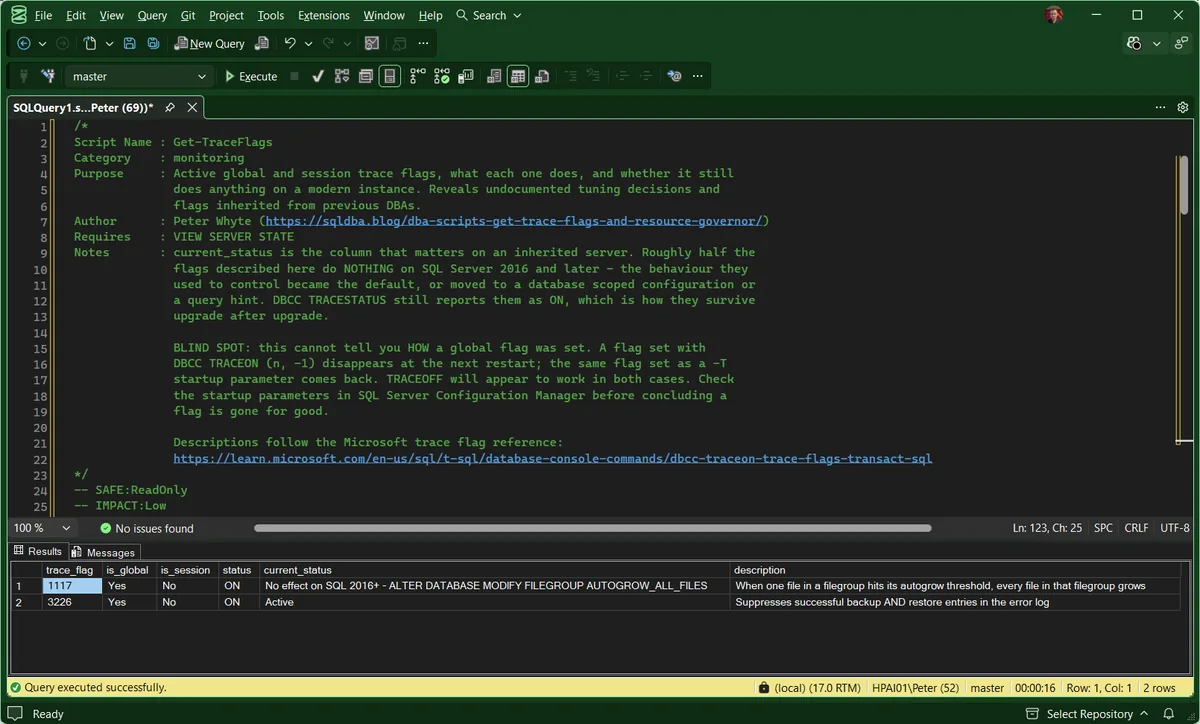
1117 is the row worth looking at. It is set, it is global, it reports as ON, and on this build it does nothing at all. That is the most common thing an inherited trace flag turns out to be, and without the current_status column there is nothing on the row to tell you: 3226 beside it looks identical and is still doing its job.
Whether 1117 will still be there after the next restart is a different question, answered in Where Each Flag Came From below.
Get-ResourceGovernorConfig on the same instance:
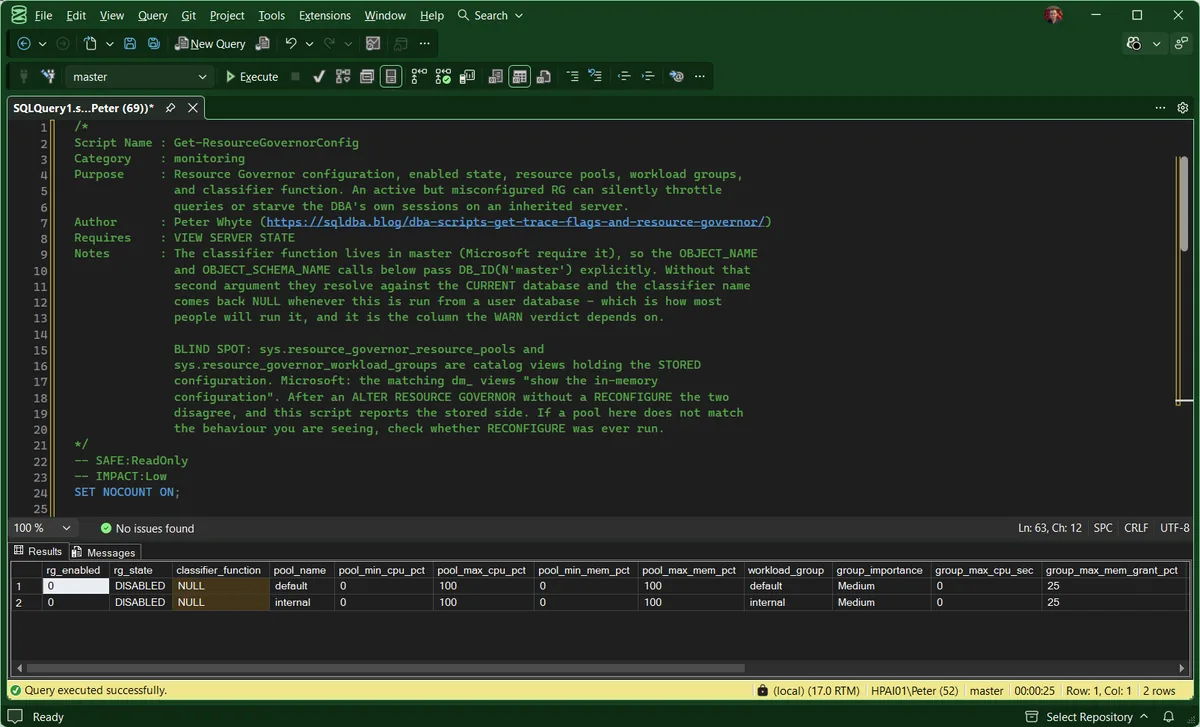
Resource Governor is disabled, both pools sit at their defaults, and classifier_function is NULL on both rows. The grid scrolls further right than the window: every column past group_max_mem_grant_pct is covered in the panel below. One of them is worth calling out here, because it is the reading people misinterpret. On this instance group_total_requests had reached 558,414 for the default group, on a server where Resource Governor has never been switched on. Every session is accounted to the default group either way, so a busy counter there is not evidence that Resource Governor is doing anything.
Where Each Flag Came From
The script tells you what is on. Before you remove an inherited flag you need two more answers: will it come back after a restart, and who switched it on. The instance holds both.
Startup Parameter or DBCC TRACEON
A flag set as a -T startup parameter comes back at every restart. One set with DBCC TRACEON (n, -1) is gone at the next. DBCC TRACEOFF clears either from the running instance, so it looks like it worked both times. The startup parameters are readable from sys.dm_server_registry, so one query separates them:
-- Where each active global trace flag came from
SET NOCOUNT ON;
CREATE TABLE #tf (TraceFlag int, Status smallint, Global smallint, Session smallint);
INSERT INTO #tf EXEC ('DBCC TRACESTATUS(-1) WITH NO_INFOMSGS');

SELECT tf.TraceFlag AS trace_flag,
       CASE WHEN EXISTS (SELECT 1
                         FROM sys.dm_server_registry AS r
                         WHERE r.value_name LIKE N'SQLArg%'
                           AND UPPER(REPLACE(CAST(r.value_data AS nvarchar(512)), N' ', N''))
                               = N'-T' + CAST(tf.TraceFlag AS nvarchar(10)))
            THEN 'startup parameter: comes back after a restart'
            ELSE 'DBCC TRACEON: gone at the next restart'
       END AS set_by
FROM #tf AS tf
WHERE tf.Global = 1
ORDER BY tf.TraceFlag;

DROP TABLE #tf;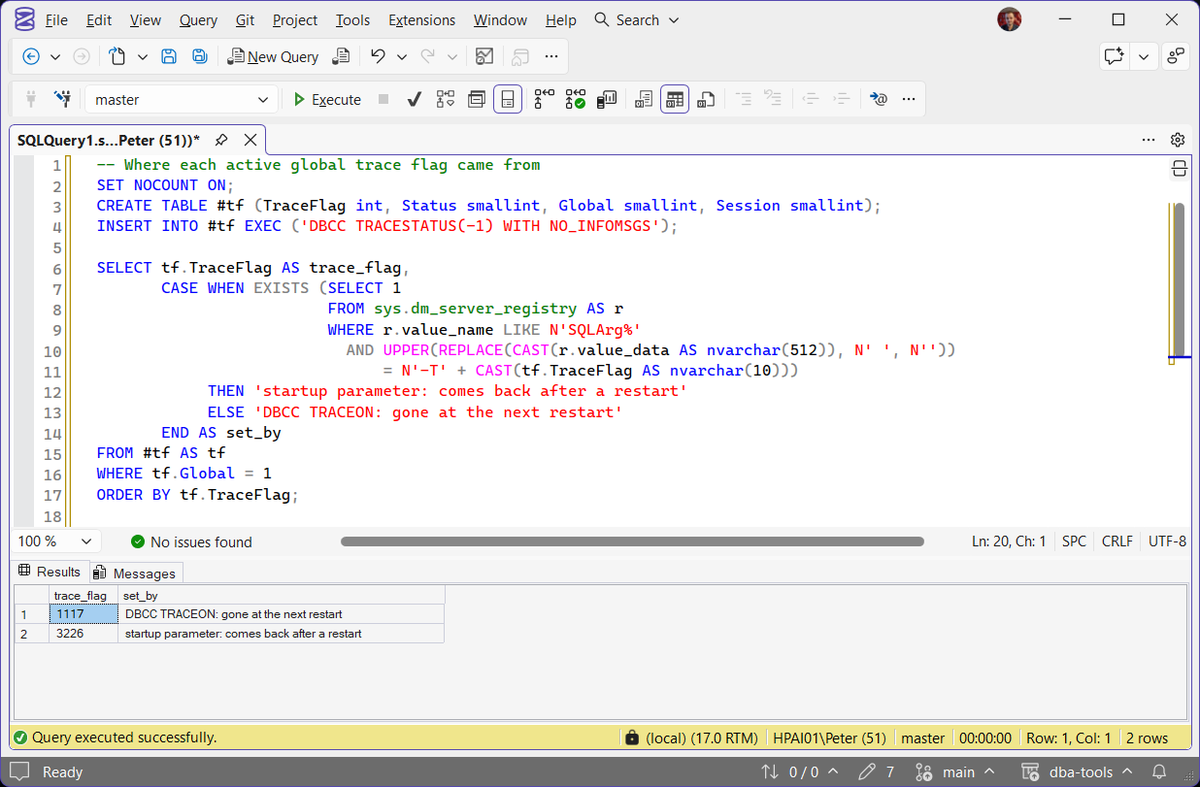
A startup flag is removed in SQL Server Configuration Manager, on the Startup Parameters tab, and the change needs a restart. A runtime flag needs only DBCC TRACEOFF (n, -1). The same parameters are listed at the top of every error log, under Registry startup parameters, and Services Information has the query that lists them on their own.
Who Switched It On
For runtime flags, the instance does record it. The error log gets a line per flag with the time, DBCC TRACEON 1117, server process ID (SPID) 81, and the default trace logs it as an Audit DBCC Event with the login, host and application that ran it:
-- Who switched a flag on at runtime, from the default trace
DECLARE @path nvarchar(260) = (SELECT path FROM sys.traces WHERE is_default = 1);

SELECT t.StartTime,
       t.LoginName,
       t.HostName,
       t.ApplicationName,
       CAST(t.TextData AS nvarchar(200)) AS command
FROM sys.fn_trace_gettable(@path, DEFAULT) AS t
WHERE t.EventClass = 116   -- Audit DBCC Event
  AND CAST(t.TextData AS nvarchar(max)) LIKE N'%TRACEON%'
ORDER BY t.StartTime DESC;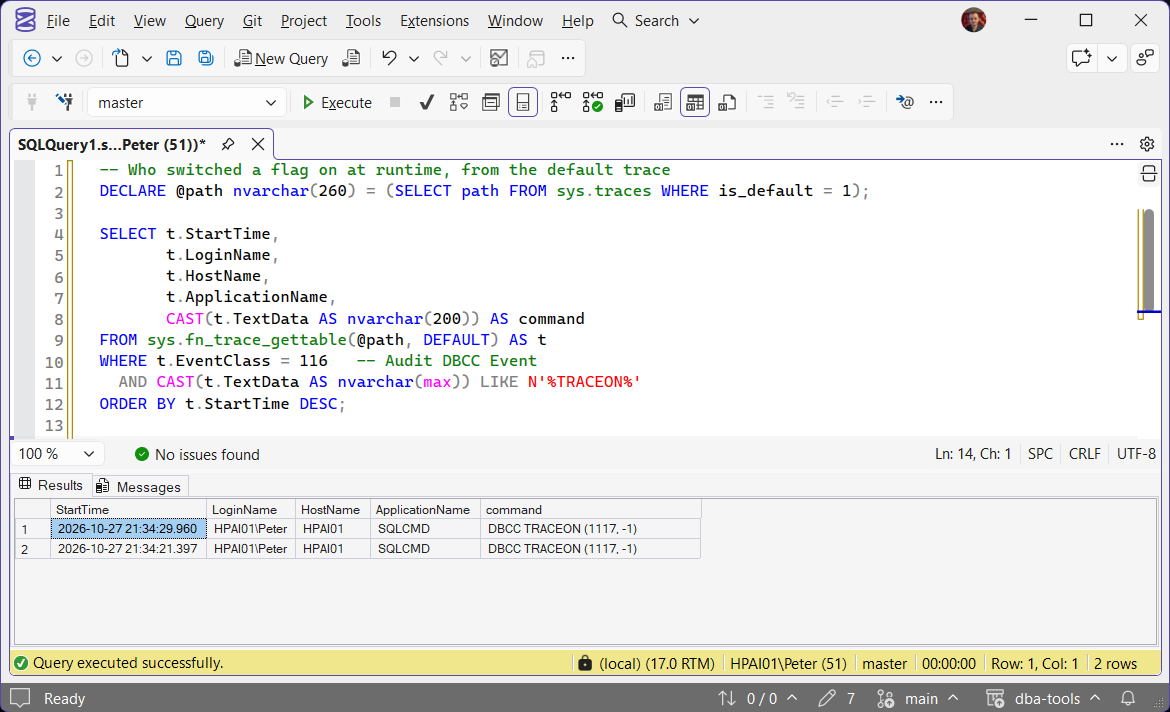
Both roll over. The default trace keeps 5 files of 20 MB, so on a busy server it reaches back days rather than years, and the error log only as far as its oldest kept file. A startup flag has no such record: the startup parameters say it is there, never who put it there. Why a flag was set is not recorded anywhere, which is what the description column is for.
Understanding the Results
Get-TraceFlags
trace_flagis_globalis_sessionstatuscurrent_statusdescriptionGet-ResourceGovernorConfig
rg_enabledrg_stateclassifier_functionpool_nameworkload_grouppool_min_cpu_pctpool_max_cpu_pctpool_min_mem_pctpool_max_mem_pctgroup_importancegroup_max_cpu_secgroup_max_mem_grant_pctgroup_max_dopgroup_max_requestsgroup_total_requestsgroup_active_requestsstatusBest Practices
- Investigate every active trace flag you didn’t set yourself. Know why it’s there before assuming it’s safe to leave or remove
- Check
current_statusbeforedescription. A flag that has no effect on your build is not a tuning decision to preserve, it is a line to remove from the startup parameters at the next maintenance window - Treat flags
834and845as memory configuration rather than trace flags. Microsoft’s server memory configuration options page is the reference for both, andsys.dm_os_sys_info.sql_memory_model_desctells you which model is actually in force. Read it with Memory Configuration and Usage - If Resource Governor shows as enabled with a classifier function, review what that function actually routes and confirm it matches current intent, not a stale rule from a retired workload
- Enable the dedicated administrator connection before you enable Resource Governor, not after. It is the only connection exempt from classification, so it is the way back in if a classifier misbehaves
- Re-run both after any migration or major version upgrade. A trace flag that made sense on SQL 2014 may be unnecessary or even harmful on SQL 2022+
- Pair with CPU Topology and OS Configuration Checks when reviewing an inherited server’s full non-default configuration surface
Frequently Asked Questions
Is it safe to just remove a trace flag I don’t recognize?
Not without understanding why it’s there first. Some trace flags fix a specific documented issue, and removing one blindly can reintroduce the exact problem it was set to work around. Check the description this script provides, confirm it against the Microsoft trace flag reference, then decide.
Which of these trace flags still do anything on SQL Server 2022 or 2025?
Fewer than you would expect. Of the 35 flags this script describes, roughly half have no effect on SQL Server 2016 and later. 1117 and 1118 were replaced by AUTOGROW_ALL_FILES and MIXED_PAGE_ALLOCATION. 2371, 6498, 8048 and 8075 are all controlled by the engine now. 7412 does nothing from SQL Server 2019, and 7752 (which the QDS_LOADDB wait post covers in its own right) stopped mattering there too. 845 has been the Standard edition default since SQL Server 2012 and Microsoft state it must not be used. 460 is the odd one out: it is governed by compatibility level rather than version, and it is the flag behind the truncation message that does not name the column.
That is what the current_status column is for. The flag is still reported as ON in every one of those cases, which is precisely why they survive migration after migration.
I ran DBCC TRACEOFF and the flag came back after a restart. Why?
Because it was set as a -T startup parameter on the service, not at runtime. DBCC TRACEOFF clears the flag from the running instance either way, so it looks like it worked, and the flag returns the next time SQL Server starts.
Where Each Flag Came From shows which kind it is. If it is a startup parameter, remove it in SQL Server Configuration Manager, and the change needs a restart to take effect.
Does Resource Governor being disabled mean it’s not configured at all?
No. Pools and workload groups can exist, as the default and internal rows in the output above show, while rg_enabled is 0. Disabled means the configuration is not being applied. Running ALTER RESOURCE GOVERNOR RECONFIGURE would immediately activate whatever pools and classifier are already defined, which is worth reading before you enable it on a server you inherited.
Why is classifier_function NULL when I know a classifier exists?
If you are running an older copy of this script, the name resolution was the problem rather than the configuration. Microsoft require the classifier function to live in the master database, but OBJECT_NAME resolves against whichever database you are connected to. Run it from a user database and the name comes back NULL even when a classifier is configured and working.
The version on this page passes DB_ID(N’master’) as the second argument to both OBJECT_NAME and OBJECT_SCHEMA_NAME, so it resolves from any database. If it still returns NULL while rg_state reads ENABLED, that is the real finding: the configuration is inert.
Do I still need trace flags 1204 and 1222 now that Extended Events exists?
Almost certainly not. Microsoft’s deadlocks guide is explicit on both halves of this: the system_health session captures xml_deadlock_report events by default, and because that session is enabled by default you do not need to configure a separate session to capture deadlock information. The same guide advises avoiding trace flags 1204 and 1222 on workload-intensive systems that are experiencing deadlocks, which is exactly the situation that makes somebody reach for them.
Both flags predate Extended Events, and they write deadlock detail to the error log because that was the only place to put it at the time. Finding either one set on an inherited server usually means it was switched on during an incident years ago and never switched off. Deadlock Summary reads the graph straight out of system_health, and deadlock troubleshooting covers what to do with it.
Can Resource Governor lock me out of my own instance?
A classifier function can, yes. It runs for every new session, so a slow one causes connection timeouts and a wrong one can route your own sessions into a starved pool. Microsoft’s advice is to keep classifiers simple and avoid data access inside them.
The way back in is the dedicated administrator connection, which is not subject to classification at all. Enabling it and knowing how to use it before you turn Resource Governor on is the difference between a five minute fix and a restart.
Summary
Both trace flags and Resource Governor are instance-wide settings that can sit invisibly in place for years, changing behavior in ways that don’t show up anywhere obvious until they matter. These two scripts turn “what’s silently configured on this server” into a direct, readable answer: which trace flags are on, what each one does, whether it still does anything on this build, and whether Resource Governor is actually doing something or merely switched on.
Run both on any inherited server before assuming its behavior is purely stock, and re-check after any major version change. Defaults shift, and an old trace-flag workaround does not always age into anything at all.
Related
- Instance Configuration Snapshot
- Instance Configuration Score
- Version Upgrade Readiness, before the upgrade that leaves an old flag doing nothing
- Troubleshoot RESOURCE_SEMAPHORE Waits, where a tight pool memory ceiling shows up first
- DBA Scripts: The Complete Guide, the map across every script on this site
Leave a Reply