
Every sp_configure setting on an instance tells a small story: a value someone changed deliberately, a value nobody’s touched since install, or a value that’s been changed but is still waiting for RECONFIGURE or a restart to actually take effect. Without a full snapshot, most of that story is invisible, and configuration drift between servers that are supposed to be identical goes unnoticed until it causes a problem that’s hard to explain.
This script captures every sp_configure setting in a single result set, with a flag for anything that’s been changed but hasn’t taken effect yet, useful as a baseline, a change-tracking snapshot, or a config-drift comparison between servers.
Why Instance Configuration Snapshot Matters
Configuration settings quietly shape everything from query performance to security surface area, and most of them are set once (or never) and forgotten:
- Compare this snapshot against a future run to catch unauthorised or accidental configuration changes
- Surfaces settings that have been changed but not yet applied, since some
sp_configurechanges require a service restart - Enables comparing configuration across servers that are supposed to be identical, a common source of “it works on the other server” bugs
- One query captures everything, rather than checking dozens of individual settings by hand
When to Run This Script
- Routine SQL Server health checks
- Before and after any configuration change, to document what actually changed
- Building a baseline for a new server, or before a migration
- Comparing configuration drift between servers in a cluster, AG, or environment tier
The Script
Run the following script against your SQL Server instance.
- Tested on: SQL Server 2025 (RTM CU8), Windows lab instance
- Last verified: 2026-10-23 (Get-InstanceConfigurationSnapshot run on the lab; the screenshot below is from it)
- Permissions: VIEW SERVER STATE
- Safety: read-only, impact low
/*
Script Name : Get-InstanceConfigurationSnapshot
Category    : configuration-and-environment
Purpose     : Capture all sp_configure settings for baseline review and change tracking.
Author      : Peter Whyte (https://sqldba.blog/dba-scripts-get-instance-configuration-snapshot/)
Requires    : VIEW SERVER STATE
HealthCheck : Yes
*/
-- SAFE:ReadOnly
-- IMPACT:Low
SET NOCOUNT ON;

SELECT
    name,
    value AS configured_value,
    value_in_use AS running_value,
    minimum,
    maximum,
    description,
    CASE WHEN value <> value_in_use THEN 1 ELSE 0 END AS pending_restart
FROM sys.configurations
ORDER BY name;
The script queries sys.configurations and returns every setting, its configured and running value, valid range, description, and whether it’s pending a restart to take effect.
How To Run From The Repo
Clone DBA Tools, initialize and run the script:
# Clone dba-tools repo:
git clone https://github.com/peterwhyte-lgtm/dba-tools

# Initialize environment:
cd dba-tools
.\Initialize-Environment.ps1

# Capture a full sp_configure snapshot:
.\run.ps1 Get-InstanceConfigurationSnapshot

# To run against a remote sql server:
.\run.ps1 Get-InstanceConfigurationSnapshot -ServerInstance SQLSERVER01
This script lives in the repo at:
sql/monitoring/instance/Get-InstanceConfigurationSnapshot.sqlpowershell/wrappers/monitoring/instance/Get-InstanceConfigurationSnapshot.ps1
Example Output
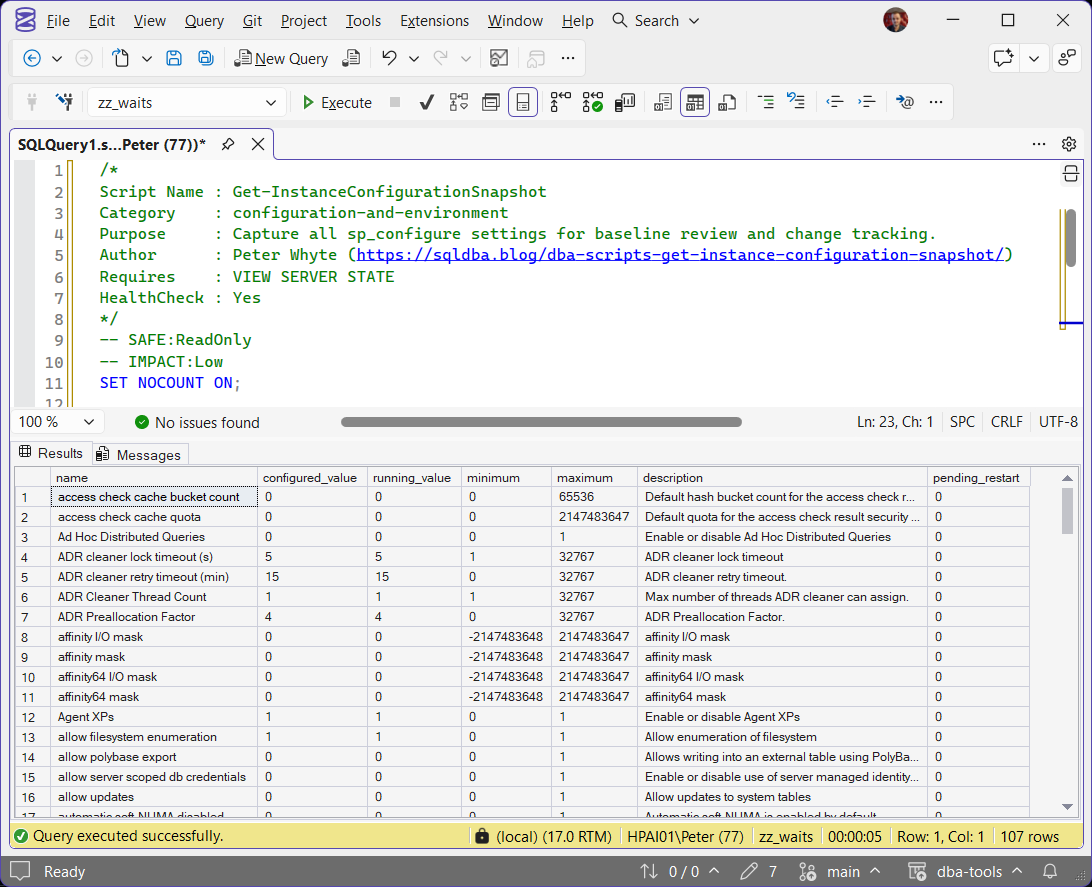
The full result set returns every sp_configure setting, over 100 rows on a default installation.
min server memory (MB) is the row that shows pending_restart = 1 on this run: configured to 0, running at 16. That is not a change waiting for a restart. Microsoft documents a configured 0 showing as 16 in use on 64-bit as expected, and min server memory takes effect on RECONFIGURE without a restart anyway (MS Docs).
Understanding the Results
namedescriptionsp_configure names it, and what it controls. Rows sort by name, so two servers’ snapshots line up row for row when you compare them.configured_valuerunning_valuesp_configure last set, and what the instance is using now. A change reaches running_value when RECONFIGURE runs, or, for a setting with is_dynamic = 0 in sys.configurations, at the next service restart. Memory settings such as max server memory are dynamic, so they need no restart (MS Docs).pending_restartRECONFIGURE shows the same flag, and so does min server memory in the example above.Act when it reads 1 on a setting you did not expect to be mid-change. Check is_dynamic before planning a restart: a dynamic setting only needs RECONFIGURE.minimummaximumMost rows on a default installation are untouched defaults; the interesting ones are the handful someone has deliberately changed.
Best Practices
- Take a snapshot before and after any configuration change, so there’s a record of exactly what changed and when.
- Keep a baseline snapshot for servers that are supposed to be configured identically (AG replicas, load-balanced tiers), and diff future snapshots against it.
- Don’t assume a configuration change is live just because you ran
RECONFIGURE. Checkpending_restartfor settings that need a service restart.
Microsoft’s reference covers sp_configure and sys.configurations in full.
Frequently Asked Questions
Why does a setting show a different configured and running value?
Either RECONFIGURE has not been run since the change, or the setting is not dynamic and waits for a service restart. is_dynamic in sys.configurations says which. Memory settings are dynamic and apply on RECONFIGURE, and a few pairs differ by design, such as min server memory reading 0 against 16 (MS Docs).
How is this different from Get Instance Configuration Score?
This script is the raw snapshot, every setting, unfiltered. Get Instance Configuration Score is a graded audit that scores a subset of settings against best-practice recommendations. Use this one for a full baseline or drift comparison; use the score for a quick pass/fail read.
Summary
A full configuration snapshot is one of the simplest things to capture and one of the most useful things to have on hand when something doesn’t match expectations, whether that’s a query behaving differently on one server than another, or a setting someone swears they never changed.
Run this script as a baseline on every server, and again after any configuration change, so there’s always a record of exactly what the instance looked like at that point in time.
Related
You may also find these useful:
- DBA Scripts: Server Inventory
- Check When SQL Server Was Last Restarted
- Get Instance Configuration Score
- Get MAXDOP Configuration
- Get Memory Configuration and Usage
- Get CPU Topology and OS Configuration Checks
- Get Trace Flags and Resource Governor Configuration
- DBA Scripts: The Complete Guide, the map across every script on this site
Leave a Reply