
In SQL, you will often see queries written using WHERE 1=1 or WHERE 1=2. At first glance, both look pointless. One is always true, the other always false.
In practice, both are deliberate patterns used for query construction and control, not filtering logic. They exist to make SQL safer, easier to manipulate, and more predictable in real-world scripts.
What WHERE 1=1 Does
WHERE 1=1 always evaluates to true.
On its own, it does nothing. It does not filter rows, change execution plans, or affect performance. The SQL Server optimizer removes it during compilation.
Its value comes entirely from how it is used.
Why DBAs Use WHERE 1=1
The primary purpose of WHERE 1=1 is to simplify query construction and modification.
It allows you to:
- Add or remove filters without rewriting the WHERE clause
- Comment conditions in and out safely
- Append conditions dynamically without worrying about leading
ANDorOR
This is especially useful in:
- Dynamic SQL
- Stored procedures
- Investigative or diagnostic scripts
- Code that evolves over time
Example
SELECT *
FROM dbo.orders
WHERE 1=1
    AND order_date >= '2025-01-01'
    AND status = 'Completed';
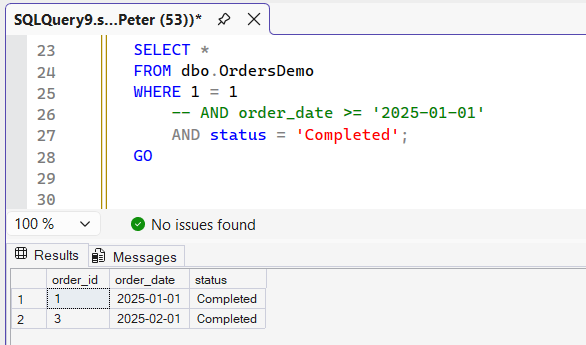
Commenting out a condition is trivial:
SELECT *
FROM dbo.orders
WHERE 1=1
    -- AND order_date >= '2025-01-01'
    AND status = 'Completed';
No syntax changes. No risk of leaving a dangling AND.
WHERE 1=1 in Dynamic SQL
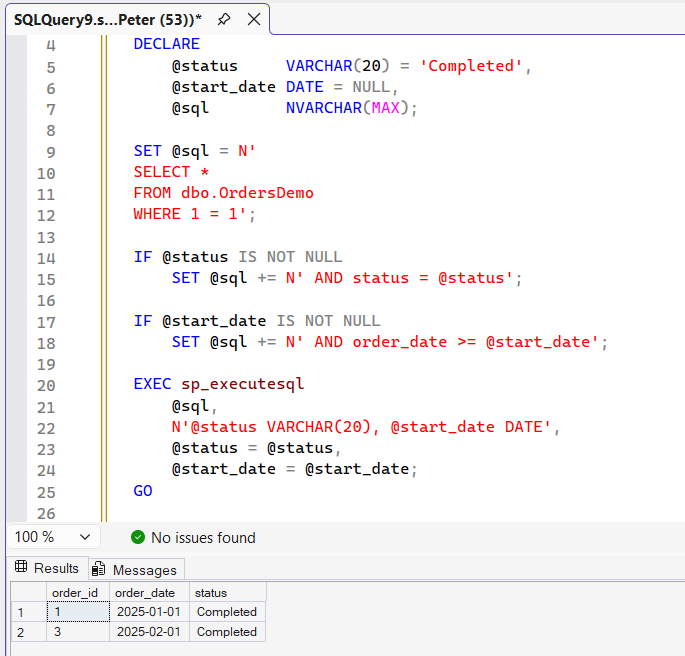
This is where the pattern earns its keep.
DECLARE @status     varchar(20) = 'shipped';
DECLARE @start_date date        = '2025-01-01';

DECLARE @sql NVARCHAR(MAX);
SET @sql = '
SELECT *
FROM dbo.orders
WHERE 1=1';

IF @status IS NOT NULL
    SET @sql += ' AND status = @status';

IF @start_date IS NOT NULL
    SET @sql += ' AND order_date >= @start_date';

EXEC sys.sp_executesql
    @sql,
    N'@status varchar(20), @start_date date',
    @status     = @status,
    @start_date = @start_date;
Using WHERE 1=1 avoids conditional logic just to decide when to add a WHERE clause. Without it, dynamic SQL quickly becomes messy and error-prone.
Note what the conditions append: parameter placeholders, not values. The final sp_executesql call passes the values separately, which keeps the pattern safe from SQL injection and lets SQL Server reuse the plan across executions. If you ever find yourself concatenating raw values into @sql, stop there; that is the version of this pattern that goes wrong.
Performance Impact of WHERE 1=1
None.
The optimizer evaluates it at compile time and removes it. It does not affect cardinality estimates or execution plans in any meaningful way.
The plans are identical, not merely similar. Run the same two predicates against the same table with and without WHERE 1=1 in front and both compile to the same operator with the same residual predicate:
-- both of these produce the same plan
SELECT * FROM dbo.orders WHERE order_date >= '2025-01-01' AND status = 'Completed';
SELECT * FROM dbo.orders WHERE 1=1 AND order_date >= '2025-01-01' AND status = 'Completed';

--   |--Clustered Index Scan(OBJECT:([dbo].[orders].[PK__orders__...]),
--        WHERE:([order_date]>='2025-01-01' AND [status]='Completed'))
The 1=1 does not appear in the plan at all.
If someone claims it slows queries down, they are wrong.
What WHERE 1=2 Does
WHERE 1=2 always evaluates to false.
The query compiles and runs, but returns no rows. That behaviour is intentional.
It also never touches the table. SQL Server folds the contradiction at compile time and the whole plan collapses to a single Constant Scan with no reference to the table in it. Run it under SET STATISTICS IO ON and there is no Table 'orders' line in the output at all, because there were no logical reads to report. That is what makes it safe to point at a large table.
Why DBAs Use WHERE 1=2
The most common use case is working with table structure without data.
It is used to:
- Copy a table’s column definitions
- Create an empty table with the same shape
- Inspect schema without touching data
- Build staging or scratch tables
- Prototype migrations or ETL logic safely
Example
CREATE TABLE source_table (
    id INT,
    name VARCHAR(255),
    value INT
);

INSERT INTO source_table (id, name, value)
VALUES
    (1, 'Item A', 10),
    (2, 'Item B', 20);
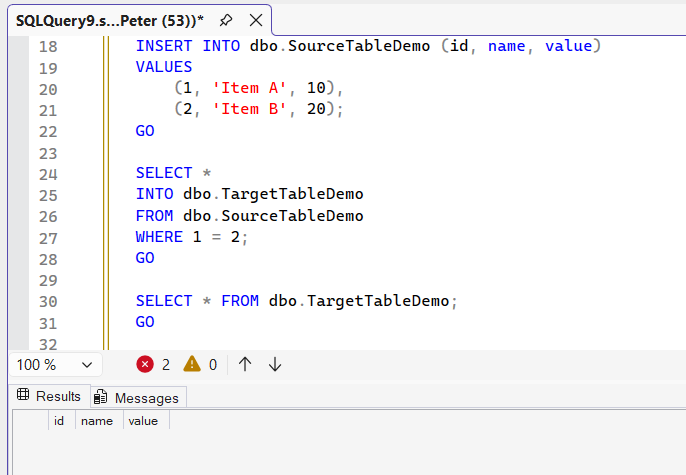
Create a new table with the same structure, but no rows:
SELECT *
INTO target_table
FROM source_table
WHERE 1=2;
The query defines the schema, but returns nothing.
Be clear about what “the schema” means here, because SELECT INTO copies less than people expect. Run it against a table carrying a primary key, a nonclustered index, a default constraint and a computed column, and the copy arrives with the column names, the data types, the nullability and the IDENTITY property, and with 0 indexes, 0 key constraints and 0 default constraints. The computed column lands as an ordinary column of the computed type, no longer computed.
So it gives you a shape, not a table. That is exactly right for a scratch or staging table and exactly wrong if anything is going to query the copy in anger. Script the keys and indexes across separately when it matters.
Why Not Use TOP 0 or LIMIT 0?
Those approaches work, but they are platform-specific.
TOP 0is SQL Server–specificLIMIT 0is common in PostgreSQL and MySQL
WHERE 1=2 is portable, predictable, and behaves consistently across engines, which is why DBAs often prefer it in cross-platform scripts.
WHERE 1=1 vs WHERE 1=2
They solve different problems:
WHERE 1=1
Always true. Used to simplify query construction and dynamic SQL.WHERE 1=2
Always false. Used to return no rows while still compiling and defining structure.
Both look odd at first. Both exist because they make real DBA work safer and easier.
A Related Pattern: Leading Commas
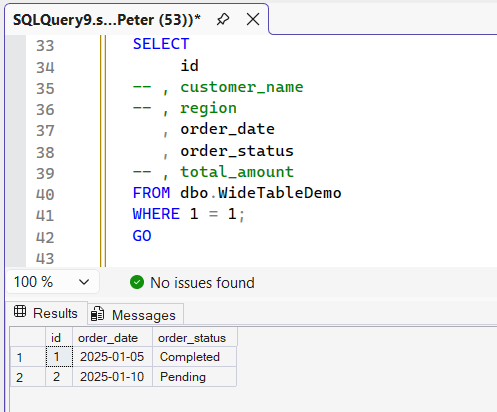
You will often see WHERE 1=1 paired with leading commas in SELECT lists:
SELECT
     Column1
-- , Column2
   , Column3
   , Column4
FROM dbo.TableName
WHERE 1 = 1;
This follows the same philosophy: make commenting and modification low-risk.
It looks strange until you have used it under pressure. Then it becomes hard to give up.
Final Thoughts
Neither WHERE 1=1 nor WHERE 1=2 is required, and they do not belong in every query.
Both are useful when used deliberately for dynamic SQL, investigation, or schema work.
They become a problem when they are used to paper over messy logic or unclear intent.
The patterns themselves are not wrong. Overuse usually means the surrounding SQL needs attention.
Both patterns are about controlling what a query touches. These are the next things that question leads to.
- DELETE vs TRUNCATE, the other everyday pattern where an empty table is the goal.
- Get Top CPU Queries, see whether your dynamic SQL is reusing plans or compiling fresh every run.
- How to Add Columns to Tables in SQL Server, for when the copied structure needs to evolve.
Leave a Reply