
What CPU and OS Settings Are Actually Doing to SQL Server
OS and Hardware Info tells you what hardware exists. These two scripts go one level deeper: how SQL Server is actually scheduling work across that hardware, and whether a handful of OS-level settings invisible from Task Manager, Lock Pages in Memory, NUMA alignment, Instant File Initialization, scheduler affinity, are quietly helping or hurting.
Get-SqlServerCpuTopologyAndSchedulerDetails gives the raw topology: sockets, cores, NUMA nodes, schedulers, MAXDOP and cost threshold in one row. Get-OsConfigurationChecks takes that same topology and grades it, flagging offline schedulers, LPIM status, and IFI in one pass, so a misconfiguration reads as a WARN, not a number you have to interpret yourself.
Why CPU Topology and OS Configuration Matter
- A CPU affinity mask that leaves schedulers offline silently caps SQL Server’s usable CPU, invisible unless you specifically check for it
- Lock Pages in Memory (LPIM) not being active means Windows can page out SQL Server’s buffer pool under memory pressure, a real and avoidable performance cliff on a memory-constrained box
- Instant File Initialization (IFI) not being enabled makes every data file autogrowth event stall while Windows zeroes pages, turning routine growth into a visible, avoidable pause
- NUMA topology affects how SQL Server allocates and schedules memory and worker threads; a single NUMA node with many CPUs is a candidate for soft-NUMA, multiple NUMA nodes need to be understood before tuning MAXDOP or CTFP
When to Run These Scripts
- First review of any unfamiliar or inherited server, alongside the rest of the Server Inventory cluster
- Before any MAXDOP, cost threshold for parallelism, or affinity mask change, to confirm the topology you’re tuning against
- When investigating unexplained autogrowth stalls (check IFI) or memory pressure that doesn’t match configured
max server memory(check LPIM) - Periodically on any production server, these settings rarely change on their own, but a rebuild, VM resize, or OS patch can silently reset them
The Scripts
1. Get-SqlServerCpuTopologyAndSchedulerDetails — Raw Topology
- Tested on: SQL Server 2025 (RTM CU5), Windows lab instance
- Last verified: 2026-08-07 (all 2 scripts on this page run, saved outputs from real runs)
- Permissions: VIEW SERVER STATE
- Safety: read-only, impact low
/*
Script Name : Get-SqlServerCpuTopologyAndSchedulerDetails
Category    : configuration-and-environment
Purpose     : CPU topology, NUMA layout, scheduler summary, and parallelism configuration in one row.
Author      : Peter Whyte (https://sqldba.blog/dba-scripts-get-cpu-topology-and-os-config/)
Requires    : VIEW SERVER STATE
*/
-- SAFE:ReadOnly
-- IMPACT:Low
SET NOCOUNT ON;

SELECT
    SERVERPROPERTY('MachineName') AS machine_name,
    SERVERPROPERTY('Edition') AS sql_edition,
    SERVERPROPERTY('ProductVersion') AS sql_version,
    osi.cpu_count AS logical_cpu_count,
    osi.hyperthread_ratio,
    osi.cpu_count / osi.hyperthread_ratio AS physical_cpu_count,
    osi.socket_count AS sockets,
    osi.cores_per_socket,
    osi.numa_node_count,
    osi.scheduler_count AS online_schedulers,
    osi.scheduler_total_count AS total_schedulers,
    osi.max_workers_count,
    osi.virtual_machine_type_desc,
    osi.sqlserver_start_time,
    (SELECT value_in_use FROM sys.configurations WHERE name = 'max degree of parallelism') AS maxdop,
    (SELECT value_in_use FROM sys.configurations WHERE name = 'cost threshold for parallelism') AS cost_threshold,
    (SELECT value_in_use FROM sys.configurations WHERE name = 'affinity mask') AS affinity_mask
FROM sys.dm_os_sys_info AS osi;

/*
-- Per-NUMA node detail (run separately in SSMS):
SELECT node_id, node_state_desc, memory_node_id, online_scheduler_count,
       active_worker_count, avg_load_balance
FROM sys.dm_os_nodes
WHERE node_state_desc <> 'ONLINE DAC'
ORDER BY node_id;

-- Per-scheduler detail (run separately in SSMS):
SELECT scheduler_id, parent_node_id, status, is_idle,
       current_tasks_count, runnable_tasks_count, work_queue_count, load_factor
FROM sys.dm_os_schedulers
WHERE scheduler_id < 255 AND status = 'VISIBLE ONLINE'
ORDER BY parent_node_id, scheduler_id;
*/
2. Get-OsConfigurationChecks — Graded Health Check
/*
Script Name : Get-OsConfigurationChecks
Category    : monitoring
Purpose     : DMV-accessible OS and hardware configuration checks: Lock Pages in Memory,
              NUMA topology, scheduler affinity, and Instant File Initialization (SQL 2019+).
              Surfaces common misconfigurations invisible from inside SQL Server.
              Pair with Test-OsConfiguration.ps1 for power plan and page file checks.
Author      : Peter Whyte (https://sqldba.blog/dba-scripts-get-cpu-topology-and-os-config/)
Requires    : VIEW SERVER STATE
*/
-- SAFE:ReadOnly
-- IMPACT:Low
SET NOCOUNT ON;

WITH numa_summary AS (
    SELECT
        COUNT(DISTINCT node_id) AS numa_node_count,
        SUM(online_scheduler_count) AS online_schedulers
    FROM sys.dm_os_nodes
    WHERE node_state_desc NOT LIKE '%DAC%'
),
offline_schedulers AS (
    SELECT COUNT(*) AS offline_count
    FROM sys.dm_os_schedulers
    WHERE status = 'VISIBLE OFFLINE'
      AND scheduler_id < 255
),
cfg AS (
    SELECT
        MAX(CASE WHEN name = 'max server memory (MB)' THEN CAST(value_in_use AS BIGINT) END) AS max_server_memory_mb,
        MAX(CASE WHEN name = 'min server memory (MB)' THEN CAST(value_in_use AS BIGINT) END) AS min_server_memory_mb
    FROM sys.configurations
)
SELECT
    osi.cpu_count AS logical_cpu_count,
    osi.cpu_count / NULLIF(osi.hyperthread_ratio, 0) AS physical_cpu_count,
    osi.hyperthread_ratio AS cores_per_socket,
    n.numa_node_count,
    n.online_schedulers AS sql_online_schedulers,
    os_off.offline_count AS sql_offline_schedulers,
    CASE
        WHEN os_off.offline_count > 0
        THEN 'WARN - ' + CAST(os_off.offline_count AS VARCHAR) +
             ' scheduler(s) offline; CPU affinity mask may be limiting SQL Server'
        ELSE 'OK'
    END AS scheduler_status,
    CASE
        WHEN n.numa_node_count > (osi.cpu_count / NULLIF(osi.hyperthread_ratio, 0))
        THEN 'INFO - soft-NUMA active (' + CAST(n.numa_node_count AS VARCHAR) +
             ' SQL NUMA nodes vs ' + CAST(osi.cpu_count / NULLIF(osi.hyperthread_ratio, 0) AS VARCHAR) + ' sockets)'
        WHEN n.numa_node_count = 1 AND osi.cpu_count > 8
        THEN 'INFO - single NUMA node with ' + CAST(osi.cpu_count AS VARCHAR) +
             ' CPUs; consider soft-NUMA for NUMA-aware memory allocation'
        ELSE 'OK'
    END AS numa_status,
    osi.sql_memory_model_desc AS memory_model,
    CASE osi.sql_memory_model_desc
        WHEN 'CONVENTIONAL'
        THEN 'WARN - LPIM not active; OS can page out SQL buffer pool under memory pressure'
        WHEN 'LOCK_PAGES' THEN 'OK - Lock Pages in Memory is active'
        WHEN 'LARGE_PAGES' THEN 'OK - Large Pages active (implies LPIM)'
        ELSE 'UNKNOWN'
    END AS lpim_status,
    CAST(osi.physical_memory_kb / 1024.0 / 1024 AS DECIMAL(10,2)) AS physical_memory_gb,
    c.max_server_memory_mb,
    c.min_server_memory_mb,
    CAST(osi.physical_memory_kb / 1024 -
         CASE WHEN osi.physical_memory_kb / 1024 > 16384 THEN 4096
              WHEN osi.physical_memory_kb / 1024 > 4096 THEN 2048
              ELSE 1024 END AS BIGINT) AS recommended_max_mem_mb,
    CASE
        WHEN CAST(SERVERPROPERTY('ProductMajorVersion') AS INT) >= 15
        THEN ISNULL(
                (SELECT TOP 1 CAST(instant_file_initialization_enabled AS NVARCHAR(5))
                 FROM sys.dm_server_services
                 WHERE servicename LIKE 'SQL Server (%'
                   AND filename NOT LIKE '%sqlagent%'
                   AND filename NOT LIKE '%OLAP%'),
                'N/A')
        ELSE 'N/A (pre-2019)'
    END AS ifi_enabled,
    CASE
        WHEN CAST(SERVERPROPERTY('ProductMajorVersion') AS INT) >= 15
             AND EXISTS (
                SELECT 1 FROM sys.dm_server_services
                WHERE servicename LIKE 'SQL Server (%'
                  AND filename NOT LIKE '%sqlagent%'
                  AND instant_file_initialization_enabled = 'Y')
        THEN 'OK - IFI active; autogrowth and data file creation do not zero pages'
        WHEN CAST(SERVERPROPERTY('ProductMajorVersion') AS INT) >= 15
        THEN 'WARN - IFI not enabled; autogrowth events stall while OS zeroes pages'
        ELSE 'INFO - IFI cannot be confirmed via SQL on pre-2019 instances; verify SE_MANAGE_VOLUME_NAME Windows privilege'
    END AS ifi_status,
    osi.sqlserver_start_time AS sql_start_time,
    DATEDIFF(DAY, osi.sqlserver_start_time, GETDATE()) AS uptime_days
FROM sys.dm_os_sys_info AS osi
CROSS JOIN numa_summary AS n
CROSS JOIN offline_schedulers AS os_off
CROSS JOIN cfg AS c;
How To Run From The Repo
Clone DBA Tools, initialize and run whichever script answers your question:
# Clone dba-tools repo:
git clone https://github.com/peterwhyte-lgtm/dba-tools

# Initialize environment:
cd dba-tools
.\Initialize-Environment.ps1

# Raw CPU topology, NUMA layout, and parallelism config:
.\run.ps1 Get-SqlServerCpuTopologyAndSchedulerDetails

# Graded OS configuration health check (LPIM, IFI, scheduler affinity):
.\run.ps1 Get-OsConfigurationChecks

# Either against a remote sql server:
.\run.ps1 Get-OsConfigurationChecks -ServerInstance SQLSERVER01
These scripts live in the repo at:
sql/monitoring/instance/Get-SqlServerCpuTopologyAndSchedulerDetails.sqlsql/monitoring/instance/Get-OsConfigurationChecks.sql
Example Output
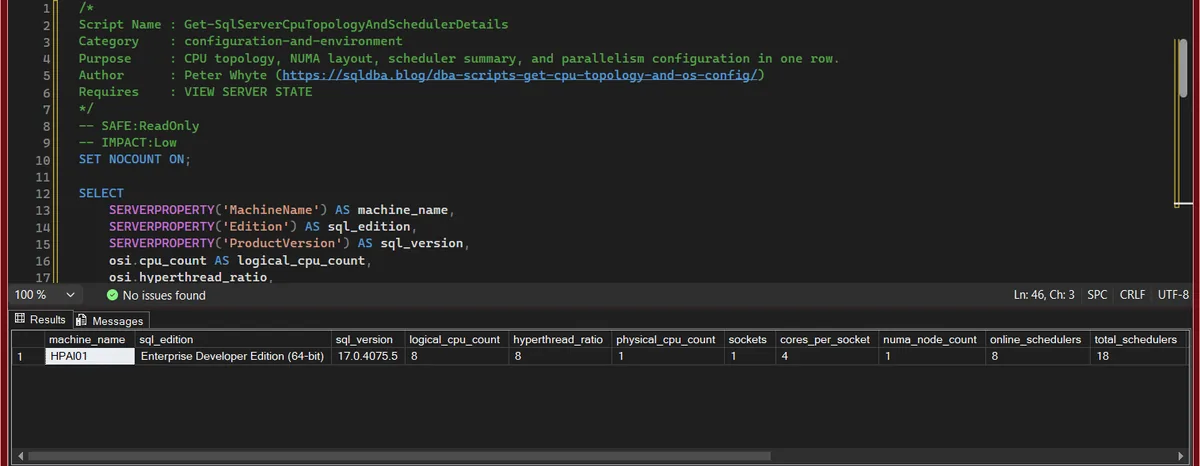
Get-SqlServerCpuTopologyAndSchedulerDetails returns one row for the instance: the CPU layout the engine sees, the schedulers it built on it, and the three settings that decide how it uses them.
Get-OsConfigurationChecks returns one row of verdicts: a status per check, with the reason in the same cell, so a WARN reads as a sentence rather than a code.
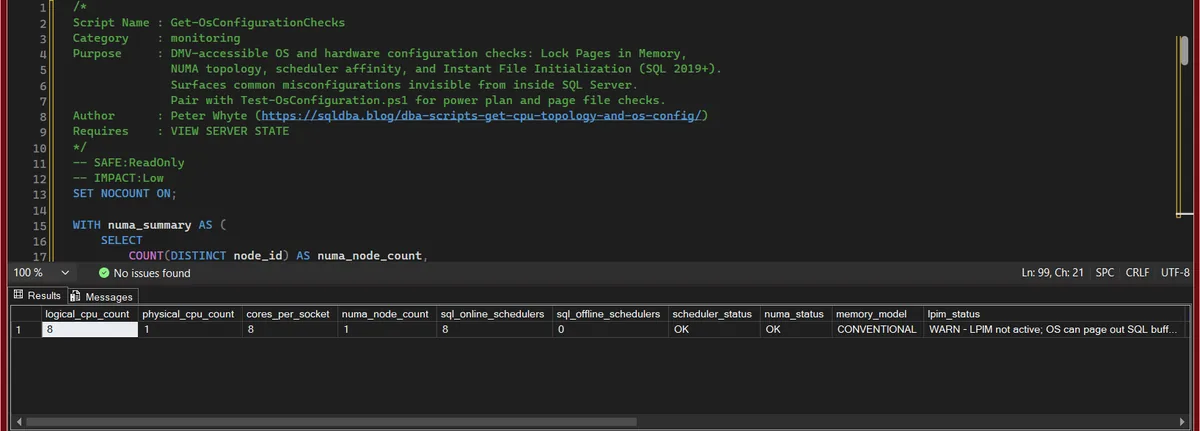
The two most common findings on a server nobody has hardened are the same two most people miss: lpim_status at WARN because Lock Pages in Memory was never granted, and ifi_status at WARN because the service account was never given Perform Volume Maintenance Tasks. Both are a one-line fix and a restart.
Understanding the Results
Get-SqlServerCpuTopologyAndSchedulerDetails
machine_namesql_editionsql_versionlogical_cpu_counthyperthread_ratiophysical_cpu_countsocketscores_per_sockethyperthread_ratio is logical CPUs per physical package, so a ratio equal to cores_per_socket means no hyper-threading is exposed, and twice it means it is.Act when the numbers do not match what the host was sold as. A VM with 8 logical CPUs on 1 socket and a ratio of 8 is a common shape, and it is not the same thing as 8 cores.numa_node_countonline_schedulerstotal_schedulersmax_workers_countmax_workers_count is the thread ceiling derived from the CPU count.Act when online_schedulers is lower than logical_cpu_count. Something, an affinity mask or an edition cap, is keeping CPUs idle.virtual_machine_type_descsqlserver_start_timemaxdopcost_thresholdaffinity_maskmaxdop 0 means one query may take them all; cost_threshold 5 is the 1990s default; affinity_mask 0 means no pinning.Act when you see 0 and 5 together. That pair is the shipped default on an upgraded instance and is wrong for most modern servers in both directions.Get-OsConfigurationChecks
logical_cpu_countphysical_cpu_countcores_per_socketnuma_node_countsql_online_schedulerssql_offline_schedulersscheduler_statusscheduler_status is OK when nothing is offline.Act when it reads WARN. An affinity mask, or an edition core cap, is limiting SQL Server to fewer schedulers than the CPUs it can see; check sp_configure 'affinity mask' and the affinity I/O mask next.numa_statusmemory_modellpim_statusphysical_memory_gbmemory_model is CONVENTIONAL until Lock Pages in Memory is granted, when it becomes LOCK_PAGES. lpim_status says the same thing as a verdict with the consequence spelled out.Act when it reads WARN. Windows can trim the buffer pool under memory pressure; grant the Lock pages in memory right to the service account and restart, on any production instance with real memory to protect.max_server_memory_mbmin_server_memory_mbrecommended_max_mem_mbifi_enabledifi_statussql_start_timeuptime_daysBest Practices
- Run both scripts together, the raw topology from the first script gives you the numbers the second script’s grading is based on
- Treat
lpim_status = WARNandifi_status = WARNas standing production hardening items on any server with dedicated SQL Server hardware, not just a “nice to have” - Re-check after any VM resize, host migration, or OS patch, all of these settings can silently reset without a corresponding SQL Server change
- Cross-reference
maxdopandcost_thresholdagainst the topology numbers here (sockets, NUMA nodes) rather than tuning them in isolation
Microsoft’s reference covers sys.configurations, sys.dm_os_sys_info and sp_configure in full.
Related Scripts
You may also find these scripts useful:
- Server Inventory (hub)
- OS and Hardware Info
- Instance Configuration Snapshot
- Instance Configuration Score
- Trace Flags and Resource Governor Configuration
- SQL Server High CPU, the walkthrough that decides working versus waiting before any setting is touched
- DBA Scripts: The Complete Guide, the map across every script on this site
Frequently Asked Questions
Does IFI apply to transaction log files too?
No, Instant File Initialization only applies to data files. Log files are always zero-initialized by SQL Server regardless of IFI, that’s a SQL Server design requirement, not a configurable setting.
Is a single NUMA node always a problem?
No, plenty of smaller servers run fine on a single NUMA node. The INFO flag here is only a note that soft-NUMA becomes worth considering once CPU count climbs past a rough threshold, it’s a tuning opportunity, not a misconfiguration.
Summary
CPU topology and a handful of OS-level settings sit underneath everything else you’ll ever tune on a SQL Server instance, MAXDOP, memory configuration, autogrowth behavior, all of it assumes this layer is already sane. These two scripts turn that assumption into something you can actually verify: the raw numbers, and a graded read on whether LPIM, IFI, and scheduler affinity are configured the way production hardening expects.
Run both as part of any new-server review, and re-check after infrastructure changes, since none of these settings announce themselves when they silently reset.
Leave a Reply