
Most production SQL Server environments have backup jobs configured. The question that actually matters is whether those jobs are running, and succeeding, for every database that needs them. A database added last month might never have been folded into the backup plan. A job that’s been failing silently for weeks looks identical to a healthy one until someone checks.
SQL Server Agent doesn’t fail loudly. A backup job that breaks at 2am doesn’t surface itself until someone tries to restore at 2pm and finds the latest backup is days old. “No alert fired” is not the same thing as “the backup ran.”
This script checks every user database against msdb’s backup history and returns a single status flag per database, so gaps and stale backups are visible at a glance instead of buried in a column of dates.
Why Backup Coverage Matters
A missing or stale backup is invisible until the moment you need it, and by then it’s too late to fix. Coverage checks close that gap before it becomes an incident:
- A database with no full backup on record has zero recovery options, full stop
- A FULL recovery model database with no log backups is accumulating transaction log growth with no point-in-time recovery to show for it
- A backup job silently failing looks, from the outside, identical to one that never existed for a given database
- Backup coverage is one of the first things worth checking on any inherited or newly onboarded server, before touching anything else
When to Run This Script
- Routine SQL Server health checks
- Taking ownership of a new or inherited instance
- After adding a new database, to confirm it’s actually in the backup plan
- Investigating recovery options during an incident
- Verifying backup jobs after a schedule or configuration change
The Script
Run the following script against your SQL Server instance.
- Tested on: SQL Server 2025 (RTM CU8), Windows lab instance
- Last verified: 2026-10-12 (real run, script unchanged; the screenshot below is from that run)
- Permissions: VIEW ANY DATABASE, db_datareader on msdb
- Safety: read-only, impact low
/*
Script Name : Get-BackupCoverage
Category    : backups-and-recovery
Purpose     : Review backup coverage per database with a status flag for quick health assessment.
Author      : Peter Whyte (https://sqldba.blog/dba-scripts-get-backup-coverage/)
Requires    : VIEW ANY DATABASE, db_datareader on msdb
HealthCheck : Yes
Notes       : This is the DAILY OPERATIONS check: it assumes a nightly full and frequent log
              backups, so its thresholds are deliberately tighter than Get-RecoveryModelAudit,
              which asks the slower question of whether a database is CONFIGURED sanely.
              The same instance can therefore be "stale" here and not there. That is intended;
              adjust the two variables below to your own backup SLA rather than assuming the
              defaults describe your shop.

              Only ONLINE databases are reported. An offline database cannot be backed up, and
              including it produced a NO_FULL_BACKUP row that sorted to the top of the report.
*/
-- SAFE:ReadOnly
-- IMPACT:Low
SET NOCOUNT ON;

DECLARE @FullBackupStaleHours INT = 25;  -- a nightly job plus roughly an hour of grace
DECLARE @LogBackupStaleHours  INT = 4;   -- assumes log backups at least every few hours

WITH latest_backups AS (
    SELECT
        bs.database_name,
        bs.backup_finish_date,
        bs.type,
        /* CAST or this lands at scale 11 - 188.09375000000 rather than 188.09 */
        CAST(bs.backup_size / 1024.0 / 1024 AS DECIMAL(18,2)) AS backup_size_mb,
        ROW_NUMBER() OVER (
            PARTITION BY bs.database_name, bs.type
            ORDER BY bs.backup_finish_date DESC
        ) AS rn
    FROM msdb.dbo.backupset AS bs
    /* Copy-only LOG backups are excluded: they preserve the log archive point and do not
       truncate the log, so counting one would suppress FULL_RECOVERY_NO_LOG and STALE_LOG
       and report OK against a log that is still growing without bound. Copy-only FULL
       backups are deliberately kept, because a copy-only full is a valid restore base. */
    WHERE bs.type <> 'L' OR bs.is_copy_only = 0
),
coverage AS (
    SELECT
        d.name                                                                  AS database_name,
        d.recovery_model_desc,
        MAX(CASE WHEN lb.type = 'D' THEN lb.backup_finish_date END)             AS last_full_backup,
        MAX(CASE WHEN lb.type = 'D' THEN DATEDIFF(HOUR, lb.backup_finish_date, GETDATE()) END)
                                                                                AS full_backup_age_hours,
        MAX(CASE WHEN lb.type = 'D' THEN lb.backup_size_mb END)                 AS full_backup_size_mb,
        MAX(CASE WHEN lb.type = 'I' THEN lb.backup_finish_date END)             AS last_diff_backup,
        MAX(CASE WHEN lb.type = 'I' THEN DATEDIFF(HOUR, lb.backup_finish_date, GETDATE()) END)
                                                                                AS diff_backup_age_hours,
        MAX(CASE WHEN lb.type = 'L' THEN lb.backup_finish_date END)             AS last_log_backup,
        MAX(CASE WHEN lb.type = 'L' THEN DATEDIFF(HOUR, lb.backup_finish_date, GETDATE()) END)
                                                                                AS log_backup_age_hours
    FROM sys.databases AS d
    LEFT JOIN latest_backups AS lb
        ON d.name = lb.database_name
       AND lb.rn  = 1
    WHERE d.database_id > 4
      AND d.state_desc = 'ONLINE'
    GROUP BY d.name, d.recovery_model_desc
),
/*
  SEVERITY ORDER. Ranked, then the rank drives both the status text and the sort, so the
  report cannot claim to be worst-first while sorting on something else.

  FULL_RECOVERY_NO_LOG sits ABOVE STALE_FULL deliberately. Ranking stale-full higher meant a
  database in FULL recovery that had never had a log backup, but whose nightly full had merely
  run late, reported STALE_FULL — which reads as "the job was slow" when the real finding is a
  log growing without bound. That is the accidental-FULL incident, mislabelled. This ordering
  matches Get-RecoveryModelAudit so the two scripts cannot disagree about the same database.
*/
ranked AS (
    SELECT c.*,
        CASE
            WHEN c.last_full_backup IS NULL                             THEN 1
            WHEN c.recovery_model_desc IN ('FULL', 'BULK_LOGGED')
             AND c.last_log_backup IS NULL                              THEN 2
            WHEN c.recovery_model_desc IN ('FULL', 'BULK_LOGGED')
             AND c.log_backup_age_hours > @LogBackupStaleHours          THEN 3
            WHEN c.full_backup_age_hours > @FullBackupStaleHours        THEN 4
            ELSE 5
        END AS severity
    FROM coverage AS c
)
SELECT
    database_name,
    recovery_model_desc,
    last_full_backup,
    full_backup_age_hours,
    full_backup_size_mb,
    last_diff_backup,
    diff_backup_age_hours,
    last_log_backup,
    log_backup_age_hours,
    CASE severity
        WHEN 1 THEN 'NO_FULL_BACKUP'
        WHEN 2 THEN 'FULL_RECOVERY_NO_LOG'
        WHEN 3 THEN 'STALE_LOG'
        WHEN 4 THEN 'STALE_FULL'
        ELSE        'OK'
    END AS backup_status
FROM ranked
ORDER BY severity, full_backup_age_hours DESC, database_name;
The script returns one row per user database with a backup_status flag, ordered worst-first so the most urgent problems sort to the top.
How To Run From The Repo
Clone DBA Tools, initialize and run the script:
# Clone dba-tools repo:
git clone https://github.com/peterwhyte-lgtm/dba-tools

# Initialize environment:
cd dba-tools
.\Initialize-Environment.ps1

# Check backup coverage and status across all user databases:
.\run.ps1 Get-BackupCoverage

# To run against a remote sql server:
.\run.ps1 Get-BackupCoverage -ServerInstance SQLSERVER01
This script lives in the repo at:
Example Output
Run against a lab instance.
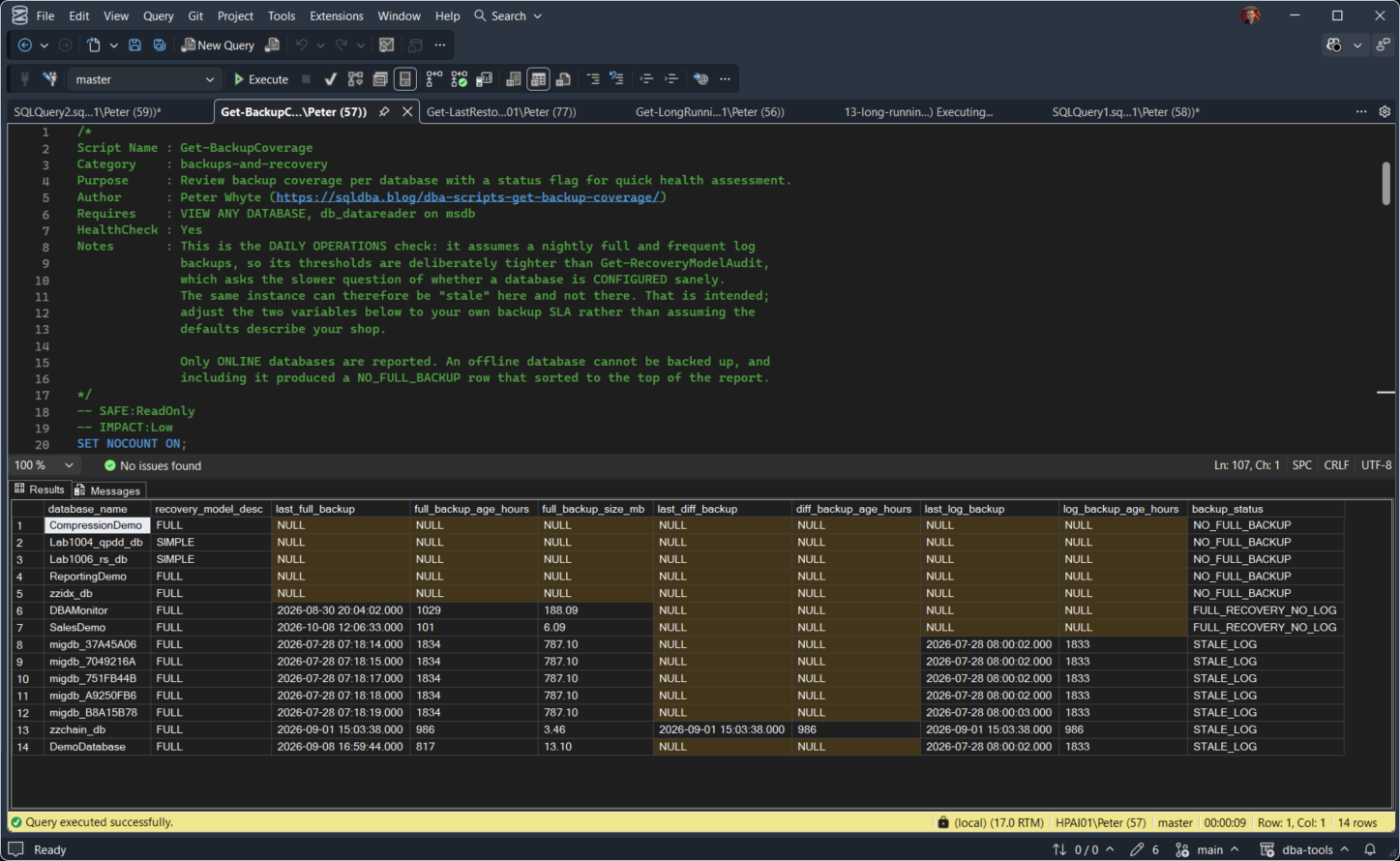
The first five rows have never had a full backup, so they read NO_FULL_BACKUP and sort to the top. Two of them are in SIMPLE recovery, which changes nothing: without a full backup there is nothing to restore. DBAMonitor and SalesDemo have a full backup but are in FULL recovery with no log backup ever, so their logs grow until the disk fills. The rest read STALE_LOG: a log backup chain that stopped running over a month ago.
Understanding the Results
The backup_status column is the one to read first. Rows are sorted by it, worst at the top, so the databases needing attention are always the first ones you see. Anything not listed below reads OK, meaning every check passed. An instance showing no OK rows at all is worth a second look on its own.
NO_FULL_BACKUPmsdb for this database. Either it was never backed up, or the history was purged. Nothing else can be true until this is: log backups have nothing to chain from. Act when always. It is the only status that means the database cannot be recovered at all.FULL_RECOVERY_NO_LOGSTALE_LOGSTALE_FULLfull_backup_age_hourslog_backup_age_hoursbackup_status, so read the status first and these second.database_namerecovery_model_descFULL_RECOVERY_NO_LOG or STALE_LOG, because its log truncates at every checkpoint and there is no log chain to keep current.last_full_backuplast_log_backuplast_log_backup and copy-only fulls are kept, because a copy-only full is a valid restore base while a copy-only log backup truncates nothing.last_diff_backupdiff_backup_age_hoursfull_backup_size_mbOK.Common Causes
- A database added to the instance after the backup jobs were configured, so it was never folded into the schedule
- A backup job failing silently, especially without job failure alerting wired up
- Migration or lab databases seeded once and never added to a real recurring backup plan, which is how a database ends up with no full backup on record at all
- msdb backup history pruned by a maintenance or cleanup job, which can make a genuinely backed-up database look like
NO_FULL_BACKUPif the history itself is gone rather than the backup - Backups taken on an Availability Group secondary are recorded in that replica’s msdb, so the primary can show
NO_FULL_BACKUPwhile the backup job runs fine on another replica; run coverage on the replica that owns the backup job
How to Fix Missing or Stale Backup Coverage
For NO_FULL_BACKUP and STALE_FULL, confirm the database is actually included in the backup job, check the SQL Agent job history, and take a backup now if one is genuinely missing:
BACKUP DATABASE [YourDatabase]
TO DISK = N'D:\SQL-Backups\YourDatabase_FULL.bak'
WITH COMPRESSION, CHECKSUM;
For FULL_RECOVERY_NO_LOG, decide whether this database actually needs point-in-time recovery. If yes, add a log backup job. Every 15 to 60 minutes is typical:
BACKUP LOG [YourDatabase]
TO DISK = N'D:\SQL-Backups\YourDatabase_LOG.trn'
WITH COMPRESSION, CHECKSUM;
If point-in-time recovery genuinely isn’t required, switch the database to SIMPLE recovery instead of leaving it in FULL with no log backup job; that configuration gives you the log growth overhead with none of the recovery benefit.
Best Practices
- Run backup coverage as a standing item in routine health checks, not just when something’s already gone wrong
- Alert on backup job failures directly, rather than relying on someone noticing a stale coverage report later
- Fold new databases into the backup schedule the same day they’re created
- Cross-check against actual backup files on disk if
NO_FULL_BACKUPlooks suspicious; aggressive msdb history cleanup can produce a false positive - Treat a
STALE_FULLfinding on a database backed up “only yesterday” as real, not a false alarm; a 25-hour threshold exists because daily backups have almost no slack before they start missing recovery point objectives - The 25-hour and 4-hour thresholds are defaults for a daily-full, hourly-log pattern; edit them in the script to match your own schedule and RPO before trusting the flags
- System databases are excluded (the script filters
database_id > 4); master and msdb still need backups, but they are not this script’s scope
Microsoft’s reference covers backupset and sys.databases in full.
Frequently Asked Questions
What counts as a stale backup?
By default, this script flags a full backup as stale after 25 hours, and a log backup as stale after 4 hours. Both thresholds are set for a daily full plus hourly log schedule; adjust them in the script if your backup cadence is different.
Does a recent backup guarantee I can recover this database?
No. Coverage confirms a backup exists and is recent, not that the backup chain is unbroken or that the file itself is valid. Pair this script with a backup chain integrity check, and test restores periodically, for the fuller picture.
Why would msdb say a database has no backups when I know one was taken?
Backup history in msdb can be pruned by cleanup jobs or maintenance plans. If NO_FULL_BACKUP looks wrong for a database you’re confident was backed up, check the actual backup files on disk before assuming the backup never happened.
Summary
A backup job existing and a backup job working are two different claims, and the gap between them is usually invisible until a restore is actually needed. This script closes that gap with one query: every user database, one status flag, worst problems first.
Run it as a standing part of routine health checks, not just when something’s already wrong, and treat every non-OK row as a real finding rather than noise. The 25-hour and 4-hour thresholds exist because recovery point objectives erode fast once a schedule starts slipping.
Related
You may also find these useful:
- DBA Scripts: Backups and Recovery
- Generate Backup and Restore Scripts
- Get Recovery Model Audit, the same gap read from the recovery model side, and the page to open when this one reports FULL_RECOVERY_NO_LOG
- Get Backup Chain Integrity
- Get Backup Encryption Status
- Get Backup Restore Duration Estimate
- Get Backup Size Trend
- Get Database Backup History
- Get Last Database Backup Times
- Get Backup Restore Progress
- Restore Testing: Proving the Backups Actually Work, coverage proves a recent backup exists, a test restore proves it actually restores
- DBA Scripts: The Complete Guide, the map across every script on this site
Leave a Reply