
Stop Hand-Typing Database Names Into Backup Commands
Writing a one-off BACKUP DATABASE or RESTORE DATABASE command for a single database is trivial. Doing it correctly for every database on an instance, with a consistent naming convention, the right options, and none typed by hand, is where mistakes creep in: a missed database, a typo in a path, a differential backup issued for a database that’s never had a full one to diff against.
These 4 scripts generate the actual BACKUP/RESTORE T-SQL for every online user database on the instance, ready to review and run, rather than asking you to write and re-type it every time. Full, differential, transaction log, and restore, one generator each, sharing the same conventions so the output reads consistently across all four.
Why Generate Backup and Restore Scripts Matters
- Generated scripts eliminate the two most common manual-backup mistakes: a database left out because someone forgot it existed, and a typo in a hand-typed path or database name
- Every generated script uses
@ts, a variable that resolves to the actual execution timestamp inside the generated script, not the moment you ran the generator, so the filename always reflects when the backup or restore actually happened, not when you built the command - The transaction log generator specifically filters to FULL/BULK_LOGGED databases only, since log backups aren’t valid for SIMPLE recovery, a distinction easy to get wrong by hand across dozens of databases
- Reviewing generated T-SQL before running it is safer than a black-box “backup everything” job: you see exactly what will execute, against which databases, with which options, before anything runs
When to Run These Scripts
- Setting up backup jobs on a newly built or newly inherited instance, where no consistent backup convention exists yet
- Building an ad-hoc backup before a risky change (a migration, a schema change, a patch), across every database in one pass rather than one at a time
- Preparing a restore script ahead of a DR test or an actual recovery, so the exact commands are ready and reviewed rather than written under pressure
- Any time the standard backup path or options need to change across the whole instance, generated fresh rather than hand-edited into an existing job
The Scripts
All four follow the same shape: set the backup path and options in a handful of variables at the top, then generate one BACKUP/RESTORE statement per online user database.
Generate-FullBackupScript — Full Backups for Every Database
- Tested on: SQL Server 2025 (RTM CU8), Windows lab instance
- Last verified: 2026-10-13 (Generate-FullBackupScript run on the lab; the screenshot below is from it)
- Permissions: VIEW ANY DATABASE
- Safety: read-only, impact low
/*
Script Name : Generate-FullBackupScript
Category    : backups-and-recovery
Purpose     : Generate a FULL backup script for all online user databases.
              @ts in the generated script resolves at execution time so filenames
              include the backup timestamp, not the script generation timestamp.
Author      : Peter Whyte (https://sqldba.blog/dba-scripts-generate-backup-and-restore-scripts/)
Requires    : VIEW ANY DATABASE
*/
-- SAFE:ReadOnly
-- IMPACT:Low
SET NOCOUNT ON;
SET QUOTED_IDENTIFIER ON;

DECLARE @BackupPath    nvarchar(260) = N'D:\SQL-Backups';
DECLARE @Compression   bit           = 1;
DECLARE @StatsInterval int           = 5;

IF RIGHT(@BackupPath, 1) = N'\' SET @BackupPath = LEFT(@BackupPath, LEN(@BackupPath) - 1);

DECLARE @WithClause nvarchar(200) = N'WITH ';
SET @WithClause += CASE WHEN @Compression = 1 THEN N'COMPRESSION, ' ELSE N'' END;
SET @WithClause += N'STATS = ' + CAST(@StatsInterval AS nvarchar(3)) + N';';

DECLARE @hdr nvarchar(max) =
    N'-- FULL backup script - ' + @@SERVERNAME                              + CHAR(13) + CHAR(10) +
    N'-- Path  : ' + @BackupPath                                            + CHAR(13) + CHAR(10) +
    N'-- Verify path exists before executing.'                              + CHAR(13) + CHAR(10) +
                                                                              CHAR(13) + CHAR(10) +
    N'DECLARE @ts   varchar(15)  = FORMAT(GETDATE(), ''yyyyMMdd_HHmmss'');' + CHAR(13) + CHAR(10) +
    N'DECLARE @path nvarchar(500);'                                          + CHAR(13) + CHAR(10);

DECLARE @cmd nvarchar(max) = @hdr;

SELECT @cmd +=
    CHAR(13) + CHAR(10) +
    N'SET @path = ''' + @BackupPath + N'\' + d.name + N'_FULL_'' + @ts + ''.bak'';'    + CHAR(13) + CHAR(10) +
    N'BACKUP DATABASE [' + d.name + N'] TO DISK = @path ' + @WithClause               + CHAR(13) + CHAR(10)
FROM sys.databases AS d
WHERE d.database_id > 4
  AND d.state_desc  = N'ONLINE'
ORDER BY d.name;

IF @cmd IS NULL OR @cmd = @hdr
    SET @cmd = @hdr + CHAR(13) + CHAR(10) +
               N'-- No online user databases found.' + CHAR(13) + CHAR(10);

SELECT @cmd AS script;
Generate-DiffBackupScript — Differential Backups
/*
Script Name : Generate-DiffBackupScript
Category    : backups-and-recovery
Purpose     : Generate a DIFFERENTIAL backup script for all online user databases.
              @ts in the generated script resolves at execution time so filenames
              include the backup timestamp, not the script generation timestamp.
Author      : Peter Whyte (https://sqldba.blog/dba-scripts-generate-backup-and-restore-scripts/)
Requires    : VIEW ANY DATABASE
*/
-- SAFE:ReadOnly
-- IMPACT:Low
SET NOCOUNT ON;
SET QUOTED_IDENTIFIER ON;

DECLARE @BackupPath    nvarchar(260) = N'D:\SQL-Backups';
DECLARE @Compression   bit           = 1;
DECLARE @StatsInterval int           = 5;

IF RIGHT(@BackupPath, 1) = N'\' SET @BackupPath = LEFT(@BackupPath, LEN(@BackupPath) - 1);

DECLARE @WithClause nvarchar(200) = N'WITH DIFFERENTIAL, ';
SET @WithClause += CASE WHEN @Compression = 1 THEN N'COMPRESSION, ' ELSE N'' END;
SET @WithClause += N'STATS = ' + CAST(@StatsInterval AS nvarchar(3)) + N';';

DECLARE @hdr nvarchar(max) =
    N'-- DIFFERENTIAL backup script - ' + @@SERVERNAME                     + CHAR(13) + CHAR(10) +
    N'-- Path  : ' + @BackupPath                                            + CHAR(13) + CHAR(10) +
    N'-- Requires a prior FULL backup for each database.'                   + CHAR(13) + CHAR(10) +
    N'-- Verify path exists before executing.'                              + CHAR(13) + CHAR(10) +
                                                                              CHAR(13) + CHAR(10) +
    N'DECLARE @ts   varchar(15)  = FORMAT(GETDATE(), ''yyyyMMdd_HHmmss'');' + CHAR(13) + CHAR(10) +
    N'DECLARE @path nvarchar(500);'                                          + CHAR(13) + CHAR(10);

DECLARE @cmd nvarchar(max) = @hdr;

SELECT @cmd +=
    CHAR(13) + CHAR(10) +
    N'SET @path = ''' + @BackupPath + N'\' + d.name + N'_DIFF_'' + @ts + ''.bak'';'    + CHAR(13) + CHAR(10) +
    N'BACKUP DATABASE [' + d.name + N'] TO DISK = @path ' + @WithClause               + CHAR(13) + CHAR(10)
FROM sys.databases AS d
WHERE d.database_id > 4
  AND d.state_desc  = N'ONLINE'
ORDER BY d.name;

IF @cmd IS NULL OR @cmd = @hdr
    SET @cmd = @hdr + CHAR(13) + CHAR(10) +
               N'-- No online user databases found.' + CHAR(13) + CHAR(10);

SELECT @cmd AS script;
Generate-TLogBackupScript — Transaction Log Backups (FULL/BULK_LOGGED Only)
/*
Script Name : Generate-TLogBackupScript
Category    : backups-and-recovery
Purpose     : Generate a transaction log backup script for all online user databases
              in FULL or BULK_LOGGED recovery model. SIMPLE recovery databases are
              excluded — log backups are not supported for them.
              @ts in the generated script resolves at execution time so filenames
              include the backup timestamp, not the script generation timestamp.
Author      : Peter Whyte (https://sqldba.blog/dba-scripts-generate-backup-and-restore-scripts/)
Requires    : VIEW ANY DATABASE
*/
-- SAFE:ReadOnly
-- IMPACT:Low
SET NOCOUNT ON;
SET QUOTED_IDENTIFIER ON;

DECLARE @BackupPath    nvarchar(260) = N'D:\SQL-Backups';
DECLARE @Compression   bit           = 1;
DECLARE @StatsInterval int           = 5;

IF RIGHT(@BackupPath, 1) = N'\' SET @BackupPath = LEFT(@BackupPath, LEN(@BackupPath) - 1);

DECLARE @WithClause nvarchar(200) = N'WITH ';
SET @WithClause += CASE WHEN @Compression = 1 THEN N'COMPRESSION, ' ELSE N'' END;
SET @WithClause += N'STATS = ' + CAST(@StatsInterval AS nvarchar(3)) + N';';

DECLARE @hdr nvarchar(max) =
    N'-- TRANSACTION LOG backup script - ' + @@SERVERNAME                  + CHAR(13) + CHAR(10) +
    N'-- Path  : ' + @BackupPath                                            + CHAR(13) + CHAR(10) +
    N'-- FULL and BULK_LOGGED databases only (SIMPLE excluded).'            + CHAR(13) + CHAR(10) +
    N'-- Verify path exists before executing.'                              + CHAR(13) + CHAR(10) +
                                                                              CHAR(13) + CHAR(10) +
    N'DECLARE @ts   varchar(15)  = FORMAT(GETDATE(), ''yyyyMMdd_HHmmss'');' + CHAR(13) + CHAR(10) +
    N'DECLARE @path nvarchar(500);'                                          + CHAR(13) + CHAR(10);

DECLARE @cmd nvarchar(max) = @hdr;

SELECT @cmd +=
    CHAR(13) + CHAR(10) +
    N'SET @path = ''' + @BackupPath + N'\' + d.name + N'_LOG_'' + @ts + ''.trn'';'    + CHAR(13) + CHAR(10) +
    N'BACKUP LOG [' + d.name + N'] TO DISK = @path ' + @WithClause                   + CHAR(13) + CHAR(10)
FROM sys.databases AS d
WHERE d.database_id > 4
  AND d.state_desc        = N'ONLINE'
  AND d.recovery_model_desc IN (N'FULL', N'BULK_LOGGED')
ORDER BY d.name;

IF @cmd IS NULL OR @cmd = @hdr
    SET @cmd = @hdr + CHAR(13) + CHAR(10) +
               N'-- No eligible databases found. All online user databases may be in SIMPLE recovery.' + CHAR(13) + CHAR(10);

SELECT @cmd AS script;
Generate-RestoreScript — Restore Databases from Backup
/*
Script Name : Generate-RestoreScript
Category    : backups-and-recovery
Purpose     : Generate a RESTORE DATABASE script for all online user databases.
              Set @ts to the timestamp of the backup files you want to restore
              before executing. Review WITH MOVE if restoring to a different server.
Author      : Peter Whyte (https://sqldba.blog/dba-scripts-generate-backup-and-restore-scripts/)
Requires    : VIEW ANY DATABASE
*/
-- SAFE:ReadOnly
-- IMPACT:Low
SET NOCOUNT ON;
SET QUOTED_IDENTIFIER ON;

DECLARE @BackupPath    nvarchar(260) = N'D:\SQL-Backups';
DECLARE @WithReplace   bit           = 1;    -- 1 = WITH REPLACE
DECLARE @WithNoRecovery bit          = 0;    -- 1 = WITH NORECOVERY (log chain)
DECLARE @StatsInterval int           = 5;

IF RIGHT(@BackupPath, 1) = N'\' SET @BackupPath = LEFT(@BackupPath, LEN(@BackupPath) - 1);

DECLARE @WithClause nvarchar(200) = N'WITH ';
SET @WithClause += CASE WHEN @WithReplace    = 1 THEN N'REPLACE, '    ELSE N'' END;
SET @WithClause += CASE WHEN @WithNoRecovery = 1 THEN N'NORECOVERY, ' ELSE N'' END;
SET @WithClause += N'STATS = ' + CAST(@StatsInterval AS nvarchar(3)) + N';';

DECLARE @hdr nvarchar(max) =
    N'-- RESTORE script - ' + @@SERVERNAME                                 + CHAR(13) + CHAR(10) +
    N'-- Path  : ' + @BackupPath                                            + CHAR(13) + CHAR(10) +
    N'-- Set @ts to the timestamp of the backup files to restore.'          + CHAR(13) + CHAR(10) +
    N'-- Review WITH MOVE if restoring to a different server or drive.'     + CHAR(13) + CHAR(10) +
                                                                              CHAR(13) + CHAR(10) +
    N'DECLARE @ts   varchar(15)  = ''yyyyMMdd_HHmmss''; -- replace with actual backup timestamp' + CHAR(13) + CHAR(10) +
    N'DECLARE @path nvarchar(500);'                                          + CHAR(13) + CHAR(10);

DECLARE @cmd nvarchar(max) = @hdr;

SELECT @cmd +=
    CHAR(13) + CHAR(10) +
    N'SET @path = ''' + @BackupPath + N'\' + d.name + N'_FULL_'' + @ts + ''.bak'';'    + CHAR(13) + CHAR(10) +
    N'RESTORE DATABASE [' + d.name + N'] FROM DISK = @path ' + @WithClause             + CHAR(13) + CHAR(10)
FROM sys.databases AS d
WHERE d.database_id > 4
  AND d.state_desc  = N'ONLINE'
ORDER BY d.name;

IF @cmd IS NULL OR @cmd = @hdr
    SET @cmd = @hdr + CHAR(13) + CHAR(10) +
               N'-- No online user databases found.' + CHAR(13) + CHAR(10);

SELECT @cmd AS script;
Each one returns a single nvarchar(max) result, the generated script itself, ready to copy out, review, and run.
How To Run From The Repo
Clone DBA Tools, initialize and run whichever generator you need:
# Clone dba-tools repo:
git clone https://github.com/peterwhyte-lgtm/dba-tools

# Initialize environment:
cd dba-tools
.\Initialize-Environment.ps1

# Generate each script type:
.\run.ps1 Generate-FullBackupScript
.\run.ps1 Generate-DiffBackupScript
.\run.ps1 Generate-TLogBackupScript
.\run.ps1 Generate-RestoreScript

# To run against a remote sql server:
.\run.ps1 Generate-FullBackupScript -ServerInstance SQLSERVER01
These scripts live in the repo at:
sql/backups/Generate-FullBackupScript.sqlsql/backups/Generate-DiffBackupScript.sqlsql/backups/Generate-TLogBackupScript.sqlsql/backups/Generate-RestoreScript.sql
Example Output
Run these with Results to Text (Ctrl+T). Each generator returns its whole script as 1 long text value, and SSMS cuts text output at 256 characters per column by default, so raise that limit first: How to Increase Maximum Characters Displayed in SSMS.
The top of the output from a lab instance, trimmed to the first 3 databases. The real output carries one SET @path and one BACKUP DATABASE per online user database, in name order.
-- FULL backup script - HPAI01
-- Path  : D:\SQL-Backups
-- Verify path exists before executing.

DECLARE @ts   varchar(15)  = FORMAT(GETDATE(), 'yyyyMMdd_HHmmss');
DECLARE @path nvarchar(500);

SET @path = 'D:\SQL-Backups\CompressionDemo_FULL_' + @ts + '.bak';
BACKUP DATABASE [CompressionDemo] TO DISK = @path WITH COMPRESSION, STATS = 5;

SET @path = 'D:\SQL-Backups\DBAMonitor_FULL_' + @ts + '.bak';
BACKUP DATABASE [DBAMonitor] TO DISK = @path WITH COMPRESSION, STATS = 5;

SET @path = 'D:\SQL-Backups\DemoDatabase_FULL_' + @ts + '.bak';
BACKUP DATABASE [DemoDatabase] TO DISK = @path WITH COMPRESSION, STATS = 5;
And the end of the same run in SSMS, the last databases in name order:
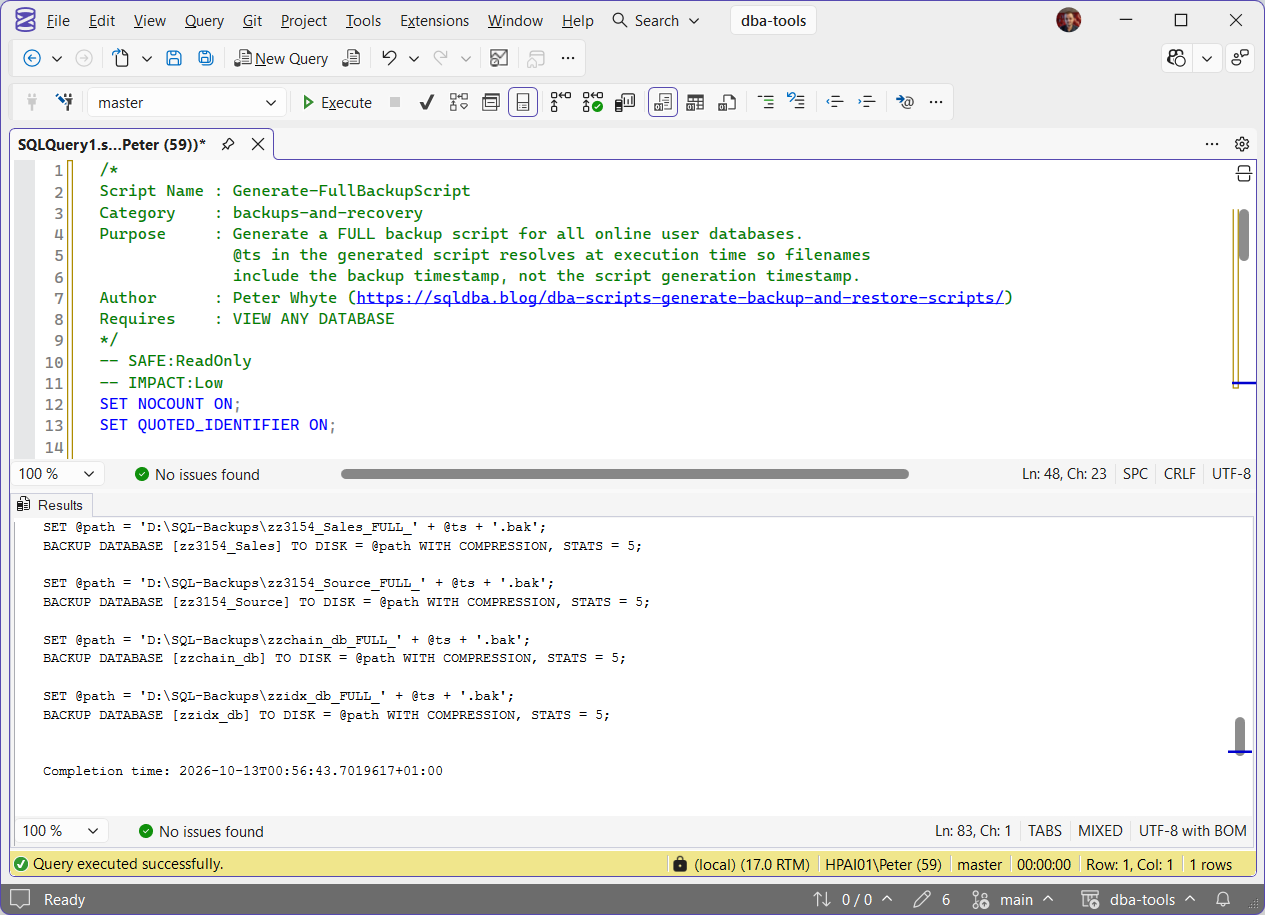
Nothing has run at this point. The generator returns text. The backup happens when you review that text and execute it.
What the Log Generator Leaves Out
The log generator emits the same shape against the same instance, with BACKUP LOG and a .trn extension:
-- TRANSACTION LOG backup script - HPAI01
-- Path  : D:\SQL-Backups
-- FULL and BULK_LOGGED databases only (SIMPLE excluded).
-- Verify path exists before executing.

DECLARE @ts   varchar(15)  = FORMAT(GETDATE(), 'yyyyMMdd_HHmmss');
DECLARE @path nvarchar(500);

SET @path = 'D:\SQL-Backups\CompressionDemo_LOG_' + @ts + '.trn';
BACKUP LOG [CompressionDemo] TO DISK = @path WITH COMPRESSION, STATS = 5;

SET @path = 'D:\SQL-Backups\DBAMonitor_LOG_' + @ts + '.trn';
BACKUP LOG [DBAMonitor] TO DISK = @path WITH COMPRESSION, STATS = 5;
The difference is the database list. Switch a single database from FULL to SIMPLE recovery and generate both again: the full script still produces 14 BACKUP DATABASE statements and the log script drops to 13, and the name that disappears is the database that changed. Switch it back and it returns. That is the recovery_model_desc IN (N'FULL', N'BULK_LOGGED') predicate earning its place. A BACKUP LOG against a SIMPLE-recovery database is not skipped quietly, it fails with Msg 4208, The statement BACKUP LOG is not allowed while the recovery model is SIMPLE. That error does not abort the batch, so the rest of a generated log script still runs and the one failure is easy to scroll past in a long Messages pane.
So if a database you expected is absent from the log script, check its recovery model before anything else. Recovery Model Audit answers that for every database in one pass, and Recovery Models Explained covers what changing it costs you.
Understanding the Results
@BackupPath@Compression@StatsIntervalD:\SQL-Backups, compression on, and STATS = 5. They are what shape the generated WITH clause, so set them before you generate rather than editing the output afterwards. STATS = 5 asks for a progress line roughly every 5 percent and the intervals it actually prints are approximate, 7, 10, 17 and 21 percent on a recent run rather than a clean 5, 10, 15, 20. Compression is worth having on by default: a 29.09 MB database backed up to 0.79 MB on the lab.Act when the path does not exist yet. The generator does not create the folder, which is why the header it writes tells you to verify the path before executing.the generated headerthe generated BACKUP commandBACKUP DATABASE per database, writing to a timestamped path, with the WITH clause your parameters produced.Act when you need more than the defaults. The generated command carries no CHECKSUM, no INIT and no COPY_ONLY. msdb.dbo.backupset records every backup these scripts produced with has_backup_checksums = 0 and is_copy_only = 0. The second one has a consequence: a full backup that is not copy-only becomes the new differential base, so any differential taken after it can only be restored on top of this file. On the lab the base GUID in sys.master_files moved the moment a second generated full ran.@ts@ts is a placeholder you must set to the real timestamp of the files you are restoring from, because nothing can know that in advance.which databases appearRESTORE statement even when its .bak is sitting in the backup folder. Tested on the lab, and it is the reason this generator is for refreshing a database that still exists rather than recovering one that is gone.Act when a database you expected is missing from the log script. The log generator skips SIMPLE-recovery databases, so check the recovery model first with Recovery Model Audit; it is very likely SIMPLE.what is not checked-- No eligible databases found comment instead of a header with no statements under it.Running the Generated Output
The generated backup statements run as written. The generated restore statements run as written only if the database is going back where it came from.
Take the restore block for one database, fill in @ts with a real backup timestamp and change nothing else, and it restores over that database and brings it online. Change only the database name, which is the first thing anyone does when restoring a copy alongside the original or onto a different server, and it stops before it reads a page:
The data and log files inside the backup still carry the original paths, so a restore under a new name tries to overwrite the files the original database is holding open. WITH MOVE is what redirects them, one clause per logical file, and the generator does not produce those clauses. RESTORE on MS Docs has the full syntax; Generate Restore With Move Script is the generator on this site that writes them for you, built from the target instance’s own file layout. Either way the logical names come out of RESTORE FILELISTONLY against the backup file, not out of a guess.
Best Practices
- Always review generated T-SQL before running it, especially the restore script,
WITH REPLACEwill overwrite an existing database of the same name - Keep the backup path variable consistent across all 4 generators, mismatched paths between backup and restore generation are an easy, avoidable mistake
- Generate the log backup script fresh any time a new database is added to the instance, rather than manually editing an existing scheduled job, so newly-FULL-recovery databases aren’t silently missed
- Use Recovery Model Audit alongside these generators to confirm every database that should have a log backup chain actually has one building correctly
- If something else owns the scheduled full backups, add
COPY_ONLYto the generated full before running it ad hoc, so your one-off does not become the base every later differential depends on - Run
RESTORE FILELISTONLY FROM DISK = '...'against the backup before you edit a generated restore, because the logical file names it returns are whatWITH MOVEneeds and they are not always the database name
Microsoft’s reference covers sys.databases in full.
Frequently Asked Questions
Why generate the script instead of just scheduling a backup job directly?
A generated script is reviewable before it runs, you see exactly which databases and options are included. It’s also a good starting point for a scheduled job once you’re happy with it, generate once, then wrap the reviewed output in a SQL Agent job step.
Can I use these against a database with existing backup jobs already configured?
Yes, they’re read-only generators, they don’t touch backup history or existing jobs, they just produce T-SQL text based on the current database list and recovery models. Running the generator doesn’t affect anything until you actually execute the generated output.
A database is missing from the generated log backup script, where did it go?
Almost always its recovery model. The log generator filters to FULL and BULK_LOGGED, so a SIMPLE-recovery database is left out by design. Measured on a lab instance with 14 online user databases: switching one of them to SIMPLE takes the log script from 14 statements to 13 while the full script stays at 14. Check the model with Recovery Model Audit before assuming the generator missed it.
Can I restore to a different server or a different database name with the generated script as it is?
No, not once the file paths differ. The generated statement is RESTORE DATABASE [name] FROM DISK = @path WITH REPLACE, STATS = 5 and it carries no WITH MOVE clauses, so the restore tries to write the data and log files back to the paths recorded in the backup. On a different drive layout, or alongside the original under a new name, that fails with Msg 3156 and the words “Use WITH MOVE to identify a valid location for the file”. Add the MOVE clauses by hand, or use Generate Restore With Move Script, which builds them from the target instance.
Will running the generated full backup interfere with an existing backup schedule?
It can, and this is the one to think about before you run it on a production instance. The generated full is not COPY_ONLY, so it resets the differential base: every differential taken after it can only be restored on top of your ad-hoc file. If a backup product or an Agent job owns the fulls and keeps them in its own catalogue, add COPY_ONLY to the generated statement first. Log backups are different, the generated BACKUP LOG is a normal part of the chain and truncates the log as usual, which is exactly why you do not want 2 schedules taking them independently.
Summary
Backup and restore commands are simple in isolation and error-prone at scale, one database missed, one path typo, one differential attempted against a database with no full backup behind it. Generating the T-SQL for every online database in one pass, with consistent conventions across full, differential, log, and restore, removes most of that risk before a single command runs.
Review the generated output before executing it, keep backup paths consistent across all 4 generators, and re-generate the log backup script whenever a new database joins the instance, so nothing gets silently missed. Two things the generated text will not do for you: add COPY_ONLY when something else owns the backup schedule, and add WITH MOVE when the restore is going anywhere but home.
Related
You may also find these useful:
- The Log in This Backup Set Is Too Recent or Too Early to Apply (Errors 4305, 4326 and 3159), what the generated restore script actually hits when the LSNs do not line up
- DBA Scripts: Backups and Recovery
- Get Backup Coverage
- Get Backup Chain Integrity
- Get Backup Encryption Status
- Get Backup Restore Duration Estimate
- Get Backup Size Trend
- Get Database Backup History
- Get Recovery Model Audit
- Get Last Restore History
- Generate Restore With Move Script, the generator that writes the
WITH MOVEclauses this one leaves out - DBA Scripts: The Complete Guide, the map across every script on this site
Leave a Reply