
The Mismatch That Fills a Disk
A database’s recovery model is a promise about what kind of restore is possible, FULL and BULK_LOGGED promise point-in-time recovery, backed by log backups; SIMPLE promises none, and truncates the log on its own. The incident happens when reality doesn’t match the promise: a FULL-recovery database with no log backup job behind it runs fine for months, quietly growing its log, until the drive fills and the database goes down.
This script checks every online database’s recovery model against its actual backup history and flags exactly that mismatch, along with the other common gaps, no full backup to anchor a chain, stale backups, before they become an incident.
Why Recovery Model Audit Matters
- The “accidental FULL” database is one of the most common silent failures in SQL Server, someone switches recovery model for a one-off requirement, or it was set that way at creation, and no one ever adds a matching log backup job
- FULL and BULK_LOGGED recovery only truncate the log on a log backup, not a full backup, so a database can be “backed up every night” and still have an ever-growing log
- A database with no full backup at all can’t have a log backup chain either, log backups are worthless without a full backup to restore from first
- This is a 5-minute check that catches a problem which otherwise surfaces as a 2am page when a drive fills
When to Run This Script
- Routine SQL Server health checks
- Any time a database’s recovery model is changed
- After provisioning a new database or restoring one from another environment
- Alongside Log Reuse Waits when a log is already growing, to see the backup-posture reason behind it
The Script
Run the following script against your SQL Server instance.
- Tested on: SQL Server 2025 (RTM CU8), Windows lab instance
- Last verified: 2026-08-30 (the script on this page runs, saved output from a real run)
- Permissions: VIEW ANY DATABASE, db_datareader on msdb
- Safety: read-only, impact low
/*
Script Name : Get-RecoveryModelAudit
Category    : backups-and-recovery
Purpose     : Audits each database's recovery model against its actual backup posture and
              flags the mismatches that cause real incidents: FULL/BULK_LOGGED databases
              with no log backups (the log grows until the disk fills), databases with no
              full backup to anchor a log chain, and SIMPLE databases where someone may be
              expecting point-in-time recovery they do not have.
Author      : Peter Whyte (https://sqldba.blog/dba-scripts-get-recovery-model-audit/)
Requires    : VIEW ANY DATABASE, db_datareader on msdb
Notes       : "Accidental FULL" is the classic finding — a database left in FULL recovery
              with no log backup job. It runs fine for months, then the log fills the drive.
              Run Get-LogReuseWaits and Get-TransactionLogSizeAndUsage alongside this to see
              the live effect. Thresholds below are defaults; adjust to your backup SLA.

              WHERE THIS GOES BLIND. Every date here comes from msdb.dbo.backupset on THIS
              instance, so a CRITICAL is evidence of missing local history, which is usually
              but not always a missing backup job. Confirm against one of these before
              raising it:
                - Availability Groups: backup history is instance-local. Backups taken on
                  another replica leave no row here.
                - Purged history: sp_delete_backuphistory or a maintenance-plan cleanup task
                  trims backupset, so a young instance-restart or an aggressive retention
                  setting can empty this out.
                - Snapshot backups that bypass the SQL backup path: VM or storage-array
                  snapshots taken without VSS/VDI integration never write a backupset row.
                  (Most third-party tools — Veeam application-aware, Commvault, LiteSpeed,
                  Redgate — go through VDI and DO appear here.)
                - Renamed databases: backupset records the name at backup time, so history
                  stays behind under the old name and the database reads as never backed up.
*/
-- SAFE:ReadOnly
-- IMPACT:Low
SET NOCOUNT ON;

DECLARE @LogBackupStaleHours INT = 24;
DECLARE @FullBackupStaleDays INT = 7;

;WITH FullBackup AS
(
    /* Copy-only fulls are deliberately COUNTED here. A copy-only full backup is a valid
       restore base and log backups can be applied on top of it, so it genuinely does let
       a log chain start. (What it does not do is reset the differential base, which is a
       different question this script does not ask.) Filtering it out here would raise a
       false CRITICAL against a database that is in fact restorable. */
    SELECT database_name, MAX(backup_finish_date) AS last_full_backup
    FROM msdb.dbo.backupset
    WHERE type = 'D'
    GROUP BY database_name
),
LogBackup AS
(
    /* Copy-only log backups are EXCLUDED, and this one matters. A copy-only log backup
       preserves the log archive point and does not truncate the log, so counting it as
       evidence the log is being managed inverts the finding this script exists to make:
       one copy-only log backup would downgrade a genuine "log will grow until the disk
       fills" CRITICAL to a mild staleness warning while the log kept growing. */
    SELECT database_name, MAX(backup_finish_date) AS last_log_backup
    FROM msdb.dbo.backupset
    WHERE type = 'L'
      AND is_copy_only = 0
    GROUP BY database_name
)

SELECT
    d.name AS database_name,
    d.recovery_model_desc AS recovery_model,
    fb.last_full_backup,
    lb.last_log_backup,
    CAST(SUM(CAST(mf.size AS BIGINT)) * 8.0 / 1024
        AS DECIMAL(18,1)) AS log_size_mb,
    CASE
        -- FULL / BULK_LOGGED: the log only truncates when a log backup runs.
        WHEN d.recovery_model_desc IN ('FULL', 'BULK_LOGGED') AND fb.last_full_backup IS NULL
            THEN 'CRITICAL: no full backup, log backup chain cannot start'
        WHEN d.recovery_model_desc IN ('FULL', 'BULK_LOGGED') AND lb.last_log_backup IS NULL
            THEN 'CRITICAL: ' + d.recovery_model_desc + ' recovery with no log backups, log will grow until the disk fills'
        WHEN d.recovery_model_desc IN ('FULL', 'BULK_LOGGED')
             AND DATEDIFF(HOUR, lb.last_log_backup, GETDATE()) > @LogBackupStaleHours
            THEN 'WARNING: log backups are stale (>' + CAST(@LogBackupStaleHours AS VARCHAR(10)) + 'h)'
        WHEN fb.last_full_backup IS NULL
            THEN 'WARNING: no full backup on record'
        WHEN DATEDIFF(DAY, fb.last_full_backup, GETDATE()) > @FullBackupStaleDays
            THEN 'WARNING: full backup is stale (>' + CAST(@FullBackupStaleDays AS VARCHAR(10)) + 'd)'
        WHEN d.recovery_model_desc = 'SIMPLE'
            THEN 'INFO: SIMPLE - no point-in-time recovery between full/diff backups'
        ELSE 'OK'
    END AS finding
FROM sys.databases AS d
JOIN sys.master_files AS mf
    ON mf.database_id = d.database_id
    AND mf.type_desc = 'LOG'
LEFT JOIN FullBackup AS fb
    ON fb.database_name = d.name
LEFT JOIN LogBackup AS lb
    ON lb.database_name = d.name
WHERE d.state_desc = 'ONLINE'
  AND d.database_id > 4
GROUP BY
    d.name,
    d.recovery_model_desc,
    fb.last_full_backup,
    lb.last_log_backup
ORDER BY
    CASE
        WHEN d.recovery_model_desc IN ('FULL', 'BULK_LOGGED') AND lb.last_log_backup IS NULL THEN 0
        WHEN fb.last_full_backup IS NULL THEN 1
        ELSE 2
    END,
    d.name;
The finding column ranks CRITICAL mismatches first, so the databases that need attention today sort straight to the top.
How To Run From The Repo
Clone DBA Tools, initialize and run the script:
# Clone dba-tools repo:
git clone https://github.com/peterwhyte-lgtm/dba-tools

# Initialize environment:
cd dba-tools
.\Initialize-Environment.ps1

# Audit every database's recovery model against its actual backup posture:
.\run.ps1 Get-RecoveryModelAudit

# To run against a remote sql server:
.\run.ps1 Get-RecoveryModelAudit -ServerInstance SQLSERVER01
This script lives in the repo at:
Example Output
Run against a lab instance.
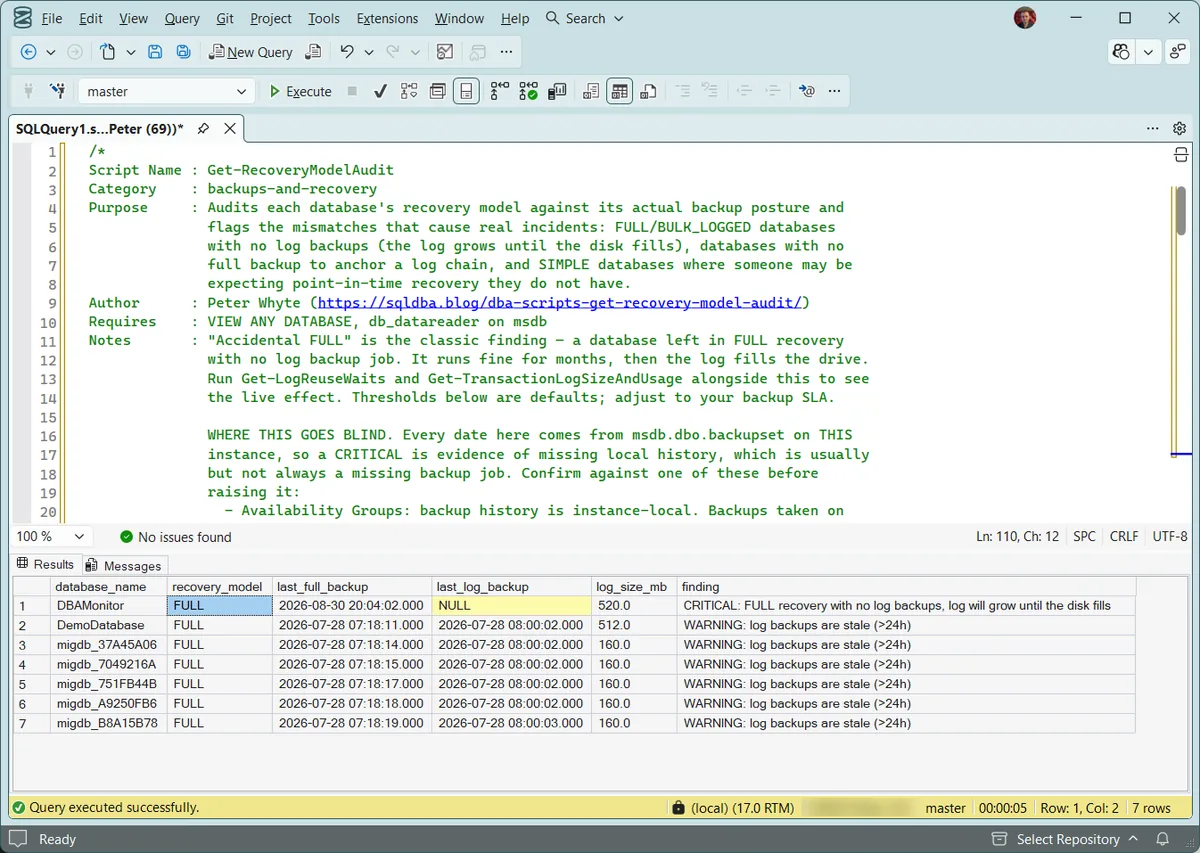
The top row is the one that matters. It is in FULL recovery, it has a full backup from that morning, and it has never had a log backup, so its log grows until the disk fills. It is also the row that looks fine on a backup report. The other 6 have a log backup chain that stopped running, which is why they read as stale rather than critical.
Understanding the Results
CRITICAL: no full backup,
log backup chain cannot startCRITICAL: FULL recovery with no
log backups, log will grow
until the disk fillsWARNING: log backups are staleWARNING: full backup is staleINFO: SIMPLElast_log_backuplast_full_backupmsdb.dbo.backupset. A SIMPLE database can still show an old last_log_backup date, left behind from when it was FULL. That date is history, not an active log chain, and it is a common misread.log_size_mbWhere This Check Goes Blind
Every date here comes from msdb.dbo.backupset on the instance you ran it against. A CRITICAL is therefore evidence of missing local history, which is usually a missing backup job but is not always. Rule these out before raising it:
- Availability Groups. Backup history is instance-local. Backups taken on another replica leave no row on this one.
- Purged history.
sp_delete_backuphistory, or the cleanup task in a maintenance plan, trimsbackupseton a retention schedule. - Snapshot backups that bypass SQL Server. VM or storage-array snapshots taken without VSS or VDI integration never write a row. Most third-party tools do go through VDI and do appear here, so this is narrower than it is usually assumed to be.
- Renamed databases.
backupsetrecords the name as it was at backup time, so the history stays behind under the old name and the database reads as never backed up.
How to Fix Recovery Model Mismatches
For a FULL/BULK_LOGGED database with no log backups, the fix is either operational or a deliberate recovery model change, not both left unresolved:
-- Option 1: add a proper log backup job (the usual fix if point-in-time recovery is needed)
BACKUP LOG [YourDatabase] TO DISK = 'D:\Backups\YourDatabase_log.trn';
-- then schedule this on the interval your recovery-point objective requires

-- Option 2: if point-in-time recovery was never actually needed, switch to SIMPLE
ALTER DATABASE [YourDatabase] SET RECOVERY SIMPLE;
-- take a full backup immediately after, the old log backup chain is now broken
For a database with no full backup at all, take one before anything else, log backups can’t help until a full backup exists to anchor them.
Best Practices
- Treat any CRITICAL finding as something to fix today, not a backlog item, an unbounded growing log eventually takes the whole instance down when the drive fills
- Every FULL or BULK_LOGGED database needs a log backup job as a matter of course when it’s created, not added later once someone notices the log is huge
- Re-run this audit after any recovery model change or new database provisioning, not just on a schedule
Microsoft’s reference covers sys.databases and sys.master_files in full.
Frequently Asked Questions
Why does a database with recent full backups still show a CRITICAL finding?
Because full backups don’t truncate the transaction log for FULL or BULK_LOGGED recovery, only a log backup does. A database can look well-backed-up on the full backup side and still have an unbounded growing log with zero log backups behind it.
Should every database just use SIMPLE recovery to avoid this?
No, SIMPLE means no point-in-time recovery between full/diff backups, only restore to the last backup taken. That’s a real tradeoff for production databases where losing hours of transactions is unacceptable. The right fix for a FULL-recovery database missing log backups is almost always to add the missing log backup job, not to downgrade the recovery model.
Summary
Recovery model and backup posture have to agree with each other, and the gap between them is exactly what causes the “the log filled the drive” incident that always seems to come out of nowhere. It doesn’t come out of nowhere, it’s been growing since the day the mismatch started.
Run this audit as part of routine health checks, and immediately after any recovery model change or new database provisioning, so a CRITICAL finding gets caught the same week it starts, not the week the disk runs out.
Related Scripts
You may also find these scripts useful:
- Backups and Recovery (hub)
- Generate Backup and Restore Scripts
- Backup Chain Integrity
- Backup Coverage
- Backup Encryption Status
- Backup Restore Duration Estimate
- Backup Size Trend
- Log Reuse Waits
- Transaction Log Size and Usage
- Last Restore History
- DBA Scripts: The Complete Guide, the map across every script on this site
Leave a Reply