
You can have a full backup from last night and still not be able to restore to 2pm today. That’s the gap this script closes. Backup coverage checks tell you when your last backups ran. They don’t tell you whether the log backups between them actually form an unbroken chain.
A single missing or damaged log backup breaks point-in-time restore for that entire window, even if every backup job shows green in your monitoring. You usually don’t find out until you’re mid-incident, restoring toward a specific time, and SQL Server tells you the chain won’t get there.
This script walks the LSN (Log Sequence Number) chain from the last full backup through every log backup since, flags any gap or damaged backup set, and calls out databases with no full backup on record at all.
Why Backup Chain Integrity Matters
Point-in-time restore depends on LSN continuity, not backup frequency. SQL Server needs an unbroken sequence from a full backup through every log backup up to the point you’re restoring to. If one log backup in that sequence is missing or damaged, or the chain was broken outright, for example by switching the database to the SIMPLE recovery model and back (MS Docs), everything after the gap becomes unrestorable to a specific point in time.
This matters most for:
- Databases in the FULL or BULK_LOGGED recovery model, where point-in-time restore is the entire reason you’re paying the log backup overhead
- Any database with a compliance or RPO requirement that assumes a working log chain
- Post-migration and post-restore scenarios, where a chain can look intact in coverage reports but actually restart from a new full backup you didn’t expect
- Availability Groups and log shipping, which depend on the same LSN continuity to keep replicas in sync
A backup coverage report can look perfectly healthy while the underlying chain is already broken. Coverage tells you a backup happened. This script tells you whether you could actually use it.
When to Run This Script
- Routine SQL Server health checks, alongside backup coverage
- Before and after any change to backup job schedules or retention
- Before a disaster recovery test, so you’re not discovering a broken chain during the test itself
- After a migration or restore, to confirm the new chain actually started cleanly
- Whenever a database’s recovery model was recently changed to FULL or BULK_LOGGED
The Script
Run the following script against your SQL Server instance.
- Tested on: SQL Server 2025 (RTM CU8), Windows lab instance
- Last verified: 2026-10-23 (real run; the screenshot below is from it)
- Permissions: SELECT on msdb, VIEW ANY DATABASE
- Safety: read-only, impact low
/*
Script Name : Get-BackupChainIntegrity
Category    : backups
Purpose     : LSN continuity analysis for each user database. Verifies the log backup chain
              from the most recent full backup to now is unbroken, and surfaces damaged
              backup sets. A gap in the log chain means point-in-time restore is impossible
              for that window.
Author      : Peter Whyte (https://sqldba.blog/dba-scripts-get-backup-chain-integrity/)
Requires    : SELECT on msdb, VIEW ANY DATABASE
Related     : Get-BackupCoverage, Get-LastDatabaseBackupTimes, Get-BackupAge check backup
              RECENCY. This checks CONTINUITY, which recency cannot see: a database backed
              up an hour ago can still have an unrestorable gap behind it.
*/
-- The Purpose line above deliberately describes only what THIS script does. It used to end
-- "coverage scripts only check recency, not continuity", and because Purpose is the
-- second-highest weighted field in the MCP script index, that sentence made this script win
-- the word "check" on every backup-recency question - so "i need to check when my databases
-- were last backed up" returned the continuity script instead of Get-LastDatabaseBackupTimes.
-- A Purpose line that describes its neighbours competes with them. Comparisons go in Related.
-- Only databases that exist in sys.databases are reported. msdb keeps backup history for
-- dropped databases until it is purged (sp_delete_backuphistory), and those rows used to come
-- back with a NULL recovery model and fall through to "OK - chain is intact", which is a false
-- all-clear for a database that is not there. A dropped database has no chain to protect, and
-- msdb history clean-up is a separate job, so orphaned history is excluded here rather than
-- flagged (same model as Get-BackupCoverage and Get-LastDatabaseBackupTimes, which both start
-- from sys.databases).
-- Databases that are not ONLINE (RECOVERY_PENDING, SUSPECT, OFFLINE, RESTORING, EMERGENCY) are
-- reported too. The no-full-backup branch used to filter d.state = 0, so a database that could
-- not come online and had never been backed up returned no row at all: the worst case was the
-- invisible one. Its state is now in the chain_status text.
-- SAFE:ReadOnly
-- IMPACT:Low
SET NOCOUNT ON;

WITH
last_full AS (
    SELECT
        bs.database_name,
        MAX(bs.backup_set_id) AS backup_set_id
    FROM msdb.dbo.backupset AS bs
    WHERE bs.type = 'D'
      AND bs.database_name NOT IN ('master','model','msdb','tempdb')
    GROUP BY bs.database_name
),
full_details AS (
    SELECT
        bs.database_name,
        bs.backup_set_id AS full_backup_set_id,
        bs.backup_start_date AS full_backup_start,
        bs.backup_finish_date AS full_backup_finish,
        bs.first_lsn AS full_first_lsn,
        bs.last_lsn AS full_last_lsn,
        bs.is_damaged AS full_is_damaged,
        bs.has_incomplete_metadata AS full_incomplete_metadata,
        CAST(bs.compressed_backup_size / 1024.0 / 1024.0 AS DECIMAL(18,2)) AS full_backup_size_mb,
        bmf.physical_device_name AS full_backup_file
    FROM last_full lf
    JOIN msdb.dbo.backupset AS bs ON bs.backup_set_id = lf.backup_set_id
    LEFT JOIN msdb.dbo.backupmediafamily AS bmf ON bmf.media_set_id = bs.media_set_id
),
log_chain AS (
    SELECT
        bs.database_name,
        bs.backup_set_id,
        bs.backup_start_date,
        bs.first_lsn,
        bs.last_lsn,
        bs.is_damaged,
        ROW_NUMBER() OVER (PARTITION BY bs.database_name ORDER BY bs.first_lsn) AS log_seq,
        LAG(bs.last_lsn) OVER (PARTITION BY bs.database_name ORDER BY bs.first_lsn) AS prev_last_lsn
    FROM msdb.dbo.backupset AS bs
    JOIN full_details AS fd ON fd.database_name = bs.database_name
    WHERE bs.type = 'L'
      AND bs.first_lsn >= fd.full_last_lsn
),
log_gaps AS (
    SELECT
        database_name,
        COUNT(*) AS log_backup_count,
        SUM(CASE WHEN is_damaged = 1 THEN 1 ELSE 0 END) AS damaged_log_backups,
        SUM(CASE
            WHEN log_seq > 1 AND prev_last_lsn IS NOT NULL AND first_lsn > prev_last_lsn + 1
            THEN 1 ELSE 0 END) AS chain_gaps,
        MIN(CASE
            WHEN log_seq > 1 AND prev_last_lsn IS NOT NULL AND first_lsn > prev_last_lsn + 1
            THEN backup_start_date END) AS first_gap_at
    FROM log_chain
    GROUP BY database_name
),
last_log AS (
    SELECT
        bs.database_name,
        MAX(bs.backup_finish_date) AS last_log_backup_finish,
        MAX(bs.last_lsn) AS last_log_lsn
    FROM msdb.dbo.backupset AS bs
    WHERE bs.type = 'L'
      AND bs.database_name NOT IN ('master','model','msdb','tempdb')
    GROUP BY bs.database_name
),
-- Combine everything before ordering (avoids alias-in-UNION ORDER BY restriction)
combined AS (
    SELECT
        fd.database_name,
        fd.full_backup_start,
        fd.full_backup_finish,
        CAST(fd.full_backup_size_mb AS DECIMAL(12,2)) AS full_backup_size_mb,
        DATEDIFF(HOUR, fd.full_backup_finish, GETDATE()) AS full_backup_age_hours,
        fd.full_is_damaged,
        fd.full_incomplete_metadata,
        ISNULL(lg.log_backup_count, 0) AS log_backups_since_full,
        ISNULL(lg.damaged_log_backups, 0) AS damaged_log_backups,
        ISNULL(lg.chain_gaps, 0) AS log_chain_gaps,
        lg.first_gap_at,
        ll.last_log_backup_finish,
        DATEDIFF(MINUTE, ll.last_log_backup_finish, GETDATE()) AS log_backup_age_minutes,
        d.recovery_model_desc,
        d.log_reuse_wait_desc,
        CASE
            WHEN d.recovery_model_desc IS NULL
            THEN 'WARN - recovery model unknown (database not visible in sys.databases); chain not assessed'
            WHEN fd.full_is_damaged = 1
            THEN 'CRITICAL - last full backup is marked damaged in msdb'
            WHEN ISNULL(lg.chain_gaps, 0) > 0
            THEN 'CRITICAL - ' + CAST(lg.chain_gaps AS VARCHAR) +
                 ' gap(s) in log chain since last full; PITR impossible for those windows (gap starts ' +
                 CONVERT(VARCHAR(20), lg.first_gap_at, 120) + ')'
            WHEN d.recovery_model_desc = 'FULL' AND ll.last_log_backup_finish IS NULL
            THEN 'WARN - FULL recovery model but no log backups since last full'
            WHEN d.recovery_model_desc = 'FULL'
                 AND DATEDIFF(MINUTE, ll.last_log_backup_finish, GETDATE()) > 60
            THEN 'WARN - last log backup is ' +
                 CAST(DATEDIFF(MINUTE, ll.last_log_backup_finish, GETDATE()) AS VARCHAR) +
                 ' minutes old; RPO exposure growing'
            WHEN ISNULL(lg.damaged_log_backups, 0) > 0
            THEN 'WARN - ' + CAST(lg.damaged_log_backups AS VARCHAR) + ' log backup(s) marked damaged'
            ELSE 'OK - chain is intact'
        END AS chain_status,
        LEFT(fd.full_backup_file, 200) AS full_backup_file_path
    FROM full_details AS fd
    LEFT JOIN log_gaps AS lg ON lg.database_name = fd.database_name
    LEFT JOIN last_log AS ll ON ll.database_name = fd.database_name
    JOIN sys.databases AS d ON d.name = fd.database_name

    UNION ALL

    SELECT
        d.name, NULL, NULL, NULL, NULL, NULL, NULL,
        0, 0, 0, NULL, NULL, NULL,
        d.recovery_model_desc, d.log_reuse_wait_desc,
        CASE
            WHEN d.state = 0
            THEN 'CRITICAL - no full backup on record for this database'
            WHEN d.state = 1
            THEN 'INFO - database is RESTORING (log shipping secondary or restore in progress); backups are taken on the primary'
            ELSE 'CRITICAL - no full backup on record and database is ' + d.state_desc +
                 '; it cannot be backed up until it is brought ONLINE'
        END,
        NULL
    FROM sys.databases AS d
    WHERE d.database_id > 4
      AND d.source_database_id IS NULL -- a database snapshot cannot be backed up
      AND d.name NOT IN (SELECT database_name FROM full_details)
)
SELECT *
FROM combined
ORDER BY
    CASE WHEN chain_status LIKE 'CRITICAL%' THEN 1
         WHEN chain_status LIKE 'WARN%' THEN 2
         ELSE 3 END,
    database_name;
The script walks msdb.dbo.backupset for each database, finds the most recent full backup, then checks every log backup since for LSN continuity, damaged flags, and staleness.
How To Run From The Repo
Clone DBA Tools, initialize and run the script:
# Clone dba-tools repo:
git clone https://github.com/peterwhyte-lgtm/dba-tools

# Initialize environment:
cd dba-tools
.\Initialize-Environment.ps1

# Check backup chain integrity across all user databases:
.\run.ps1 Get-BackupChainIntegrity

# To run against a remote sql server:
.\run.ps1 Get-BackupChainIntegrity -ServerInstance SQLSERVER01
This script lives in the repo at:
Example Output
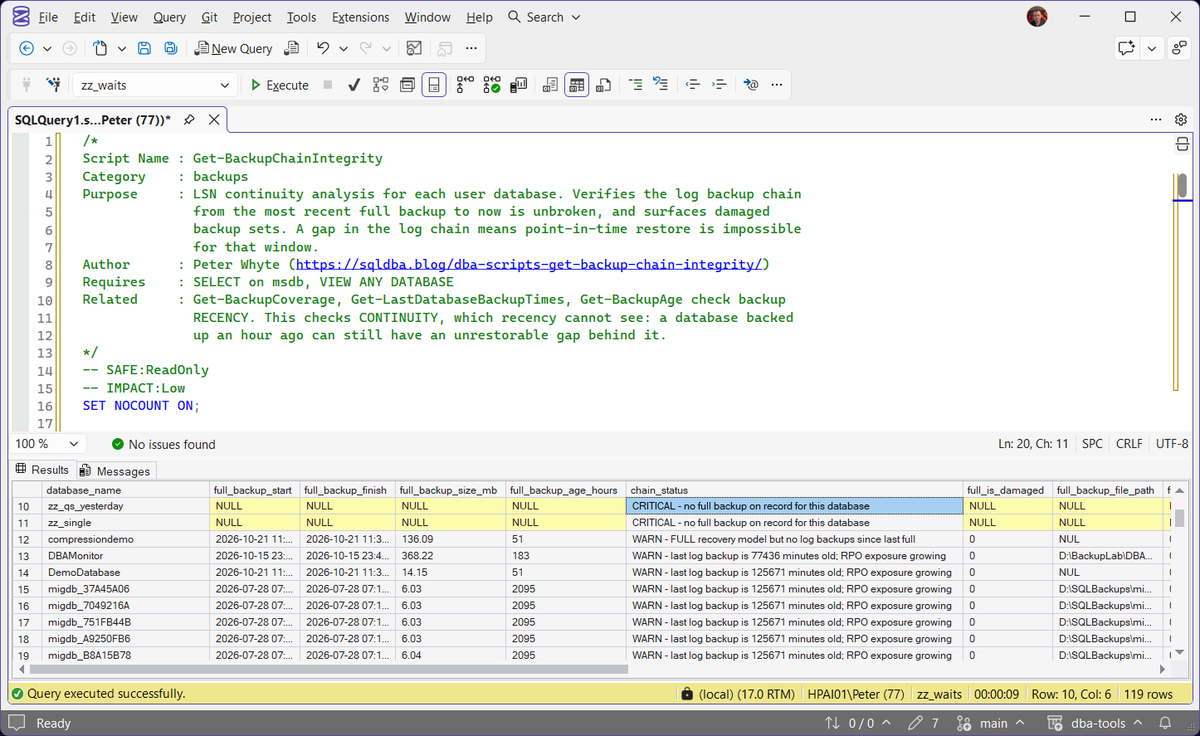
On the lab instance the script returned one row for every user database apart from two database snapshots, which cannot be backed up and are left out. 13 have no full backup on record, and one of them, SalesArchive, is stuck in RECOVERY_PENDING, so no backup job could take one until it is back ONLINE. 7 are in the FULL recovery model with no log backup since their last full, and 8 had log backups that stopped between 8 and 87 days ago. None of that shows up in a backup coverage report that only asks “was a full backup taken recently”.
No row came back OK, because nothing on this lab has an intact chain. The backup history msdb still holds for databases dropped long ago is left out as well, since the script only reports databases that exist in sys.databases.
Understanding the Results
The chain_status column is the one to read first. It’s ranked CRITICAL, then WARN, then INFO and OK, so the worst problems sort to the top.
first_gap_at, say where the first break starts.sys.databases, so the recovery model should always be there. If it is missing, the chain was not judged, and the row is not an all-clear.Act when it appears. Check the database in sys.databases and run the script again before trusting anything about its backups.full_backup_age_hourslog_backup_age_minuteslog_backups_since_fulllog_chain_gapsfirst_gap_atrecovery_model_desclog_reuse_wait_descsys.databases, so they describe the database as it is now, not as it was when the backups ran. LOG_BACKUP on a FULL recovery database with no log backups is the same finding seen from the log’s side: Get Log Reuse Waits covers it.full_backup_startfull_backup_finishfull_backup_size_mbfull_is_damagedfull_incomplete_metadatafull_backup_file_pathCommon Causes
The pattern in the example output is a common one: databases added to an instance after the backup jobs were configured. A new database defaults to whatever recovery model the model database uses (often FULL), the scheduled full and log backup jobs don’t automatically pick it up, and it sits invisible until someone runs a chain integrity check or, worse, needs to restore it.
Other common causes:
- Migration or restore leftovers (like the
migdb_*databases here) that were never folded into the production backup schedule - A log backup job that’s failing silently, especially if job failure alerts aren’t wired up
- Someone switching a database’s recovery model to FULL for a one-off requirement and never adding log backups
- A log chain broken by a switch to the SIMPLE recovery model and back, or by restoring over a database without reinitializing its backup schedule
How to Fix a Broken or Missing Backup Chain
The fix depends on which finding you’re looking at.
No full backup on record. Take one now. There’s no chain to repair, only one to start:
BACKUP DATABASE [YourDatabase]
TO DISK = N'D:\SQL-Backups\YourDatabase_FULL.bak'
WITH COMPRESSION, CHECKSUM;
No full backup and not ONLINE. A database has to be ONLINE before it can be backed up, so find out why it is not before anything else: the SQL Server error log records why recovery stopped. Once it is back, take the full backup above straight away. If it is SUSPECT or will not come back, Database Marked SUSPECT (Error 926) covers EMERGENCY mode and CHECKDB, the options left when there is no backup to restore.
FULL recovery model with no log backups. Either start taking log backups on a schedule, or switch to SIMPLE recovery if point-in-time restore genuinely isn’t a requirement for this database. Don’t leave it in FULL with no log backup job; that configuration gives you all of the log growth overhead and none of the recovery benefit.
-- Option A: start log backups (add this to your scheduled backup job)
BACKUP LOG [YourDatabase]
TO DISK = N'D:\SQL-Backups\YourDatabase_LOG.trn'
WITH COMPRESSION, CHECKSUM;

-- Option B: switch to SIMPLE if PITR isn't required
ALTER DATABASE [YourDatabase] SET RECOVERY SIMPLE;
A gap in the log chain. You can’t repair a gap after the fact. Take a fresh full backup, or a differential on top of an intact full, to restart the chain (MS Docs), then resume log backups from there on schedule.
Whichever fix applies, run this script again afterward to confirm the chain is intact before you consider the database covered.
Best Practices
- Run backup coverage and backup chain integrity together. Coverage tells you a backup happened; this script tells you whether it’s usable
- Alert on new databases the day they appear, so they get added to the backup schedule immediately rather than discovered later
- Alert on log backup job failures directly, don’t rely on periodically noticing a stale chain
- Treat any FULL recovery model database with no scheduled log backups as a finding, not a curiosity
- Verify the chain after any migration, restore, or manual log operation, not just on the regular schedule
Good backup management catches a broken chain before you need it, not during the restore.
Microsoft Learn: sys.databases
Frequently Asked Questions
What is a backup chain in SQL Server?
It’s the unbroken LSN sequence from a full backup through every log backup taken since. Point-in-time restore needs every link in that chain present and undamaged, not just a recent backup.
What’s the difference between backup coverage and backup chain integrity?
Coverage answers “did a backup run recently.” Chain integrity answers “could I actually restore to a specific point in time using what I have.” A database can pass coverage checks and still have a broken chain.
Does this matter for SIMPLE recovery model databases?
Not in the same way. SIMPLE recovery model databases don’t support log backups or point-in-time restore, so chain integrity is a FULL and BULK_LOGGED recovery model concern.
Can I fix a broken log chain without taking a new full backup?
Yes, with a differential backup, as long as the full backup it is based on is still intact: Microsoft names a full or a differential as the backup that starts a log chain (MS Docs). What you cannot do is bridge the gap with log backups. Once the LSN sequence breaks, nothing after it can be restored to a point in time using the old chain.
Summary
Backup coverage tells you a backup happened. It doesn’t tell you whether you could actually restore to a specific point in time with what you have. This script checks the part that coverage reports miss: whether the LSN chain from your last full backup through every log backup since is actually intact.
Run it alongside your regular coverage checks, not instead of them. A clean coverage report and a broken chain can coexist quietly for months, right up until you need to restore and find out the hard way.
Add this to your routine health checks, and re-run it after any backup job change, migration, or restore, so a broken chain gets found on your schedule rather than during an incident.
Related
You may also find these useful:
- The Log in This Backup Set Is Too Recent or Too Early to Apply (Errors 4305, 4326 and 3159), the restore errors a broken chain produces when you try to roll forward past it
- DBA Scripts: Backups and Recovery
- Generate Backup and Restore Scripts
- Get Backup Coverage
- Get Backup Encryption Status
- Get Backup Restore Duration Estimate
- Get Backup Size Trend
- Get Database Backup History
- Get Last Database Backup Times
- Get Backup Restore Progress
- Get Last Restore History
- DBA Scripts: The Complete Guide, the map across every script on this site
Leave a Reply