
What Your Backup Sizes Are Quietly Telling You
The backup drive is filling faster than planned, or a full backup suddenly ran long, and you need to know which database grew and when. This rolls msdb backup history up to one row per database, per backup type, per month, so the change shows in a few lines instead of hundreds of backup rows.
Why Backup Size Trend Matters
- A month where a database’s full backup size drops sharply is worth investigating immediately, it can mean real, unexpected data loss, not just less activity
- Steady month-over-month growth tells you when a database will outgrow its current backup window or storage allocation, well before it becomes an emergency
avg_compression_pctmoving over time can flag a change in the data itself (more already-compressed data like images, or a schema change) as easily as a backup configuration change- This is a trend script, not a point-in-time check, one month’s number means little, the shape of the line across twelve months is the actual signal
When to Run This Script
- Monthly, as part of a capacity-planning or storage-review cadence, not just when something already looks wrong
- After any backup job or maintenance plan change, to confirm sizes are still behaving as expected
- When a backup suddenly takes longer or uses more storage, to see whether database growth is the cause
- Alongside Database Sizes and Free Space when building a full storage capacity picture
The Script
Run the following script against your SQL Server instance.
- Tested on: SQL Server 2025 (RTM CU8) 17.0.4075.5, Windows lab instance
- Last verified: 2026-10-05 (the Example Output is a real run on the lab instance)
- Permissions: any login that can connect, because msdb grants SELECT on
dbo.backupsetto public - Safety: read-only, impact low
/*
Script Name : Get-BackupSizeTrend
Category    : backups
Purpose     : Monthly backup size trend per database over the last 12 months, an indirect proxy for data growth rate. Shrinking backups can indicate unexpected data loss; growing backups inform storage planning.
Author      : Peter Whyte (https://sqldba.blog/dba-scripts-get-backup-size-trend/)
Requires    : any login that can connect (msdb grants SELECT on dbo.backupset to public)
*/
-- SAFE:ReadOnly
-- IMPACT:Low
SET NOCOUNT ON;

SELECT
    database_name,
    CASE type
        WHEN 'D' THEN 'Full'
        WHEN 'I' THEN 'Differential'
        WHEN 'L' THEN 'Log'
        ELSE type
    END AS backup_type,
    CAST(YEAR(backup_finish_date) AS CHAR(4)) + '-' +
    RIGHT('0' + CAST(MONTH(backup_finish_date) AS VARCHAR(2)), 2) AS year_month,
    COUNT(*) AS backup_count,
    CAST(AVG(backup_size) / 1073741824.0 AS DECIMAL(10,3)) AS avg_size_gb,
    CAST(MAX(backup_size) / 1073741824.0 AS DECIMAL(10,3)) AS max_size_gb,
    CAST(MIN(backup_size) / 1073741824.0 AS DECIMAL(10,3)) AS min_size_gb,
    CAST(AVG(CASE WHEN compressed_backup_size > 0
                  THEN compressed_backup_size END)
                                    / 1073741824.0 AS DECIMAL(10,3)) AS avg_compressed_gb,
    CAST(AVG(CASE WHEN compressed_backup_size > 0 AND backup_size > 0
                  THEN CAST(compressed_backup_size AS FLOAT) / backup_size * 100
                  END) AS DECIMAL(5,1)) AS avg_compression_pct
FROM msdb.dbo.backupset
WHERE backup_finish_date >= DATEADD(MONTH, -12, GETDATE())
  AND type IN ('D', 'I', 'L')
GROUP BY database_name, type, YEAR(backup_finish_date), MONTH(backup_finish_date)
ORDER BY database_name, backup_type, year_month;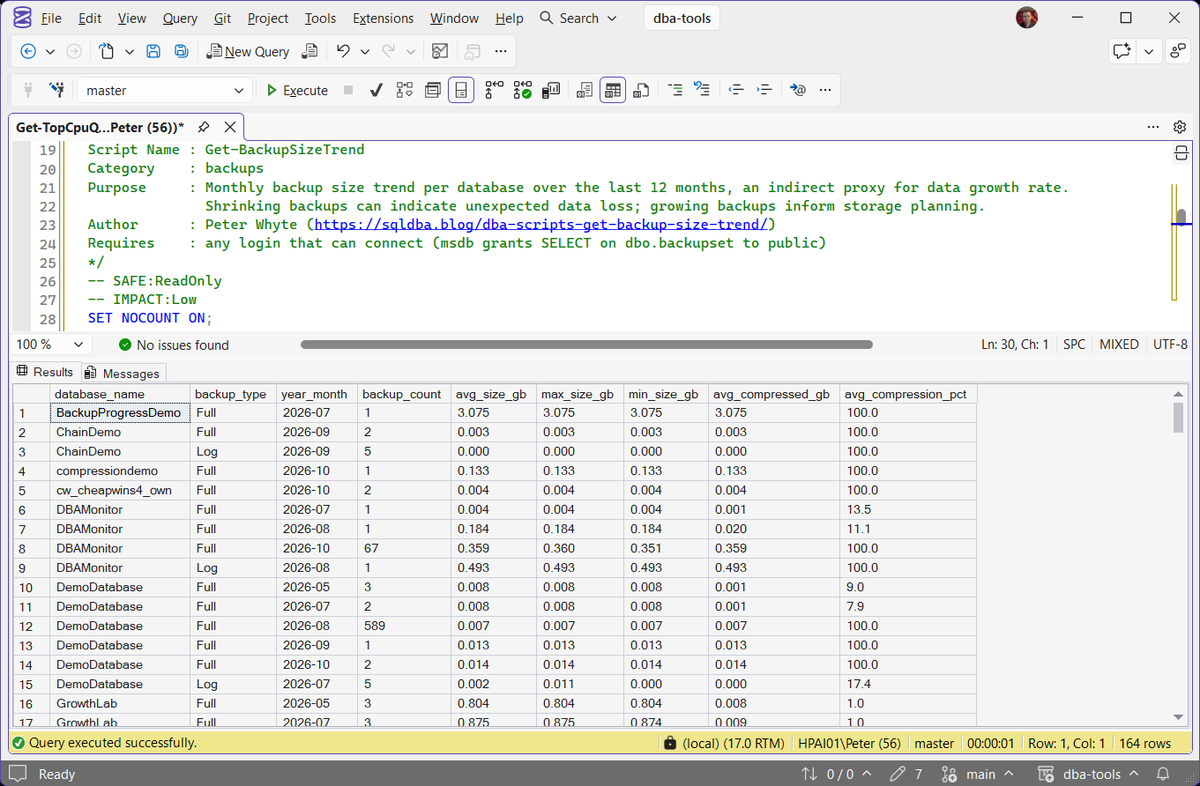
One row per database, per backup type, per month, pulled straight from msdb.dbo.backupset (MS Docs), no other server required.
How To Run From The Repo
Clone DBA Tools, initialize and run the script:
# Clone dba-tools repo:
git clone https://github.com/peterwhyte-lgtm/dba-tools

# Initialize environment:
cd dba-tools
.\Initialize-Environment.ps1

# Get 12 months of backup size trend per database:
.\run.ps1 Get-BackupSizeTrend

# To run against a remote sql server:
.\run.ps1 Get-BackupSizeTrend -ServerInstance SQLSERVER01
This script lives in the repo at:
Example Output
One run on the lab instance returned 151 rows across 96 databases. These are the 10 rows for 4 of them, with max_size_gb and min_size_gb left out for width.
Read down each database. GrowthLab’s full backup grew from 0.804 GB to 0.875 GB over 2 months, 8.8%, steady growth to plan storage around. SalesDemo’s grew 60%, from 0.128 GB to 0.205 GB, yet its backup file stayed at 0.022 GB because the new data compressed well.
When a drive is filling, read avg_compressed_gb: it is what lands on disk. avg_size_gb is the data before compression, so on GrowthLab 0.875 GB of data wrote a 0.009 GB file.
Understanding the Results
avg_compressed_gbcompressed_backup_size as the bytes stored on disk, and on an uncompressed backup it equals the uncompressed size.Act when the backup drive is filling. This column times backup_count times your retention is the space the backups take. avg_size_gb overstates it on every compressed backup.avg_size_gbmax_size_gbmin_size_gbavg_size_gb drops between months. Treat it as possible data loss until a cleanup, an archive job or a backup of the wrong database explains it.avg_compression_pctbackup_countCOPY_ONLY backups included. The window is 12 months back from the moment you run it, so the current month and the oldest month are both partial.Act when it does not match the schedule. Too many is usually copy-only backups taken outside it; too few is a schedule that stopped, so cross-check against Backup Coverage.Best Practices
- Review this monthly as part of a standing capacity or storage cadence, not just reactively
- Treat any sharp drop in
avg_size_gbas an incident-worthy finding until proven otherwise, silent data loss is the worst-case explanation - Pair with Database Sizes and Free Space and Backup Restore Duration Estimate for a full picture of where storage and backup-window pressure is heading
- Twelve months is the window this script covers by design, long enough to see a real trend, short enough to stay fast; adjust the
DATEADD(MONTH, -12, ...)window if your retention or reporting cadence needs more history
Frequently Asked Questions
Why 12 months instead of all available history?
Twelve months is enough to see a genuine trend, including any seasonal pattern in data volume, without scanning years of msdb.dbo.backupset history on a busy instance. The window runs 12 months back from the moment you run it, so the first and the current month are both partial. Extend the DATEADD window if you need a longer view for a specific investigation.
Does a shrinking backup always mean data loss?
Not always, an archival job, a deliberate cleanup, or a change to what’s included in the backup can all explain it legitimately. But it’s always worth confirming which of those it is rather than assuming, since real unexpected data loss looks exactly the same in this report.
Why is avg_compression_pct 100.0 on some rows?
Those backups were not compressed. SQL Server records an uncompressed backup with compressed_backup_size equal to backup_size, so the ratio is exactly 100. A figure in between can be a blend: 1 uncompressed and 3 compressed full backups in one month on the lab averaged 39.8. Check the job’s WITH COMPRESSION option and the instance’s backup compression default.
Why does one month show far more full backups than the schedule takes?
The script counts COPY_ONLY backups with the scheduled ones, because msdb records both in the same table. Ad hoc copies, a third-party tool or a test harness can add hundreds: one lab database logged 589 copy-only fulls in a single month, and because they were uncompressed its avg_compression_pct went from 7.9 to 100.0 at the same time. Add AND is_copy_only = 0 to the WHERE clause to see the scheduled backups alone.
Who can run this script?
Any login that can connect. msdb grants SELECT on dbo.backupset to public and lets guest in, so on the lab instance a login with no msdb user and no role returned the same 151 rows as sysadmin. Backup history, database names included, is readable by every login unless that grant has been revoked.
Summary
Backup size is data SQL Server already tracks for you, msdb.dbo.backupset has the full history, this script just turns twelve months of it into one readable trend per database. A shrinking backup deserves the same urgency as a failed one, and a steadily growing one is exactly the early signal capacity planning needs.
Add this to a monthly review alongside the rest of the backup and storage series, and treat any unexplained drop in size as worth investigating immediately, not filed away for later.
Related
You may also find these scripts useful:
- Backups and Recovery (hub)
- Diff Backup Script / Full Backup Script / Restore Script / T Log Backup Script
- Backup Chain Integrity
- Backup Coverage
- Backup Encryption Status
- Backup Restore Duration Estimate
- msdb Is Growing: Purge Backup, Job and Mail History Safely, check how far back this chart needs before you choose a backup history retention
- Database Backup History
- Last Restore History
- DBA Scripts: The Complete Guide, the map across every script on this site
Leave a Reply