
sp_delete_backuphistory with a cutoff of a year ago, wraps every delete in one transaction, and on a table that has never been purged that transaction is what fills the msdb log and makes the purge look hung.Which msdb Problem Do You Have?
Four completely different things make msdb grow, and the fix for one does nothing for the others. Find the line that matches what you are actually looking at and start where it says.
| What you are seeing | What it usually means | Start at |
|---|---|---|
| msdb is several GB and the system drive is filling | One history table has never been purged | Step 1: data file or log |
| The msdb data file is big but the log is small | Rows, not an open transaction | Step 2: which table |
sp_delete_backuphistory has been running for hours | One cutoff date, one transaction, millions of rows | Step 4: why it hangs |
9002, the transaction log for database msdb is full | The purge is the open transaction | Step 5: date steps |
sysjobhistory is the largest table | The Agent history limit is off, or set very high | Step 6: job history |
| msdb grows on a server that barely takes backups | Database Mail items, or maintenance plan logs | Step 7: mail and plan logs |
| Rows are gone and the file is the same size | Free space inside the file, which is correct | Step 8: file size |
| It came back three months later | Nothing is scheduled to keep it down | Step 9: schedule it |
Every step is one check and one decision. Nothing on this page deletes anything a restore needs, and Step 3 is the preview that proves it before you run the purge.
Step 1: Is It the Data File or the Log?
This decides which half of the page you need. A big data file is history rows, and you purge them. A big log file is an open transaction or a recovery model nobody meant to change, and purging harder makes that one worse.
SELECT  f.name,
        f.type_desc,
        CAST(f.size * 8.0 / 1024 AS decimal(10,1))                            AS size_mb,
        CAST(FILEPROPERTY(f.name,'SpaceUsed') * 8.0 / 1024 AS decimal(10,1))  AS used_mb,
        f.physical_name
FROM    msdb.sys.database_files AS f;

SELECT  name, recovery_model_desc, log_reuse_wait_desc
FROM    sys.databases
WHERE name = 'msdb';Two things to read there. The data file is 90 percent used, which is normal and says nothing is wrong on its own. And msdb is in SIMPLE recovery, which is how Microsoft ships it. If yours says FULL, somebody applied a policy to every database on the instance and msdb now needs log backups like any other, which is a common and completely silent reason for a log that only grows. SQL Server Recovery Models Explained covers the choice, and Get Recovery Model Audit finds every database the policy caught.
If the file that is full is the log, skip to Step 5. If it is the data file, carry on.
Step 2: Which History Table Is Holding the Space?
There is no point purging backup history on a server whose problem is Database Mail. One query, run in msdb, names the table.
USE msdb;

SELECT  t.name                                                          AS history_table,
        SUM(CASE WHEN ps.index_id < 2 THEN ps.row_count ELSE 0 END)     AS rows_,
        CAST(SUM(ps.reserved_page_count) * 8.0 / 1024 AS decimal(10,1)) AS reserved_mb
FROM    sys.dm_db_partition_stats AS ps
JOIN    sys.tables AS t ON t.object_id = ps.object_id
WHERE   t.name IN ('backupset','backupmediafamily','backupfile','backupfilegroup',
                   'restorehistory','sysjobhistory','sysmail_mailitems','sysmail_log',
                   'sysmaintplan_log','sysmaintplan_logdetail',
                   'log_shipping_monitor_history_detail','sysssislog')
GROUP BY t.name
ORDER BY SUM(ps.reserved_page_count) DESC;That is a healthy instance, and it is here so you know what one looks like. The server you have been called about has one line with six or seven figures in the row count, and that line decides whether you need Step 4, Step 6 or Step 7. sys.dm_db_partition_stats is the cheap way to ask, because it reads cached allocation metadata rather than counting rows, so it returns in milliseconds on a table that COUNT(*) would sit on for a minute.
Across a whole estate the same question at database level is Get Database Sizes and Free Space, which is usually how msdb gets noticed in the first place.
Step 3: Preview the Cutoff Before You Purge
Run this before you run anything that deletes. It answers the only two questions that matter: how far back the history goes, and how many rows a given cutoff would take out. Buckets of 30 days, oldest first.
USE msdb;

SELECT  DATEDIFF(DAY, backup_finish_date, GETDATE()) / 30 AS months_old,
        COUNT(*)                                          AS backup_sets,
        MIN(backup_finish_date)                           AS oldest_in_bucket
FROM    dbo.backupset
GROUP BY DATEDIFF(DAY, backup_finish_date, GETDATE()) / 30
ORDER BY months_old DESC;On a server with a real problem the top of that list runs back years and the counts are in the hundreds of thousands. Read it as a work plan, not as a report: the oldest bucket is your first batch, and the number in it is how big that batch will be.
Two things this is also telling you. Backup history is not the backups. Deleting a row from backupset does not touch a .bak file and does not stop you restoring from it, it only means SSMS cannot build the restore sequence for you and RESTORE HEADERONLY becomes your friend. And whatever you keep, keep enough to cover your longest restore chain plus the reporting anybody actually does, which in practice is 90 days for most shops and 13 months for shops with an auditor. Get Database Backup History is the report that reads this data, and Get Backup Size Trend is the one that genuinely needs a long window, so check what it is charting before you choose a retention.
Step 4: Why One Far Back Date Hangs
Everybody does the same thing first. One call, one cutoff, go and get a coffee. An hour later it is still running, the Agent jobs are timing out and somebody is asking whether they can restart SQL Server. Here is what is happening inside, because it is not a mystery and it is not a bug.
Read the procedure rather than guessing at it. sp_delete_backuphistory ships as plain T-SQL in msdb and you can see all of it with SELECT OBJECT_DEFINITION(OBJECT_ID('msdb.dbo.sp_delete_backuphistory')). This is the shape of it, trimmed to the part that matters:
DECLARE @backup_set_id TABLE      (backup_set_id INT)
DECLARE @media_set_id TABLE       (media_set_id INT)
DECLARE @restore_history_id TABLE (restore_history_id INT)

INSERT INTO @backup_set_id (backup_set_id)
SELECT DISTINCT backup_set_id
FROM msdb.dbo.backupset
WHERE backup_finish_date < @oldest_date
...
BEGIN TRANSACTION

  DELETE FROM msdb.dbo.backupfile      WHERE backup_set_id IN (SELECT backup_set_id FROM @backup_set_id)
  DELETE FROM msdb.dbo.backupfilegroup WHERE backup_set_id IN (SELECT backup_set_id FROM @backup_set_id)
  DELETE FROM msdb.dbo.restorefile     WHERE restore_history_id IN (SELECT restore_history_id FROM @restore_history_id)
  DELETE FROM msdb.dbo.restorefilegroup WHERE restore_history_id IN (SELECT restore_history_id FROM @restore_history_id)
  DELETE FROM msdb.dbo.restorehistory  WHERE restore_history_id IN (SELECT restore_history_id FROM @restore_history_id)
  DELETE FROM msdb.dbo.backupset       WHERE backup_set_id IN (SELECT backup_set_id FROM @backup_set_id)
  DELETE msdb.dbo.backupmediafamily ...
  DELETE msdb.dbo.backupmediaset ...

COMMIT TRANSACTION
Three facts fall straight out of that, and together they are the whole problem.
- Eight deletes, one transaction. There is a single
BEGIN TRANSACTIONand a singleCOMMIT. Nothing is released until all eight finish, so the log has to hold every row image for the whole run, the locks are held for the whole run, and cancelling half way through rolls the lot back and leaves you exactly where you started, only later. - The row lists live in table variables. Table variables carry no statistics, so the optimizer costs
IN (SELECT ... FROM @backup_set_id)as if it will match a handful of rows. Feed it 2 million and the plan it chose for a handful is the plan you get. - It is driven by the date on one table. Everything else is found by joining back to the list of
backup_set_idvalues, which is why the foreign key chain below decides how fast this runs.
The Foreign Key Chain
Backup history is seven tables wired together, and the deletes have to go in child-before-parent order or the constraints reject them. This is the real chain, read from sys.foreign_keys in msdb:
SELECT  OBJECT_NAME(fk.parent_object_id)     AS child_table,
        OBJECT_NAME(fk.referenced_object_id) AS parent_table,
        fk.delete_referential_action_desc    AS on_delete
FROM    msdb.sys.foreign_keys AS fk
WHERE   OBJECT_NAME(fk.referenced_object_id) IN
            ('backupset','backupmediaset','restorehistory')
ORDER BY parent_table, child_table;Every one is NO_ACTION, so there is no cascade doing the work for you. Each delete from a parent has to be preceded by its children and checked against every remaining child, which is where the index question comes in.
Check the Indexes, Do Not Assume They Are Missing
The advice you will find on forums is to add a clutch of indexes to msdb, headed by one on backupset.backup_finish_date. Check before you create anything, because on current builds Microsoft has already shipped them. This asks whether every foreign key column in msdb has an index that leads on it:
USE msdb;

WITH fkcol AS (
    SELECT  OBJECT_NAME(fkc.parent_object_id)    AS child_table,
            OBJECT_NAME(fk.referenced_object_id) AS parent_table,
            c.name                               AS child_col,
            fkc.parent_object_id AS oid, fkc.parent_column_id AS cid
    FROM    sys.foreign_keys AS fk
    JOIN    sys.foreign_key_columns AS fkc ON fkc.constraint_object_id = fk.object_id
    JOIN    sys.columns AS c ON c.object_id = fkc.parent_object_id
                            AND c.column_id = fkc.parent_column_id
)
SELECT  f.child_table, f.child_col, f.parent_table,
        CASE WHEN EXISTS (SELECT 1 FROM sys.index_columns AS ic
                          WHERE ic.object_id = f.oid AND ic.column_id = f.cid
                            AND ic.key_ordinal = 1 AND ic.is_included_column = 0)
             THEN 'indexed' ELSE 'NO INDEX' END AS supporting_index
FROM    fkcol AS f
ORDER BY supporting_index, f.child_table;On SQL Server 2025 all 7 of the backup and restore history foreign keys are already covered, and backupset carries 4 nonclustered indexes of its own including backupsetDate on backup_finish_date. Run the check on your own build before you add anything, and if your instance really is missing the date index, this is the one everybody adds:
-- Only if the check above says it is missing.
CREATE NONCLUSTERED INDEX backupsetDate
    ON msdb.dbo.backupset (backup_finish_date);
The three that are genuinely unindexed on a current build are the Database Mail and maintenance plan children, which is Step 7, and that is a far better use of a CREATE INDEX than re-creating something that is already there. See sp_delete_backuphistory on MS Docs for the parameter and the permissions it needs.
Step 5: Purge Oldest First, in Date Steps
The fix is not a different procedure. It is the same supported procedure called many times with a date that walks forward, so each call is its own small transaction that commits and lets the log reuse its space before the next one starts.
Here is what the one shot version costs. A throwaway database was built with the same table shapes and the same foreign key chain as msdb backup history: 40,000 backup sets spread over 1,000 days, with 80,000 backupfile rows, 40,000 backupfilegroup rows and 40,000 media sets behind them. Its log file was capped at 32 MB, which is simply a smaller version of a log on a drive that has no room left. Then one cutoff, everything in one transaction:
54 seconds in, and when the rollback finished the table still held all 40,000 backup sets. That is the part worth sitting with: the run was not partly successful. One transaction means all or nothing, so an hour of work and a failure at the end leaves the instance exactly where it started, with an hour of log written and thrown away. ACTIVE_TRANSACTION in that message is the log telling you the holdup is your own purge.
Then the same database, which still held all 40,000 backup sets because the first attempt rolled back, and the same 32 MB log, deleted oldest first in 30 day steps:
Nothing clever happened there. Each batch committed on its own, the checkpoint let the log reuse the space, and the next batch started in a log that had room. The stepped run was still working through the backlog when this was written, and that is the point rather than a caveat: it makes progress you keep. The single transaction makes none, however long you leave it, and it would behave the same way at 4 million rows, because what sets the size of a batch is the date window and not the size of the table.
This is the pattern, written against the supported procedure rather than against the tables:
-- Catch up on a backlog. Run it when the Agent is quiet.
DECLARE @keep_days int      = 90;
DECLARE @step_days int      = 7;          -- smaller on a bigger backlog
DECLARE @cutoff    datetime = DATEADD(DAY, -@keep_days, GETDATE());
DECLARE @step      datetime = (SELECT MIN(backup_finish_date) FROM msdb.dbo.backupset);

WHILE @step < @cutoff
BEGIN
    SET @step = DATEADD(DAY, @step_days, @step);
    IF @step > @cutoff SET @step = @cutoff;

    EXEC msdb.dbo.sp_delete_backuphistory @oldest_date = @step;

    -- Breathing room for the log and for anything else using msdb.
    WAITFOR DELAY '00:00:02';
END
Four things about it that are deliberate.
- It starts at the oldest row, not at the cutoff. That is what makes each call small. Calling the procedure once with the cutoff is the thing that just failed.
@step_daysis a dial. Seven days is a sensible start. If a batch still runs long, halve it. There is no penalty for small batches beyond a few more round trips, and there is a large penalty for one that is too big.- The
WAITFORis not padding. The Agent is writing into these tables while you delete from them, and a purge that never pauses will block job history writes and get blocked in return. - It is restartable. Stop it at any point and the work already committed stays committed. Run it again tomorrow and it picks up from the new oldest row.
Watch it from another session with the Step 3 preview query: the oldest bucket disappearing one row at a time is how you know it is working, and it is a far better progress indicator than staring at a spinning cursor.
Step 6: Job History, and the Setting That Should Have Capped It
If sysjobhistory is the big table, the purge is one call. The reason it got big is a checkbox, and fixing the checkbox is what stops you doing this again next year.
Read the current setting first. It is stored in the registry rather than in a table, and this is the supported way to see it:
EXEC msdb.dbo.sp_get_sqlagent_properties;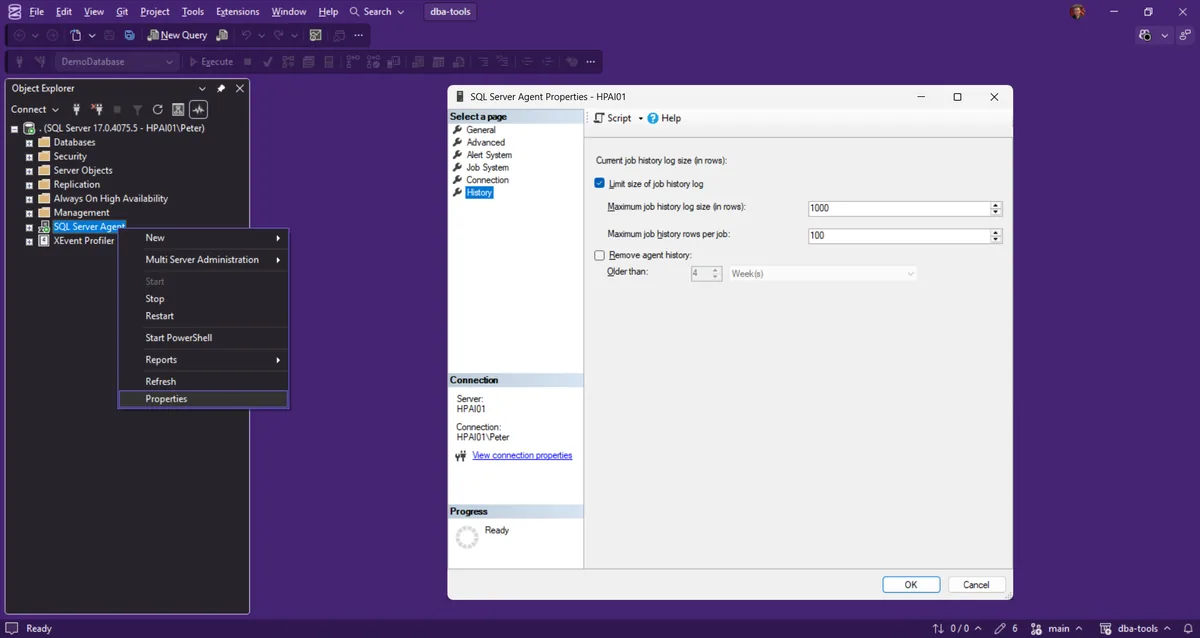
Those are the shipped defaults, and they are the same two boxes as SQL Server Agent Properties, History page, “Limit size of job history log”: 1000 rows for the whole instance and 100 per job. On that instance sysjobhistory held 972 rows, which is the cap doing its job rather than a coincidence.
If what comes back is not a sensible row count, the box is unticked and there is no cap at all, which is the usual explanation for a sysjobhistory with millions of rows: nothing has ever trimmed it. A busy instance with a job every minute and several steps per job writes a row per step, and that is 5 million rows a year without anybody doing anything wrong. The other common cause is a job that logs step output into the history, which makes each row large as well as numerous. MS Docs documents the dialog on the SQL Server Agent Properties, History Page.
Purging it is one supported call, and unlike backup history it is a single table with no chain behind it:
DECLARE @cutoff datetime = DATEADD(DAY, -90, GETDATE());

EXEC msdb.dbo.sp_purge_jobhistory @oldest_date = @cutoff;
Two cautions. The parameter has to be a variable or a constant, not an expression: @oldest_date = DATEADD(DAY, -90, GETDATE()) inside an EXEC is a syntax error, which is why the declare is on its own line above. And on a table of several million rows this is still one delete in one transaction, so step the date the same way as Step 5 if the first attempt sits there. The procedure also takes @job_name if one job is the whole problem, which is the quickest way to deal with a single chatty job without touching anybody else’s history. The parameters are on MS Docs under sp_purge_jobhistory.
Before you delete it, be sure nothing is reading it. Duration trending reads sysjobhistory directly, so check what Get Job Schedules and Duration Trends is charting and keep a window that covers it, and Get SQL Agent Job Overview will tell you which jobs are producing the volume in the first place.
Step 7: Database Mail and Maintenance Plan Logs
This is the case that confuses people, because msdb is growing on a server that takes two backups a day and runs four jobs. The space is in mail items, and every alert and every job notification since the instance was built is still in there, attachments included.
Database Mail keeps the message body and any attachment in msdb until something deletes it, and nothing deletes it by default. Two procedures, and they are separate on purpose: one removes the messages, the other removes the diagnostic log about sending them.
DECLARE @cutoff datetime = DATEADD(DAY, -30, GETDATE());

-- The messages themselves, with their attachments.
EXEC msdb.dbo.sysmail_delete_mailitems_sp @sent_before = @cutoff;

-- The send log, which is diagnostics and not the mail.
EXEC msdb.dbo.sysmail_delete_log_sp @logged_before = @cutoff;
Both take an optional status filter as well, so @sent_status = 'sent' keeps the failures while clearing everything that went out cleanly, which is usually what you want on the first pass. MS Docs has the full signatures for sysmail_delete_mailitems_sp and sysmail_delete_log_sp.
This is where the index check in Step 4 pays off. sysmail_attachments.mailitem_id and sysmail_send_retries.mailitem_id are foreign keys back to sysmail_mailitems and neither has an index that leads on them, so deleting a mail item means a scan of those tables to prove nothing still points at it. On an instance with a few hundred thousand mail items that is the difference between a purge that finishes and one that does not. Batch this one by date as well, and if the table is enormous and you are going to be doing this regularly, these two are a far better use of a CREATE INDEX than anything on backupset.
Maintenance plans have their own pair of tables, sysmaintplan_log and sysmaintplan_logdetail, with the same shape of problem: the detail table is the child, it has no supporting index on its foreign key, and nothing trims either of them unless you ask. If the plan writes a report to the log on every run it grows steadily and silently for years.
The queue side of Database Mail, which is a different question from the history side, is covered by Get Service Broker Health and Database Mail Queue. Run it before you purge if mail has also stopped arriving, because an enormous sysmail_mailitems and a stalled mail queue are two different incidents that like to happen on the same day.
Step 8: The Rows Are Gone and the File Is the Same Size
That is correct and it is not a failure. Deleting rows frees space inside the file, it does not hand the space back to the drive. Run the Step 2 query again and the row counts will have collapsed while the file size has not moved.
Whether you then shrink is a real decision and not a formality. If msdb grew to 20 GB once because of a decade of history and will now stay at 500 MB, shrinking it once is reasonable and the space is genuinely wanted back. If it is 2 GB and will be 2 GB again next quarter, shrinking it just means it autogrows all over again and you have bought nothing but fragmentation. Shrink once, after the purge, never on a schedule, and reindex msdb afterwards because the shrink will have fragmented what is left.
-- Only after the purge, and only once. Target leaves room to grow back into.
USE msdb;
DBCC SHRINKFILE (MSDBData, 512);
The cost of shrinking is measured rather than asserted in SQL Server Shrink Fragmentation Measured, and Shrink Database Files in Chunks is how to do it on a file big enough that one call would run all night. MS Docs covers the mechanics under Shrink a database.
Step 9: Hand It to a Job So It Never Comes Back
Everything above is a one off. The reason you were called is that nothing was scheduled, and if nothing is scheduled now you will be called again, by somebody else, in about three years.
The steady state is a weekly job with four statements in it, each with a retention you chose on purpose. Once the backlog is cleared by the date stepping in Step 5, a weekly run only ever deletes one week of history, which finishes in seconds and never troubles the log again. That is the whole point of catching up with batches rather than one cutoff: you are not trying to make the big delete fast, you are trying to never need the big delete again.
-- Weekly, after the backlog is cleared. Retentions chosen, not inherited.
DECLARE @BackupCutoff datetime = DATEADD(DAY, -90, GETDATE());
DECLARE @JobCutoff    datetime = DATEADD(DAY, -90, GETDATE());
DECLARE @MailCutoff   datetime = DATEADD(DAY, -30, GETDATE());

EXEC msdb.dbo.sp_delete_backuphistory @oldest_date = @BackupCutoff;
EXEC msdb.dbo.sp_purge_jobhistory     @oldest_date = @JobCutoff;

IF EXISTS (SELECT 1 FROM msdb.dbo.sysmail_profile)
BEGIN
    EXEC msdb.dbo.sysmail_delete_mailitems_sp @sent_before   = @MailCutoff;
    EXEC msdb.dbo.sysmail_delete_log_sp       @logged_before = @MailCutoff;
END
If you would rather not hand-build the job on every instance, Generate Database Integrity and Housekeeping Jobs writes it out as readable DDL alongside the integrity checks, with the retentions as parameters, so you can review the T-SQL before it ever runs on a production box. Tick the Agent history limit back on while you are in there, because that is the one setting that keeps Step 6 from recurring without a job at all.
Frequently Asked Questions
msdb is 20 GB. What is actually safe to delete?
sp_delete_backuphistory has been running for two hours. Can I kill it?
The transaction log for msdb is full. What do I do right now?
SELECT log_reuse_wait_desc FROM sys.databases WHERE name = 'msdb' names the holdup: ACTIVE_TRANSACTION means something is still running, LOG_BACKUP means msdb has been put into FULL recovery and nobody is backing its log up. The full decision tree for both is SQL Server Transaction Log Full, and if the drive itself is out of space start at Disk Is Full or the Log Will Not Truncate.sysjobhistory has millions of rows and the purge will not finish.
sp_purge_jobhistory with one cutoff is one delete in one transaction. Step the date forward in weeks from the oldest row you have, and run it when the Agent is quiet, because every job that completes while you are purging writes into the table you are deleting from. Then go to Step 6 and tick the history limit back on, because an uncapped job history is the only way the table got to millions of rows in the first place.Can I just TRUNCATE TABLE backupset?
backupset, from backupfile, backupfilegroup and restorehistory, and TRUNCATE TABLE is refused outright on a table referenced by a foreign key. You could drop the constraints, truncate and recreate them, and people do, but you are then hand-editing the system tables of msdb with the Agent running against them, and the supported procedure does the same job in the right order if you give it dates it can cope with. If you genuinely want all of it gone, call the procedure with tomorrow’s date, stepped.Does deleting backup history stop me restoring?
backupset and backupmediafamily, so with the history gone it has nothing to propose and you write the RESTORE statements yourself, with RESTORE HEADERONLY against the files to confirm what is in them. That is a real cost during an incident at 3am, which is the argument for keeping 90 days rather than 7, not an argument for keeping 10 years.How far back should I keep?
Which page you want depends on what the first two steps told you.
- SQL Server Agent Will Not Start, or “Agent XPs Component Is Turned Off” (Error 15281), the 393 waiting-on-msdb path
- SQL Server Transaction Log Full, if the file that is full is the log rather than the data file.
- Disk Is Full or the Log Will Not Truncate, if the drive itself is at zero and msdb is only one of the casualties.
- Generate Database Integrity and Housekeeping Jobs, to leave the instance with a schedule instead of a reminder.
- SQL Server Shrink Fragmentation Measured, before you decide whether to shrink msdb at all.
- DBA Scripts: Backups and Recovery, the pillar the backup history scripts on this page belong to.
Leave a Reply