
Get SQL Server Database Sizes and Free Space
Database size checks are one of the first things I review when assessing a SQL Server environment.
The goal is simple: understand where storage is being consumed, identify databases that need attention, and make sure there is enough capacity for normal growth.
In production environments, database growth is expected. Data volumes increase, indexes grow, CDC tables accumulate changes, reporting databases expand, and transaction logs can increase during heavy workloads or maintenance operations.
The risk is not growth itself. The risk is unexpected growth, insufficient free space, or discovering too late that the SQL Server host cannot support the next expansion.
This script provides a quick view of all online user databases, showing allocated data and log sizes, current usage, and remaining free space, ordered biggest database first, an inventory view. For a triage view ordered by tightest free space first, with human-readable units and raw columns ready for charting, see Database Free Space Summary.
Why Database Sizes and Free Space Matters
As a DBA, this is a simple but valuable health check.
The output helps answer questions such as:
- Which databases consume the most storage?
- Are data files approaching their current allocation?
- Are transaction logs larger than expected?
- Are CDC, staging, or reporting databases growing unusually quickly?
- Do databases have enough room for normal growth?
- Does the server have enough disk capacity for future expansion?
Database free space and server disk space should always be reviewed together.
A database may have available space inside its files, but the underlying drive may not have enough capacity for future growth.
Equally, a server may have plenty of disk capacity while an individual database file requires attention.
This script should be used alongside the Disk Space check to understand both sides of SQL Server storage management:
- Database level: how much space is available inside SQL Server files.
- Server level: how much storage remains available for growth.
When to Run This Script
Run this script during:
- Routine SQL Server health checks.
- Capacity planning reviews.
- Storage investigations.
- Database migrations.
- After large data changes.
- When investigating unexpected database growth.
- When reviewing transaction log growth.
- Before planned application changes that may increase data volume.
The Script
Run the following script against your SQL Server instance.
- Tested on: SQL Server 2025 (RTM CU5), Windows lab instance
- Last verified: 2026-08-07 (saved output from a real run, Get-DatabaseSizesAndFreeSpace-20260807-211553.csv)
- Permissions: VIEW ANY DATABASE, plus access to each online database it inspects (it opens every database)
- Safety: read-only, impact low
/*
Script Name : Get-DatabaseSizesAndFreeSpace
Category    : storage-capacity-management
Purpose     : Data and log file sizes with used and free space for all online user databases.
              Uses dynamic SQL so FILEPROPERTY runs inside each database's own context,
              where it correctly reports allocated vs used pages.
              The original CTE approach querying sys.master_files from master caused
              FILEPROPERTY to return NULL for other databases' files.
Author      : Peter Whyte (https://sqldba.blog/dba-scripts-get-database-sizes-and-free-space/)
Requires    : VIEW ANY DATABASE, plus access to each online database it inspects (it opens every database)
HealthCheck : Yes
*/
-- SAFE:ReadOnly
-- IMPACT:Low
SET NOCOUNT ON;

CREATE TABLE #sizes (
    database_name sysname NOT NULL,
    data_size_mb DECIMAL(18,1) NOT NULL,
    data_used_mb DECIMAL(18,1) NOT NULL,
    log_size_mb DECIMAL(18,1) NOT NULL,
    log_used_mb DECIMAL(18,1) NOT NULL
);

DECLARE @sql NVARCHAR(MAX) = N'';

SELECT @sql += N'
USE ' + QUOTENAME(name) + N';
INSERT INTO #sizes (database_name, data_size_mb, data_used_mb, log_size_mb, log_used_mb)
SELECT
    DB_NAME(),
    CAST(ROUND(SUM(CASE WHEN type = 0 THEN size * 8.0 / 1024 ELSE 0 END), 1) AS DECIMAL(18,1)),
    CAST(ROUND(SUM(CASE WHEN type = 0
        THEN ISNULL(FILEPROPERTY(name, ''SpaceUsed''), size) * 8.0 / 1024
        ELSE 0 END), 1) AS DECIMAL(18,1)),
    CAST(ROUND(SUM(CASE WHEN type = 1 THEN size * 8.0 / 1024 ELSE 0 END), 1) AS DECIMAL(18,1)),
    CAST(ROUND(SUM(CASE WHEN type = 1
        THEN ISNULL(FILEPROPERTY(name, ''SpaceUsed''), size) * 8.0 / 1024
        ELSE 0 END), 1) AS DECIMAL(18,1))
FROM sys.database_files;
'
FROM sys.databases
WHERE state_desc = 'ONLINE'
  AND database_id > 4;

IF LEN(@sql) > 0
    EXEC sys.sp_executesql @sql;

SELECT
    database_name,
    data_size_mb,
    CAST(ROUND(data_size_mb - data_used_mb, 1) AS DECIMAL(18,1)) AS data_free_mb,
    CAST(ROUND(CASE WHEN data_size_mb > 0
        THEN 100.0 * (data_size_mb - data_used_mb) / data_size_mb
        ELSE NULL END, 1) AS DECIMAL(5,1)) AS data_free_pct,
    log_size_mb,
    CAST(ROUND(log_size_mb - log_used_mb, 1) AS DECIMAL(18,1)) AS log_free_mb,
    CAST(ROUND(CASE WHEN log_size_mb > 0
        THEN 100.0 * (log_size_mb - log_used_mb) / log_size_mb
        ELSE NULL END, 1) AS DECIMAL(5,1)) AS log_free_pct
FROM #sizes
ORDER BY data_size_mb + log_size_mb DESC;

DROP TABLE #sizes;
This returns data and transaction log size, usage and available free space for every online user database.
How To Run From The Repo
Clone DBA Tools, initialize and run the script:
# Clone dba-tools repo:
git clone https://github.com/peterwhyte-lgtm/dba-tools

# Initialize environment:
cd dba-tools
.\Initialize-Environment.ps1

# Check database sizes and free space across all user databases:
.\run.ps1 Get-DatabaseSizesAndFreeSpace

# To run against a remote sql server:
.\run.ps1 Get-DatabaseSizesAndFreeSpace -ServerInstance SQLSERVER01
This script lives in the repo at:
sql/monitoring/disk-space/Get-DatabaseSizesAndFreeSpace.sqlpowershell/wrappers/monitoring/disk-space/Get-DatabaseSizesAndFreeSpace.ps1
Example Output
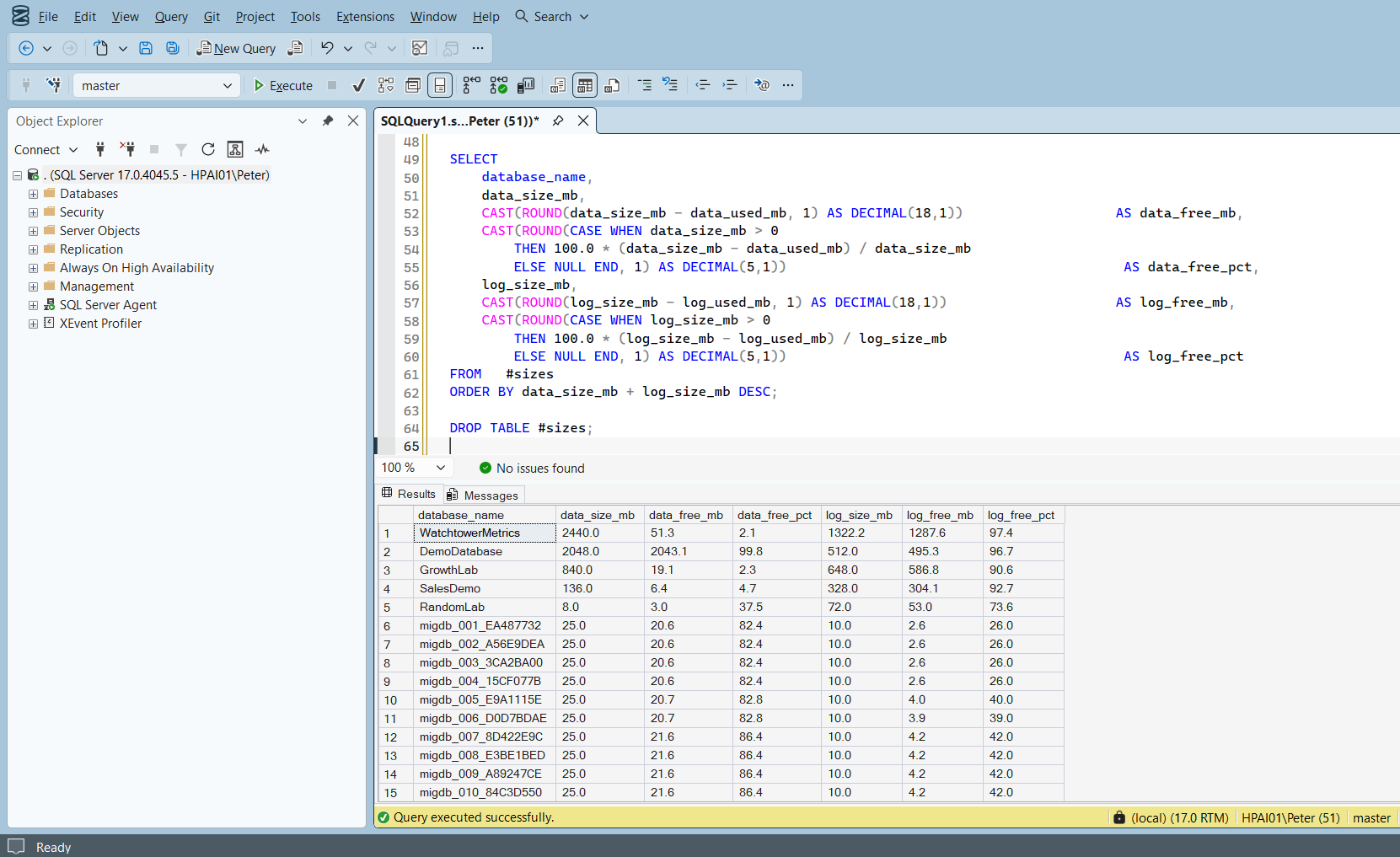
Largest database first, so the row that matters is rarely the top one. Here it is WatchtowerMetrics: the data file is 2.1% free and the next insert that does not fit will trigger an autogrowth, while its transaction log is 1.3 GB and 97.4% free, which is a log that grew once and was never sized back down. The 10 migdb_ rows underneath are a migration test set, and they are the shape you learn to skim past.
Understanding the Results
There are no fixed thresholds that apply to every SQL Server environment. A large database with low free space may be entirely normal if the growth is controlled and the storage is there. A small database growing in a way nobody expected may need looking at today. What the columns give you is the shape of each database, and the rows that stand out.
database_namedatabase_id > 4, so master, model, msdb and tempdb are never listed, and a database that is offline or restoring is absent too.Act when a database you expected is missing. It is offline, it is mid-restore, or you cannot open it. The script enters every database in turn, so a permissions gap shows up as a missing row rather than an error.data_size_mbdata_free_mbdata_free_pctlog_size_mblog_free_mblog_free_pctlog_reuse_wait_desc in sys.databases: LOG_BACKUP means log backups are not running and the file will keep growing until the volume stops it. Every value it can return, and what to do about each.Free Space That Nobody Chose
Large amounts of unused space are worth a question rather than an alarm. Previous growth that is no longer needed, an archive or cleanup that ran, a database restored from a bigger environment, or deliberate pre-sizing all look identical in these columns. The question is not whether the free space is large, it is whether the current size is one somebody chose.
Usually the answer is to leave it alone. If the space will be reused, the allocation is doing no harm, and shrinking a file to reclaim it fragments indexes and generally ends with the file growing straight back.
Common Causes Of Database Growth
Common causes include:
- Application growth.
- Large imports or migrations.
- Index maintenance.
- CDC retention issues.
- ETL workloads.
- Reporting processes.
- Unexpected transaction volume.
- Long-running transactions.
- Poorly planned file sizing.
Microsoft’s reference covers sys.master_files, sys.database_files and sys.databases in full.
Related Scripts
You may also find these scripts useful:
- Storage and Capacity (hub)
- Database Growth Forecast
- Database Growth Risk
- Database Free Space Summary
- Database Files Detail
- Disk Space
- Filegroup Space
- The Filegroup Has No Files Assigned to It (Error 622)
- msdb Is Growing: Purge Backup, Job and Mail History Safely, the next move when msdb is the row that stands out in this output
- Transaction Log Size and Usage
- VLF Count
- Autogrowth History
- OS and Hardware Info
- Patch Level
- Linked Servers
- Database Snapshot Inventory
- Login and Job Inventory
- Database Inventory
- Database Summary
- DBA Scripts: The Complete Guide, the map across every script on this site
Frequently Asked Questions
Should I shrink databases with free space?
Usually not.
If the space is expected to be reused, keeping the allocation is normally preferable. Shrinking files can introduce fragmentation and often results in the files growing again.
Why check database free space and disk space separately?
Database free space shows capacity available inside SQL Server files.
Disk space shows whether the server can support future growth.
Both are required for proper capacity management.
Why does the script use dynamic SQL?
FILEPROPERTY('SpaceUsed') must run in the context of the database containing the file. The script switches database context to return accurate usage information.
Summary
Database size monitoring is a simple but important SQL Server health check.
This script provides an estate-wide view of database storage by showing allocated data and transaction log sizes, current usage, and available free space across all online user databases.
Combined with disk monitoring and growth tracking, it gives DBAs the information needed to identify storage risks early, investigate unexpected growth, and plan capacity before storage becomes a production issue.
Regular storage reviews are one of the simplest ways to prevent avoidable SQL Server incidents.
Leave a Reply