
Identify SQL Server Logins With Sysadmin Access
The sysadmin fixed server role provides unrestricted access to a SQL Server instance.
Members of this role can perform any operation on the server, including creating databases, changing security settings, accessing all data, and modifying server configuration. Because of this level of privilege, knowing exactly who has sysadmin access is a basic but important security review.
In many environments, sysadmin membership grows over time. Temporary access becomes permanent, old administrator accounts remain enabled, service accounts are granted excessive permissions, or accounts from previous teams are never removed.
Regularly reviewing sysadmin membership helps ensure privileged access is intentional and still required.
This script returns all members of the SQL Server sysadmin fixed server role, including account type, disabled status, and account creation details. A clean sysadmin list should never contain surprises. If you don’t recognise every account, you have something to investigate.
Why Sysadmin Members Matters
SQL Server security is built around controlling who can perform privileged actions.
The sysadmin role bypasses normal permission checks and effectively provides full control of the SQL Server instance.
Reviewing sysadmin membership helps with:
- Security audits.
- Access reviews.
- Least privilege assessments.
- Compliance checks.
- New environment handovers.
- Investigating unexpected administrative activity.
- Identifying stale or unnecessary privileged accounts.
Things I typically look for:
- Unexpected user accounts with sysadmin access.
- Disabled accounts that should be removed.
- Personal accounts used where groups should exist.
- Service accounts with excessive permissions.
- Old administrator access from previous teams or projects.
A healthy production environment should have a small, understood list of sysadmin members, with every account having a clear reason for requiring that level of access.
Unlike database permissions, sysadmin bypasses almost every security boundary inside SQL Server. Membership grants unrestricted administrative privilege within the instance, which makes this one of the highest value security checks any DBA can perform.
When to Run This Script
Run this script during:
- Routine SQL Server security reviews.
- New server onboarding.
- Access audits.
- Compliance assessments.
- Team or ownership changes.
- After security incidents.
- Before production go-lives.
- Regular DBA health checks.
The Script
Run the following script against your SQL Server instance.
/*
Script Name : Get-SysadminMembers
Category    : security-and-permissions
Purpose     : List members of the sysadmin fixed server role for audits and privilege review.
Author      : Peter Whyte (https://sqldba.blog/dba-scripts-get-sysadmin-members/)
Requires    : VIEW ANY DEFINITION (sysadmin and securityadmin have it implicitly)
HealthCheck : Yes
*/

-- SAFE:ReadOnly
-- IMPACT:Low

SET NOCOUNT ON;

SELECT
    sp.name AS login_name,
    sp.type_desc,
    sp.is_disabled,
    sp.create_date,
    sp.modify_date
FROM sys.server_principals sp
JOIN sys.server_role_members srm
    ON sp.principal_id = srm.member_principal_id
JOIN sys.server_principals sr
    ON srm.role_principal_id = sr.principal_id
WHERE sr.name = 'sysadmin'
ORDER BY sp.name;
This joins sys.server_principals with sys.server_role_members to return every login assigned to the sysadmin fixed server role, together with its login type, disabled status and creation metadata.
How To Run From The Repo
Clone DBA Tools, initialise the environment and run the script:
# Clone dba-tools repo:
git clone https://github.com/peterwhyte-lgtm/dba-tools

# Initialize environment:
cd dba-tools
.\Initialize-Environment.ps1

# List members of the sysadmin server role:
.\run.ps1 Get-SysadminMembers

# Run against a remote SQL Server:
.\run.ps1 Get-SysadminMembers -ServerInstance SQLSERVER01
This script lives in the repo at:
sql/security/access/Get-SysadminMembers.sqlpowershell/wrappers/security/access/Get-SysadminMembers.ps1
Example Output
Below is the script run against a test instance. Eleven principals hold sysadmin: five SQL logins, five Windows service accounts created by the SQL Server installer, and sa. Row 4 is the one to notice. DemoDisabledAdmin carries is_disabled = 1 and still holds the role.
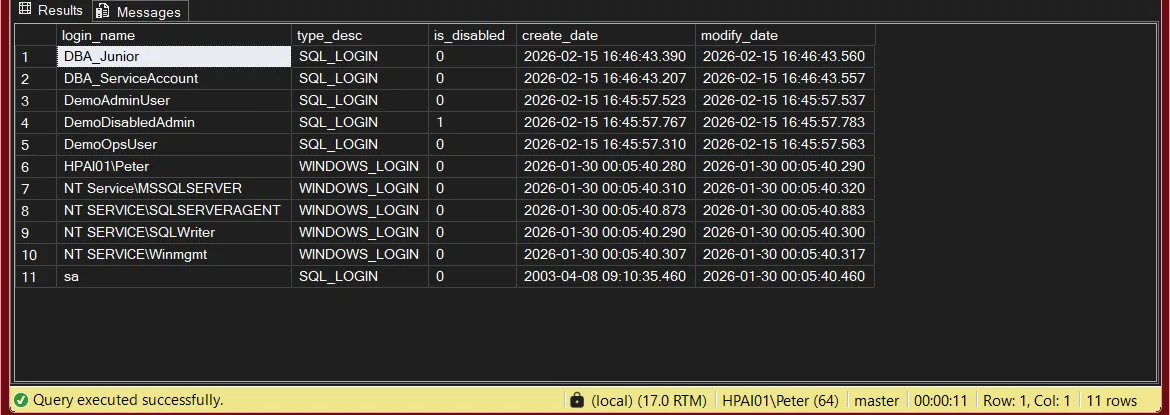
The status bar reads 11 rows, and that number matters more than it looks. A short result is the thing to be suspicious of, for the reason set out below.
Understanding the Results
One row per principal that is a direct member of sysadmin. Five columns, and the last two are more useful than they look.
login_namesa.WatchEvery name here should map to a person or a documented service. A name nobody can account for is the finding.type_descsys.server_principals.type_desc and not filtered, so a value you do not recognise is a real value and not a bug.Blind spotA WINDOWS_GROUP row is a group, not a person. Its members never appear here and have to be reviewed in Active Directory.is_disabled1 means the login cannot authenticate today. DemoDisabledAdmin above is the example.WatchDisabled is not removed. Re-enabling is one command and the sysadmin membership comes back with it, so review and justify rather than assuming it is harmless.create_datemodify_dateWhat This Script Does Not Tell You
Read this before using the output as evidence. The query answers one narrow question: which server principals are direct members of sysadmin.
sys.server_principals is itself permission controlled. A caller without VIEW ANY DEFINITION sees only the principals it owns and gets a shorter list rather than an error. On my test instance the full list is 11 rows. The identical query run as a plain login with no server level permission returned 1. No warning, just an instance that looks clean. Confirm the result is complete before you trust it:SELECT IS_SRVROLEMEMBER('sysadmin') AS is_sysadmin,
HAS_PERMS_BY_NAME(NULL, NULL, 'VIEW ANY DEFINITION') AS can_see_all_principals;can_see_all_principals is 0 and you are not a sysadmin, the list is incomplete. VIEW ANY DATABASE is granted to public and does not help here, which is exactly why it is the wrong thing to check for.DOMAIN\DBA-Admins appears, that group holds sysadmin. The query shows the group and never the people inside it. To answer “who actually has sysadmin on this instance” you have to review that group in Active Directory too, and again every time its membership changes.CONTROL SERVER, ownership chaining, high privilege database roles and impersonation can add up to something close to administrative control without putting a row in this list.Best Practices
Good SQL Server security hygiene usually means:
- Keep sysadmin membership as small as practical.
- Prefer Windows groups over individual administrator accounts.
- Avoid granting sysadmin to application service accounts.
- Remove unused privileged accounts.
- Review access regularly.
- Document why each sysadmin member exists.
- Export results periodically as an audit baseline.
- Treat every new sysadmin member as a change requiring approval.
The goal is not to eliminate sysadmin access. DBAs and operational teams need appropriate administrative access. The goal is ensuring every privileged account is intentional.
Microsoft’s reference covers sys.server_principals and sys.server_role_members in full.
Related Scripts
You may also find these scripts useful:
- Security (hub)
- Permissions and Role Membership
- Login Security Audit
- Orphaned Users
- User Permissions Audit
- Locked Out of SQL Server: Regain Sysadmin When Nobody Has It, what to do when this script returns nobody you can log in as
- Troubleshoot Login Failed for User (Error 18456)
- DBA Scripts: The Complete Guide, the map across every script on this site
Frequently Asked Questions
What is the sysadmin role in SQL Server?
sysadmin is a fixed server role that provides unrestricted administrative access to a SQL Server instance. Members can perform any action on the server.
Should application accounts have sysadmin access?
Generally no.
Application accounts should normally have only the permissions required for the application workload.
Why does the script return fewer rows than I expect?
Almost always permissions. Listing every member of sysadmin needs VIEW ANY DEFINITION, which sysadmin and securityadmin hold implicitly. Without it SQL Server returns only the principals you can see instead of raising an error, so the result looks like a short, healthy list. Run the HAS_PERMS_BY_NAME check above before trusting a small number.
Why don’t I see members of Windows groups?
SQL Server stores only the Windows group as the sysadmin member. Individual users are resolved by Active Directory, so you’ll need to inspect the group’s membership outside SQL Server.
Should every DBA be a sysadmin?
DBAs typically require elevated access, but membership should still be controlled, documented and reviewed regularly.
Is removing sysadmin access enough for security?
No.
Security reviews should also include database permissions, server roles, login activity and authentication settings.
Summary
Reviewing sysadmin membership is one of the simplest SQL Server security checks but one of the most important.
Over time, privileged access can accumulate through temporary requests, migrations, team changes and operational workarounds. Without regular reviews, SQL Server instances can end up with more administrators than intended.
This script provides a quick view of every login with sysadmin access, helping DBAs identify unexpected privileged accounts and maintain better access control.
Run this script regularly, keep historical outputs where appropriate, and investigate every unexpected account. A sysadmin list should never contain surprises.
Leave a Reply