
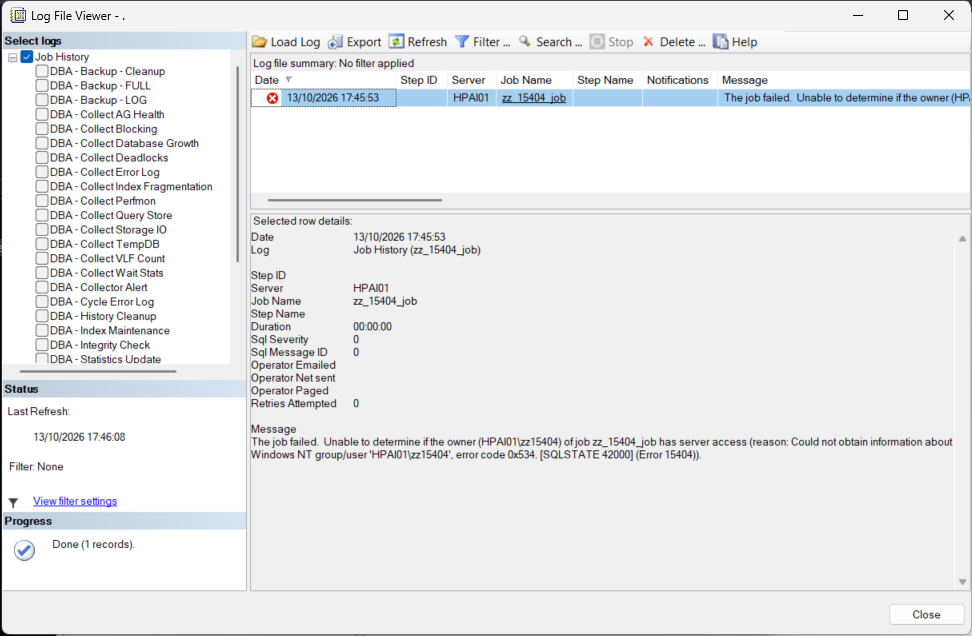
The same failure on the lab, with a local Windows account that owned the job and was then deleted: the same message, error code 0x534.
sp_update_job, then check every other job before the next one fails tonight.A job that ran for years fails before its first step, and the step history is empty. Most of the time someone has left, their domain account was removed, and the job was still in their name. SQL Server Agent checks the owner every time a job starts, and when it cannot get an answer it refuses to run the job at all.
Read the Reason in Brackets
The headline is the same for every cause. Everything after reason: is the part that tells you which one you have, and the error number at the end of it is the cause. On the lab the headline turned up with a reason that has nothing to do with the owner at all:
That instance had Agent XPs configured on but not yet applied (value 1, value_in_use 0), and every job on it, the sa ones included, had been failing with the same headline; the oldest of those failures still in job history was at 03:00 the day before. Nobody owned a missing account. So the owner in the message is not always the problem, and the bracket is where you find out.
| What the reason says | What it means | What to do |
|---|---|---|
Error 15404, error code 0x534 |
Windows has no account by that name any more, usually because it was deleted. Captured on the lab with a local account that does not exist. | Change the owner. |
Error 15404, error code 0x5 |
Access denied. The account may be fine, but the service account doing the lookup is not allowed to read it from Active Directory. Documented, not reproduced here. | Check the service account’s rights in AD, or change the owner to a login that needs no lookup. |
Error 15404, error code 0x54b |
No such domain: the domain could not be contacted, or a domain controller was unreachable when the job started. Documented, not reproduced here. | Fix the domain connectivity first. The owner may be perfectly valid. |
Error 15281, Agent XPs |
The Agent extended procedures are switched off, so the check itself cannot run. Every job fails. Captured on the lab. | Find out why Agent XPs is off before you touch any owner. MS Docs says starting Agent from SSMS turns it on, and it takes effect without a restart. |
No bracket: does not have server access |
The owner login exists but is denied CONNECT SQL. Read from the check procedure, not reproduced here. |
Change the owner, or find out who denied the login and why. |
The check is the procedure msdb.dbo.sp_sqlagent_has_server_access, and it is readable. For a Windows owner it calls xp_logininfo with the owner’s name, which is a live question to Windows or Active Directory. For a SQL login it reads hasaccess from the login metadata. A successful Windows answer is cached in msdb.dbo.syscachedcredentials for under 29 minutes, which is one reason a job can run at 01:00 and fail at 02:00 with nothing changed on the SQL Server side. If every job is failing, not just one, SQL Server Agent Will Not Start and the Agent XPs option page on MS Docs are the places to start.
Run the Same Lookup Agent Runs
You do not have to wait for the next scheduled run to know if the owner will pass. Take the name from the message and ask Windows the same question Agent asks:
EXEC master.dbo.xp_logininfo N'DOMAIN\user';That is the reason text from the job history, word for word, so this is the error the job would have failed with. A row back means the account can get in, through its own login or through a group. No rows and no error means the account exists in Windows but has no way into this instance at all, which Agent also treats as no access. That is what two built-in local accounts with no login returned on the lab. An unknown domain name also came back as 0x534 on the lab, because the lab is not domain joined; on a domain-joined server expect 0x54b for that case.
Find Every Job That Will Fail Next
One failed job is rarely the only one. Whoever left usually owned a handful, and the others fail on their own schedules over the next few days. This script checks every job owner the way the Agent procedure does, runs the Windows lookup once per distinct Windows owner, and writes the fix command for anything that is not clean. It changes nothing.
/*
Script Name : Get-SqlAgentJobOwnerAccess
Category    : configuration-and-environment
Purpose     : Check every SQL Agent job owner the way Agent does before a job starts, and list the jobs that will fail with "Unable to determine if the owner ... has server access" (error 15404) or "does not have server access".
Author      : Peter Whyte (https://sqldba.blog)
Requires    : db_datareader on msdb and VIEW ANY DEFINITION. The Windows owner check calls xp_logininfo, which needs sysadmin (or EXECUTE on xp_logininfo); without it those owners report the permission error instead of a result.
Notes       : Read-only. xp_logininfo asks Windows / Active Directory about each distinct Windows owner, the same call Agent makes at job start, so a domain account that has been deleted or cannot be looked up shows its real 15404 error here. Set @CheckWindowsOwners = 0 to skip the lookups. fix_command is generated text only; nothing is changed.
*/
-- SAFE:ReadOnly
-- IMPACT:Low
SET NOCOUNT ON;
SET QUOTED_IDENTIFIER ON;

DECLARE @CheckWindowsOwners bit     = 1;      -- 0 = skip the xp_logininfo lookups (no AD calls)
DECLARE @NewOwner           sysname = N'sa';  -- owner written into fix_command (use a dedicated service login if you have one)

DECLARE @agent_xps_in_use int =
    (SELECT CONVERT(int, value_in_use) FROM sys.configurations WHERE name = N'Agent XPs');

-- One row per distinct job owner, named the same way Agent names it (SUSER_SNAME of the stored SID)
CREATE TABLE #owner
(
    owner_sid     varbinary(85)  NOT NULL PRIMARY KEY,
    owner_name    sysname        NULL,
    windows_check nvarchar(2048) NULL
);

INSERT INTO #owner (owner_sid, owner_name)
SELECT DISTINCT j.owner_sid, SUSER_SNAME(j.owner_sid)
FROM msdb.dbo.sysjobs AS j;

-- Windows owners: ask Windows, as Agent does. A row back means the account has a way in
-- (its own login or a group); an error here is the error the job will fail with.
IF @CheckWindowsOwners = 1
BEGIN
    CREATE TABLE #xp
    (
        account_name      sysname       NULL,
        type              nvarchar(10)  NULL,
        privilege         nvarchar(10)  NULL,
        mapped_login_name sysname       NULL,
        permission_path   sysname       NULL
    );

    DECLARE @sid varbinary(85), @name sysname;
    DECLARE owner_cur CURSOR LOCAL FAST_FORWARD FOR
        SELECT o.owner_sid, o.owner_name
        FROM #owner AS o
        WHERE o.owner_name LIKE N'%\%'
          AND o.owner_name <> N'NT AUTHORITY\SYSTEM'
          AND NOT EXISTS (SELECT 1
                          FROM sys.server_permissions AS p
                          JOIN sys.server_principals AS sp ON sp.principal_id = p.grantee_principal_id
                          WHERE sp.sid = o.owner_sid
                            AND p.permission_name = N'CONNECT SQL'
                            AND p.state = 'D');
    OPEN owner_cur;
    FETCH NEXT FROM owner_cur INTO @sid, @name;
    WHILE @@FETCH_STATUS = 0
    BEGIN
        DELETE FROM #xp;
        BEGIN TRY
            INSERT INTO #xp EXEC master.dbo.xp_logininfo @name;
            UPDATE #owner
            SET windows_check = CASE WHEN EXISTS (SELECT 1 FROM #xp) THEN N'OK' ELSE N'NO ACCESS' END
            WHERE owner_sid = @sid;
        END TRY
        BEGIN CATCH
            UPDATE #owner
            SET windows_check = N'ERROR Msg ' + CONVERT(nvarchar(10), ERROR_NUMBER()) + N': ' + ERROR_MESSAGE()
            WHERE owner_sid = @sid;
        END CATCH;
        FETCH NEXT FROM owner_cur INTO @sid, @name;
    END;
    CLOSE owner_cur;
    DEALLOCATE owner_cur;
END;

WITH owner_state AS
(
    SELECT
        o.owner_sid,
        o.owner_name,
        o.windows_check,
        sp.type_desc,
        sp.is_disabled,
        CASE WHEN EXISTS (SELECT 1 FROM sys.server_permissions AS p
                          WHERE p.grantee_principal_id = sp.principal_id
                            AND p.permission_name = N'CONNECT SQL' AND p.state = 'D') THEN 1 ELSE 0 END AS connect_denied,
        CASE WHEN EXISTS (SELECT 1 FROM sys.server_permissions AS p
                          WHERE p.grantee_principal_id = sp.principal_id
                            AND p.permission_name = N'CONNECT SQL' AND p.state IN ('G', 'W')) THEN 1 ELSE 0 END AS connect_granted,
        CASE WHEN EXISTS (SELECT 1 FROM sys.server_role_members AS rm
                          JOIN sys.server_principals AS r ON r.principal_id = rm.role_principal_id
                          WHERE rm.member_principal_id = sp.principal_id
                            AND r.name = N'sysadmin') THEN 1 ELSE 0 END AS is_sysadmin
    FROM #owner AS o
    LEFT JOIN sys.server_principals AS sp ON sp.sid = o.owner_sid
),
verdict AS
(
    SELECT
        os.owner_sid,
        os.owner_name,
        os.type_desc,
        CASE
            WHEN os.owner_name IS NULL THEN 'FAIL'
            WHEN os.connect_denied = 1 THEN 'FAIL'
            WHEN os.owner_name NOT LIKE N'%\%' AND os.type_desc IS NOT NULL
                 AND os.connect_granted = 0 AND os.is_sysadmin = 0 THEN 'FAIL'
            WHEN os.windows_check LIKE N'ERROR%' THEN 'FAIL'
            WHEN os.windows_check = N'NO ACCESS' THEN 'FAIL'
            WHEN os.owner_name LIKE N'%\%' AND os.windows_check IS NULL
                 AND os.owner_name <> N'NT AUTHORITY\SYSTEM' THEN 'AT RISK'
            WHEN os.is_disabled = 1 THEN 'REVIEW'
            WHEN os.type_desc = 'WINDOWS_LOGIN'
                 AND os.owner_name NOT LIKE N'NT SERVICE\%'
                 AND os.owner_name NOT LIKE N'NT AUTHORITY\%' THEN 'REVIEW'
            ELSE 'OK'
        END AS owner_check,
        CASE
            WHEN os.owner_name IS NULL
                THEN 'Owner SID resolves to no login and no Windows account, so Agent cannot name or check the owner'
            WHEN os.connect_denied = 1
                THEN 'Owner login is denied CONNECT SQL: "does not have server access"'
            WHEN os.owner_name NOT LIKE N'%\%' AND os.type_desc IS NOT NULL
                 AND os.connect_granted = 0 AND os.is_sysadmin = 0
                THEN 'Owner login has no CONNECT SQL grant: "does not have server access"'
            WHEN os.windows_check LIKE N'ERROR%'
                THEN 'Windows lookup failed, the job fails with the same error: ' + os.windows_check
            WHEN os.windows_check = N'NO ACCESS'
                THEN 'Windows account exists but has no login or group path into this instance'
            WHEN os.owner_name LIKE N'%\%' AND os.windows_check IS NULL
                 AND os.owner_name <> N'NT AUTHORITY\SYSTEM'
                THEN 'Windows owner, looked up in AD at every job start; not checked (@CheckWindowsOwners = 0)'
            WHEN os.is_disabled = 1
                THEN 'Owner login is disabled. Agent''s check reads CONNECT SQL, not is_disabled, so this alone does not fail the job'
            WHEN os.type_desc = 'WINDOWS_LOGIN'
                 AND os.owner_name NOT LIKE N'NT SERVICE\%'
                 AND os.owner_name NOT LIKE N'NT AUTHORITY\%'
                THEN 'Owned by an individual Windows account: the job fails once that account is removed from AD'
            ELSE 'Owner resolves and has server access'
        END AS owner_reason
    FROM owner_state AS os
)
SELECT
    j.name AS job_name,
    j.enabled AS job_enabled,
    ISNULL(v.owner_name, '(unresolved) ' + CONVERT(varchar(200), j.owner_sid, 1)) AS owner_name,
    CASE WHEN v.owner_name IS NULL THEN 'UNRESOLVED SID'
         WHEN v.type_desc IS NOT NULL THEN v.type_desc
         WHEN v.owner_name LIKE N'%\%' THEN 'WINDOWS (no own login)'
         ELSE 'NO LOGIN'
    END AS owner_type,
    v.owner_check AS access_check,
    CASE WHEN @agent_xps_in_use = 0
         THEN 'AGENT XPS OFF (value_in_use = 0): every job fails at start, sa included. Owner: ' + v.owner_reason
         ELSE v.owner_reason
    END AS reason,
    CASE js.last_run_outcome
        WHEN 0 THEN 'Failed'
        WHEN 1 THEN 'Succeeded'
        WHEN 2 THEN 'Retry'
        WHEN 3 THEN 'Cancelled'
        ELSE 'Unknown'
    END AS last_run_outcome,
    CASE WHEN js.last_run_date = 0 OR js.last_run_date IS NULL THEN NULL
         ELSE CONVERT(datetime,
                  STUFF(STUFF(CAST(js.last_run_date AS char(8)), 7, 0, '-'), 5, 0, '-') + ' ' +
                  STUFF(STUFF(RIGHT('000000' + CAST(js.last_run_time AS varchar(6)), 6), 5, 0, ':'), 3, 0, ':'))
    END AS last_run_at,
    CASE WHEN v.owner_check = 'OK' THEN NULL
         ELSE N'EXEC msdb.dbo.sp_update_job @job_name = N''' + REPLACE(j.name, N'''', N'''''')
              + N''', @owner_login_name = N''' + REPLACE(@NewOwner, N'''', N'''''') + N''';'
    END AS fix_command
FROM msdb.dbo.sysjobs AS j
JOIN verdict AS v ON v.owner_sid = j.owner_sid
LEFT JOIN msdb.dbo.sysjobservers AS js ON js.job_id = j.job_id
ORDER BY
    CASE v.owner_check
        WHEN 'FAIL' THEN 1 WHEN 'AT RISK' THEN 2 WHEN 'REVIEW' THEN 3 ELSE 4 END,
    j.name;
It needs sysadmin for the xp_logininfo calls; without it the Windows owners report the permission error rather than a result. Set @CheckWindowsOwners = 0 to skip the AD lookups, and those owners come back as AT RISK instead. From the repo:
# Clone dba-tools repo:
git clone https://github.com/peterwhyte-lgtm/dba-tools

# Initialize environment:
cd dba-tools
.\Initialize-Environment.ps1

# Check every SQL Agent job owner:
.\run.ps1 Get-SqlAgentJobOwnerAccess

# Against a remote sql server:
.\run.ps1 Get-SqlAgentJobOwnerAccess -ServerInstance SQLSERVER01
The script lives in the repo at sql/monitoring/jobs/Get-SqlAgentJobOwnerAccess.sql.
On the lab I set up four throwaway jobs, each owned in a way that goes wrong in production: a SQL login denied CONNECT SQL, an owner SID for a domain account that no longer exists (written straight into msdb.dbo.sysjobs on a throwaway job, because the lab has no domain to delete an account from), a disabled SQL login, and a job owned by a person’s Windows login. The top of the result:
The other 25 rows were the lab’s own sa jobs, all OK. Every reason on that instance started with AGENT XPS OFF (value_in_use = 0): every job fails at start, sa included., the same state as the job history above, followed by the owner finding. The owner findings for the four test jobs, verbatim:
- FAIL, denied login:
Owner login is denied CONNECT SQL: "does not have server access" - FAIL, unresolved SID:
Owner SID resolves to no login and no Windows account, so Agent cannot name or check the owner. The owner name is the raw SID, because there is no name left to show. - REVIEW, disabled login:
Owner login is disabled. Agent's check reads CONNECT SQL, not is_disabled, so this alone does not fail the job - REVIEW, a person’s account:
Owned by an individual Windows account: the job fails once that account is removed from AD. This is the one to act on before anyone leaves.
A Windows owner that fails the lookup comes back as FAIL with the lookup error in the reason, the same Msg 15404 ... error code 0x534 as above. That path was tested on the lab with the lookup block on its own; there was no domain account to delete for a full run. Ordering is FAIL, AT RISK, REVIEW, OK, so the work is at the top. Get SQL Agent Job Overview shows the same jobs with their last run, if you want the wider picture.
Change the Owner
The fix is one call per job. sp_update_job changes the owner and nothing else, and it works when the current owner no longer resolves:
EXEC msdb.dbo.sp_update_job
     @job_name         = N'Nightly Export',
     @owner_login_name = N'sa';
The fix_command column already has that line for every job that needs it. On the lab I ran the four generated commands and the script again: all four test jobs came back OK, the unresolved one included. In SSMS it is the Owner box on the job’s General page, which MS Docs walks through in Give others ownership of a job.
- A sysadmin owner changes what a T-SQL step runs as. A step owned by a non-sysadmin runs as that login. Owned by
saor any sysadmin, it runs as the Agent service account. Moving a job from a narrow login tosagives it more rights, not just a working owner. saworks because it never leaves and needs no lookup in AD. A dedicated SQL login for job ownership does the same job with an owner name you chose.- Do not reuse another person’s account. That is the same incident again, later.
- Maintenance plans: the owner of a plan’s jobs can be reset when someone edits and saves the plan in SSMS. Documented, not reproduced here. Run the check again after anyone saves a plan.
One thing that will not cause this: dropping the login. SQL Server refuses while the login still owns a job:
So an owner that stops resolving almost always comes from the Windows side, where nobody asks SQL Server first. That is also why it lands after a migration: SQL Server Login Migration: What Gets Silently Left Behind covers the jobs that arrive on a new server owned by a login that did not make the trip.
Frequently Asked Questions
The job ran fine yesterday. Why now?
Does disabling a leaver’s SQL login stop their jobs?
CONNECT SQL, not whether it is disabled. On the lab a disabled login still showed hasaccess = 1, and EXECUTE AS LOGIN for it still worked. The job run itself was not reproduced, because Agent XPs was off on the lab. Change the owner rather than relying on the disable.Every job is failing with this, even the ones owned by sa. What is going on?
Error 15281, Agent XPs switched off. A domain-wide outage gives a similar picture for Windows owners only, with 0x54b in the reason.The owner is in an AD group but has no login of their own. Does that work?
xp_logininfo finds the group path and Agent accepts it. It is still a person’s account, so the job fails the day they leave, and it fails whenever AD cannot be reached. The script reports these as WINDOWS (no own login).Should I just run every job as sa?
sa is the common fix and it is fine for maintenance jobs that need sysadmin anyway. For a job that only needs rights in one database, a dedicated login keeps those steps running with those rights and nothing more.The owner check is the first thing Agent does with a job. These cover what comes before and after it:
- SQL Agent Job Failed, the router, if the job did start and a step is what broke.
- Get SQL Agent Job Failure Summary, every recent failure across the instance, so you can see how many jobs this has already hit.
- Get SQL Agent Job Overview, every job with its owner, enabled state and last outcome.
- Get Login and Job Inventory, the login and job lists to check before an account is decommissioned.
- SQL Server Login Migration: What Gets Silently Left Behind, the same failure arriving after a server move.
- SQL Server Agent Will Not Start, when no job runs at all because Agent itself is down.
- DBA Scripts: SQL Agent and Jobs, the pillar the Agent scripts on this page belong to.
Leave a Reply