
Inserts Fail on a Table That Has Worked for Years
Every insert into one table starts failing at once. Nothing was deployed, the table is not full in any storage sense, and the error names a data type rather than a constraint:
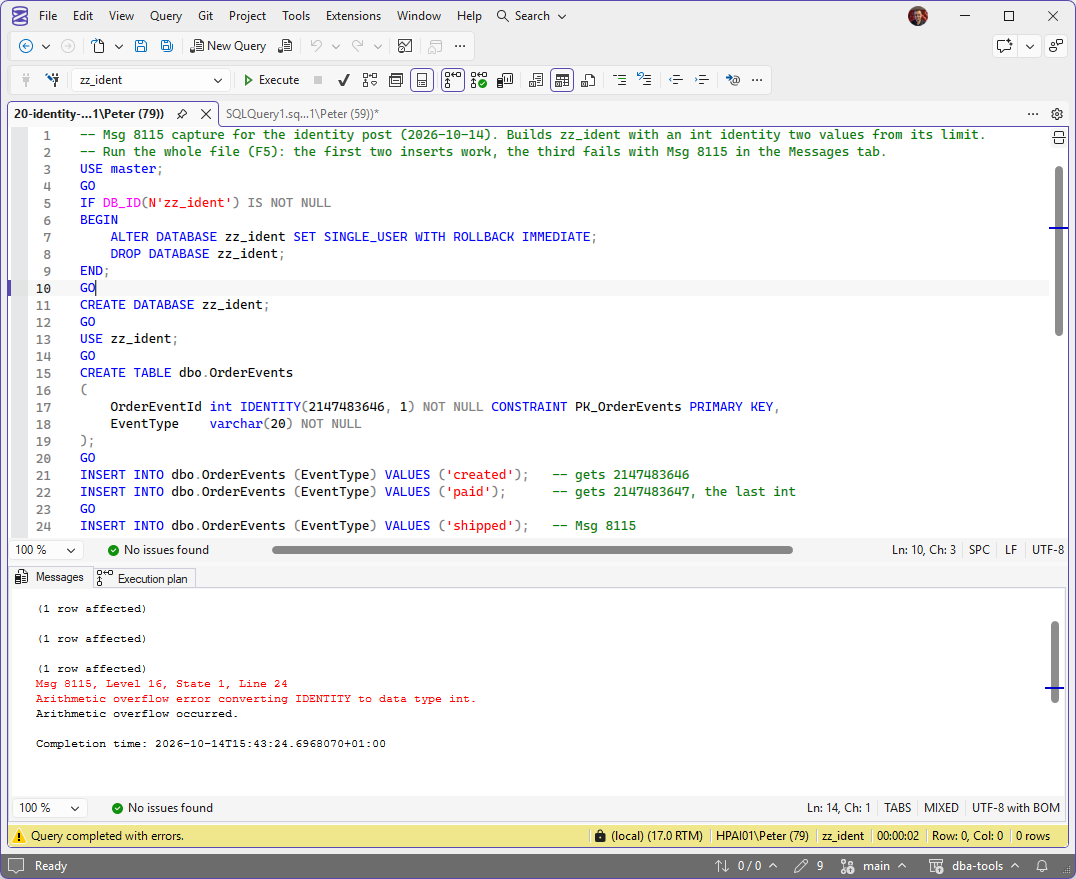
The same error on the lab, as SSMS shows it: an int identity seeded two values from the top. The inserts before it worked; the one that needed the next number failed with Msg 8115 and wrote nothing.
The identity column has run out of numbers. An int identity seeded at 1 can hand out 2,147,483,647 values and no more, and the insert that needs the next one fails. Every insert after it fails the same way, and the error aborts the whole batch, so anything that ran after the insert in that batch never ran at all.
This script lists every identity column in every online database on the instance with how far through its range it is and how many inserts are left, so the column at 86% is found on a quiet afternoon rather than by the application.
Why Identity Column Usage Matters
- The failure is total and sudden. The table works perfectly until the last value is used, then rejects every insert
- Row count tells you nothing. Gaps from rollbacks, failed inserts, deletes and identity caching all burn values, so a small table can be close to the limit
- The fix is not quick. Widening a key column means dropping and recreating the primary key and everything that references it, which is planned work, not an incident fix
- Smaller types run out first and are easy to forget: a
smallintlookup key stops at 32,767 and atinyintat 255
When to Run This Script
- Straight away, when inserts fail with Msg 8115 and an identity is named in the message
- As a routine capacity check alongside disk and database growth, monthly is plenty for most systems
- Before a bulk load, migration or data import that will add a large number of rows to an existing table
- When taking over an estate you did not build, to find the old
intkeys before they find you
The Script
Run the following script against your SQL Server instance.
- Tested on: SQL Server 2025 (RTM CU8), Windows lab instance
- Last verified: 2026-10-09 (real run against a scratch database holding identity columns of every integer type, deliberately pushed towards their limits, then dropped)
- Permissions: VIEW ANY DATABASE, plus access to each database it inspects
- Safety: read-only, impact low
/*
Script Name : Get-IdentityColumnUsage
Category    : monitoring
Purpose     : Show how close every identity column on the instance is to the maximum value its
              data type can hold, so an int key is found at 85% rather than when inserts start
              failing with Msg 8115 (arithmetic overflow converting IDENTITY to data type int).
Author      : Peter Whyte (https://sqldba.blog)
Requires    : VIEW ANY DATABASE, plus access to each online database it inspects (it opens every database)
Notes       : percent_used is the share of the range between the column's seed and the limit of its
              data type (the maximum for a positive increment, the minimum for a negative one) that
              last_value has already consumed. values_remaining is how many more inserts fit at the
              current increment (NULL for decimal/numeric identities wider than 30 digits).
              last_value is NULL until the first row is ever inserted.
              A reseed (DBCC CHECKIDENT ... RESEED) moves last_value but not seed_value. When a reseed
              has put last_value behind the seed, such as an exhausted int reseeded into its negative
              range, percent_used is measured from the far end of the data type instead.
              Sequences (sys.sequences) are not identity columns and are not covered here.
              Set @MinPercentUsed to filter out columns below a threshold (0 returns every column).
*/
-- SAFE:ReadOnly
-- IMPACT:Low
SET NOCOUNT ON;
SET QUOTED_IDENTIFIER ON;

DECLARE @MinPercentUsed DECIMAL(5,2) = 0;

IF OBJECT_ID('tempdb..#identity') IS NOT NULL DROP TABLE #identity;

CREATE TABLE #identity (
    database_name NVARCHAR(128),
    schema_name NVARCHAR(128),
    table_name NVARCHAR(128),
    column_name NVARCHAR(128),
    data_type NVARCHAR(40),
    seed_value DECIMAL(38,0),
    increment_value DECIMAL(38,0),
    last_value DECIMAL(38,0) NULL,
    type_max DECIMAL(38,0),
    type_min DECIMAL(38,0),
    row_count BIGINT
);

DECLARE @sql NVARCHAR(MAX) = N'';

SELECT @sql += N'
USE ' + QUOTENAME(name) + N';
INSERT INTO #identity
SELECT
    DB_NAME(),
    s.name,
    t.name,
    ic.name,
    CASE WHEN ty.name IN (''decimal'', ''numeric'')
         THEN ty.name + ''('' + CAST(ic.precision AS VARCHAR(2)) + '',0)''
         ELSE ty.name END,
    CAST(ic.seed_value AS DECIMAL(38,0)),
    CAST(ic.increment_value AS DECIMAL(38,0)),
    CAST(ic.last_value AS DECIMAL(38,0)),
    CASE ty.name
        WHEN ''tinyint''  THEN CAST(255 AS DECIMAL(38,0))
        WHEN ''smallint'' THEN CAST(32767 AS DECIMAL(38,0))
        WHEN ''int''      THEN CAST(2147483647 AS DECIMAL(38,0))
        WHEN ''bigint''   THEN CAST(9223372036854775807 AS DECIMAL(38,0))
        ELSE CAST(REPLICATE(''9'', ic.precision) AS DECIMAL(38,0))
    END,
    CASE ty.name
        WHEN ''tinyint''  THEN CAST(0 AS DECIMAL(38,0))
        WHEN ''smallint'' THEN CAST(-32768 AS DECIMAL(38,0))
        WHEN ''int''      THEN CAST(-2147483648 AS DECIMAL(38,0))
        WHEN ''bigint''   THEN CAST(-9223372036854775808 AS DECIMAL(38,0))
        ELSE -CAST(REPLICATE(''9'', ic.precision) AS DECIMAL(38,0))
    END,
    (SELECT SUM(p.rows)
     FROM sys.partitions AS p
     WHERE p.object_id = t.object_id
       AND p.index_id IN (0, 1))
FROM sys.identity_columns AS ic
JOIN sys.tables AS t
    ON t.object_id = ic.object_id
JOIN sys.schemas AS s
    ON s.schema_id = t.schema_id
JOIN sys.types AS ty
    ON ty.user_type_id = ic.system_type_id
WHERE t.is_ms_shipped = 0;
'
FROM sys.databases
WHERE state_desc = 'ONLINE'
  AND database_id <> 2            /* tempdb is rebuilt at every startup */
  AND HAS_DBACCESS(name) = 1;     /* skip what this account cannot open, rather than failing the whole run */

EXEC sys.sp_executesql @sql;

;WITH dir AS (
    /* the limit is the end of the range the increment walks towards; the start is the far end */
    SELECT
        *,
        CASE WHEN increment_value > 0 THEN type_max ELSE type_min END AS type_limit,
        CASE WHEN increment_value > 0 THEN type_min ELSE type_max END AS type_start
    FROM #identity
), base AS (
    /* measure from the seed, unless a reseed has moved last_value behind the seed (the usual
       fix of reseeding an exhausted int into its negative range), then from the far end */
    SELECT
        *,
        CASE WHEN last_value IS NOT NULL
              AND SIGN(last_value - seed_value) = -SIGN(increment_value)
             THEN type_start ELSE seed_value END AS range_base
    FROM dir
), calc AS (
    SELECT
        database_name,
        schema_name,
        table_name,
        column_name,
        data_type,
        seed_value,
        increment_value,
        last_value,
        type_limit,
        row_count,
        /* worked in FLOAT so a numeric(38,0) column cannot overflow the subtraction */
        CAST(
            CASE WHEN last_value IS NULL OR type_limit = range_base THEN 0
                 ELSE (CAST(last_value AS FLOAT) - CAST(range_base AS FLOAT))
                    / (CAST(type_limit AS FLOAT) - CAST(range_base AS FLOAT)) * 100
            END AS DECIMAL(6,2)) AS percent_used,
        /* exact for tinyint to bigint and narrower decimals; NULL for decimal/numeric wider than
           30 digits, where the exact count does not fit and percent_used is the figure to read */
        CASE WHEN ABS(type_limit) < 1e30
             THEN FLOOR(ABS(type_limit - COALESCE(last_value, seed_value - increment_value)) / ABS(increment_value))
        END AS values_remaining
    FROM base
)
SELECT
    database_name,
    schema_name,
    table_name,
    column_name,
    data_type,
    seed_value,
    increment_value,
    last_value,
    type_limit,
    values_remaining,
    percent_used,
    row_count
FROM calc
WHERE percent_used >= @MinPercentUsed
ORDER BY percent_used DESC, database_name, schema_name, table_name;

DROP TABLE #identity;
It builds one pass per database over sys.identity_columns, works out the limit of each column’s data type in the direction its increment travels, and compares last_value against it. Set @MinPercentUsed at the top to hide everything below a threshold; at the default of 0 it returns every identity column, highest first.
How To Run From The Repo
Clone DBA Tools, initialize and run the script:
# Clone dba-tools repo:
git clone https://github.com/peterwhyte-lgtm/dba-tools

# Initialize environment:
cd dba-tools
.\Initialize-Environment.ps1

# Check identity column usage across every database:
.\run.ps1 Get-IdentityColumnUsage

# To run against a remote sql server:
.\run.ps1 Get-IdentityColumnUsage -ServerInstance SQLSERVER01
This script lives in the repo at:
sql/monitoring/databases/Get-IdentityColumnUsage.sqlpowershell/wrappers/monitoring/databases/Get-IdentityColumnUsage.ps1
Example Output
Run against a lab instance with @MinPercentUsed set to 50, after four tables in a scratch database were pushed towards the limit of their data types. The unfiltered run returned 34 identity columns across the instance, and nothing outside those four was above 0.01%. The database_name, schema_name, seed_value and increment_value columns are left out here for width; they were the scratch database, dbo, 1 and 1 on every row.
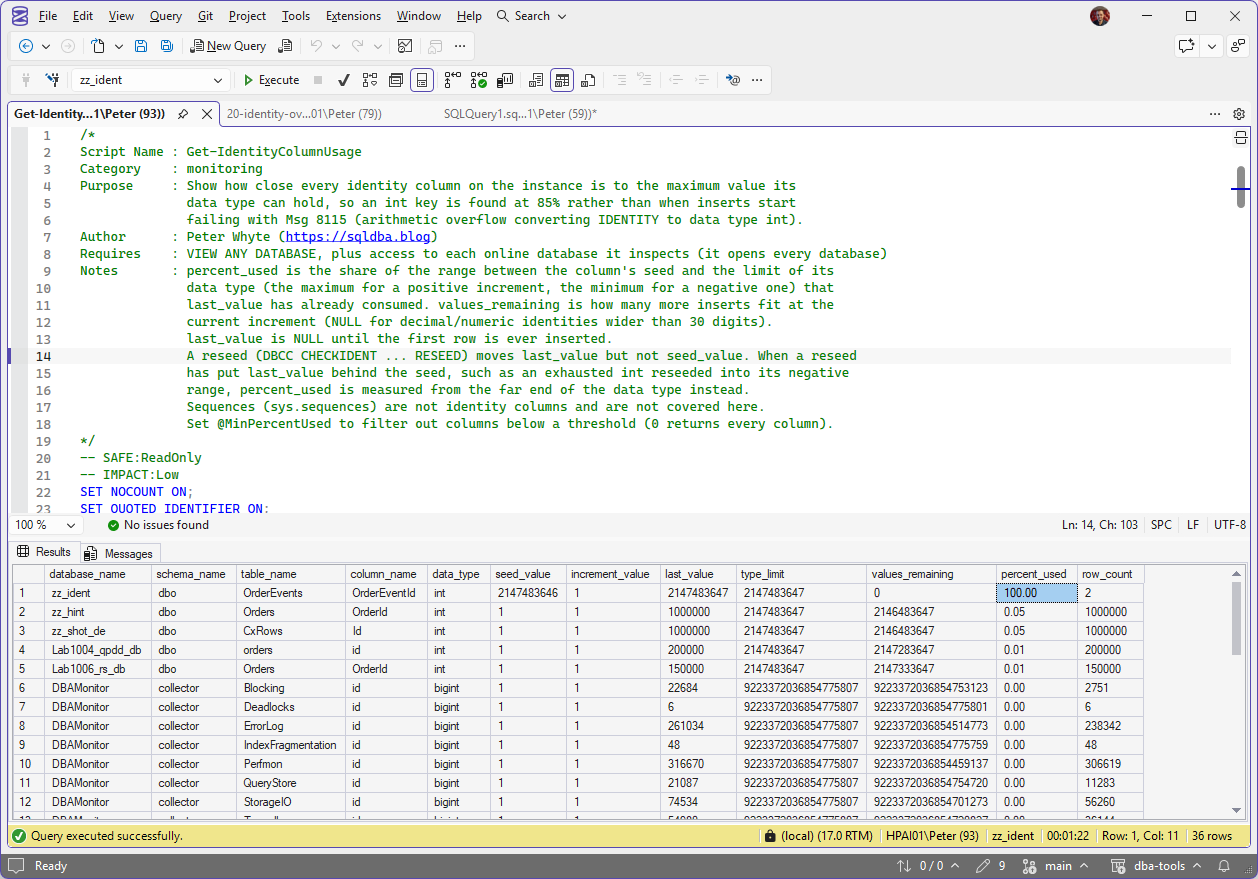
The script straight after, every identity column on the instance. OrderEvents is at the top at 100.00 with 0 values remaining and only 2 rows in the table, which is why a row count is no warning at all. The collector tables further down were created as bigint and sit at 0.00.
LookupCode is at 100.00 with 0 values remaining, so the next insert into it fails with Msg 8115. Ticket is a decimal(5,0) identity, and its limit is 99,999 because the limit of a decimal identity comes from its precision, not from any integer type.
Look at OrderEvents: 4 rows, 86.15% used. The column was reseeded to 1,850,000,000 to simulate years of churn, but in production the same picture comes from deletes, failed inserts and rolled-back transactions, none of which give their values back. A table with a small row count and a high last_value is the one a row-count check misses.
Understanding the Results
database_nameschema_nametable_namecolumn_nametempdb skipped because it is rebuilt at every startup. A database the account cannot open is skipped rather than failing the run.data_typetinyint 255, smallint 32,767, int 2,147,483,647, bigint 9,223,372,036,854,775,807. Decimal and numeric identities show their precision, and their limit is that many nines.seed_valueincrement_valuelast_value, not this. A negative increment walks towards the type minimum instead, and the script measures it that way.last_valuesys.identity_columns. NULL means no row has ever been inserted. It is not the highest value in the table: deleted rows, failed inserts and rollbacks all used values that are gone.type_limitvalues_remainingvalues_remaining is the number that matters for planning: divide it by the daily insert rate and you have the days left. It is NULL only for decimal or numeric identities wider than 30 digits.Act when the days left are fewer than the time it takes to schedule an outage. Widening a clustered primary key on a large table is a rebuild of the table, so the lead time is change approval plus maintenance window, not the length of the ALTER.percent_usedlast_value behind the seed, such as an exhausted int reseeded to its minimum, it is measured from the far end of the type instead, so the reseeded column reads near 0 rather than a negative number.Act when an int or smallint is past 80%. It is not urgent at that point, and that is exactly why it is the time to do it.row_countsys.partitions. Compare it with last_value: a large gap means values are being burned, and the column will run out sooner than the row count suggests.Monitor It Before It Fails
The script is the monitor. Three habits turn it from a one-off check into an early warning:
- Schedule it. Weekly in a SQL Server Agent job, or with the rest of your capacity checks. Identity columns burn slowly, so weekly is enough to see one coming months out.
- Set
@MinPercentUsedto 70. A healthy instance then returns nothing, and any row that comes back is the alert. - Keep
values_remainingfrom every run. Two readings a week apart give the burn rate, andvalues_remainingdivided by that rate is how many weeks are left. That date is what turns it into planned work.
I’ve seen this one in production myself, and on the business-critical databases the fix usually lands with the database developers who own the schema. Widening the key means the primary key, every foreign key that points at it, and any application code that holds the id in an int, which is their change to make and test. The DBA’s part is finding it early and handing them the table, the burn rate and the date it runs out, so it goes through a release instead of an outage.
How to Fix an Identity Column That Is Running Out
There are two real options, and the right one depends on whether you are planning or already failing. Widening to bigint is the permanent fix. On the lab, an ALTER COLUMN straight to bigint on a column that carries the primary key was refused:
So the key, and anything else bound to the column, comes off first:
-- Option 1: widen the column. The identity property and the current value carry over.
-- The primary key (and any foreign keys, indexes or schema-bound views on the column)
-- must be dropped first and recreated after. This rewrites every row: plan it as an outage.
ALTER TABLE dbo.OrderEvents DROP CONSTRAINT PK_OrderEvents;
ALTER TABLE dbo.OrderEvents ALTER COLUMN OrderEventId BIGINT NOT NULL;
ALTER TABLE dbo.OrderEvents ADD CONSTRAINT PK_OrderEvents PRIMARY KEY CLUSTERED (OrderEventId);

-- Option 2: buy time by reseeding into the negative half of the range.
-- Only if nothing depends on the key going up (ORDER BY id, "latest row" logic, ranges).
DBCC CHECKIDENT ('dbo.OrderEvents', RESEED, -2147483648);
On the lab, after the primary key was dropped, widened and recreated, sys.identity_columns reported the column as bigint with the identity property intact and last_value carried straight across, and the next insert took the next number. Foreign keys in other tables that reference the column have to be widened too, because a foreign key column must match the type it points at.
Reseeding is the emergency option. On the lab, a full int reseeded to -2,147,483,648 handed out -2,147,483,647 on the next insert, because a reseed on a table that already has rows uses the new value plus the increment. That buys the other half of the range, about 2.1 billion more values, with no table change at all. It only works if nothing depends on new rows having higher ids than old ones.
Going further: Get Table Sizes tells you how big the table you are about to rebuild really is, and Get Schema Change History shows whether someone has already been reseeding or altering it.
Best Practices
- Use
bigintfor the identity on any table that takes inserts continuously, such as logs, events, audit and queue tables. The cost is 4 extra bytes a row; the saving is this whole post. - Run this check on a schedule with the rest of your capacity checks, and track
values_remainingover time rather than a single snapshot, so you know the burn rate. - Never reseed backwards into values already in use. Check the lowest and highest ids in the table before any
DBCC CHECKIDENT ... RESEED. - When you widen a key, find every foreign key, index, view and application data type that references it before the change window, not during it.
MS Docs covers sys.identity_columns, DBCC CHECKIDENT, the IDENTITY property and the integer data type ranges in full.
Related Scripts
You may also find these scripts useful:
- Storage and Capacity (hub)
- Database Growth Risk and Forecast, the same question asked of data files
- Table Sizes
- Schema Change History
- Database Health
- Index Design Issues
- Conversion Failed When Converting the varchar Value to Data Type int (Error 245), another int limit that surfaces as an insert error
- DBA Scripts: The Complete Guide, the map across every script on this site
Frequently Asked Questions
What is the maximum value of an int identity column?
2,147,483,647. The full int range runs from -2,147,483,648 to 2,147,483,647, but an identity seeded at 1 with an increment of 1 only ever uses the positive half. smallint stops at 32,767, tinyint at 255, and bigint at 9,223,372,036,854,775,807, which no realistic insert rate reaches.
Does a failed insert use up an identity value?
Yes. Identity values are not transactional, so a rolled-back insert, a failed insert and a server restart with the identity cache can all leave gaps. That is why the script reads last_value rather than counting rows: a table with 4 rows can still have used 1.85 billion values, which is the shape of the lab table in the example output above.
Can I just reseed the identity column to the lowest unused value?
Only if you are certain no row already holds the values you are about to hand out again. DBCC CHECKIDENT does not check, and on a primary key the next clash fails with a duplicate key error rather than an overflow. Reseeding into the negative range avoids the clash because nothing has used those values, but it breaks any code that assumes the newest row has the highest id.
Why does a reseeded column show 0.00 percent used?
Because it has the whole negative range in front of it. When last_value sits behind the seed, the script measures from the far end of the data type instead, so an exhausted int reseeded to -2,147,483,648 shows almost 4.3 billion values remaining rather than a negative percentage. Read that figure with care: only the 2.1 billion negative values are free. Once the column climbs back past 0 it runs into the ids already in the table, and on a primary key the next insert fails with a duplicate key error.
Does this cover sequences?
No. A SEQUENCE object is a separate thing with its own minimum, maximum and cycle settings in sys.sequences, and it can be shared by several tables. This script reads sys.identity_columns only.
Summary
An identity column runs out without warning: every insert works until the last value is gone, then every insert fails with Msg 8115. Row counts do not predict it, because deletes, failures and rollbacks burn values that never come back.
Run this as a routine capacity check and read values_remaining against how fast the table grows. Anything past 80% on an int or smallint is time to plan the change to bigint, and a reseed into the negative range is the way to buy time if you are already at the wall.
Leave a Reply