
Before diving into anything deeper, a health check should start with the basics: is every database actually online, is the recovery model what it’s supposed to be, and is anything quietly stuck waiting for a log backup it isn’t getting. None of these are exotic checks, but they’re exactly the kind of thing that goes unnoticed for months on an instance nobody’s watching closely, because a database in SUSPECT state or stuck on LOG_BACKUP doesn’t necessarily throw an alert anywhere.
This script is the one-query overview: state, recovery model, log reuse wait reason, access mode, 3 risky settings, and current data/log size, for every user database on the instance in one pass.
Why Database Health Matters
Each column here answers a specific operational question that, left unchecked, turns into an incident:
state_descnotONLINEmeans a database is unavailable right now,RECOVERY_PENDING,SUSPECT, andOFFLINEall mean something has already gone wrong.recovery_model_descdetermines what backup strategy is even possible. A database quietly runningSIMPLEwhen the business expects point-in-time recovery is a gap that only surfaces during an actual restore, the worst possible time to find out.log_reuse_wait_descnotNOTHINGmeans the transaction log can’t reclaim space until whatever it’s waiting on clears, most commonly a missing log backup, which left unresolved leads straight to log file growth and eventually a full transaction log.is_auto_shrink_onis a setting Microsoft itself recommends against, it causes the log and data files to shrink and then immediately grow again under normal usage, generating fragmentation and I/O for no benefit.is_auto_close_oncloses and reopens the database’s files after every connection drops to zero, adding startup latency to the next connection, rarely appropriate outside single-user desktop scenarios.
Common Symptoms
- A transaction log that keeps growing despite regular log backups appearing to run.
- A database discovered offline or in recovery only when an application throws a connection error.
- Inconsistent backup behaviour traced back to a database that’s on
SIMPLErecovery when everyone assumedFULL. - Unexplained I/O spikes at regular intervals, sometimes a symptom of auto-shrink fighting normal growth.
When to Run This Script
- Routine SQL Server health checks, this is a good first query in any check, before the deeper diagnostics
- Getting to know a new or inherited instance for the first time
- Investigating unexpected transaction log growth
- After any change to backup jobs or maintenance plans, to confirm recovery model and log reuse status match expectations
The Script
Run the following script against your SQL Server instance.
/*
Script Name : Get-DatabaseHealth
Category    : maintenance-and-reliability
Purpose     : Review the health and sizing posture of user databases.
Author      : Peter Whyte (https://sqldba.blog/dba-scripts-get-database-health/)
Requires    : VIEW ANY DATABASE
HealthCheck : Yes
*/
-- SAFE:ReadOnly
-- IMPACT:Low
SET NOCOUNT ON;

SELECT
    d.name AS database_name,
    d.state_desc,
    d.recovery_model_desc,
    d.log_reuse_wait_desc,
    d.user_access_desc,
    d.is_read_only,
    d.is_auto_close_on,
    d.is_auto_shrink_on,
    ROUND(CAST(SUM(CASE WHEN mf.type_desc = 'ROWS' THEN mf.size END) * 8.0 / 1024 AS DECIMAL(18,2)), 1) AS data_size_mb,
    ROUND(CAST(SUM(CASE WHEN mf.type_desc = 'LOG' THEN mf.size END) * 8.0 / 1024 AS DECIMAL(18,2)), 1) AS log_size_mb
FROM sys.databases AS d
LEFT JOIN sys.master_files AS mf
    ON d.database_id = mf.database_id
WHERE d.database_id > 4
GROUP BY
    d.name,
    d.state_desc,
    d.recovery_model_desc,
    d.log_reuse_wait_desc,
    d.user_access_desc,
    d.is_read_only,
    d.is_auto_close_on,
    d.is_auto_shrink_on
ORDER BY d.name;
This queries sys.databases joined to sys.master_files, returning one row per user database with its current state, recovery model, log reuse wait reason, 3 risky configuration flags, and total data and log size in MB.
How To Run From The Repo
Clone DBA Tools, initialize and run the script:
# Clone dba-tools repo:
git clone https://github.com/peterwhyte-lgtm/dba-tools

# Initialize environment:
cd dba-tools
.\Initialize-Environment.ps1

# Review state, recovery model, and risky settings for every database:
.\run.ps1 Get-DatabaseHealth

# To run against a remote sql server:
.\run.ps1 Get-DatabaseHealth -ServerInstance SQLSERVER01
This script lives in the repo at:
sql/monitoring/databases/Get-DatabaseHealth.sqlpowershell/wrappers/monitoring/databases/Get-DatabaseHealth.ps1
Example Output
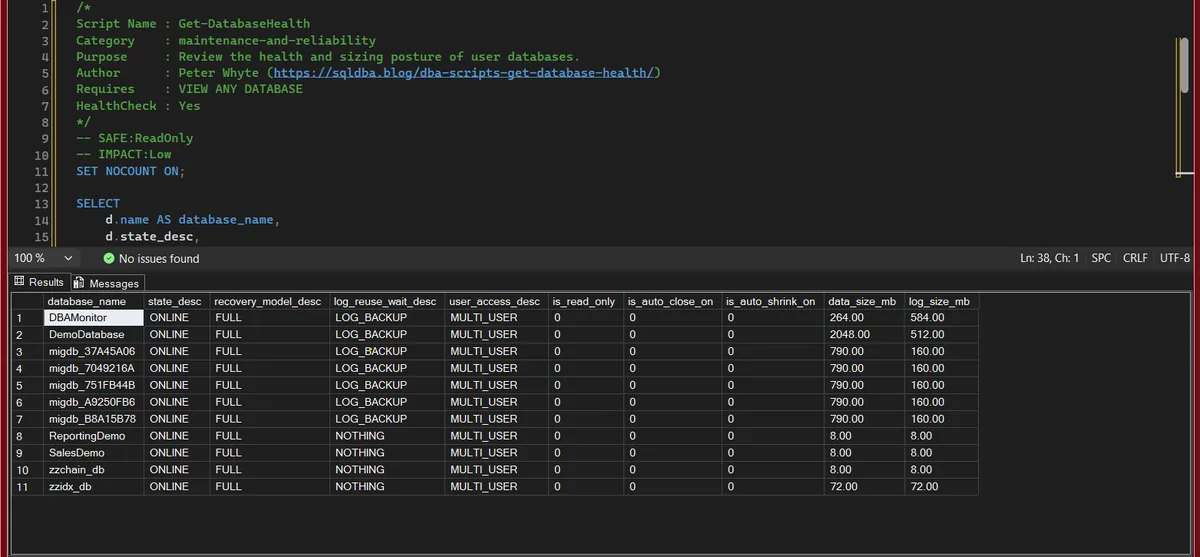
One row per database, and this instance shows the pattern the script exists to catch: 7 of the 11 are on FULL recovery with log_reuse_wait_desc at LOG_BACKUP, which means no log backup has run and the log cannot reuse its space. DBAMonitor is the one to worry about first, a 264 MB data file carrying a 584 MB log, because the log has already outgrown the data and will keep going until a log backup job exists or the database is switched to SIMPLE. The 4 rows reading NOTHING are healthy. Every state is ONLINE and every access is MULTI_USER, and the 2 legacy auto options are off everywhere.
Understanding the Results
database_namestate_descONLINE is the only good answer. RECOVERY_PENDING, SUSPECT, OFFLINE and RESTORING are active problems now, not warnings of a future one.Act when a database reads RESTORING and nobody is restoring anything. It was left behind by a restore chain, or it is a log shipping secondary that is meant to look like that.recovery_model_desclog_reuse_wait_descNOTHING is healthy. LOG_BACKUP means no recent log backup, ACTIVE_TRANSACTION a long-running transaction, REPLICATION, DATABASE_MIRRORING and AVAILABILITY_REPLICA a partner that has not caught up.Act when FULL and LOG_BACKUP appear on the same row. That database has point-in-time recovery in theory and a log that only grows in practice; either schedule log backups or switch it to SIMPLE.user_access_descMULTI_USER for anything in service. SINGLE_USER or RESTRICTED_USER on a production database means a maintenance step never switched it back, and the application is being refused.is_read_onlyis_auto_close_onis_auto_shrink_ondata_size_mblog_size_mbCommon Causes
LOG_BACKUP reuse waits on FULL recovery databases almost always trace back to the same root cause: someone (correctly) put the database on FULL recovery for point-in-time restore capability, but the log backup job either was never created, silently started failing, or was scoped to exclude a newly added database. The database keeps taking full backups on schedule, which look reassuring in a job history report, while the log itself just keeps growing between them.
How to Fix Database Health Issues
Missing log backups on FULL recovery, either add a scheduled log backup job, or, if point-in-time recovery genuinely isn’t needed for that database, switch it to SIMPLE:
-- Option A: take a log backup now, then schedule regular ones
BACKUP LOG RandomLab TO DISK = 'D:\Backups\RandomLab_log.trn';

-- Option B: if point-in-time recovery isn't needed, switch to SIMPLE
ALTER DATABASE RandomLab SET RECOVERY SIMPLE;
Auto-shrink or auto-close enabled:
ALTER DATABASE RandomLab SET AUTO_SHRINK OFF;
ALTER DATABASE RandomLab SET AUTO_CLOSE OFF;
Best Practices
- Run this script as the first step in any health check, it surfaces availability and backup-chain problems before you go looking at performance detail.
- Never leave a
FULLrecovery database without a matching log backup job, if you can’t commit to log backups, the database should be onSIMPLE. - Leave auto-shrink and auto-close off on every production database, both cause more harm (fragmentation, connection latency) than the disk space or resource saving is worth.
- Re-run periodically, not just at initial setup, jobs get disabled, recovery models get changed during troubleshooting and never changed back, and new databases get added without inheriting the standard configuration.
Microsoft’s reference covers sys.databases and sys.master_files in full.
Frequently Asked Questions
What does log_reuse_wait_desc mean in SQL Server?
It names the specific reason a transaction log’s inactive VLFs can’t be reused, and therefore why the log isn’t shrinking back down after activity. NOTHING means there’s no blocker. Any other value, most commonly LOG_BACKUP, names exactly what needs to happen before the log can reclaim that space.
Why does my transaction log keep growing even with regular full backups?
Because full backups don’t touch the transaction log’s reuse status, only a log backup does, on FULL or BULK_LOGGED recovery. A database on FULL recovery without a scheduled log backup job will grow its log indefinitely regardless of how often full backups run.
Should auto-shrink be enabled on a SQL Server database?
No, on essentially every production workload. Auto-shrink causes files to shrink and then immediately grow again under normal usage, which generates fragmentation and I/O with no lasting benefit. Microsoft’s own documentation recommends against it.
Summary
None of the columns in this script are individually exotic, state, recovery model, log reuse wait, a couple of legacy settings. What makes it worth running regularly is that each one, left unchecked, becomes a real incident: an offline database nobody noticed, a log file that grew to fill the drive, a restore that couldn’t hit the point in time it needed to.
Run it as the opening move of any health check, and treat anything other than ONLINE and NOTHING in the state and log-reuse columns as worth a closer look before moving on to deeper diagnostics.
Related Scripts
You may also find these scripts useful:
- Suspect Pages and Integrity Checks
- Last DBCC CHECKDB
- Database Inventory
- Database Summary
- DBA Scripts: The Complete Guide, the map across every script on this site
Leave a Reply