
One Query, Every Database’s Migration Readiness
Before you migrate, upgrade, or consolidate anything, you need one honest answer per database: is it actually online, what recovery model is it running, and is its compatibility level going to surprise you on the target server. Digging that out of SSMS one database properties dialog at a time doesn’t scale past a handful of databases, and it’s easy to miss the one database somebody set to read-only 18 months ago and forgot about.
Get-DatabaseInventory pulls every user database on the instance into a single result set: state, recovery model, log reuse wait, compatibility level, read-only/auto-close flags, creation date, and collation. It’s the first thing to run before you plan a migration, not partway through one.
Why Database Inventory Matters
A migration or upgrade plan built on assumptions instead of a real inventory tends to fail on the details, not the big picture:
- Compatibility level doesn’t move itself on restore or attach. A database sitting three versions behind the instance’s default will keep running old cardinality estimation behaviour on new hardware, silently, until someone notices a regression.
- Recovery model drives your backup strategy. A database quietly running SIMPLE when everyone assumed FULL means point-in-time recovery isn’t actually available for it.
log_reuse_wait_descstuck on anything other thanNOTHINGorLOG_BACKUP(replication, active transaction, backup) is worth knowing about before a migration, not discovering mid-cutover.- Read-only and auto-close flags change what a migration script can and can’t do to a database, and both are easy to set once and forget.
- Collation mismatches between source and target are one of the most common “why did this fail on restore/attach” causes, and catching it here is cheaper than catching it during the cutover window.
When to Run This Script
- Before scoping any migration, consolidation, or version upgrade, as the first script to run, not a mid-project check
- As a standing pre-migration checklist item alongside Get Migration Risk Assessment and Get Version Upgrade Readiness
- When you inherit a server and need a fast, honest baseline of what’s actually running on it before you touch anything
- Periodically on servers slated for future migration, so drift (a database quietly flipped to read-only, a compat level someone forgot to bump) gets caught early
The Script
Run the following script against your SQL Server instance.
- Tested on: SQL Server 2025 (RTM CU8, 17.0.4075.5), Windows lab instance HPAI01
- Last verified: 2026-10-30 (real run, results captured below)
- Permissions: VIEW ANY DATABASE
- Safety: read-only, impact low
/*
Script Name : Get-DatabaseInventory
Category    : migration
Purpose     : Inventory user databases for migration readiness — compatibility level, recovery model, state.
Author      : Peter Whyte (https://sqldba.blog/dba-scripts-get-database-inventory/)
Requires    : VIEW ANY DATABASE
*/
-- SAFE:ReadOnly
-- IMPACT:Low
SET NOCOUNT ON;
SELECT
    d.name AS database_name,
    d.database_id,
    d.state_desc,
    d.recovery_model_desc,
    d.log_reuse_wait_desc,
    d.compatibility_level,
    d.is_read_only,
    d.is_auto_close_on,
    d.create_date,
    d.user_access_desc,
    d.collation_name
FROM sys.databases AS d
WHERE d.database_id > 4
ORDER BY d.name;
Filters to user databases (database_id > 4, so master/tempdb/model/msdb are excluded) and returns one row per database, ordered by name.
How To Run From The Repo
Clone DBA Tools, initialize and run the script:
# Clone dba-tools repo:
git clone https://github.com/peterwhyte-lgtm/dba-tools

# Initialize environment:
cd dba-tools
.\Initialize-Environment.ps1

# Inventory every user database's migration-relevant state:
.\run.ps1 Get-DatabaseInventory

# To run against a remote sql server:
.\run.ps1 Get-DatabaseInventory -ServerInstance SQLSERVER01
This script lives in the repo at:
Example Output
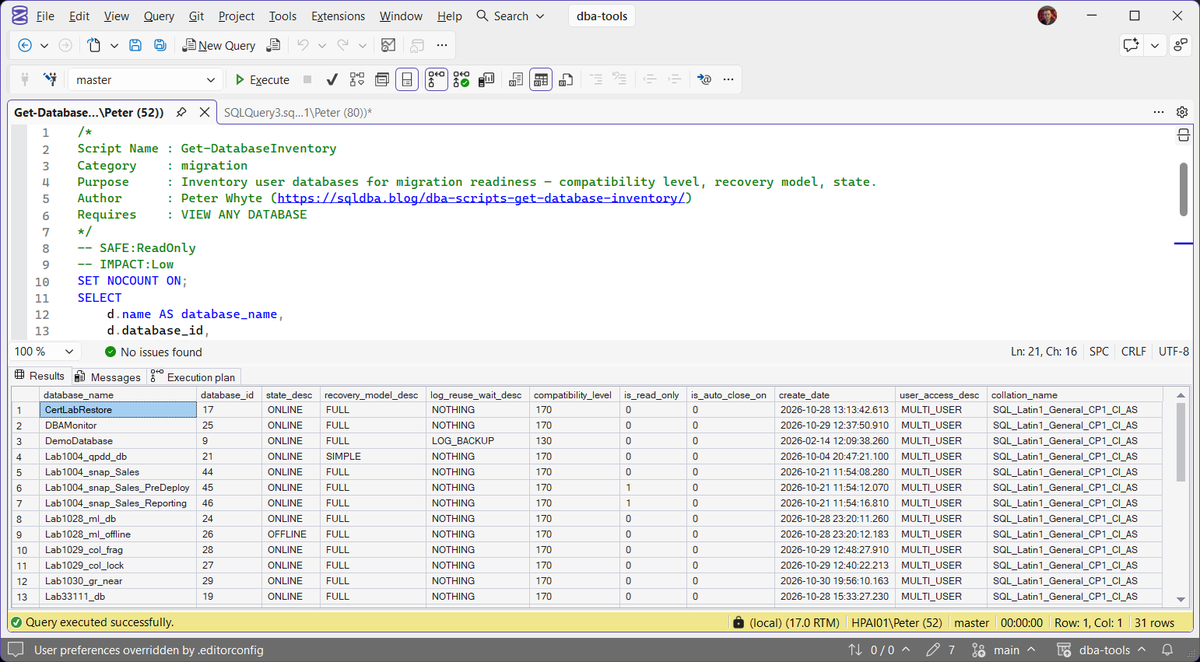
Run against a lab instance with 31 user databases; the capture shows the first 13 by name. Every column the script returns is in the grid, so it is worth scrolling right rather than stopping at the recovery model.
Understanding the Results
A few rows in the capture above are worth pointing at before the columns themselves. DemoDatabase is on compatibility level 130 while every other database is on 170, and it is the only row in view with LOG_BACKUP as its log reuse wait. Lab1004_qpdd_db runs SIMPLE where the others shown run FULL, the two Lab1004_snap_Sales copies (_PreDeploy and _Reporting) are read only, and Lab1028_ml_offline is OFFLINE. On a lab instance none of that needs fixing, but each is the kind of detail this script exists to put in front of you before a migration, rather than after one.
database_name and database_iddatabase_id > 4, so the four system databases are deliberately absent rather than missing.state_descONLINE, such as RESTORING, RECOVERY_PENDING or SUSPECT.Act when this is not ONLINE. That is a problem to solve before it is a database to migrate, and everything else on the row is secondary until it is understood.recovery_model_descSIMPLE where you expected FULL means no log backups are running and there is no point in time recovery for that database.compatibility_levellog_reuse_wait_descNOTHING and LOG_BACKUP are the two normal steady states, and a server with log backups running will mostly show LOG_BACKUP. Anything else, such as ACTIVE_TRANSACTION or REPLICATION, means something is holding the log open right now.is_read_onlyis_auto_close_onuser_access_descMULTI_USER, SINGLE_USER or RESTRICTED_USER.Act when you find SINGLE_USER nobody reverted. It blocks a migration step just as hard as read only does, and it is easier to miss.create_datecollation_nameBest Practices
- Run this before scoping a migration, not after the plan is already written. The compatibility level and collation columns can change the shape of the plan itself.
- Keep a dated copy of the output alongside your migration runbook so “what did the source actually look like” isn’t a question you have to reconstruct later.
- Re-run it immediately before cutover, not just during planning. Recovery model and read-only flags can drift in the weeks between the two.
Microsoft’s reference covers sys.databases in full.
Frequently Asked Questions
I ran this as a login that is not sysadmin and got fewer databases than I expected.
That is sys.databases doing what it is supposed to. A login only sees the databases it owns or has permission to see, so without VIEW ANY DATABASE you get a short list with no error and no warning. Check the permission before you treat the inventory as complete.
Does restoring a database onto a newer instance change its compatibility level?
Only when it has to. A restore or attach keeps the level the database came with, so a database three versions behind stays three versions behind. If that level is older than the lowest the target instance supports, SQL Server raises it to that minimum. Either way you do not get the instance default unless you set it yourself.
log_reuse_wait_desc says NOTHING but the log is clearly not being reused.
The column reports what blocked reuse the last time SQL Server tried, not what is blocking it at the moment you look. Take a log backup or let a checkpoint run, then query it again, because a stale NOTHING and a genuine NOTHING look identical here.
What is the difference between is_read_only and user_access_desc?
is_read_only is whether writes are refused. user_access_desc is who is allowed in at all. A database can be fully writable and still be sitting in SINGLE_USER from a maintenance operation nobody reversed, and that will stop a migration step just as hard as read only will.
Summary
Get-DatabaseInventory is deliberately narrow: one row per database, the handful of columns that actually change a migration plan, nothing else. It’s not a replacement for Get Database Summary‘s ongoing operational view or Get Database Sizes and Free Space‘s capacity detail. It’s the fast, honest baseline you pull before you commit to a migration plan, so the plan is built on what’s actually on the server rather than what the documentation says should be there.
Run it early, keep the output, and re-run it right before cutover. The columns that matter most here (recovery model, compatibility level, collation) are exactly the ones that fail quietly if nobody checks them until the migration is already underway.
Leave a Reply