
The Snapshot Everyone Forgot They Created
A database snapshot is created for one specific reason, a pre-deployment rollback point, a reporting-consistency workaround, a test before a risky change, and then it just sits there. Snapshots don’t show up in a routine size check the way a growing data file does, but every snapshot is a sparse file on disk that keeps growing as the source database changes underneath it, until it is dropped or the volume it sits on runs out of room.
This script lists every snapshot on the instance with its source database, age, and the real size of its sparse file on disk, so “forgotten and consuming space” becomes a specific, visible finding instead of an invisible one.
Why Database Snapshot Inventory Matters
- A snapshot’s storage footprint grows as pages in the source database change, up to the size of the source data files, so an old forgotten snapshot can end up consuming more space than anyone expects
- If the volume holding the sparse file fills, the snapshot is marked suspect and has to be dropped, and every other snapshot of the same source has to be dropped before you can revert to the one you actually wanted
- Snapshots were Enterprise-only up to SQL Server 2014 and are available in Standard from SQL Server 2016 SP1, so from 2016 SP1 onward they are a space problem rather than a licensing one, and if you don’t know a snapshot exists, you won’t know to remove it before a downgrade to 2014 or earlier
age_daysturns “is this still needed” into an objective number instead of a guess, a snapshot from a change that completed months ago is a strong candidate for cleanup- Dropping a snapshot is a genuinely safe, fast operation once you’ve confirmed nothing depends on it, the hard part is knowing it exists in the first place
When to Run This Script
- Routine storage or capacity reviews, snapshots are an easy thing to miss in a standard size check
- Before an edition downgrade, alongside Edition Feature Usage
- Reviewing a server you’ve just inherited, to catch snapshots left behind by whoever was here before
- Investigating a drive that is filling with no data or log file growth to explain it
- Before reverting a database to a snapshot, a revert fails while any other snapshot of the same source still exists
The Script
- Tested on: SQL Server 2025 (RTM CU8) 17.0.4075.5, Windows lab instance
- Last verified: 2026-10-04 (saved output from a real run against 2 snapshots of one source database, Get-DatabaseSnapshotInventory-20261004-190806.csv)
- Permissions: VIEW ANY DEFINITION and VIEW SERVER PERFORMANCE STATE (VIEW SERVER STATE before SQL Server 2022)
- Safety: read-only, impact low
/*
Script Name : Get-DatabaseSnapshotInventory
Category    : monitoring
Purpose     : Lists all database snapshots with source database, age, and the real size of each sparse file on disk, so forgotten snapshots are visible before they fill a volume.
Author      : Peter Whyte (https://sqldba.blog/dba-scripts-get-database-snapshot-inventory/)
Requires    : VIEW ANY DEFINITION, VIEW SERVER PERFORMANCE STATE (VIEW SERVER STATE before SQL Server 2022)
*/
-- SAFE:ReadOnly
-- IMPACT:Low
--
-- DESIGN: allocated_mb comes from sys.master_files and is the snapshot's maximum size, fixed at the
-- size of the source data files when the snapshot was created. It never grows. size_on_disk_mb is
-- the sparse file's real footprint from sys.dm_io_virtual_file_stats, and it grows as pages change
-- in the source. Without VIEW ANY DEFINITION, sys.master_files returns no rows for snapshots you do
-- not own and the script returns 0 rows without an error.
SET NOCOUNT ON;
SET QUOTED_IDENTIFIER ON;

SELECT
    s.name AS snapshot_name,
    src.name AS source_database,
    s.create_date,
    DATEDIFF(DAY, s.create_date, GETDATE()) AS age_days,
    s.state_desc,
    src.recovery_model_desc,
    CAST(SUM(CAST(f.size AS BIGINT) * 8.0 / 1024) AS DECIMAL(20,2)) AS allocated_mb,
    CAST(SUM(vfs.size_on_disk_bytes) / 1048576.0 AS DECIMAL(20,2)) AS size_on_disk_mb
FROM sys.databases s
JOIN sys.databases src ON src.database_id = s.source_database_id
JOIN sys.master_files f ON f.database_id = s.database_id
CROSS APPLY sys.dm_io_virtual_file_stats(s.database_id, f.file_id) vfs
GROUP BY s.name, src.name, s.create_date, s.state_desc, src.recovery_model_desc
ORDER BY s.create_date ASC;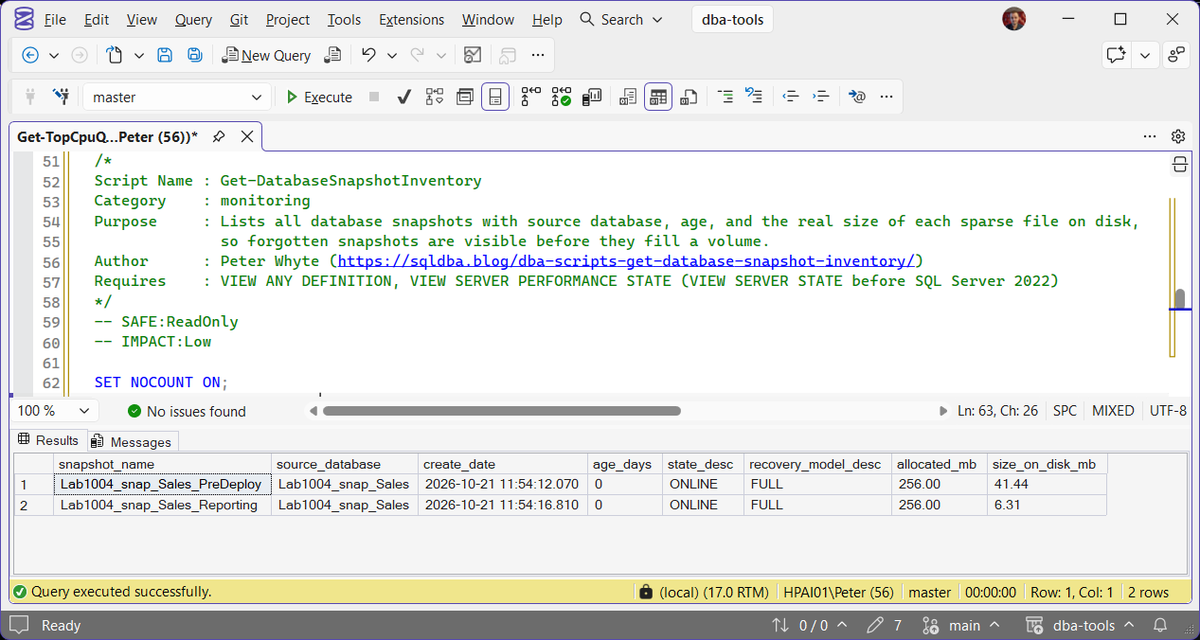
The source_database_id join is what identifies a database as a snapshot at all, regular databases have source_database_id = NULL and won’t appear in this result set. The script returns 0 rows with no error when the login running it lacks VIEW ANY DEFINITION, so an empty result from a low-privileged login proves nothing.
How To Run From The Repo
Clone DBA Tools, initialize and run the script:
# Clone dba-tools repo:
git clone https://github.com/peterwhyte-lgtm/dba-tools

# Initialize environment:
cd dba-tools
.\Initialize-Environment.ps1

# List every database snapshot with age and allocated size:
.\run.ps1 Get-DatabaseSnapshotInventory

# To run against a remote sql server:
.\run.ps1 Get-DatabaseSnapshotInventory -ServerInstance SQLSERVER01
This script lives in the repo at:
Example Output
One run against the lab instance, 2 snapshots of the same source database. 7 of the 8 columns are shown, create_date is left out.
Both rows read 256.00 in allocated_mb, the size of the source data file when each snapshot was taken, and that number never moves. size_on_disk_mb is the real footprint: the source was heavily rewritten between the 2 snapshots, so the older one, Lab1004_snap_Sales_PreDeploy, already holds 40.44 MB of preserved pages while the newer one holds 5.31 MB. Sum size_on_disk_mb to know what snapshots are costing the drive, and sum allocated_mb to know the worst case.
Understanding the Results
snapshot_namesource_databaseRESTORE DATABASE ... FROM DATABASE_SNAPSHOT fails with Msg 3137 until every other snapshot of that source has been dropped.age_daysstate_descallocated_mbsys.master_files. It is not space in use, and it does not grow.Act when the total across all snapshots is more than the free space on the volume holding the sparse files. That is the worst case, a source rewritten end to end.size_on_disk_mbsys.dm_io_virtual_file_stats, in 64 KB steps. A page is copied in only the first time it changes after the snapshot was taken, so rewriting the same rows again does not grow it further, while every newer snapshot of the same source starts copying from zero. Every first change to a page in the source also costs a write into each snapshot, which shows up as the REPLICA_WRITES wait.Act when it is climbing towards allocated_mb or towards the free space on the drive, and the snapshot is still needed. Otherwise drop it.Best Practices
- Include this in routine storage reviews, snapshots don’t show up in a standard database-size check the way growing data files do
- Read it alongside Disk Space for the volume that holds the sparse files, because that volume is what a growing snapshot fills
- Treat every snapshot older than a completed change window as a cleanup candidate, confirm nobody depends on it, then drop it (
DROP DATABASE [snapshot_name]) - Check this before any edition downgrade if the target is SQL Server 2014 or earlier, where snapshots are Enterprise-only and must be removed first. From 2016 SP1 onward Standard supports them and nothing needs removing
- Document the reason for any snapshot that’s genuinely meant to be long-lived, so a future review doesn’t misidentify it as forgotten
MS Docs: Database Snapshots · Sparse file size of a snapshot · sys.dm_io_virtual_file_stats · sys.master_files · sys.databases
Frequently Asked Questions
Does dropping a snapshot affect the source database?
No, dropping a snapshot only removes the snapshot itself, the source database is completely unaffected. The one thing to confirm first is that nothing (a report, a rollback plan, a test process) still depends on reading from that specific snapshot.
Do database snapshots need Enterprise Edition?
Not from SQL Server 2016 SP1 onward. Snapshots were Enterprise-only up to SQL Server 2014, and Microsoft moved them into Standard, Web and Express with SQL Server 2016 SP1. On anything from 2016 SP1 onward a snapshot is not a licensing blocker, so if a downgrade check tells you it is, that check is running the pre-2016 rule. Estates on 2014 or earlier are the case where the Enterprise requirement genuinely applies.
Why does reverting to a snapshot fail with Msg 3137?
Because another snapshot of the same source still exists. With 2 snapshots of one database, RESTORE DATABASE ... FROM DATABASE_SNAPSHOT returns “Msg 3137, Level 16, State 4. Database cannot be reverted. Either the primary or the snapshot names are improperly specified, all other snapshots have not been dropped, or there are missing files.” followed by Msg 3013. Run this script, drop every row for that source except the snapshot you are reverting to, then run the restore again. MS Docs on reverting lists the other conditions.
Why does Explorer show the snapshot file at the full size of the database?
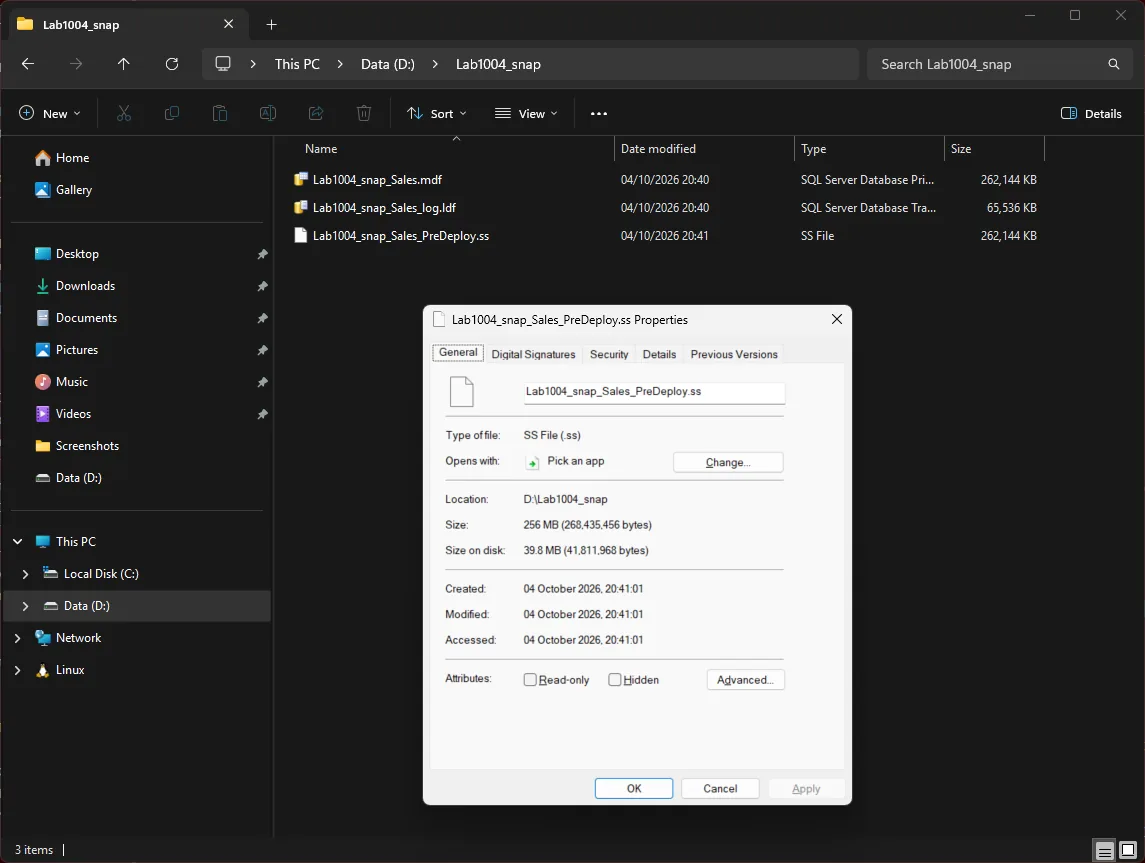
A snapshot is an NTFS sparse file, created at the size of the source data file but holding only the pages that have changed since. Explorer’s Size column reports the full size, 256 MB for each of the snapshots above, while the file’s Size on disk matches size_on_disk_mb, 40.44 MB for the older one. Adding up the Size column across a folder of .ss files overstates what they cost the drive.
Summary
A database snapshot is easy to create for a good reason and just as easy to forget about afterward, quietly consuming disk space the whole time. This script turns that blind spot into a direct, readable inventory: what exists, how old it is, and how much disk it’s really using.
Include it in routine storage reviews and before any edition downgrade, and treat every old snapshot as a cleanup candidate until confirmed otherwise.
Related Scripts
You may also find these scripts useful:
- Server Inventory (hub)
- Edition Feature Usage
- Database Sizes and Free Space
- Database Inventory
- Database Summary
- DBA Scripts: The Complete Guide, the map across every script on this site
Leave a Reply