
A SQL Server instance is really a handful of Windows services working together, and it is surprisingly common for one of them to be quietly misconfigured. The SQL Server Agent service set to Manual startup instead of Automatic. A service running under an account nobody can account for. The Full-Text service left Disabled that nobody remembers switching off. None of it shows up as an error until the day the server reboots and something does not come back with it.
This script inventories every SQL Server service on the instance with its startup type, status and account, and adds three plain risk columns on top. It is deliberately a visibility script rather than a verdict: it shows you the state and the obvious risks, and leaves the judgement to you. Correlating findings across a whole instance is what the health check and its AI assessment are for.
Why Services Information Matters
The services layer sits underneath everything else a DBA monitors. If SQL Server Agent is not running, scheduled jobs stop firing, and backups, index maintenance and every collector job go quiet with no immediate symptom. If the service account is wrong you inherit either a security exposure, such as LocalSystem and its unrestricted local access, or an operational fragility, such as a named user account whose password will eventually expire and take the service down with it.
This is one of the first things worth checking on a server you did not build yourself:
- Confirms the Engine and Agent are both set to start automatically
- Surfaces high-privilege or shared service accounts that should be dedicated instead
- Separates services that must be running from features that are allowed to sit idle
- Confirms cluster node ownership on a Failover Cluster Instance
When to Run This Script
- Routine SQL Server health checks
- Reviewing a server you have just inherited or migrated
- After a Windows patch cycle or reboot, to confirm every service came back
- Auditing service account usage across an estate
- Troubleshooting a job that “just stopped running”, where the Agent service is the first thing to check
The Script
Run the following against your SQL Server instance.
- Tested on: SQL Server 2025 (RTM CU8, 17.0.4075.5), Windows lab instance
- Last verified: 2026-10-27 (run against a live instance, and each account branch tested against sample values)
- Permissions: VIEW SERVER STATE
- Safety: read-only, impact low
/*
Script Name : Get-ServicesInformation
Category    : monitoring
Purpose     : SQL Server services — startup type, running status, and service account with
              risk flags. Surfaces manual/disabled startup on critical services and
              high-privilege service accounts (LocalSystem, SYSTEM, NetworkService).
Author      : Peter Whyte (https://sqldba.blog/dba-scripts-get-services-information/)
Requires    : VIEW SERVER STATE
*/
-- SAFE:ReadOnly
-- IMPACT:Low
SET NOCOUNT ON;

SELECT
    servicename,
    startup_type_desc,
    status_desc,
    process_id,
    -- datetimeoffset carries 7 fractional digits; style 120 needs VARCHAR(19), and a
    -- shorter target silently truncates to minutes
    CONVERT(VARCHAR(19), last_startup_time, 120) AS last_startup_time,
    service_account,
    is_clustered,
    cluster_nodename,
    -- Service account risk: built-in high-privilege accounts are a security concern
    CASE
        WHEN service_account IN ('LocalSystem', 'NT AUTHORITY\SYSTEM')
            THEN 'CRITICAL - LocalSystem has unrestricted local access; use a dedicated service account'
        WHEN service_account = 'NT AUTHORITY\NETWORK SERVICE'
            THEN 'WARN - NetworkService shares identity with other services; prefer a dedicated account'
        WHEN service_account LIKE 'NT Service\%'
            THEN 'OK - Managed Service Account (virtual account)'
        WHEN service_account LIKE '%$'
            THEN 'OK - Group Managed Service Account (gMSA)'
        WHEN service_account IS NULL OR service_account = ''
            THEN 'INFO - service account not visible (insufficient permissions or service not running)'
        ELSE 'OK - dedicated service account'
    END AS account_risk,
    -- Startup type: SQL Engine and Agent should be Automatic
    CASE
        WHEN startup_type_desc = 'Disabled'
            THEN 'CRITICAL - service is disabled; will not start after reboot'
        WHEN startup_type_desc = 'Manual'
             AND servicename NOT LIKE '%Browser%'
             AND servicename NOT LIKE '%Full-text%'
            THEN 'WARN - Manual startup; service will not auto-recover after reboot'
        WHEN startup_type_desc = 'Manual'
            THEN 'INFO - Manual startup (acceptable for Browser/Full-text if not required)'
        ELSE 'OK'
    END AS startup_risk,
    -- Running status
    CASE
        WHEN status_desc = 'Running'  THEN 'OK'
        WHEN status_desc = 'Stopped' AND servicename NOT LIKE '%Browser%'
            THEN 'WARN - service is stopped'
        ELSE 'INFO - ' + status_desc
    END AS running_status
FROM sys.dm_server_services
ORDER BY
    CASE
        WHEN servicename LIKE '%SQL Server (%' AND servicename NOT LIKE '%Agent%' THEN 1
        WHEN servicename LIKE '%SQL Server Agent%'                                 THEN 2
        ELSE 3
    END,
    servicename;
It queries sys.dm_server_services and returns one row per service with three risk columns: account_risk, startup_risk and running_status.
How To Run From The Repo
Clone DBA Tools, initialize and run the script:
# Clone dba-tools repo:
git clone https://github.com/peterwhyte-lgtm/dba-tools

# Initialize environment:
cd dba-tools
.\Initialize-Environment.ps1

# Services, startup types, accounts and risk flags:
.\run.ps1 Get-ServicesInformation
This script lives in the repo at:
Example Output
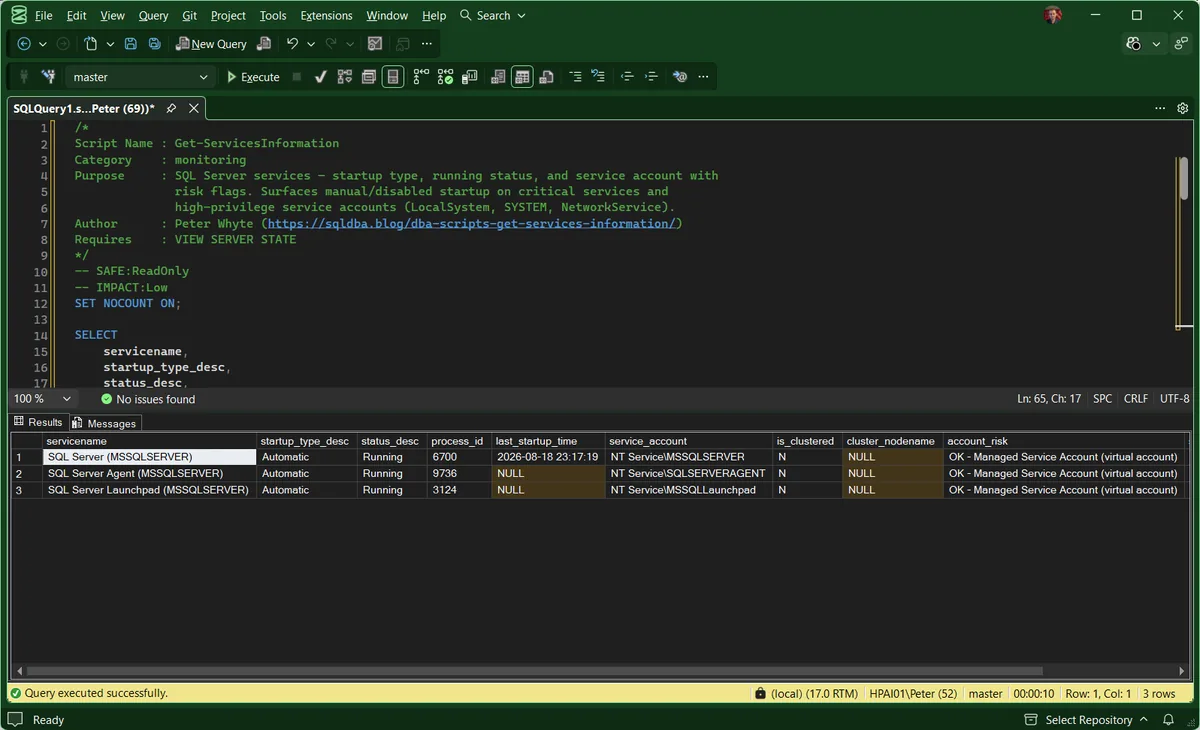
Which services come back depends on what is installed. On a default instance with Machine Learning Services you get the Engine, the Agent and Launchpad; add Browser and Full-Text on a named instance that uses them.
The grid scrolls further right than the window: startup_risk and running_status sit past account_risk and are covered in the panel below. Note last_startup_time here, populated for the Engine and NULL for the Agent and Launchpad. That is Windows, not a fault.
Understanding the Results
Read the three risk columns first and the raw values only when one of them says something.
servicenamestartup_type_descstatus_descservice_accountNT Service\MSSQLSERVER), a managed service account is a domain account tied to one computer, and a group managed service account is the same idea across many. Both MSA and gMSA end in $.account_riskNT Service\ is the Microsoft default and needs no action, and an account ending in $ is managed for you. Everything else is reported OK, so a plain domain account passes here whether or not it is a real service account.Act when this reads CRITICAL. LocalSystem has unrestricted access to the whole machine, far beyond what the database engine needs, and it is the account an attacker most wants to land on.startup_riskrunning_statusprocess_idlast_startup_timelast_startup_time is not populated for every service: on the lab instance the Engine reports one while Agent and Launchpad return NULL. A NULL here is not a finding.is_clusteredcluster_nodenameis_clustered reads N and cluster_nodename is NULL, which is the normal, healthy answer.Act when you expected a cluster and see N. Somebody is looking at a standalone instance, or at the wrong server.Anything CRITICAL is worth acting on directly. WARN deserves a deliberate decision: fix it, or write down why it is intentional, rather than leave it as an accident of how the instance was built. INFO is the script telling you it cannot judge something for you.
Startup Parameters
The services are half the picture. The other half is what the Engine is started with: the master database and error log paths, and any -T trace flags that switch on at every restart. SQL Server Configuration Manager shows them, and so does a query, with nothing more than VIEW SERVER STATE:
-- The Engine's startup parameters, as the service is configured to start
SELECT value_name,
       value_data
FROM sys.dm_server_registry
WHERE value_name LIKE N'SQLArg%'
ORDER BY value_name;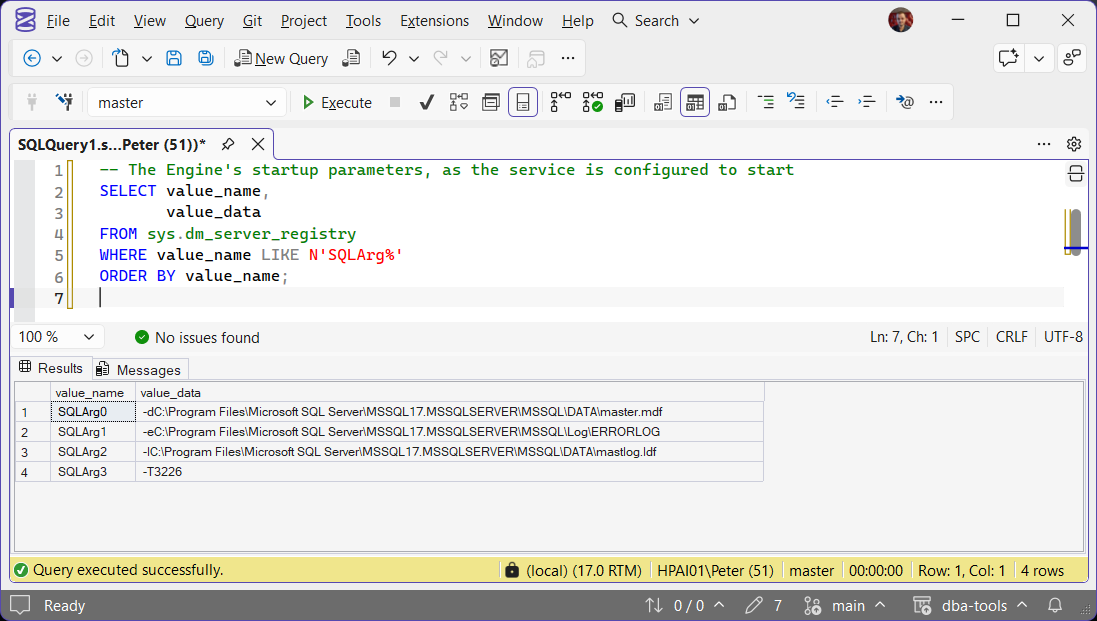
SQLArg0 to SQLArg2 are on every instance: -d for the master data file, -e for the error log and -l for the master log file. Anything after them was added by somebody. A -T entry is a trace flag that comes back after every restart, which is why Get Trace Flags alone cannot tell you whether a flag will survive one.
Frequently Asked Questions
Why is SQL Server Agent set to Manual instead of Automatic?
Usually an oversight from the original build rather than a deliberate choice. Automatic is correct for almost every production instance, since Agent-dependent jobs (backups, maintenance, collectors) need it running after every reboot without anyone intervening.
Is NT Service\MSSQLSERVER a managed service account?
No, and the distinction matters if anyone ever audits you on it. That is a virtual account: local to the machine, created per service, with its password managed by Windows. A managed service account is a domain account named DOMAIN\ACCOUNTNAME$, and a group managed service account is the same thing shared across several servers. Microsoft’s reference keeps all three separate.
Virtual accounts are the Microsoft default and are the right answer for a standalone instance that never reaches off the box. You want an MSA or gMSA when the service needs to authenticate somewhere else, such as a backup share or a linked server.
Can this tell a proper service account from someone’s personal login?
No, and it does not pretend to. DOMAIN\svc_sql and DOMAIN\peter are indistinguishable from the account name alone, so both are reported the same way: OK - dedicated service account. That OK only means the account is not LocalSystem or NetworkService. It is not a check that anyone has confirmed the account is a real service account.
It is worth confirming, because a personal account is the one that takes the service down at the next password expiry, and it usually happens while that person is on leave.
Why is Launchpad flagged when Browser and Full-text are not?
Browser and Full-text are exempt from the Manual warning, and Browser from the stopped warning, because they are not always required. Anything else optional is not exempt: a stopped Launchpad on an instance that never runs R or Python will show a WARN.
That is a judgement call the script leaves to you rather than encoding. Read the risk columns as prompts, not verdicts.
Is running SQL Server as LocalSystem actually dangerous?
Yes, on a shared or multi-role server. LocalSystem has unrestricted access to the local machine, well beyond what the SQL Server process needs. A virtual account, managed service account or gMSA keeps the blast radius contained if the account is ever compromised.
Summary
Service configuration is one of those things nobody checks until something has already gone wrong: a job that stopped running, a service that did not come back after a patch, an audit asking who has access to what. It takes seconds to review and rarely changes once it is set correctly.
Run it when you onboard a server you did not build, and again after any Windows patch cycle or cluster failover, to confirm every service is running under the account and startup type you expect.
Related
- Cannot Bulk Load, Access Is Denied (Error 4861), the error where the first thing you need is the service account name this script returns
- SQL Server Agent Will Not Start, or “Agent XPs Component Is Turned Off” (Error 15281), for when it is the Agent service that will not come back
- SQL Server Service Will Not Start: Error 17113, 17058, 1067 and Where the Real Reason Is, for when the Engine service itself fails to start
- OS and Hardware Info, the Windows layer these services sit on
- Patch Level, for what the last patch cycle actually installed
- SQL Agent Job Overview, for what stops running when the Agent does
- Instance Configuration Snapshot, the settings layer above the services
- User Permissions Audit, if a service account turns out to be a person
- How to Check Listening Ports on Windows, to confirm from the OS side what the service is actually listening on
- DBA Scripts: The Complete Guide, the map across every script on this site
Leave a Reply