
Most SQL Server instances end up with a handful of Agent jobs that quietly run backups, index maintenance, and monitoring collectors in the background. Nobody looks at them until something breaks, and by then it can be hard to tell whether a job has been failing for a day or for 3 months. A job that fails silently every night, with no alert wired up and nobody checking, is one of the most common ways a “we thought we had backups” incident happens.
This script gives a single-glance overview of every SQL Agent job on the instance: whether it’s enabled, who owns it, and how its last run actually went. For what actually failed in the last 7 days, and the error text behind it, use Get SQL Agent Job Failure Summary.
Why SQL Agent Job Overview Matters
SQL Agent is the scheduler behind most of the routine work that keeps a database healthy: backups, index and statistics maintenance, log shipping, replication agents, and any custom collector jobs. A job that’s disabled, orphaned, or silently failing doesn’t throw an error anyone sees unless alerting is specifically configured for it.
This overview surfaces the things that matter operationally:
- Jobs that are disabled and no longer running at all
- Jobs owned by a login that no longer exists, or by
sawhen it shouldn’t be - The outcome of each job’s last run: Succeeded, Failed, Retry, or Cancelled
- How long the last run actually took
When to Run This Script
- Routine SQL Server health checks
- After inheriting or migrating a server, to see what’s actually scheduled
- Investigating a backup or maintenance gap
- Auditing job ownership before decommissioning a login or service account
The Script
Run the following script against your SQL Server instance.
- Tested on: SQL Server 2025 (RTM CU8, 17.0.4075.5), Windows lab instance HPAI01
- Last verified: 2026-10-30 (real run, results captured below)
- Permissions: db_datareader on msdb
- Safety: read-only, impact low
/*
Script Name : Get-SqlAgentJobOverview
Category    : configuration-and-environment
Purpose     : Show all SQL Agent jobs with enabled state, owner, and last run outcome.
Author      : Peter Whyte (https://sqldba.blog/dba-scripts-get-sql-agent-job-overview/)
Requires    : db_datareader on msdb, plus VIEW ANY DEFINITION to resolve job owner names (the job rows return either way; an owner only resolves if that login is visible to you)
HealthCheck : Yes
*/
-- SAFE:ReadOnly
-- IMPACT:Low
SET NOCOUNT ON;

SELECT
    j.name AS job_name,
    j.enabled,
    j.description,
    ISNULL(sp.name, '(unknown)') AS owner_name,
    j.date_created,
    j.date_modified,
    CASE js.last_run_outcome
        WHEN 0 THEN 'Failed'
        WHEN 1 THEN 'Succeeded'
        WHEN 2 THEN 'Retry'
        WHEN 3 THEN 'Cancelled'
        ELSE 'Unknown'
    END AS last_run_outcome,

    -- Last run timestamp (last_run_date is yyyymmdd int, last_run_time is HHmmss int;
    -- both are 0 for a job that has never run)
    CASE WHEN js.last_run_date = 0 OR js.last_run_date IS NULL THEN NULL
         /* Inline conversion - agent_datetime() is a scalar UDF that db_datareader
            cannot EXECUTE, so using it would break the stated Requires */
         ELSE CONVERT(DATETIME,
                  STUFF(STUFF(CAST(js.last_run_date AS CHAR(8)), 7, 0, '-'), 5, 0, '-') + ' ' +
                  STUFF(STUFF(RIGHT('000000' + CAST(js.last_run_time AS VARCHAR(6)), 6), 5, 0, ':'), 3, 0, ':'))
    END AS last_run_at,

    -- Duration formatted as HH:MM:SS (last_run_duration is an HHMMSS-packed int)
    CASE WHEN js.last_run_date = 0 OR js.last_run_date IS NULL THEN NULL
         ELSE RIGHT('0' + CAST(js.last_run_duration / 10000 AS varchar(4)), 2) + ':'
            + RIGHT('0' + CAST((js.last_run_duration % 10000) / 100 AS varchar(2)), 2) + ':'
            + RIGHT('0' + CAST(js.last_run_duration % 100 AS varchar(2)), 2)
    END AS last_run_duration
FROM msdb.dbo.sysjobs AS j
LEFT JOIN sys.server_principals AS sp ON j.owner_sid = sp.sid
LEFT JOIN msdb.dbo.sysjobservers AS js ON j.job_id = js.job_id
ORDER BY j.name;
The script joins msdb.dbo.sysjobs to the job’s owner and its last recorded run status, returning one row per Agent job.
How To Run From The Repo
Clone DBA Tools, initialize and run the script:
# Clone dba-tools repo:
git clone https://github.com/peterwhyte-lgtm/dba-tools

# Initialize environment:
cd dba-tools
.\Initialize-Environment.ps1

# List every SQL Agent job with owner and last run outcome:
.\run.ps1 Get-SqlAgentJobOverview

# To run against a remote sql server:
.\run.ps1 Get-SqlAgentJobOverview -ServerInstance SQLSERVER01
This script lives in the repo at:
sql/monitoring/jobs/Get-SqlAgentJobOverview.sqlpowershell/wrappers/monitoring/jobs/Get-SqlAgentJobOverview.ps1
Example Output
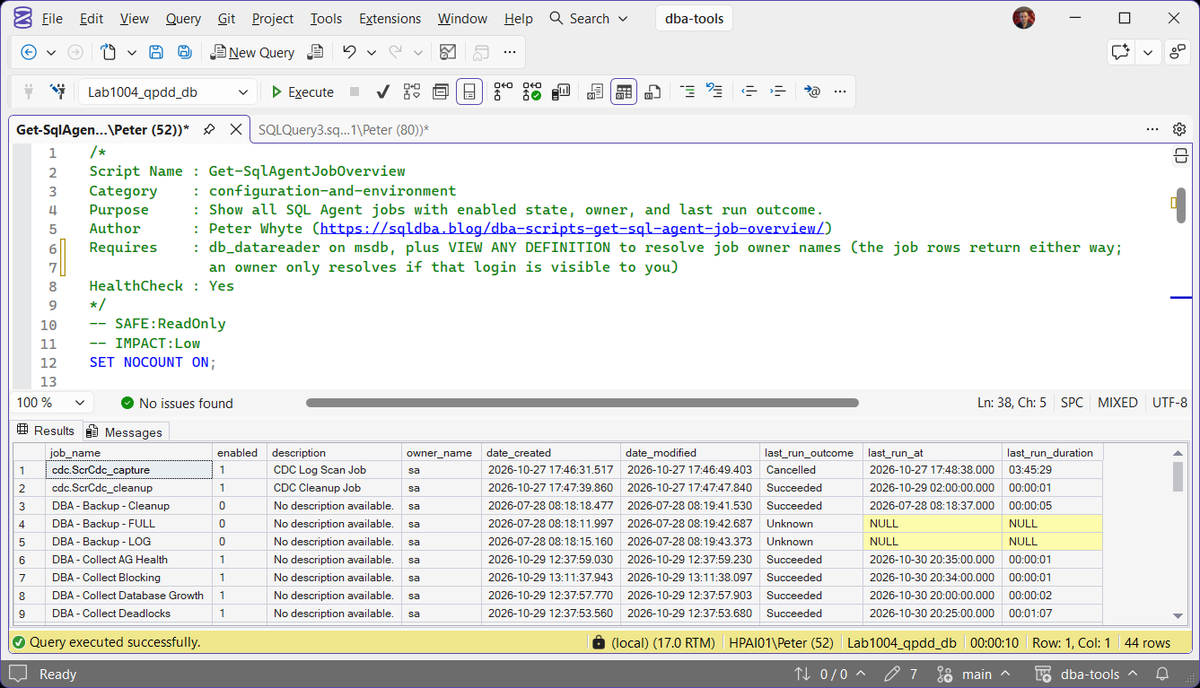
The run returned 44 jobs, and the first 9 in view tell the story on their own. cdc.ScrCdc_capture shows Cancelled after a 03:45:29 run on 27 October; the CDC capture job is meant to run continuously, so a last run that ended at all means something stopped it. The disabled DBA - Backup - FULL and DBA - Backup - LOG jobs show Unknown with NULL run columns, meaning they have never executed, which is a backup gap rather than housekeeping. The collectors underneath (AG Health, Blocking, Database Growth, Deadlocks) are enabled and succeeded this evening, the longest at 00:01:07.
The columns you actually need are enabled, owner_name, and last_run_outcome; the rest is context for when one of those three looks wrong. The run timestamps come back as a real last_run_at datetime and the duration as HH:MM:SS, rather than the raw integer formats msdb stores internally, so the output reads at a glance. A job that has never run shows Unknown with both columns NULL.
Understanding the Results
enabled1 means the job runs on its schedule; 0 means it exists but will never fire.Act when you find a 0 you cannot explain. A disabled backup job is a backup gap, not housekeeping.descriptionowner_namesa or a dedicated service account.date_createddate_modifiedlast_run_outcomelast_run_atlast_run_durationHH:MM:SS, decoded from msdb’s packed integer. Blank means the job has never run.Act when a job that normally finishes in seconds suddenly takes minutes. Growth problems show up here first.A job with no rows in msdb.dbo.sysjobservers at all has never run since it was created, which is its own kind of red flag.
Microsoft’s reference covers dbo.sysjobs and dbo.sysjobservers in full.
Frequently Asked Questions
Why does a job show no last run date at all?
It has never executed since it was created, either because it’s disabled, its schedule hasn’t triggered yet, or it was created without a schedule and is meant to be run manually.
Does this script show job step details or just the overall outcome?
Just the overall outcome. For the failed step and its error message, run Get SQL Agent Job Failure Summary, which reads msdb.dbo.sysjobhistory for the last 7 days.
Summary
A SQL Agent job that silently stopped succeeding is one of the quieter ways a “we have backups” assumption turns out to be wrong. This script gives a fast way to confirm every scheduled job is enabled, correctly owned, and actually succeeding, rather than waiting to find out during a restore.
Run this script as part of your regular SQL Server health checks, and again any time you inherit a server, to confirm what’s actually scheduled matches what you expect to be running.
Related
You may also find these scripts useful:
- DBA Scripts: Enable or Disable All SQL Agent Jobs, the bulk enable/disable sibling of this overview
- SQL Server Agent Will Not Start, or “Agent XPs Component Is Turned Off” (Error 15281), for the reader whose jobs vanished with msdb
- Agent Alerts and Operators
- Job Duration Trends
- Job Schedule Summary
- DBA Scripts: Get Maintenance Job Status
- SQL Agent Job Failed: Finding the Step That Actually Broke, the router for reading the step row once the overview shows which job broke
- SQL Server Agent Jobs Queued on Maximum User Working Threads, when a job shows as waiting for a thread and never starts
- DBA Scripts: The Complete Guide, the map across every script on this site
Leave a Reply