
A maintenance job that’s silently failing is one of the more dangerous states a SQL Server instance can be in, because everything looks normal from the outside. The database is online, queries run fine, and the index maintenance or stats update job that’s supposed to be keeping things healthy has been failing every night for months, with nobody watching the job history to notice.
SQL Server Agent’s job history is the record of truth here, but it’s buried in msdb and not something anyone checks unless they already suspect a problem, which is exactly backwards.
This script surfaces every job whose name follows the DBA % naming convention, its last run outcome, how long it took, the actual error message if it failed, and when it’s scheduled to run next.
Why Maintenance Job Status Matters
Maintenance jobs are the automation that keeps a database performant and protected day to day, and their failure mode is uniquely quiet:
- A failed backup job doesn’t stop the database from working, it just means the next restore, when someone eventually needs one, has a bigger gap than expected or fails outright.
- A failed index or statistics maintenance job doesn’t throw an error anyone sees, query plans just quietly get worse over weeks as fragmentation and stale statistics accumulate.
next_run_atbeing empty for an enabled job is its own warning sign, distinct from a run failure, it usually means the schedule was removed or disabled while the job itself stayed enabled, so nothing is actually going to run it again.- Job history in
msdbhas a retention limit. Jobs that fail silently for long enough can have their failure evidence age out before anyone goes looking, which is one more reason to check regularly rather than reactively.
Common Symptoms
- Backup restore testing reveals a much larger gap than the backup schedule implies.
- Index fragmentation or stale statistics turn up in a performance investigation, and the maintenance job that should have prevented it turns out to have been failing for weeks.
- A job shows as
Enabledin a quick glance at SQL Server Agent, but nobody has verified it actually ran successfully recently.
When to Run This Script
- Routine SQL Server health checks
- Immediately after deploying or changing the maintenance job framework, to confirm everything is actually running
- Investigating unexpected fragmentation, stale statistics, or a backup gap
- After any SQL Server Agent service restart or account change, which can silently break job execution
The Script
Run the following script against your SQL Server instance.
- Tested on: SQL Server 2025 (RTM CU5), Windows lab instance
- Last verified: 2026-08-07 (saved output from a real run, Get-MaintenanceJobStatus-20260807-211450.csv)
- Permissions: db_datareader on msdb (or sysadmin); SQLAgentReaderRole alone cannot SELECT the job tables
- Safety: read-only, impact low
/*
Script Name : Get-MaintenanceJobStatus
Category    : maintenance
Purpose     : Reports last run outcome, duration, and next scheduled run for all
              DBA maintenance jobs (any job whose name starts with 'DBA').
              Use after deploying the maintenance framework to confirm jobs are
              running on schedule and not failing silently.
Author      : Peter Whyte (https://sqldba.blog/dba-scripts-get-maintenance-job-status/)
Requires    : db_datareader on msdb (or sysadmin); SQLAgentReaderRole alone cannot SELECT the job tables
HealthCheck : Yes
*/
-- SAFE:ReadOnly
-- IMPACT:Low
SET NOCOUNT ON;

SELECT
    j.name AS job_name,
    CASE j.enabled WHEN 1 THEN 'Enabled' ELSE 'Disabled' END AS status,

    -- Last run outcome
    CASE h.run_status
        WHEN 0 THEN 'Failed'
        WHEN 1 THEN 'Succeeded'
        WHEN 2 THEN 'Retry'
        WHEN 3 THEN 'Cancelled'
        WHEN 4 THEN 'In Progress'
        ELSE 'Never run'
    END AS last_run_status,

    -- Last run timestamp (run_date is yyyymmdd int, run_time is HHmmss int)
    CASE WHEN h.run_date IS NULL THEN NULL
         /* Inline conversion - agent_datetime() is a scalar UDF that db_datareader
            cannot EXECUTE, so using it would break the stated Requires */
         ELSE CONVERT(DATETIME,
                  STUFF(STUFF(CAST(h.run_date AS CHAR(8)), 7, 0, '-'), 5, 0, '-') + ' ' +
                  STUFF(STUFF(RIGHT('000000' + CAST(h.run_time AS VARCHAR(6)), 6), 5, 0, ':'), 3, 0, ':'))
    END AS last_run_at,

    -- Duration formatted as HH:MM:SS
    CASE WHEN h.run_duration IS NULL THEN NULL
         ELSE RIGHT('0' + CAST(h.run_duration / 10000 AS varchar(4)), 2) + ':'
            + RIGHT('0' + CAST((h.run_duration % 10000) / 100 AS varchar(2)), 2) + ':'
            + RIGHT('0' + CAST(h.run_duration % 100 AS varchar(2)), 2)
    END AS last_run_duration,

    -- First 200 chars of last outcome message (errors show here)
    LEFT(ISNULL(h.message, ''), 200) AS last_message,

    -- Next scheduled run
    CASE WHEN sch.next_run_date = 0 THEN NULL
         ELSE CONVERT(DATETIME,
                  STUFF(STUFF(CAST(sch.next_run_date AS CHAR(8)), 7, 0, '-'), 5, 0, '-') + ' ' +
                  STUFF(STUFF(RIGHT('000000' + CAST(sch.next_run_time AS VARCHAR(6)), 6), 5, 0, ':'), 3, 0, ':'))
    END AS next_run_at,

    j.date_created AS created_at

FROM msdb.dbo.sysjobs j

-- Most recent job-level outcome (step_id = 0 is the job-level summary row)
OUTER APPLY (
    SELECT TOP 1
        h.run_date, h.run_time, h.run_duration, h.run_status, h.message
    FROM msdb.dbo.sysjobhistory h
    WHERE h.job_id = j.job_id
      AND h.step_id = 0
    ORDER BY h.run_date DESC, h.run_time DESC
) h

-- Next scheduled run from attached schedules
OUTER APPLY (
    SELECT TOP 1
        js.next_run_date, js.next_run_time
    FROM msdb.dbo.sysjobschedules js
    JOIN msdb.dbo.sysschedules s ON s.schedule_id = js.schedule_id
    WHERE js.job_id = j.job_id
      AND s.enabled = 1
      AND (js.next_run_date > 0 OR js.next_run_time > 0)
    ORDER BY js.next_run_date, js.next_run_time
) sch

WHERE j.name LIKE N'DBA %' -- matches 'DBA - X' and 'DBA X' naming styles
ORDER BY j.name;
This reads msdb.dbo.sysjobs for every job named DBA %, joins the most recent job-level history entry for last run status/duration/message, and joins the next scheduled run from sysjobschedules, returning one row per maintenance job with its full recent history and future schedule in view.
How To Run From The Repo
Clone DBA Tools, initialize and run the script:
# Clone dba-tools repo:
git clone https://github.com/peterwhyte-lgtm/dba-tools

# Initialize environment:
cd dba-tools
.\Initialize-Environment.ps1

# Check last run outcome, duration, and next schedule for every DBA maintenance job:
.\run.ps1 Get-MaintenanceJobStatus

# To run against a remote sql server:
.\run.ps1 Get-MaintenanceJobStatus -ServerInstance SQLSERVER01
This script lives in the repo at:
sql/maintenance/Get-MaintenanceJobStatus.sqlpowershell/wrappers/maintenance/Get-MaintenanceJobStatus.ps1
Example Output
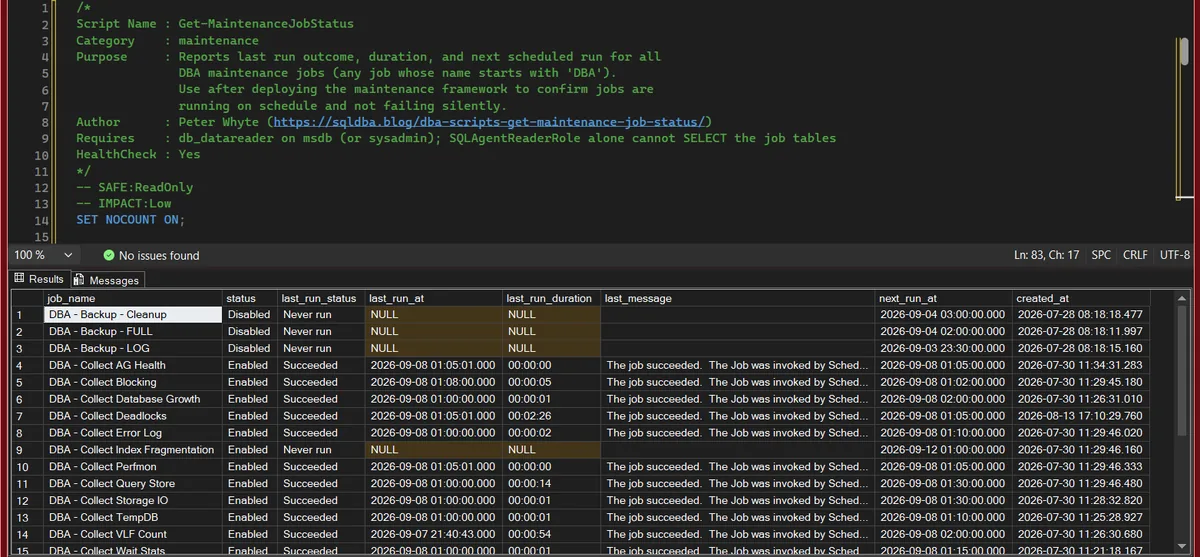
Every job whose name starts with DBA, one row each. Most of the collectors ran a minute ago and succeeded, which is the boring majority you want. The rows to read are the ones with NULL in last_run_at: three backup jobs that are disabled and have never run, which is a decision somebody made, and DBA - Collect Index Fragmentation, which is enabled, has never run, and is not due until the 12th, which is the shape of a job somebody created and never tested. last_message on a successful run only tells you which schedule fired it; it earns its width on the failed rows.
Understanding the Results
job_namestatuslast_run_statuslast_run_atFailed needs reading now. Never run on an enabled job means it was created and never scheduled or triggered.Act when the last run is weeks old on a job that is meant to run nightly. The status may say Succeeded; the date says it stopped.last_run_durationlast_messagenext_run_atcreated_atCommon Causes
Jobs like this usually go silent for one of two reasons. Either the job was created and run manually once during setup or testing, and a proper recurring schedule was never actually attached, exactly what the example above shows. Or a job that was working correctly stops after some environmental change, a SQL Agent service account permission change, a disk path that moved, a linked server or credential that expired, and the failure just sits in history unnoticed because nobody’s checking.
How to Fix a Failed or Unscheduled Maintenance Job
Attach a schedule to a job that has none (the immediate fix for the example above):
EXEC msdb.dbo.sp_add_jobschedule
    @job_name = N'DBA Index Stats Maintenance',
    @name = N'Nightly',
    @freq_type = 4,           -- daily
    @freq_interval = 1,
    @active_start_time = 020000;  -- 02:00
Investigate a genuine failure by reading the full step output, the 200-character last_message here is a summary, the full text (and any earlier attempts) lives in job history:
SELECT sjh.run_date, sjh.run_time, sjh.step_name, sjh.message
FROM msdb.dbo.sysjobhistory sjh
JOIN msdb.dbo.sysjobs sj ON sj.job_id = sjh.job_id
WHERE sj.name = N'DBA Index Stats Maintenance'
ORDER BY sjh.run_date DESC, sjh.run_time DESC;
Best Practices
- Treat “enabled” and “actually running on schedule” as two separate things to verify, they aren’t the same check.
- Run this script as a routine part of any health check, not just when a specific maintenance problem is already suspected.
- When a job legitimately needs to be run manually once (testing, a one-off fix), attach a proper recurring schedule immediately afterward rather than leaving it as a manual-only job.
- Alert on
last_run_status = Failedfor anyDBA %job as part of your monitoring, this is exactly the kind of failure that benefits from a proactive notification rather than a periodic manual check.
Microsoft’s reference covers sp_add_jobschedule in full.
Related Scripts
You may also find these scripts useful:
- SQL Agent and Jobs (hub)
- Maintenance Job Framework (backups, integrity checks, index and statistics maintenance)
- Generate Backup Jobs
- Generate Database Integrity and Housekeeping Jobs
- Generate Index Maintenance Jobs
- SQL Agent Job Overview
- SQL Agent Job Failure Summary
- SQL Agent Job Failed: Finding the Step That Actually Broke, the router for the failure itself, once the status query has found it
- DBA Scripts: The Complete Guide, the map across every script on this site
Frequently Asked Questions
How do I check if a SQL Server Agent job failed?
Query msdb.dbo.sysjobhistory filtered to step_id = 0 for the job-level summary row, and check run_status (0 = Failed, 1 = Succeeded). This script does exactly that for every job matching a naming pattern, in one pass instead of checking jobs individually.
Why does an enabled SQL Server Agent job never run?
Almost always because it has no active schedule attached, being Enabled only means the job itself can run, it says nothing about whether anything is actually configured to trigger it. Check msdb.dbo.sysjobschedules for that job, or just look for a blank next_run_at in this script’s output.
How long is SQL Server Agent job history kept?
By default, SQL Server Agent caps total job history rows (1,000 by default) and rows per job (100 by default), configurable via sp_set_sqlagent_properties. On an active instance with many jobs, older history can age out faster than expected, one more reason to check status regularly rather than relying on being able to look back after the fact.
Summary
The maintenance jobs behind a healthy SQL Server instance, backups, index and statistics upkeep, monitoring collectors, only do their job if they’re actually running, and a silent failure is functionally identical to the job never having existed at all. The gap between “enabled” and “actually executing on schedule” is exactly where things go quiet.
Run this script as a standard part of any health check, and treat both a Failed status and a blank next_run_at as findings worth chasing down, not just the obvious one.
Leave a Reply