
A SQL Server can raise a severity 19-25 error, the fatal, “something is genuinely broken” tier, corruption, out-of-resource conditions, hardware faults, and if there’s no alert configured for that severity, nothing happens. No email, no page, no ticket. The error sits in the error log where it will be found eventually, usually during the next health check or, worse, during the incident it caused.
Alerts alone aren’t enough either. An alert with no operator attached fires and has nowhere to send the notification, which looks identical to a working alert in every way except the one that matters.
This script checks the whole notification chain at once: which of severities 17-25 have an enabled alert covering them (19 and above treated as critical, 17-18 as the warning tier), whether every configured alert has a live operator attached to receive it, and whether Database Mail underneath them can actually send anything.
Why Agent Alerts and Operators Matter
SQL Server Agent alerts are the only built-in mechanism that turns a severity-level error into an outbound notification, nothing else in the platform does this automatically:
- Severities 19-25 are the fatal tier. These aren’t warnings, they represent conditions SQL Server itself considers serious enough to potentially take a database or the instance down. Missing coverage here means the platform’s most serious errors are silent by default.
- An alert without an operator is a false sense of security. It shows up as “configured” in
sysalerts, looks correct in a quick glance at SSMS, and does nothing when it fires, because there’s no notification target. - Coverage doesn’t inherit. Configuring an alert for severity 21 does nothing for severity 22, each severity needs its own explicit alert. It’s easy to configure a handful and assume the rest are covered by extension.
- This is infrastructure most DBAs configure once, at build time, and never revisit, which is exactly the kind of setting that silently rots as operators change roles or leave the team.
Common Symptoms
- A serious error found in the error log during a routine check, with no corresponding alert or notification history.
- An operator who left the team months ago is still the only one attached to critical alerts.
- Confidence that “alerting is set up” that turns out to mean a handful of alerts exist, not that severity coverage is complete.
- An incident that could have been caught early was instead discovered by a user or a downstream failure.
When to Run This Script
- Routine SQL Server health checks
- Immediately after building a new instance, alerting is not configured out of the box
- After any change to the operators list (someone leaving the team, an email migration, a paging tool switch)
- As part of any DR or incident-response readiness review
The Script
Run the following script against your SQL Server instance.
- Tested on: SQL Server 2025 (RTM CU8), Windows lab instance
- Last verified: 2026-08-30 (saved output from a real run, Get-AgentAlertsAndOperators-20260830-115216.csv)
- Permissions: VIEW SERVER STATE, SELECT on msdb
- Safety: read-only, impact low
Any thresholds in this script are operational heuristics; claim types are labelled where they appear in the text.
/*
Script Name : Get-AgentAlertsAndOperators
Category    : monitoring
Purpose     : SQL Agent alerts and operators with severity gap analysis, plus the notification
              path itself: Database Mail on, a profile present, operators with email addresses,
              recent send failures. Surfaces instances where no alerts exist for severity 19-25
              (critical errors go unnoticed) and where alerts exist but mail cannot be sent.
Author      : Peter Whyte (https://sqldba.blog/dba-scripts-get-agent-alerts-and-operators/)
Requires    : VIEW SERVER STATE, SELECT on msdb
Notes       : SQL Server Agent's own "Enable mail profile" setting (Agent Properties > Alert
              System) is registry-backed and not readable from T-SQL; if everything below is
              OK and mail still does not arrive, check that box in SSMS and restart Agent.
*/
-- SAFE:ReadOnly
-- IMPACT:Low
SET NOCOUNT ON;

-- Severity coverage: which of 17–25 have at least one enabled alert?
WITH severity_alerts AS (
    SELECT DISTINCT severity
    FROM msdb.dbo.sysalerts
    WHERE enabled = 1
      AND severity BETWEEN 17 AND 25
),
severity_spine AS (
    SELECT 17 AS sev UNION ALL SELECT 18 UNION ALL SELECT 19 UNION ALL
    SELECT 20 UNION ALL SELECT 21 UNION ALL SELECT 22 UNION ALL
    SELECT 23 UNION ALL SELECT 24 UNION ALL SELECT 25
),
operators AS (
    SELECT COUNT(*) AS operator_count FROM msdb.dbo.sysoperators WHERE enabled = 1
)
SELECT * FROM (
    SELECT
        'severity_gap_check' AS result_type,
        sp.sev AS severity,
        CASE WHEN sa.severity IS NOT NULL THEN 'COVERED' ELSE 'NO ALERT' END AS coverage,
        CASE sp.sev
            WHEN 17 THEN 'Insufficient resources'
            WHEN 18 THEN 'Non-fatal internal error'
            WHEN 19 THEN 'Fatal resource error'
            WHEN 20 THEN 'Fatal error in current process'
            WHEN 21 THEN 'Fatal error in database processes'
            WHEN 22 THEN 'Fatal error: table integrity suspect'
            WHEN 23 THEN 'Fatal error: database integrity suspect'
            WHEN 24 THEN 'Fatal error: hardware error'
            WHEN 25 THEN 'Fatal error'
            ELSE ''
        END AS description,
        (SELECT operator_count FROM operators) AS enabled_operators,
        CASE WHEN sa.severity IS NULL AND sp.sev >= 19
             THEN 'CRITICAL - severity ' + CAST(sp.sev AS VARCHAR) + ' errors will not trigger an alert'
             WHEN sa.severity IS NULL
             THEN 'WARN - no alert for severity ' + CAST(sp.sev AS VARCHAR)
             ELSE 'OK'
        END AS status
    FROM severity_spine sp
    LEFT JOIN severity_alerts sa ON sa.severity = sp.sev

    UNION ALL

    -- All configured alerts (severity + error-number based)
    SELECT
        'configured_alert' AS result_type,
        a.severity AS severity,
        CASE a.enabled WHEN 1 THEN 'ENABLED' ELSE 'DISABLED' END AS coverage,
        a.name AS description,
        (SELECT COUNT(*) FROM msdb.dbo.sysnotifications n
         JOIN msdb.dbo.sysoperators op ON op.id = n.operator_id AND op.enabled = 1
         WHERE n.alert_id = a.id) AS enabled_operators,
        CASE
            WHEN a.enabled = 0
                THEN 'INFO - alert is disabled'
            WHEN NOT EXISTS (SELECT 1 FROM msdb.dbo.sysnotifications n
                             JOIN msdb.dbo.sysoperators op ON op.id = n.operator_id AND op.enabled = 1
                             WHERE n.alert_id = a.id)
                THEN 'WARN - no enabled operator assigned; alert fires but nobody is notified'
            ELSE 'OK'
        END AS status
    FROM msdb.dbo.sysalerts AS a

    UNION ALL

    -- Notification path: alerts and operators only matter if Database Mail can actually send.
    -- (Agent's registry-backed "Enable mail profile" flag cannot be read from T-SQL - see Notes.)
    SELECT
        'mail_system_check' AS result_type,
        NULL AS severity,
        CASE WHEN c.mail_xps = 1 THEN 'ENABLED' ELSE 'DISABLED' END AS coverage,
        'Database Mail XPs (server configuration)' AS description,
        (SELECT operator_count FROM operators) AS enabled_operators,
        CASE WHEN c.mail_xps = 1 THEN 'OK'
             ELSE 'CRITICAL - Database Mail is off; no alert on this instance can send email'
        END AS status
    FROM (SELECT CAST(value_in_use AS INT) AS mail_xps
          FROM sys.configurations WHERE name = 'Database Mail XPs') AS c

    UNION ALL

    SELECT
        'mail_system_check',
        NULL,
        CASE WHEN EXISTS (SELECT 1 FROM msdb.dbo.sysmail_profile) THEN 'CONFIGURED' ELSE 'MISSING' END,
        'Database Mail profile exists',
        (SELECT operator_count FROM operators),
        CASE WHEN EXISTS (SELECT 1 FROM msdb.dbo.sysmail_profile) THEN 'OK'
             ELSE 'CRITICAL - no mail profile exists; notifications have no way out'
        END

    UNION ALL

    SELECT
        'mail_system_check',
        NULL,
        CAST((SELECT COUNT(*) FROM msdb.dbo.sysoperators
              WHERE enabled = 1 AND (email_address IS NULL OR email_address = '')) AS VARCHAR(10)) + ' MISSING',
        'Enabled operators with no email address',
        (SELECT operator_count FROM operators),
        CASE WHEN EXISTS (SELECT 1 FROM msdb.dbo.sysoperators
                          WHERE enabled = 1 AND (email_address IS NULL OR email_address = ''))
             THEN 'WARN - operator(s) that can never receive an email notification'
             ELSE 'OK'
        END

    UNION ALL

    SELECT
        'mail_system_check',
        NULL,
        CAST((SELECT COUNT(*) FROM msdb.dbo.sysmail_faileditems
              WHERE send_request_date > DATEADD(DAY, -7, GETDATE())) AS VARCHAR(10)) + ' FAILED',
        'Database Mail failed items, last 7 days',
        (SELECT operator_count FROM operators),
        CASE WHEN EXISTS (SELECT 1 FROM msdb.dbo.sysmail_faileditems
                          WHERE send_request_date > DATEADD(DAY, -7, GETDATE()))
             THEN 'WARN - recent send failures; check msdb.dbo.sysmail_event_log'
             ELSE 'OK'
        END
) results

ORDER BY
    CASE result_type
        WHEN 'severity_gap_check' THEN 1
        WHEN 'configured_alert' THEN 2
        ELSE 3
    END,
    severity,
    result_type;
This builds a fixed spine of severities 17-25, left-joins it against enabled alerts to flag any gap, then unions in every configured alert with a check for whether it has a live, enabled operator attached, and 4 checks on the mail path itself, returning one combined result set ranked severity coverage first, individual alert detail second, mail path last.
How To Run From The Repo
Clone DBA Tools, initialize and run the script:
# Clone dba-tools repo:
git clone https://github.com/peterwhyte-lgtm/dba-tools

# Initialize environment:
cd dba-tools
.\Initialize-Environment.ps1

# Check severity 17-25 alert coverage and operator assignment:
.\run.ps1 Get-AgentAlertsAndOperators

# To run against a remote sql server:
.\run.ps1 Get-AgentAlertsAndOperators -ServerInstance SQLSERVER01
This script lives in the repo at:
sql/monitoring/jobs/Get-AgentAlertsAndOperators.sqlpowershell/wrappers/monitoring/jobs/Get-AgentAlertsAndOperators.ps1
Example Output
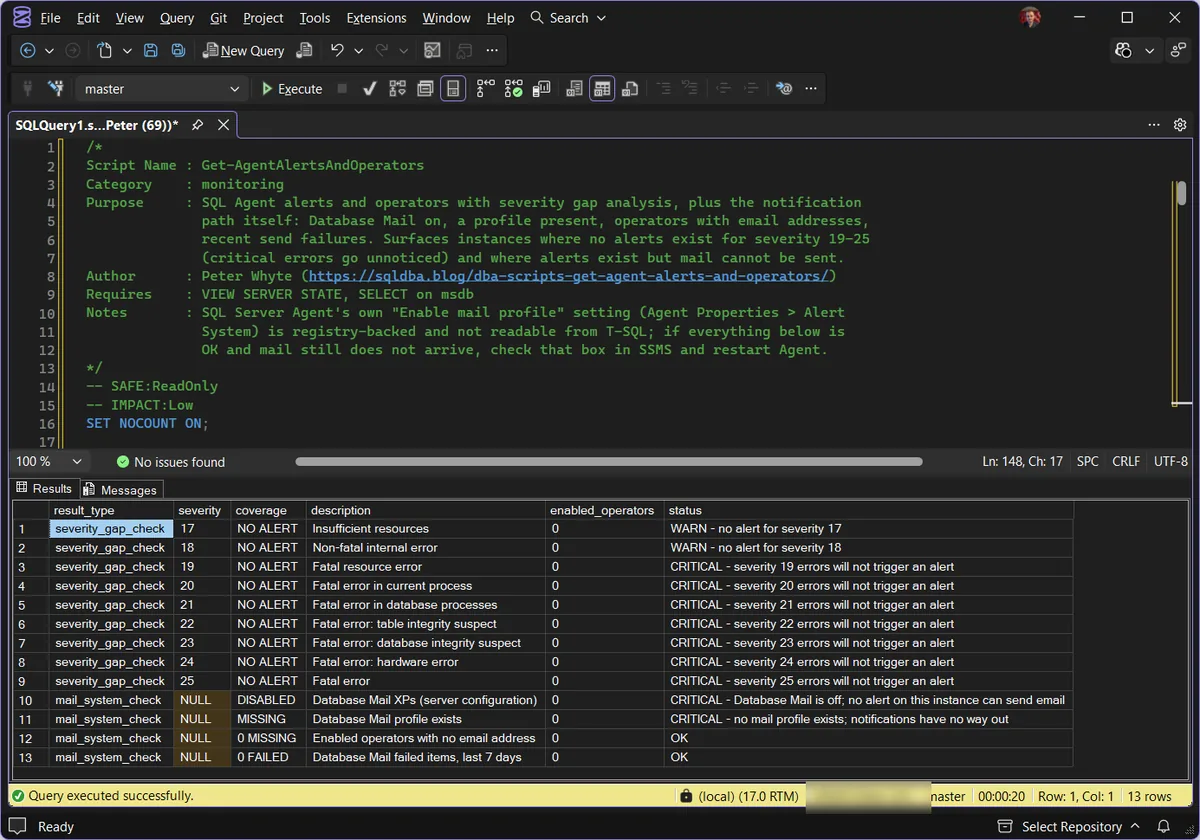
A genuinely stark finding: zero alert coverage across all nine severities, zero enabled operators, and then the mail_system_check rows confirming the notification path underneath is just as dead: Database Mail off and no mail profile, both CRITICAL. sysalerts is empty on this box. This is a lab instance, but it is exactly the state a freshly built production server is in before anyone configures alerting; nothing here was staged to make the point.
Understanding the Results
severity_gap_checkcoverage = NO ALERT means that severity has zero enabled alerts watching for it. One nuance: alerts built on a specific message_id (an 823 or 824 alert, say) do not count as severity coverage, so NO ALERT against severity 24 is accurate even if error-number alerts exist. Act when NO ALERT shows against severity 19 or above. That is the fatal tier running silent; the script marks it CRITICAL for you.configured_alertmail_system_checkenabled_operators0 jumps out immediately as “nobody would be notified even if alerts existed.”statusCRITICAL, WARN, INFO, or OK per row, with the reason in the text.Common Causes
Alerting typically ends up missing for one of two reasons. Either it was never configured at build time, SQL Server ships with zero alerts and zero operators out of the box, so unless someone explicitly runs through the setup, this state is the default, not an anomaly. Or it was configured once, correctly, and then quietly broken later: an operator’s email address changes, the person leaves the team and their account gets disabled, or a migration to a new paging tool never updated the SQL Agent operator list to match. There is also a third, sneakier failure mode: the alerts and operators are all intact, and the mail underneath them is broken. Database Mail switched off, the profile deleted, or an operator whose address stopped existing. That whole class of problem is invisible in the alerts UI, which is why this script checks the notification path itself.
How to Fix Missing Alert Coverage
Create an operator first (an alert with nowhere to send its notification is nearly as useless as no alert):
EXEC msdb.dbo.sp_add_operator
    @name = N'DBA Team',
    @enabled = 1,
    @email_address = N'dba-team@example.com';
Then add an alert per missing severity, repeating for each gap the script surfaces:
EXEC msdb.dbo.sp_add_alert
    @name = N'Severity 019 - Fatal Resource Error',
    @message_id = 0,
    @severity = 19,
    @enabled = 1,
    @delay_between_responses = 60,
    @notification_message = N'Severity 19 error occurred.';

EXEC msdb.dbo.sp_add_notification
    @alert_name = N'Severity 019 - Fatal Resource Error',
    @operator_name = N'DBA Team',
    @notification_method = 1;  -- 1 = email
Repeat for each of 19 through 25 at minimum, then 17 and 18 if you want the earlier warning tier covered too. SQL Server Agent must be running for any of this to fire.
Then confirm the mail path underneath. The script’s mail_system_check rows cover what T-SQL can see: Database Mail enabled, a profile present, operators with addresses (this site’s Database Mail status script digs deeper). One setting no query can reach: SQL Server Agent’s own “Enable mail profile” checkbox, under Agent Properties > Alert System in SSMS. It is registry-backed, off by default, and forgetting it is the classic reason a perfectly configured alert never sends a thing. Tick it, pick the profile, restart Agent.
Best Practices
- Configure alerts for every severity 19-25 as a standard part of any new instance build, don’t leave this to be discovered missing later.
- Always attach at least one enabled operator to every alert, an alert with no operator gives a false sense of coverage.
- Review the operator list whenever team membership changes, a departed team member left as the sole operator is a silent gap.
- Re-run this script periodically, not just at initial setup, alerting infrastructure decays quietly as people and tools change around it.
Microsoft’s reference covers sp_add_alert, sp_add_operator, sp_add_notification, and Database Mail in full.
Frequently Asked Questions
What are SQL Server severity levels 19-25?
They’re the fatal error tier, conditions SQL Server itself treats as serious enough to potentially affect the availability or integrity of a database or the instance: fatal resource errors, database or table integrity failures, and hardware errors. Anything at severity 19 and above is worth an immediate notification, not a note in the log to find later. The full tier-by-tier breakdown lives in SQL Server error severities explained, and the error library covers the individual messages.
Does SQL Server alert on critical errors by default?
No. SQL Server Agent alerts are opt-in, a freshly installed instance has zero alerts and zero operators configured. Alerting has to be explicitly set up, it isn’t part of the default install.
Why would an alert exist but not actually notify anyone?
Because an alert and its notification target are two separate objects in SQL Server Agent. An alert can be enabled and correctly configured to fire on a given severity, but if it has no operator attached (or the attached operator is disabled), the notification has nowhere to go. It looks configured and does nothing.
Alerts, operators and Database Mail are all configured. Why do no emails arrive?
Almost always SQL Server Agent’s own mail setting: Agent Properties > Alert System > “Enable mail profile” in SSMS. It is a separate, registry-backed switch that no T-SQL query can read, it ships unticked, and Agent needs a restart after you set it. If that is already on, check msdb.dbo.sysmail_event_log for send errors next.
Summary
Alert coverage is one of those checks that’s invisible right up until the moment it isn’t, a severity 21 error either has somewhere to go or it sits quietly in the error log until someone happens to look. This script turns “is alerting actually configured” from an assumption into a 2-second answer: 9 severities checked, every configured alert’s operator assignment verified, in one query.
Run it right after any new build, and again any time the operator list might have drifted, because unlike most misconfigurations, this one only ever shows up the day you actually needed it.
Related Scripts
You may also find these scripts useful:
- SQL Agent and Jobs (hub)
- Job Schedules and Duration Trends
- SQL Agent Job Failure Summary
- SQL Agent Job Overview
- Database Mail and xp_cmdshell Status
- DBA Scripts: The Complete Guide, the map across every script on this site
Leave a Reply