
You have an error in front of you and need to know how worried to be. The Level in Msg 229, Level 14, State 5 is the severity, and it tells you before you read the message whether the statement was wrong, the server ran short of something, or the engine itself is in trouble. The bands follow MS Docs on Database Engine error severities.
SQL Server Error Severity Levels
| Severity | Meaning | Errors you will meet |
|---|---|---|
| 0 to 9 | Informational messages. The engine raises none of its own errors at 0 to 9. | |
| 10 | Informational message (returned as severity 0 to the client). | 825 read retry, still a disk warning |
| 11 | Object or entity does not exist. | |
| 12 | Query using non-locking hints; potential inconsistent reads. | |
| 13 | Deadlock detected. | 1205 deadlock victim |
| 14 | Security-related error (permission denied). | 229 permission denied 18456 login failed |
| 15 | Syntax error in T-SQL. | 102 incorrect syntax |
| 16 | General user-correctable error. | 208 invalid object name 8134 divide by zero |
| 17 | Out of resources (memory, locks, disk space) or over a limit the administrator set. | 1105 filegroup full 9002 log full |
| 18 | Engine software error. The statement completes and the connection stays open. | |
| 19 | Nonconfigurable engine limit exceeded. The batch is stopped. | 701 insufficient system memory |
| 20 | Fatal error affecting the current task. | |
| 21 | Fatal error affecting all tasks in the current database. | 3417 cannot recover master |
| 22 | Table or index corruption. | |
| 23 | Database integrity in question. | |
| 24 | Media failure or hardware-related issue. | 823 and 824 I/O errors |
Operational notes:
- Severity 19 to 24 is always written to the SQL Server error log. Lower ones get there only when the message is flagged as event-logged or raised
WITH LOG, which is why 18456 at Level 14 and 825 at Level 10 show up in it. - Engine errors at 19 and above stop the current batch.
- Severity 20 and above ends the task, and in most cases the connection with it.
- TRY…CATCH cannot handle an error that ends the connection.
How to Read an Error in SSMS
Every error carries a number, a message, a Level (the severity), a State and a Line. This one is quick to reproduce.
Run it as a database user with no permission on the table:
-- DemoSeverityUser has no rights on this table, so the read is refused
EXECUTE AS USER = 'DemoSeverityUser';
GO
SELECT * FROM dbo.SeverityDemo;
GO
REVERT;
GOLevel 14 says security before you read the message: the engine is fine and the fix is a permission. The State tells the engine’s own call sites apart, and the Line points at the statement. The number at the start is how the SQL Server Errors library is indexed.
Severity Ranges in Production Terms
Instead of memorising every definition, think of severity in ownership terms:
Not a failure, with one exception: error 825 is Level 10 and means a read only worked on a retry.Ignore the band, never that number.
Bad T-SQL, missing objects, permissions, constraint violations, deadlocks.Usually owned by development or query logic.
Memory exhaustion, lock limits, a full log or filegroup, and engine software faults at 18.Owned by the DBA. Investigate configuration and workload.
Connection termination, corruption, database integrity issues, storage failure.Immediate investigation required. May involve CHECKDB, restore strategy, or storage review.
Amber goes back to whoever wrote the statement. Orange and red come to you.
TRY…CATCH and ERROR_SEVERITY()
TRY...CATCH catches runtime errors above severity 10 that do not end the connection. A severity 10 message raised inside the TRY block goes straight to the client and execution carries on.
If the error ends the connection (usually severity 20 and above), execution stops and control never reaches the CATCH block.
Inside a CATCH block, you can retrieve the severity of the error using ERROR_SEVERITY():
-- Generates severity 16
BEGIN TRY
    SELECT 1 / 0;  -- Generates severity 16
END TRY
BEGIN CATCH
    SELECT
        ERROR_NUMBER()    AS ErrorNumber,
        ERROR_SEVERITY()  AS ErrorSeverity,
        ERROR_STATE()     AS ErrorState,
        ERROR_MESSAGE()   AS ErrorMessage;
END CATCH;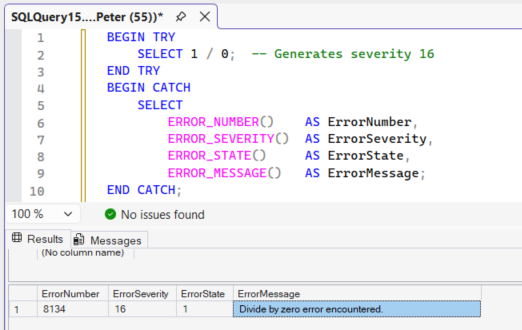
Error 8134 at severity 16: user-correctable, the connection stays open and execution lands in the CATCH block.
ERROR_SEVERITY() returns the severity of the error that triggered that specific CATCH block. If it is called outside the scope of a CATCH block, it returns NULL.
MS Docs covers ERROR_SEVERITY() inside nested TRY…CATCH blocks.
Where Errors Are Stored
All system and user-defined error messages are stored in the sys.messages catalog view.
It holds the definition of each error, not a history of when one happened. This counts the engine messages at each severity:
-- Engine messages per severity, and how many are always logged when raised
SELECT
    severity,
    COUNT(*)                          AS messages,
    SUM(CAST(is_event_logged AS int)) AS event_logged
FROM sys.messages
WHERE language_id = 1033
GROUP BY severity
ORDER BY severity;3 in 4 engine messages are 16 (12,578 of 16,781). Nothing is defined above 24: severity 25 exists only for RAISERROR.
To find when an error happened, look in:
- The SQL Server error log
- Windows Event Viewer
- Extended Events
- Custom logging tables
Reading the log itself. Severity tells you how bad one message is; the log tells you whether it is happening repeatedly, and at what time of day.
- The SELECT Permission Was Denied on the Object (Error 229), the Error Library entry for Msg 229
- Recent Error Log Entries, read the log without scrolling it
- Error Log Patterns, find what repeats, rather than what happened once
Application Errors: RAISERROR and THROW
An application error carries whatever severity the code chose, and it never reaches the error log unless the code asks. From a login with no server roles:
RAISERROR('severity 10 from a plain login', 10, 1);
RAISERROR('severity 11 from a plain login', 11, 1);
RAISERROR('severity 16 from a plain login', 16, 1);
RAISERROR('severity 18 from a plain login', 18, 1);
RAISERROR('severity 16 WITH LOG', 16, 1) WITH LOG;Severity 10 comes back as a plain message with no Msg line, because the client receives it as severity 0. 11 to 18 come back as errors and the batch carries on. None of it reached the error log.
WITH LOG: sysadmin or
ALTER TRACE, anyone else gets Msg 2778. Writes to the error log and the Windows Application log.Severity 19 to 25: sysadmin or
ALTER TRACE, and only with WITH LOG, otherwise Msg 2754.THROW: always severity 16, unless it rethrows a caught error, which keeps its own severity.
The rules are in MS Docs for RAISERROR and THROW. To keep application errors, log ERROR_NUMBER(), ERROR_SEVERITY(), ERROR_MESSAGE() and SYSDATETIME() to a table from the CATCH block.
Frequently Asked Questions
Which severity levels should actually wake someone up?
Why do some errors never reach my application?
Can TRY…CATCH handle every error?
The error number is not in any of these posts. What now?
sys.messages holds every message text and severity the instance knows about.Why is my application error not in the SQL Server error log?
RAISERROR only writes there with WITH LOG, which needs sysadmin or ALTER TRACE, and THROW cannot log at all. Log application errors to your own table from the CATCH block.Summary
Severity is the quickest triage signal SQL Server gives you.
- 16 usually means fix the code.
- 17 means check resources.
- 22 or 23 means check integrity.
- 24 means check storage.
Reading severity first tells you who likely owns the issue and how worried you should be before you even dig into the full message text.
Where To Go Next
- Get Error Log Patterns, find the errors already repeating on your instance before anyone reports them
- Get Agent Job Failure Summary, for the severities that only ever surface in a failed job
- The Script Finder, 100+ scripts organised by the symptom rather than the script name
- Performance and Troubleshooting Scripts, the pillar that holds the error log scripts
Leave a Reply