
The firewall team, or a vendor, wants the exact IP address and port before they will open an allow-list rule, and the server has more than one address. Do not read it off ipconfig and do not assume 1433: ask SQL Server which address and port the connection actually arrived on.
The IP and Port Your Session Connected To
Run this from the client that needs the rule, or from SSMS connected the same way the application connects. It returns the server-side address and port of your own connection, plus the client address SQL Server saw.
-- Connection details for the current session
SELECT
    local_net_address   AS ConnectedServerIP,
    local_tcp_port      AS ConnectedPort,
    client_net_address  AS ClientIP,
    client_tcp_port     AS ClientPort,
    net_transport       AS Protocol,
    @@SPID              AS SessionID
FROM sys.dm_exec_connections
WHERE session_id = @@SPID;
Permission required: VIEW SERVER STATE, or VIEW SERVER PERFORMANCE STATE on SQL Server 2022 and later, which VIEW SERVER STATE covers. Both are listed on the MS Docs page for sys.dm_exec_connections.
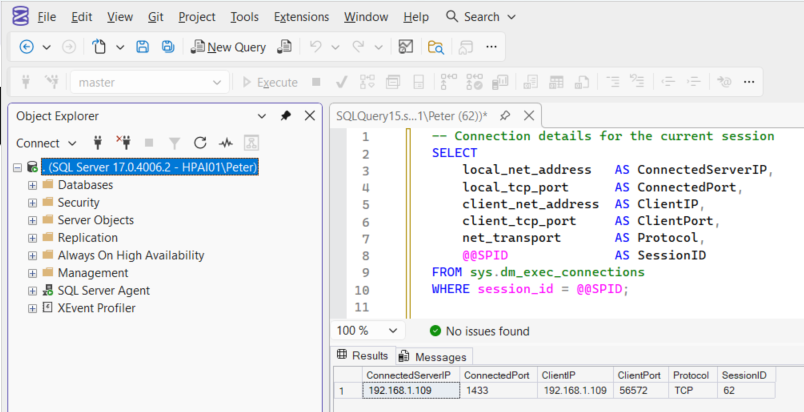
ConnectedServerIP and ConnectedPort are the 2 values the rule needs. ClientIP is the address the connection came from. If the port surprises you, do not assume 1433, named instances and changed defaults are common: see SQL Server Default Ports.
Why It Returns NULL on the Server Itself
local_net_address and local_tcp_port are filled in only for connections over TCP. A query window opened on the server itself, with . or (local) as the server name, normally connects over Shared Memory, which MS Docs lists as enabled by default on every edition. Both columns come back NULL, and that is not a fault. Put tcp: in front of the server name to force TCP:
sqlcmd -S tcp:HPAI01,1433 -E -C -W -Q "SELECT CONNECTIONPROPERTY('net_transport') AS net_transport, CONNECTIONPROPERTY('local_net_address') AS local_net_address, CONNECTIONPROPERTY('local_tcp_port') AS local_tcp_port, CONNECTIONPROPERTY('client_net_address') AS client_net_address;"Where Shared Memory has been disabled on the instance, a plain . connection falls back to TCP and returns the address without the prefix, so a NULL on one server and a value on another is the protocol, not the query. If the tcp: connection fails outright, TCP/IP is off and nothing remote can connect either: Enabling TCP Connections in SQL Server.
Quick Alternative: CONNECTIONPROPERTY()
The same values for the current connection, without reading the DMV:
SELECT
    CONNECTIONPROPERTY('local_net_address')  AS ServerIPAddress,
    CONNECTIONPROPERTY('local_tcp_port')     AS ServerPort,
    CONNECTIONPROPERTY('client_net_address') AS ClientIPAddress,
    CONNECTIONPROPERTY('net_transport')      AS Protocol;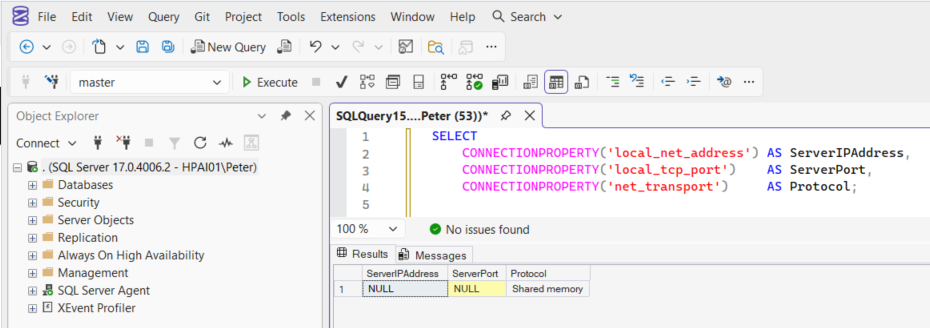
That is the NULL from the section above: SSMS connected to . over Shared Memory. MS Docs for CONNECTIONPROPERTY says the address is available only for connections that use the TCP transport provider, so it is NULL for Shared Memory and Named Pipes too, and always NULL in Azure SQL Database.
Every Address Clients Are Arriving On
One session tells you the address your own connection used. The allow-list has to cover every address the applications use, and a host with IPv6 enabled can be answering on both. Roll the current connections up by server address:
-- Every server address and port that current connections arrived on
SELECT local_net_address,
       local_tcp_port,
       net_transport,
       COUNT(*) AS connections
FROM sys.dm_exec_connections
GROUP BY local_net_address, local_tcp_port, net_transport
ORDER BY connections DESC;Half the connections on that instance arrived over IPv6, on a link-local address, not on the IPv4 one. The %8 on the end is the zone index of the network interface, not a port. When local_net_address shows an IPv6 address, the firewall rules and allow-lists need the IPv6 address as well.
What the Instance Is Listening On
The DMV shows where connections did arrive. The error log records where they can, once per startup:
EXEC xp_readerrorlog 0, 1, N'Server is listening on', N'1433';'any' means SQL Server is listening on every address the host owns, so the log gives you the port and not the IP. That is the Listen All setting. In SQL Server Configuration Manager, under SQL Server Network Configuration, Protocols for the instance, TCP/IP Properties, Listen All on the Protocol tab reads Yes here. While it is Yes, only the TCP Port under IPAll on the IP Addresses tab is used, and the individual IP1, IP2 entries are ignored, their Enabled setting included (MS Docs). On the instance above, the IPv6 entry carrying 5 connections is set to Enabled No. For every listening port at once, including the DAC, use the sys.dm_tcp_listener_states query on the ports page.
The Host Name Is Not an IP Address
SELECT SERVERPROPERTY('MachineName'); gives the Windows computer name. Resolve it from the client that needs access, not from the server, because that is the answer the client will use:
Resolve-DnsName HPAI01 -Type AOne name, 2 IPv4 addresses: the Wi-Fi adapter and the virtual switch Hyper-V creates for WSL. SQL Server listens on both, and a connection by name from that host arrived on 192.168.1.109. ipconfig lists every adapter the same way and cannot say which one a client uses; the session query can. To confirm the host is listening on the port and which process owns it, see How to Check Listening Ports on Windows.
Availability Group Listener and Whitelisting
If you connect through an Availability Group listener, there are two common checks:
- Did my session connect via a listener VIP (Virtual Network IP) or directly to a node?
- What IPs should be whitelisted (listener VIPs and node IPs)?
A VIP (Virtual Network IP) is the IP address assigned to the listener name that clients connect to. It is “virtual” in the sense that it is not tied permanently to one host, it is owned by whichever node currently has the listener online.
Confirm whether you hit a listener VIP
Run the session query through the listener name, then compare its ConnectedServerIP to the listener VIPs:
-- Listener names and the VIPs registered against them
SELECT
    l.dns_name,
    l.port,
    lip.ip_address,
    lip.state_desc
FROM sys.availability_group_listeners AS l
JOIN sys.availability_group_listener_ip_addresses AS lip
    ON lip.listener_id = l.listener_id;
The listener name and the listener addresses live in two different views. sys.availability_group_listeners holds dns_name and port, and sys.availability_group_listener_ip_addresses holds the addresses, so the two have to be joined on listener_id. On an instance with no Availability Group it returns 0 rows.
If ConnectedServerIP matches one of the listener IPs, you came in through the listener VIP as expected. If it shows a node IP, your connection string is likely bypassing the listener.
If you are troubleshooting cross-zone connectivity, validate the route from the application side as well. See: Testing Remote Server Port Connectivity with PowerShell.
DNS check from the client side
On a client machine (or anywhere with the same DNS view as the app), run:
nslookup AGListenerNameThat shows which listener IPs DNS is returning. In multi-subnet setups it is normal for multiple IPs to be returned. In those cases, make sure your application connection string uses MultiSubnetFailover=True to reduce failover connection delays.
For whitelisting, you will typically need the listener VIPs plus the replica node IPs as well:
nslookup Node1Name
nslookup Node2NameThe address is one link in the chain. These are the checks either side of it when a client still cannot connect.
- Enabling TCP Connections in SQL Server, an address is no use if TCP/IP is switched off on the instance.
- SQL Server Ports: 1433, Dynamic Ports and Firewall Rules, which port to connect on, and which ones the firewall has to allow.
- How to Check Listening Ports on Windows, confirm the host is listening on that port, and which process owns it.
- Testing Remote Server Port Connectivity with PowerShell, prove the path from the client before blaming SQL Server.
- sqlcmd Examples for SQL Server, connect from the command line once the address and port are settled.
- Cannot Connect to SQL Server: The Checks in the Order That Finds It, the router for every connection error, start here when you are not sure which one you have.
- DBA Scripts: Server and Configuration, the hub this sits in, every instance-level check that establishes what a server is and how it is configured.
Leave a Reply