
Something cannot connect, or the firewall team wants a port number before they will open anything. Both questions have the same answer, and it is not a guess: ask the instance what it is listening on.
TCP 1433 is right on a default instance nobody has touched, and it stops being right as soon as anything else is going on. A named instance takes a dynamic port that can change when the service restarts, which is the whole reason the SQL Server Browser service exists. Mirroring and Availability Group endpoints, Service Broker and SSIS each bring ports of their own. When a connection fails, the port you assumed is rarely the port in use.
If TCP is not enabled on the instance at all, none of this applies yet: Enabling TCP Connections in SQL Server covers that first step.
What This Instance Is Listening On
Run this on the instance. One row per address and port, with the firewall consequence on the end of each row.
-- Every port this instance is listening on, and whether a firewall rule has to cover it
SELECT type_desc,
       ip_address,
       port,
       state_desc,
       CASE WHEN ip_address IN ('127.0.0.1', '::1')
            THEN 'loopback only, no firewall rule'
            ELSE 'reachable from the network, needs a firewall rule' END AS firewall_scope
FROM sys.dm_tcp_listener_states
ORDER BY type_desc, port, ip_address;4 things to read off that. TSQL on 0.0.0.0, port 1433 is the rule the firewall needs. TSQL on 127.0.0.1, port 1434 is the Dedicated Administrator Connection bound to loopback, so it needs nothing opened. The SERVICE_BROKER rows are on a dynamic loopback port and this instance has no Service Broker endpoint of its own, so they are not a firewall question either. And no row at all for a port you expected means the instance is not listening on it, which is a different fault from the firewall dropping it.
SQL Server Port Reference
Every port SQL Server uses, and which of them move:
| Port | Used by | Notes |
|---|---|---|
| TCP 1433 | Database Engine, default instance | The default, and only true until somebody changes it. |
| Dynamic | Database Engine, named instances | Picked at startup and it can change on restart. Pin it to a fixed port. |
| TCP 1434 | Dedicated Administrator Connection | Default instance. Bound to loopback until remote admin connections is enabled. |
| UDP 1434 | SQL Server Browser service | How a client finds a named instance’s port. Blocked or stopped, the instance looks dead. |
| TCP 135 | RPC endpoint mapper, used by the SSIS service, MSDTC and WMI | Owned by Windows, not by sqlservr. Cannot be changed. |
| TCP 4022 | Service Broker endpoint | No default. 4022 is convention. The live port is in sys.dm_tcp_listener_states. |
| TCP 5022 | Mirroring and Availability Group endpoints | No default. 5022 is convention. Read the endpoint, never assume. |
| TCP 2383 | Analysis Services, default instance | Documented, not reproduced here. |
| TCP 80 and 443 | Reporting Services | Documented, not reproduced here. |
Everything above Analysis Services was read off a running instance. Those last 2 rows come from the MS Docs list of ports to open for SQL Server, because neither service is installed on the instance these captures came from, so they are documented rather than reproduced.
TCP 1434 Is the DAC, UDP 1434 Is the Browser
The Dedicated Administrator Connection has a port of its own. On a default instance that is TCP 1434, and if the port is already taken when the service starts, SQL Server assigns a dynamic one instead. A named instance always takes a dynamic port, and writes it to the error log at startup.
You may see it said that the DAC uses UDP 1434. That is a genuine mix-up, and it is worth being precise about which half is wrong. UDP 1434 belongs to the SQL Server Browser service for instance discovery. The DAC listens on TCP 1434. Two different protocols, the same number, which is why the two get run together so often.
A local DAC connection needs no firewall rule. Remote DAC is switched off by default, and turning it on means opening the DAC port as well as enabling remote admin connections.
The error log says it outright at startup: Dedicated admin connection support was established for listening locally on port 1434. The listener query says the same thing from the other side, TSQL on 127.0.0.1 and ::1 and nothing else, and remote admin connections reads 0 in sys.configurations until somebody turns it on.
Named Instances and the Browser Service
A named instance does not get 1433. It takes a dynamic port at startup, so a client holding only HOST\INSTANCE has no number to connect to. That is what the SQL Server Browser service is for: the client asks Browser over UDP 1434 which port the instance is on, Browser answers, and only then does the real connection happen. Browser carries no database traffic itself, it only answers that question.
Which is why a stopped or firewalled Browser looks exactly like a dead server. With the service stopped nothing is listening on UDP 1434 at all, and the connection fails before it reaches the engine: SQL Server Network Interfaces: Error Locating Server/Instance Specified, then a login timeout. That message reads identically whether Browser is unreachable or the instance name is simply wrong, so check both.
The durable fix is to stop needing Browser: pin the instance to a fixed TCP port in Configuration Manager and connect to host,port. Then the only thing the firewall team has to carry is one TCP port that does not move.
Where the Configured Port Lives
The listener query reads what is running right now. SQL Server Configuration Manager reads what is configured, which is what the instance will come back on after a restart. When the two disagree, the configured value is the one that will bite you.
Open SQL Server Configuration Manager and navigate to:
SQL Server Network Configuration → Protocols for <InstanceName> → TCP/IP Properties → IP Addresses tab
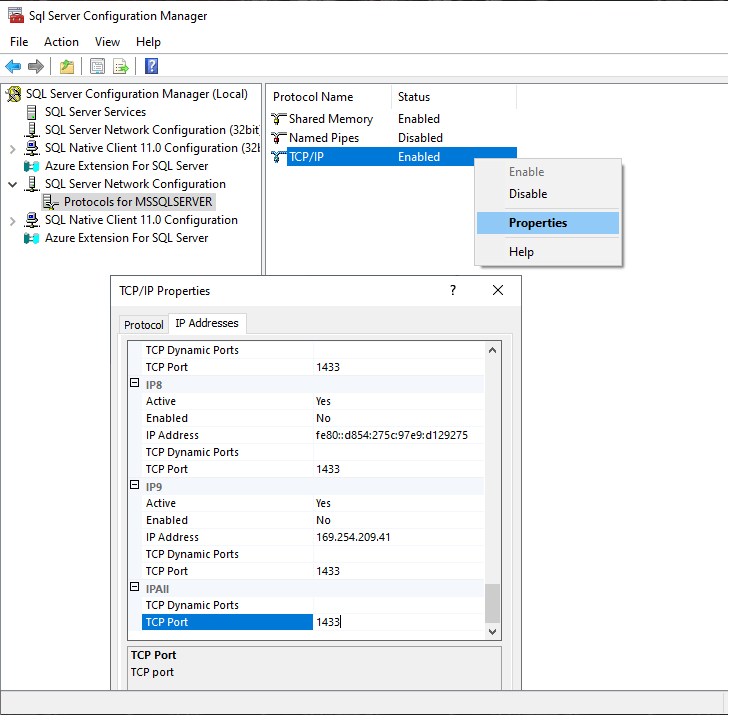
If several instances are installed on the same server, repeat the check for each one. And if you need to confirm what the host is actually listening on and which process owns the port, that is an OS-level question: How to Check Listening Ports on Windows.
Checking the HADR or Mirroring Endpoint Port
Availability Groups and database mirroring use a separate TCP endpoint, which listens on its own port. To read the port off the endpoint itself:
-- Show database mirroring endpoint state, encryption, and listening port
SELECT
    e.name AS Endpoint_Name,
    e.state_desc AS Endpoint_State,
    e.type AS Endpoint_Type,
    e.type_desc AS Endpoint_Type_Description,
    d.state AS Mirroring_State,
    d.state_desc AS Mirroring_State_Desc,
    tcp.port AS Port_Number,
    d.is_encryption_enabled AS Encryption_Enabled,
    d.encryption_algorithm_desc AS Encryption_Algorithm_Desc,
    d.certificate_id AS Certificate_Id
FROM sys.endpoints e
JOIN sys.database_mirroring_endpoints d ON e.endpoint_id = d.endpoint_id
JOIN sys.tcp_endpoints tcp ON e.endpoint_id = tcp.endpoint_id;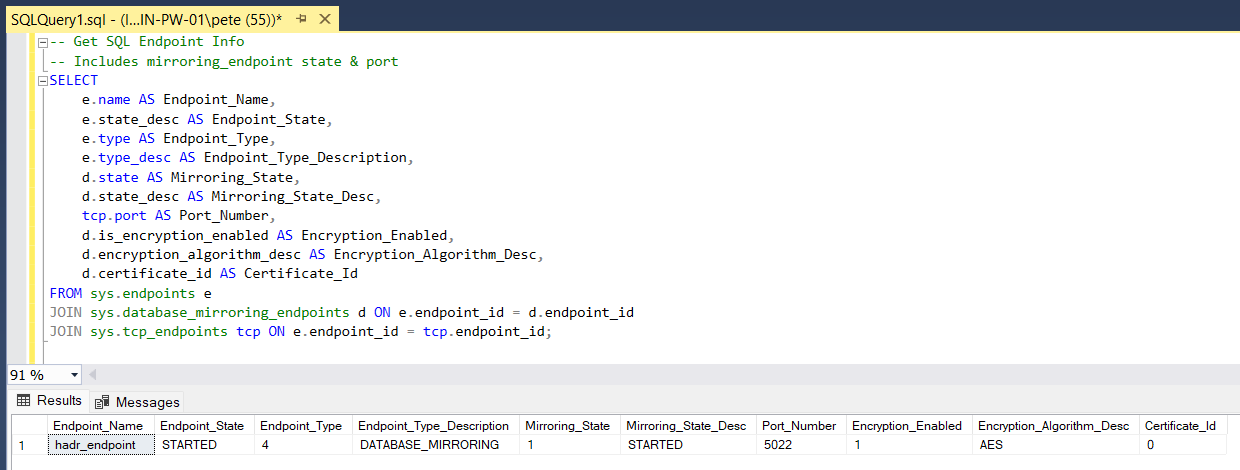
On an instance with no mirroring or Availability Group endpoint the query returns no rows, and that is the answer: there is no endpoint port to open. Once an endpoint is created and started the error log records it like any other listener, Server is listening on [ 'any' <ipv4> 5022] followed by The Database Mirroring endpoint is now listening for connections.
5022 is only the common convention. The port is fully configurable, so do not assume it when you are validating firewall rules or Availability Group connectivity.
Other Ways to Identify SQL Server Ports
Review the SQL Server Error Log
The error log records every listener at startup, so one filtered read gives the whole set without leaving SSMS:
EXEC xp_readerrorlog 0, 1, N'Server is listening';A dynamic port shows up here too, which makes this the quickest way to find what a named instance picked this time. The clicking route to the same thing is Management, then SQL Server Logs, then the current log.
Check the Windows Registry
SQL Server port configuration is also stored in the Windows Registry, under:
HKEY_LOCAL_MACHINE\SOFTWARE\Microsoft\Microsoft SQL Server\<InstanceID>\MSSQLServer\SuperSocketNetLib\Tcp\IPAllReplace <InstanceID> with the instance’s registry ID, which is not the same as its name. A default SQL Server 2025 instance is MSSQL17.MSSQLSERVER, and the mapping from name to ID is listed under HKEY_LOCAL_MACHINE\SOFTWARE\Microsoft\Microsoft SQL Server\Instance Names\SQL.
The port is in the IPAll subkey, not in Tcp itself, which carries only the protocol settings. Read TcpPort for a fixed port and TcpDynamicPorts for the port a dynamic instance picked at startup. On the instance these captures came from, TcpPort reads 1433 and TcpDynamicPorts is empty, which is what a pinned port looks like. A dynamic instance is the other way round.
Registry checks are useful for automation and verification, but they are not a replacement for Configuration Manager day to day.
Query Active Connections
You can also see the TCP port that current connections are using:
SELECT DISTINCT local_net_address, local_tcp_port
FROM sys.dm_exec_connections
WHERE local_tcp_port IS NOT NULL;
This shows what connections are using, which is not the same as what the instance is configured to listen on. The IS NOT NULL predicate also drops any session that did not arrive over TCP, so on an instance where everything connects locally it can return nothing at all. For the single-session view, what your own session connected to right now, see: How to Get the SQL Server IP Address.
Operational Considerations
- Do not assume 1433. Read the listener.
- Named instances take dynamic ports, and a dynamic port can change on restart.
- Mirroring and Availability Group endpoints need firewall rules of their own.
- The Browser service should be running on purpose, not by accident.
In larger organisations network access is controlled by a central firewall team, and a request needs the source host, the destination host, the protocol and the destination port. Supplying a port you assumed rather than one you read is how a change window gets burned. Testing it afterwards is our job too, not theirs.
When a connection is failing, validate in this order:
- TCP is enabled on the instance.
- The instance is listening on the port you expect, and the listener says it is reachable rather than loopback only.
- The name resolves and there is a network path to the host, which fails with its own message long before the port matters.
- The port answers from the client.
- The session landed on the IP and port you think it did.
Knowing the port is one step. These are the checks that use it.
- Enabling TCP Connections in SQL Server, TCP has to be on before any port matters.
- How to Check Listening Ports on Windows, confirm the server is listening on that port, and which process owns it.
- Testing Remote Server Port Connectivity with PowerShell, test the port from the client side.
- How to Get the SQL Server IP Address, confirm the IP and port a session actually connected to.
- The Server Network Address Cannot Be Reached or Does Not Exist (Error 1418), what you get when the endpoint port is wrong, closed or not listening.
- sqlcmd Examples for SQL Server, connect on that port from the command line.
- Cannot Connect to SQL Server: The Checks in the Order That Finds It, the router for every connection error, start here when you are not sure which one you have.
- DBA Scripts: Server and Configuration, the hub this sits in, every instance-level check that establishes what a server is and how it is configured.
Leave a Reply