
The failure mode nobody monitors
All four can be true while the database is unrecoverable. Every problem on this page shares one property: SQL Server does not tell you about it. Not in the error log, not as a failed job, not as an exception to the application. They are found by looking, or not at all.
Most SQL Server troubleshooting starts with a signal. An error number, a failed job, a phone call.
That is the easy half, and it is where nearly all the writing is, because a message gives you
something to search for.
This post is about the other half. The problems that produce no message at all, where the
instance keeps reporting good health right up until the moment it matters. They are not exotic. Most
of them are configuration you inherited or a job somebody set up years ago, and each one is
individually mundane, which is exactly why nobody has looked.
The pattern they share is worth naming once, because once you can see it you find these yourself:
SQL Server reports on operations, not on outcomes. A backup job that ran is a successful backup
job. Whether the resulting chain can restore you to 3pm on Tuesday is a different question, and
nothing in the instance is asking it.
What Your Monitoring Sees, and What Is True
The dashboard
- Backups: ran, succeeded, 0 failures
- Integrity: no 823, 824 or 825 in the log
- Jobs: last run status SUCCESS
- Security: no failed logins, no denied permissions
- Performance: no long-running query alerts
What is actually true
- Backups: full only, no log chain, so no point-in-time restore
- Integrity: nothing has verified a page in two years
- Jobs: step 2 fails nightly and the job continues to step 3
- Security: a disabled sysadmin waiting for the next server rebuild
- Performance: the optimizer is planning from statistics from 2023
Neither column is wrong. The left one is answering the question it was asked.
The Catalogue
Twelve of them, each with the symptom you actually experience, the mechanism underneath, and where
to look. Severity here means what it costs you when it finally surfaces, not how likely it is.
DBCC DBINFO WITH TABLERESULTS → dbi_dbccLastKnownGoodSELECT name, page_verify_option_desc FROM sys.databasesrecovery_model_desc vs msdb.dbo.backupset WHERE type = 'L' AND is_copy_only = 0SELECT name, is_trustworthy_on FROM sys.databasesNOCHECK is left untrusted. It still blocks bad data, but the optimizer stops believing it and can no longer use it to eliminate joins or simplify predicates. You lose plan quality silently, and only on the tables somebody bulk loaded.SELECT name, is_not_trusted FROM sys.foreign_keys WHERE is_not_trusted = 1SELECT ... FROM msdb.dbo.sysjobsteps WHERE on_fail_action = 3SELECT name, is_auto_shrink_on FROM sys.databasesSELECT name, SUSER_SNAME(owner_sid) FROM sys.databasessys.database_principals.sid with no match in sys.server_principalsCREATE LOGIN has no syntax for creating a disabled login, so any transfer produces an enabled one, with the original password hash and SID intact, and then re-adds it to sysadmin in the next statement.is_disabled = 1 joined to sys.server_role_membersSELECT name, is_auto_update_stats_on FROM sys.databasesSELECT name, growth, is_percent_growth FROM sys.master_filesFinding All Twelve in One Pass
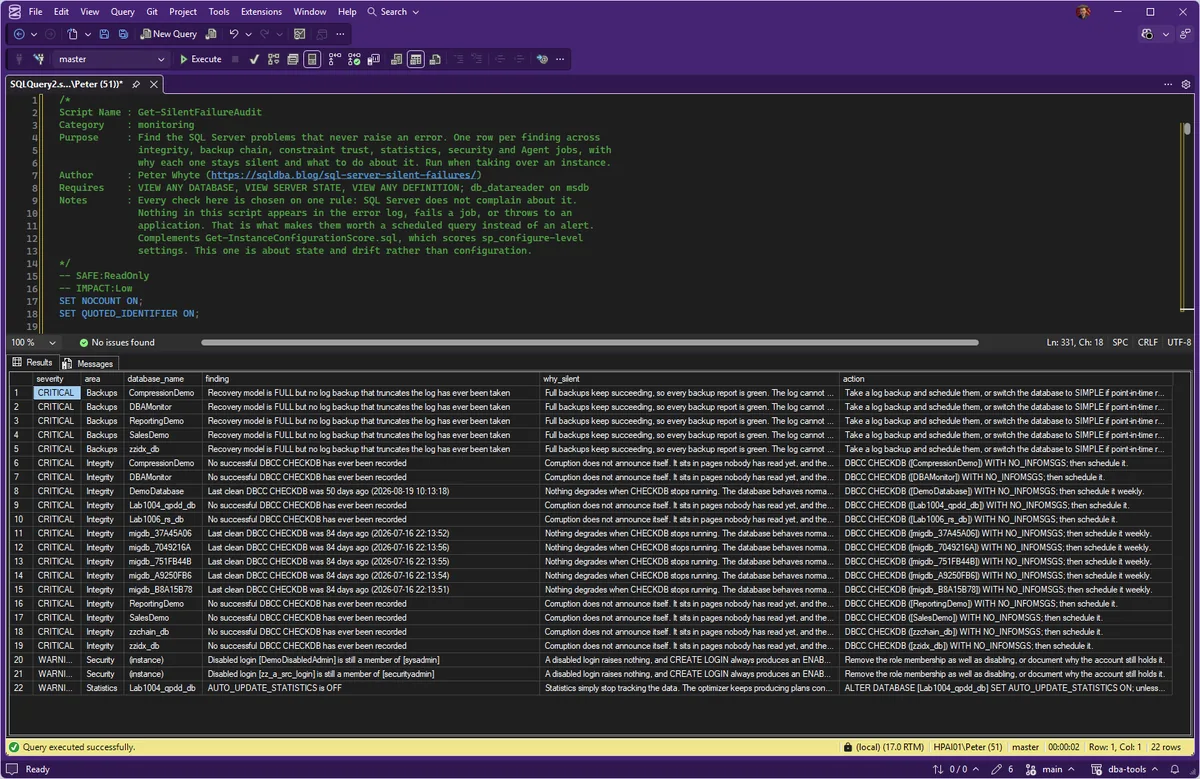
Checking these by hand is twelve queries against every database, which is why they go unchecked. The
repo has a script that runs the lot and returns one row per finding, with the reason it stayed
silent alongside the fix.
/*
Script Name : Get-SilentFailureAudit
Category    : monitoring
Purpose     : Find the SQL Server problems that never raise an error. One row per finding across
              integrity, backup chain, constraint trust, statistics, security and Agent jobs, with
              why each one stays silent and what to do about it. Run when taking over an instance.
Author      : Peter Whyte (https://sqldba.blog/sql-server-silent-failures/)
Requires    : VIEW ANY DATABASE, VIEW SERVER STATE, VIEW ANY DEFINITION; db_datareader on msdb
Notes       : Every check here is chosen on one rule: SQL Server does not complain about it.
              Nothing in this script appears in the error log, fails a job, or throws to an
              application. That is what makes them worth a scheduled query instead of an alert.
              Complements Get-InstanceConfigurationScore.sql, which scores sp_configure-level
              settings. This one is about state and drift rather than configuration.
*/
-- SAFE:ReadOnly
-- IMPACT:Low
SET NOCOUNT ON;
SET QUOTED_IDENTIFIER ON;

/*
  DESIGN: one flat result set, ordered by severity, so it reads top-down and exports cleanly.

  Columns:
    severity     - CRITICAL / WARNING / INFO
    area         - which part of the estate the finding belongs to
    database_name- '(instance)' for server-scoped findings
    finding      - what is actually true right now
    why_silent   - why nothing has told you about it, which is the point of the script
    action       - the next step, not a lecture

  Databases that are offline, restoring, or otherwise unreadable are skipped rather than
  failing the run, and the skip is reported as its own INFO row so the gap is visible.
*/

DECLARE @findings TABLE (
    severity      varchar(10)   NOT NULL,
    area          varchar(30)   NOT NULL,
    database_name sysname       NOT NULL,
    finding       nvarchar(500) NOT NULL,
    why_silent    nvarchar(400) NOT NULL,
    action        nvarchar(400) NOT NULL
);

-- ════════════════════════════════════════════════════════════════════════════
-- SERVER-SCOPED CHECKS
-- ════════════════════════════════════════════════════════════════════════════

-- A disabled login that is still a member of a high-privilege server role.
-- Silent because a disabled login is invisible in day-to-day use, and any process
-- that recreates logins (a migration, a DR build) produces an ENABLED one.
INSERT INTO @findings
SELECT 'WARNING', 'Security', '(instance)',
       N'Disabled login [' + p.name + N'] is still a member of [' + r.name + N']',
       N'A disabled login raises nothing, and CREATE LOGIN always produces an ENABLED login, so any rebuild of this server silently re-arms it with its original password.',
       N'Remove the role membership as well as disabling, or document why the account still holds it.'
FROM sys.server_principals p
JOIN sys.server_role_members srm ON srm.member_principal_id = p.principal_id
JOIN sys.server_principals r     ON r.principal_id = srm.role_principal_id
WHERE p.is_disabled = 1
  AND r.name IN (N'sysadmin', N'securityadmin', N'serveradmin', N'setupadmin');

-- Databases whose owner SID resolves to nothing.
INSERT INTO @findings
SELECT 'WARNING', 'Security', d.name,
       N'Database owner SID does not resolve to any login',
       N'Ownership is stored as a SID. When the login is dropped or arrives with a new SID the database keeps working normally, so nothing surfaces it.',
       N'ALTER AUTHORIZATION ON DATABASE::' + QUOTENAME(d.name) + N' TO [sa]; or to the correct owner.'
FROM sys.databases d
WHERE d.database_id > 4
  AND SUSER_SNAME(d.owner_sid) IS NULL;

-- TRUSTWORTHY is an escalation path, and it is off by default for a reason.
INSERT INTO @findings
SELECT 'CRITICAL', 'Security', d.name,
       N'TRUSTWORTHY is ON and the owner is a sysadmin',
       N'Nothing warns about this combination. It lets code inside the database run with sysadmin rights on the whole instance.',
       N'ALTER DATABASE ' + QUOTENAME(d.name) + N' SET TRUSTWORTHY OFF; unless a documented feature needs it.'
FROM sys.databases d
WHERE d.is_trustworthy_on = 1
  AND d.database_id > 4
  AND IS_SRVROLEMEMBER('sysadmin', SUSER_SNAME(d.owner_sid)) = 1;

-- Page verify anything other than CHECKSUM means torn pages can go unnoticed.
INSERT INTO @findings
SELECT 'CRITICAL', 'Integrity', d.name,
       N'PAGE_VERIFY is ' + d.page_verify_option_desc + N', not CHECKSUM',
       N'Without CHECKSUM, corruption on disk is not detected when the page is read, so there is no 824 error to alert on. It is found later, or never.',
       N'ALTER DATABASE ' + QUOTENAME(d.name) + N' SET PAGE_VERIFY CHECKSUM;'
FROM sys.databases d
WHERE d.page_verify_option <> 2
  AND d.database_id > 4
  AND d.state_desc = N'ONLINE';

-- Auto-shrink: fragments indexes continuously, and reports nothing.
INSERT INTO @findings
SELECT 'WARNING', 'Configuration', d.name,
       N'AUTO_SHRINK is ON',
       N'Shrink runs in the background, fragments every index as it goes, and never logs a problem. Performance degrades slowly enough to look like growth.',
       N'ALTER DATABASE ' + QUOTENAME(d.name) + N' SET AUTO_SHRINK OFF;'
FROM sys.databases d
WHERE d.is_auto_shrink_on = 1 AND d.database_id > 4;

-- Auto-close: pays a startup cost on every first connection.
INSERT INTO @findings
SELECT 'WARNING', 'Configuration', d.name,
       N'AUTO_CLOSE is ON',
       N'The database shuts down when the last session leaves and pays a full start-up on the next connection. It presents as an intermittent slow login, never as an error.',
       N'ALTER DATABASE ' + QUOTENAME(d.name) + N' SET AUTO_CLOSE OFF;'
FROM sys.databases d
WHERE d.is_auto_close_on = 1 AND d.database_id > 4;

-- Auto-update statistics off: plans quietly get worse as data grows.
INSERT INTO @findings
SELECT 'WARNING', 'Statistics', d.name,
       N'AUTO_UPDATE_STATISTICS is OFF',
       N'Statistics simply stop tracking the data. The optimizer keeps producing plans confidently from figures that are years old, and no error is ever raised.',
       N'ALTER DATABASE ' + QUOTENAME(d.name) + N' SET AUTO_UPDATE_STATISTICS ON; unless a maintenance job owns this deliberately.'
FROM sys.databases d
WHERE d.is_auto_update_stats_on = 0 AND d.database_id > 4 AND d.state_desc = N'ONLINE';

-- Percent growth on a data or log file: each growth is bigger than the last.
INSERT INTO @findings
SELECT 'WARNING', 'Storage', DB_NAME(mf.database_id),
       N'File [' + mf.name + N'] grows by ' + CAST(mf.growth AS nvarchar(10)) + N' percent',
       N'Percentage growth compounds, so each autogrow takes longer than the last. It shows up as an intermittent stall during the growth, not as an error.',
       N'Set a fixed growth increment in MB sized for the file.'
FROM sys.master_files mf
JOIN sys.databases d ON d.database_id = mf.database_id
WHERE mf.is_percent_growth = 1
  AND mf.database_id > 4
  AND d.state_desc = N'ONLINE';

-- FULL or BULK_LOGGED with no log backup: the log grows forever and the
-- "backups are running fine" statement is still true.
INSERT INTO @findings
SELECT 'CRITICAL', 'Backups', d.name,
       N'Recovery model is ' + d.recovery_model_desc + N' but no log backup that truncates the log has ever been taken',
       N'Full backups keep succeeding, so every backup report is green. The log cannot truncate, and point-in-time recovery does not actually exist.',
       N'Take a log backup and schedule them, or switch the database to SIMPLE if point-in-time recovery is not required.'
FROM sys.databases d
WHERE d.recovery_model_desc IN (N'FULL', N'BULK_LOGGED')
  AND d.database_id > 4
  AND d.state_desc = N'ONLINE'
  /* is_copy_only = 0 is load-bearing: a copy-only log backup does not truncate the log, so
     one taken once, ever, would satisfy this NOT EXISTS and delete the finding entirely. */
  AND NOT EXISTS (SELECT 1 FROM msdb.dbo.backupset bs
                  WHERE bs.database_name = d.name AND bs.type = 'L'
                    AND bs.is_copy_only = 0);

-- Suspect pages are recorded quietly in msdb.
INSERT INTO @findings
SELECT 'CRITICAL', 'Integrity', DB_NAME(sp.database_id),
       N'Suspect page recorded (event type ' + CAST(sp.event_type AS nvarchar(5)) + N', ' + CAST(sp.error_count AS nvarchar(10)) + N' error(s))',
       N'The row is written to msdb.dbo.suspect_pages and nothing else happens. Unless somebody reads that table, a corrupt page is simply on record.',
       N'Investigate immediately: DBCC CHECKDB on the database and check the storage layer.'
FROM msdb.dbo.suspect_pages sp
WHERE sp.event_type IN (1, 2, 3);

-- Agent job steps set to carry on after a failure: the job reports success.
INSERT INTO @findings
SELECT 'WARNING', 'Agent Jobs', '(instance)',
       N'Job [' + j.name + N'] step ' + CAST(s.step_id AS nvarchar(5)) + N' [' + s.step_name + N'] continues on failure',
       N'On failure the step moves to the next one, so the job finishes and reports SUCCESS. The failure exists only in the step history nobody opens.',
       N'Set the step to quit with failure, or confirm that continuing is deliberate for this step.'
FROM msdb.dbo.sysjobsteps s
JOIN msdb.dbo.sysjobs j ON j.job_id = s.job_id
WHERE j.enabled = 1
  AND s.on_fail_action = 3          -- 3 = go to the next step
  AND s.step_id < (SELECT MAX(s2.step_id) FROM msdb.dbo.sysjobsteps s2 WHERE s2.job_id = j.job_id);

-- ════════════════════════════════════════════════════════════════════════════
-- PER-DATABASE CHECKS (need to run inside each database)
-- ════════════════════════════════════════════════════════════════════════════

DECLARE @dbname sysname;
DECLARE @sql    nvarchar(max);

DECLARE db_cur CURSOR LOCAL FAST_FORWARD FOR
    SELECT name
    FROM sys.databases
    WHERE database_id > 4
      AND state_desc = N'ONLINE'
      AND is_read_only = 0
      AND DATABASEPROPERTYEX(name, 'Updateability') = 'READ_WRITE'
    ORDER BY name;

OPEN db_cur;
FETCH NEXT FROM db_cur INTO @dbname;

WHILE @@FETCH_STATUS = 0
BEGIN
    BEGIN TRY
        SET @sql = N'
        USE ' + QUOTENAME(@dbname) + N';

        -- Untrusted constraints: the optimizer stops believing them, quietly.
        SELECT ''WARNING'', ''Constraints'', DB_NAME(),
               N''Untrusted '' + CASE WHEN o.type = ''F'' THEN N''foreign key'' ELSE N''check constraint'' END
                 + N'' [ '' + o.name + N'' ] on ['' + OBJECT_NAME(o.parent_object_id) + N'']'',
               N''A constraint left untrusted after WITH NOCHECK still stops bad data, but the optimizer no longer uses it to simplify plans. Queries just get slower.'',
               N''ALTER TABLE '' + QUOTENAME(OBJECT_SCHEMA_NAME(o.parent_object_id)) + N''.'' + QUOTENAME(OBJECT_NAME(o.parent_object_id))
                 + N'' WITH CHECK CHECK CONSTRAINT '' + QUOTENAME(o.name) + N'';''
        FROM sys.objects o
        LEFT JOIN sys.foreign_keys      fk ON fk.object_id = o.object_id
        LEFT JOIN sys.check_constraints ck ON ck.object_id = o.object_id
        WHERE o.type IN (''F'', ''C'')
          AND ISNULL(fk.is_not_trusted, ck.is_not_trusted) = 1
          AND ISNULL(fk.is_disabled, ck.is_disabled) = 0

        UNION ALL

        -- A disabled index is still maintained in metadata and still costs you nothing but confusion.
        SELECT ''WARNING'', ''Indexes'', DB_NAME(),
               N''Index ['' + i.name + N''] on ['' + OBJECT_NAME(i.object_id) + N''] is DISABLED'',
               N''A disabled index is not used and not maintained, and no query fails because of it. Queries that relied on it simply scan instead.'',
               N''ALTER INDEX '' + QUOTENAME(i.name) + N'' ON '' + QUOTENAME(OBJECT_SCHEMA_NAME(i.object_id)) + N''.'' + QUOTENAME(OBJECT_NAME(i.object_id)) + N'' REBUILD; or drop it.''
        FROM sys.indexes i
        WHERE i.is_disabled = 1 AND i.type > 0

        UNION ALL

        -- Orphaned users: permissions look intact and the account cannot use them.
        SELECT ''WARNING'', ''Security'', DB_NAME(),
               N''Orphaned database user ['' + dp.name + N''] has no matching login'',
               N''The user still exists with every role membership, so a permissions review reads as correct. It just cannot authenticate through any login.'',
               N''Re-map with ALTER USER '' + QUOTENAME(dp.name) + N'' WITH LOGIN = [login]; or drop the user.''
        FROM sys.database_principals dp
        WHERE dp.type = ''S''
          AND dp.authentication_type_desc = ''INSTANCE''
          AND dp.sid IS NOT NULL
          AND NOT EXISTS (SELECT 1 FROM sys.server_principals sp WHERE sp.sid = dp.sid);';

        INSERT INTO @findings (severity, area, database_name, finding, why_silent, action)
        EXEC sp_executesql @sql;
    END TRY
    BEGIN CATCH
        INSERT INTO @findings
        SELECT 'INFO', 'Coverage', @dbname,
               N'Per-database checks could not run here',
               N'Reported rather than skipped quietly, because an unchecked database looks identical to a clean one in the output.',
               N'Check access and state for this database, then re-run. (' + LEFT(ERROR_MESSAGE(), 200) + N')';
    END CATCH

    FETCH NEXT FROM db_cur INTO @dbname;
END

CLOSE db_cur;
DEALLOCATE db_cur;

-- Databases that were not examined at all, named explicitly.
INSERT INTO @findings
SELECT 'INFO', 'Coverage', d.name,
       N'Not examined: state is ' + d.state_desc
         + CASE WHEN d.is_read_only = 1 THEN N' (read only)' ELSE N'' END,
       N'A database nobody checked produces no findings, which is indistinguishable from a clean one unless it is named.',
       N'Bring the database online or run the audit against it separately.'
FROM sys.databases d
WHERE d.database_id > 4
  AND (d.state_desc <> N'ONLINE' OR d.is_read_only = 1);

-- ════════════════════════════════════════════════════════════════════════════
-- DBCC CHECKDB: last known good, read from each database's boot page
-- ════════════════════════════════════════════════════════════════════════════
DECLARE @dbcc TABLE (ParentObject varchar(255), Object varchar(255), Field varchar(255), Value varchar(255));
DECLARE @lkg  datetime;

DECLARE dbcc_cur CURSOR LOCAL FAST_FORWARD FOR
    SELECT name FROM sys.databases
    WHERE database_id > 4 AND state_desc = N'ONLINE'
    ORDER BY name;

OPEN dbcc_cur;
FETCH NEXT FROM dbcc_cur INTO @dbname;

WHILE @@FETCH_STATUS = 0
BEGIN
    SET @lkg = NULL;
    BEGIN TRY
        DELETE FROM @dbcc;
        SET @sql = N'DBCC DBINFO(' + QUOTENAME(@dbname, '''') + N') WITH TABLERESULTS, NO_INFOMSGS';
        INSERT INTO @dbcc EXEC sp_executesql @sql;

        SELECT @lkg = TRY_CONVERT(datetime, MAX(Value))
        FROM @dbcc
        WHERE Field = 'dbi_dbccLastKnownGood';

        -- SQL Server writes 1900-01-01 when CHECKDB has never completed cleanly
        IF @lkg IS NOT NULL AND @lkg < '1901-01-01' SET @lkg = NULL;

        IF @lkg IS NULL
            INSERT INTO @findings
            SELECT 'CRITICAL', 'Integrity', @dbname,
                   N'No successful DBCC CHECKDB has ever been recorded',
                   N'Corruption does not announce itself. It sits in pages nobody has read yet, and the usual first symptom is a restore that fails months later.',
                   N'DBCC CHECKDB (' + QUOTENAME(@dbname) + N') WITH NO_INFOMSGS; then schedule it.';
        ELSE IF DATEDIFF(day, @lkg, GETDATE()) > 7
            INSERT INTO @findings
            SELECT CASE WHEN DATEDIFF(day, @lkg, GETDATE()) > 14 THEN 'CRITICAL' ELSE 'WARNING' END,
                   'Integrity', @dbname,
                   N'Last clean DBCC CHECKDB was ' + CAST(DATEDIFF(day, @lkg, GETDATE()) AS nvarchar(10))
                     + N' days ago (' + CONVERT(varchar(19), @lkg, 120) + N')',
                   N'Nothing degrades when CHECKDB stops running. The database behaves normally right up until a page nobody has touched is finally read.',
                   N'DBCC CHECKDB (' + QUOTENAME(@dbname) + N') WITH NO_INFOMSGS; then schedule it weekly.';
    END TRY
    BEGIN CATCH
        INSERT INTO @findings
        SELECT 'INFO', 'Coverage', @dbname,
               N'Could not read DBCC CHECKDB history',
               N'Reported rather than skipped quietly, because an unchecked database looks identical to a clean one.',
               N'Run DBCC DBINFO against it manually. (' + LEFT(ERROR_MESSAGE(), 150) + N')';
    END CATCH

    FETCH NEXT FROM dbcc_cur INTO @dbname;
END

CLOSE dbcc_cur;
DEALLOCATE dbcc_cur;

-- ════════════════════════════════════════════════════════════════════════════
SELECT
    severity,
    area,
    database_name,
    finding,
    why_silent,
    action
FROM @findings
ORDER BY CASE severity WHEN 'CRITICAL' THEN 1 WHEN 'WARNING' THEN 2 ELSE 3 END,
         area,
         database_name,
         finding;
Run it from the repo:
git clone https://github.com/peterwhyte-lgtm/dba-tools
cd dba-tools
.\Initialize-Environment.ps1

.\run.ps1 Get-SilentFailureAudit

# keep the result with the handover pack
.\powershell\wrappers\monitoring\instance\Get-SilentFailureAudit.ps1 -ServerInstance PROD01 -OutputFormat Csv -OutputPath .\output-files\reviews\prod01-silent.csv
It lives at
sql/monitoring/instance/Get-SilentFailureAudit.sql
with its wrapper at
powershell/wrappers/monitoring/instance/Get-SilentFailureAudit.ps1.
One design decision worth copying
The script reports the databases it could not examine as their own rows:
INFO Coverage ArchiveDb Not examined: state is OFFLINE
An unchecked database produces no findings, which on a report looks exactly like a clean one. Any
audit tool you write should name what it skipped, or it is quietly doing the same thing this post is
about.
Microsoft documents the underlying behaviour in DBCC CHECKDB and transaction log backups.
What This Deliberately Does Not Cover
It checks state, not configuration. sp_configure settings such as max server memory, MAXDOP and
cost threshold are scored by
Get Instance Configuration Score,
and duplicating them here would give you two answers to maintain.
It is also not a corruption checker. It tells you DBCC CHECKDB has not run. It does not run it,
because a full integrity check on a production instance is a decision about IO, not a background
task a read-only audit should take on your behalf.
Frequently Asked Questions
If these are so serious, why does SQL Server not warn about them?
Because almost every one of them is a legitimate configuration that somebody chose. AUTO_SHRINK, TRUSTWORTHY, a job step that continues on failure and FULL recovery without log backups are all valid states with real use cases. A warning would be an opinion, and the engine does not hold opinions about how you run your estate.
That is the correct design and it is also why the checking has to be yours. The instance can tell you what is true; only you can tell it what should be.
Which one should I check first on a server I have just inherited?
The backup chain, then integrity. Those two are the only entries on the list where the cost is unbounded: everything else degrades performance or widens a security surface, and both of those can lose data permanently. Run the audit, read the CRITICAL rows for Backups and Integrity, and deal with them before you look at anything else.
Is a green backup report really worth so little?
It is worth exactly what it says: those backup operations completed. It is not a statement about recoverability, because nothing in the job asked whether the resulting chain restores. A FULL recovery model database with no log backups reports perfect coverage and gives you last night’s full backup and nothing since.
The only real test is a restore. Everything short of that, including this script, is a way of narrowing down which servers to test first.
How often should this run?
Once when you take over an instance, then monthly. It is deliberately a slow-moving list: state drifts over months, not hours, and running it nightly would produce an unchanging report that people stop reading. If you want it scheduled, treat a new row appearing as the event worth alerting on rather than the report itself.
My constraint says it is enabled. Why does the script call it untrusted?
Enabled and trusted are two different flags. WITH NOCHECK re-enables a constraint without validating the data already in the table, so SQL Server enforces it going forward but cannot promise the existing rows comply. Since it cannot promise, the optimizer will not use the constraint to simplify a plan. Re-validate with ALTER TABLE ... WITH CHECK CHECK CONSTRAINT and the trust comes back.
Does any of this apply to Azure SQL Database?
Some of it, differently. Backups and CHECKDB are managed for you there, so those entries fall away. Untrusted constraints, orphaned users, disabled indexes and stale statistics behave exactly the same, because they are properties of the database rather than of the instance. The audit script is written for SQL Server and reads instance-level catalogs, so it is not the tool to point at a single Azure SQL database.
Related Scripts
- Get Instance Configuration Score, the
sp_configurehalf of the same job - Run a Full SQL Server Health Check, the 45-script collection this complements
- Get Last DBCC CHECKDB, integrity history on its own
- Get Backup Coverage, whether the chain actually covers what you think
- Fix Orphaned Users
- Get Sysadmin Members
- SET Options Have Incorrect Settings (Error 1934), the classic works-in-SSMS-fails-in-the-job failure, with the reason
- DBA Scripts: The Complete Guide
Summary
Every entry here shares one property, and it is the reason to keep a list like this at all: the
instance is not going to raise it. Monitoring is built around signals, so a problem that emits no
signal is invisible to a monitoring-shaped approach no matter how good the monitoring is.
The cure is not more alerting. It is a periodic, deliberate look at the things that never announce
themselves, on a schedule slow enough that people still read the output. Once a month, and first on
any server you have just been handed.
Leave a Reply