
Everything Is Going Parallel and the CPU Is Flat Out
Two settings decide when SQL Server splits a query across processors, and both ship with values you are probably meant to change. Read what yours are before anything else:
SELECT
    (SELECT value_in_use FROM sys.configurations WHERE name = 'max degree of parallelism')      AS maxdop,
    (SELECT value_in_use FROM sys.configurations WHERE name = 'cost threshold for parallelism') AS cost_threshold,
    cpu_count      AS logical_cpu,
    numa_node_count,
    cpu_count / NULLIF(numa_node_count, 0) AS cpus_per_numa_node
FROM sys.dm_os_sys_info;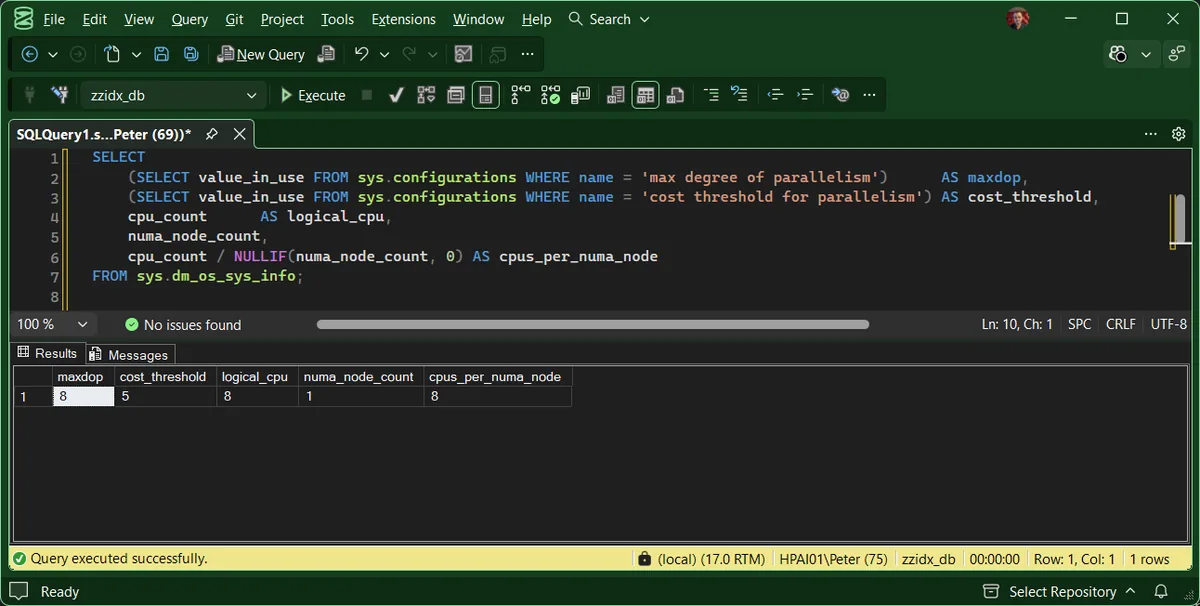
MAXDOP caps how many processors one query may use. Cost threshold for parallelism decides whether a query is expensive enough to bother. They work together, and tuning one without the other is the usual mistake.
The Number Microsoft No Longer Recommends
Cost threshold has defaulted to 5 since the 1990s, when 5 was a meaningful amount of work. The current Microsoft documentation now says this, verbatim:
Read that carefully, because it is more interesting than it looks. Microsoft disowns their own default, endorses raising it, prescribes a method, and still publishes no target number. So when someone tells you to set it to 50, they are passing on community consensus, not documentation. That is not a reason to ignore them. It is a reason to measure rather than copy.
What To Actually Set MAXDOP To
Microsoft does publish a table for this one, and it changed in SQL Server 2016. A lot of advice still in circulation quotes the older version, which simply capped multi-NUMA servers at 8. The current rule:
| Server | Processors | MAXDOP |
|---|---|---|
| Single NUMA node | 8 or fewer logical | At or under the logical processor count |
| Single NUMA node | More than 8 logical | 8 |
| Multiple NUMA nodes | 16 or fewer per node | At or under the processors per node |
| Multiple NUMA nodes | More than 16 per node | Half the processors per node, capped at 16 |
Get-MaxdopConfiguration computes this for you and says whether the instance matches. On the lab:
maxdop  cost_threshold  logical_cpu  numa_nodes  cpus_per_node  recommended  maxdop_verdict
------  --------------  -----------  ----------  -------------  -----------  -----------------------------------------
     8               5            8           1              8            8  OK: matches the current Microsoft guidance
                                                                             REVIEW: still the default 5. Microsoft
                                                                             calls 5 "a starting point, not a
                                                                             recommendation"
One setting right, one wrong, which is a very common shape. MAXDOP gets attention because it is the famous one. Cost threshold sits on its 1990s default underneath.
What You Will Find On Most Servers
MAXDOP = 0cost threshold = 5MAXDOP = 1Why CXPACKET Is No Longer the Evidence You Think
The old reflex was: high CXPACKET, lower MAXDOP. That advice was written when
CXPACKET meant almost anything to do with parallelism. It has since been narrowed twice, per the
sys.dm_os_wait_stats reference:
- From SQL Server 2016 SP2 and 2017 CU3, consumer-side waiting moved out into
CXCONSUMER, which Microsoft describes as “a normal part of parallel query execution”. A large CXCONSUMER number on its own is not a problem. - From SQL Server 2022, synchronisation moved out again into
CXSYNC_PORTandCXSYNC_CONSUMER.
So on a current build, CXPACKET means only that threads are waiting to produce rows. It is a narrower and more useful signal than it used to be, and a big number is a reason to look, not a verdict. Worth knowing that Microsoft never retracted the old advice with any fanfare. The original sentence is still the first line of that entry, with the narrowing added underneath as notes.
One more trap in Microsoft’s own indicator table: SOS_SCHEDULER_YIELD is listed
as a symptom of cost threshold being both too low and too high. It is real
evidence of CPU pressure and no evidence at all about which direction to move.
Where To Set It
- Instance, with
sp_configure. Takes effect immediately, no restart. - Database, with
ALTER DATABASE SCOPED CONFIGURATION SET MAXDOP. Useful when one database on a shared instance has a different workload shape. - Query, with
OPTION (MAXDOP n). For the one report that needs different treatment, not for fixing a server. - Resource Governor workload group, which caps everything above it.
Precedence runs the other way: Resource Governor is a ceiling nothing exceeds, then the query hint, then the database scoped setting, then the instance.
Frequently Asked Questions
Does SQL Server 2019 set MAXDOP for me?
At install, yes. Setup detects the processor layout and writes a recommended value, and it does so even if you skip that page in the wizard. It is not ongoing self-configuration though, and the engine default for the setting is still 0. An in-place upgrade, a restored configuration or a manual reset all land you back on 0, so read the instance rather than assuming the version fixed it.
What should I set cost threshold to?
Microsoft does not say, and that is worth knowing before you accept a number from anyone. What they do say is that “the default value of 5 is a starting point, not a recommendation”, that raising it helps keep small OLTP queries serial, and that you should “use small increments and observe a full business cycle before further changes”. The widely repeated 50 is community consensus. It is a reasonable place to start, but cite it honestly.
High CXPACKET means lower MAXDOP, right?
Not any more, and this is the most out of date advice in circulation. CXPACKET has been narrowed twice. From SQL Server 2016 SP2 and 2017 CU3, consumer-side waiting split out into CXCONSUMER, which Microsoft calls “a normal part of parallel query execution”. From 2022, synchronisation split out again into CXSYNC_PORT and CXSYNC_CONSUMER. On a modern build CXPACKET means something much more specific than it did on 2014, so a big number is no longer evidence on its own.
Which setting wins if I set it in several places?
Resource Governor is a ceiling nothing can exceed. Below that, a query hint beats the database scoped configuration, which beats sp_configure. Worth knowing that the query hints page opens by saying the hint “also overrides the Resource Governor” and only then explains that it is capped by it, which reads as the opposite of what it means.
Does MAXDOP affect anything other than queries?
Yes, and it catches people during maintenance windows. It also governs the parallelism of DBCC CHECKDB, CHECKTABLE and CHECKFILEGROUP, and index operations, though an index statement can override it with its own MAXDOP option.
Related
- Get MAXDOP Configuration, the script behind the output above
- CXPACKET and CXCONSUMER waits, the deep dive
- SOS_SCHEDULER_YIELD, when the CPU really is the problem
- Get Top CPU Queries, to find what is actually burning the processors
- SQL Server High CPU, the walkthrough that decides working versus waiting before any setting is touched
- Performance & Troubleshooting, the pillar this sits in
Summary
MAXDOP caps how wide one query can go, cost threshold decides whether it goes wide at all, and the defaults are wrong on most modern servers in opposite directions. MAXDOP 0 lets one query take the machine. Cost threshold 5 sends trivial queries parallel, and Microsoft now says in writing that 5 was never a recommendation. Set MAXDOP from the published table, raise cost threshold in small steps and watch a full business cycle, and stop treating CXPACKET as a verdict, because it does not mean what it meant on SQL Server 2014.
Leave a Reply