
From Finding Orphaned Users to Actually Fixing Them
Restored a database onto another server and the application now gets Cannot open database “…” requested by the login. The login failed., even though its user is still in the database? The user’s SID no longer matches any login on this instance. This script scans every online user database, read-only ones included, and writes an ALTER USER ... WITH LOGIN line for each orphaned SQL user that has a login of the same name to map to, and a Cannot auto-fix line with the reason for each one that does not. Get Orphaned Users is the detection-only sibling.
Why Orphaned Users Matters
- Orphaned users fail silently until someone tries to log in. The database looks fine; nothing errors until an application or person actually authenticates as that user and gets denied.
- It’s a near-guaranteed side effect of certain migration patterns. Restoring a database onto a new server without preserving login SIDs (via
Generate-LoginScript.sql WITH SID = ...) orphans every SQL-authenticated user in it. - The fix is mechanical but risky to get wrong at scale. Hand-mapping users one by one across dozens of databases is slow and error-prone; generating the DDL and reviewing it before running is faster and safer.
- Not every orphan can be auto-fixed, and the script is explicit about which ones it can’t, rather than guessing.
When to Run This Script
- On the TARGET server, immediately after restoring databases during a migration, once the matching logins have been created
- After any restore where you’re not certain the source and target logins share the same SIDs
- As a periodic check on a server that regularly receives restored databases (refresh-from-prod environments are a common repeat offender)
- Following up a Get Orphaned Users finding, to generate the actual fix rather than fixing users by hand
The Script
Run the following script against your SQL Server instance.
/*
Script Name : Fix-OrphanedUsers
Category    : migration
Purpose     : Generate ALTER USER statements to re-map orphaned database users to their
              matching server-level logins across all user databases. Run on TARGET after
              databases are restored and logins are created.
Author      : Peter Whyte (https://sqldba.blog/dba-scripts-fix-orphaned-users/)
Requires    : VIEW ANY DEFINITION and CONNECT ANY DATABASE (or sysadmin). Stops with an error
              without VIEW ANY DEFINITION; a database it cannot connect to is listed as
              NOT A COMPLETE SCAN
*/
-- SAFE:ReadOnly
-- IMPACT:Low
SET NOCOUNT ON;

-- PERMISSION GUARD. Without VIEW ANY DEFINITION, metadata visibility hides rows instead of
-- raising an error, and both failures were measured on the lab 2026-10-05:
--   CONNECT ANY DATABASE alone: every database's users are invisible, so the script printed
--     "No orphaned users found. All database users map to a valid server login." over 112
--     real orphans.
--   a user with VIEW DEFINITION in one database: sys.server_principals shows only the caller,
--     so every mapped user in that database came out as a false "Cannot auto-fix" orphan, and
--     every other database stayed silent.
-- A missing CONNECT is loud (the per-database catch below), so only this one needs a guard.
IF HAS_PERMS_BY_NAME(NULL, NULL, N'VIEW ANY DEFINITION') <> 1
BEGIN
    RAISERROR(N'Fix-OrphanedUsers needs VIEW ANY DEFINITION (and CONNECT ANY DATABASE or access to each database). Without it, logins and users are hidden rather than refused, and the result would be a false all-clear or false orphans.', 16, 1);
    RETURN;
END

/*
  DESIGN: After restoring databases from a source server, SQL logins are re-created with the
  same SID (via Generate-LoginScript.sql WITH SID = ...). This means SQL-authenticated users
  are NOT orphaned: their SID in sys.database_principals matches the new login's SID.

  Windows-authenticated users are also fine because the AD SID never changes. They are NOT
  scanned here: their authentication_type_desc is WINDOWS, not INSTANCE (the same filter as the
  MS Docs orphaned-user query), and a Windows user with no login of its own can still connect
  through a Windows group login. Recreate a missing Windows login with CREATE LOGIN ... FROM
  WINDOWS and the user remaps itself on the AD SID, no ALTER USER needed.

  The orphan case that CAN occur:
    - SQL logins created without SID preservation (e.g. the old login was dropped and re-created
      and the SID therefore differs from what is stored in the restored database).
    - Databases restored from an environment where logins no longer exist on the new server.

  This script generates ALTER USER ... WITH LOGIN statements for any user in any database whose
  SID does not match any login on this instance. It assumes login name = user name (common case).
  Review the output before executing; not every orphan can be fixed with a simple name match.

  This script never applies a fix. It RETURNS the ALTER USER statements as text for you to
  review and run yourself, which is why it is classed ReadOnly. There are no commented-out
  EXEC lines to uncomment: the one EXEC sp_executesql below collects the orphan list, it does
  not repair anything.
*/

DECLARE @ddl  nvarchar(max) = N'';
DECLARE @crlf nchar(2)      = CHAR(13) + CHAR(10);
DECLARE @sql  nvarchar(max);
DECLARE @dbname nvarchar(128);

SET @ddl = @ddl
    + N'-- ================================================================' + @crlf
    + N'-- Orphaned User Fix Script' + @crlf
    + N'-- Target  : ' + @@SERVERNAME + @crlf
    + N'-- Generated: ' + CONVERT(nvarchar(30), GETDATE(), 120) + @crlf
    + N'-- Review before executing. Each line maps a database user to a login' + @crlf
    + N'-- by name - verify the name match is correct first.' + @crlf
    + N'-- ================================================================' + @crlf + @crlf;

-- Temp table to collect orphans across all databases
IF OBJECT_ID('tempdb..#orphans') IS NOT NULL DROP TABLE #orphans;
CREATE TABLE #orphans (
    database_name nvarchar(128),
    user_name     nvarchar(128),
    user_type     char(1),
    user_sid      varbinary(85),
    is_read_only  bit,
    login_has_user nvarchar(128) NULL  -- a user in this database already mapped to the same-named login
);

IF OBJECT_ID('tempdb..#failed') IS NOT NULL DROP TABLE #failed;
CREATE TABLE #failed (
    database_name nvarchar(128),
    reason        nvarchar(2048)
);

-- READ-ONLY DATABASES ARE SCANNED, NOT SKIPPED. This filter used to be
-- `AND is_read_only = 0`, and the orphans in a read-only database then vanished from the
-- output with no warning at all: the report looked clean. Proved on the lab 2026-09-01 by
-- setting a test database READ_ONLY - three known orphans disappeared and the database was
-- not even mentioned. Read-only is common exactly where this script is used: readable AG
-- secondaries, archive copies, and databases restored for reporting during a migration.
-- Reading sys.database_principals in a read-only database works fine; only the ALTER USER
-- fix needs write access, so the orphan is reported and the generated line says what has to
-- happen first. Silently under-reporting is the worse failure: the reader cannot see it.
DECLARE db_cur CURSOR LOCAL FAST_FORWARD FOR
    SELECT name FROM sys.databases
    WHERE database_id > 4
      AND state_desc = N'ONLINE'
    ORDER BY name;

OPEN db_cur;
FETCH NEXT FROM db_cur INTO @dbname;

WHILE @@FETCH_STATUS = 0
BEGIN
    -- QUOTENAME on the database, not string concatenation into brackets: a database name
    -- containing a ] would otherwise terminate the identifier early and change what this
    -- dynamic SQL means.
    SET @sql = N'
        INSERT INTO #orphans (database_name, user_name, user_type, user_sid, is_read_only, login_has_user)
        SELECT
            N''' + REPLACE(@dbname, N'''', N'''''') + N''',
            dp.name,
            dp.type,
            dp.sid,
            CASE WHEN DATABASEPROPERTYEX(N''' + REPLACE(@dbname, N'''', N'''''')
              + N''', ''Updateability'') = ''READ_ONLY'' THEN 1 ELSE 0 END,
            (SELECT TOP (1) d2.name
             FROM ' + QUOTENAME(@dbname) + N'.sys.database_principals d2
             INNER JOIN sys.server_principals sp2 ON sp2.sid = d2.sid
             WHERE sp2.name = dp.name)
        FROM ' + QUOTENAME(@dbname) + N'.sys.database_principals dp
        WHERE dp.type IN (''S'', ''U'', ''G'')
          -- INSTANCE = a user created FOR a server login. In practice that is SQL users only:
          -- Windows users and groups report WINDOWS (see DESIGN above), contained users with a
          -- password DATABASE, and WITHOUT LOGIN users NONE, so none of those are reported.
          AND dp.authentication_type_desc = N''INSTANCE''
          AND dp.sid IS NOT NULL
          AND dp.name NOT IN (N''dbo'', N''guest'', N''sys'', N''INFORMATION_SCHEMA'')
          AND dp.name NOT LIKE N''##%''
          -- NOT EXISTS, not NOT IN. A single NULL sid in the server_principals list makes
          -- `sid NOT IN (...)` evaluate to UNKNOWN for EVERY row, so the script would report
          -- zero orphans on a server that has them. Same shape as the sibling detector
          -- Get-OrphanedUsers, which already used NOT EXISTS.
          AND NOT EXISTS (
              SELECT 1 FROM sys.server_principals sp
              WHERE sp.sid = dp.sid AND sp.type IN (''S'', ''U'', ''G'')
          );';

    -- A FAILED SCAN MUST NOT LOOK LIKE A CLEAN ONE. Without this, any per-database failure
    -- (no CONNECT permission, the database going offline mid-loop, a broken principal) was
    -- swallowed: the INSERT simply did not happen, that database's orphans vanished, and the
    -- script still printed "No orphaned users found. All database users map to a valid server
    -- login." Demonstrated for real on 2026-09-01 - a syntax slip in this very statement made
    -- all eight databases fail and the script reported the instance CLEAN. Silence is the one
    -- answer a check like this must never give.
    BEGIN TRY
        EXEC sp_executesql @sql;
    END TRY
    BEGIN CATCH
        INSERT INTO #failed (database_name, reason) VALUES (@dbname, ERROR_MESSAGE());
    END CATCH;
    FETCH NEXT FROM db_cur INTO @dbname;
END

CLOSE db_cur;
DEALLOCATE db_cur;

-- Build output
SELECT @ddl = @ddl
    + N'-- ' + o.database_name + N': ' + CAST(cnt.n AS nvarchar(10)) + N' orphan(s)' + @crlf
FROM #orphans o
INNER JOIN (SELECT database_name, COUNT(*) AS n FROM #orphans GROUP BY database_name) cnt
    ON cnt.database_name = o.database_name
GROUP BY o.database_name, cnt.n
ORDER BY o.database_name;

SET @ddl = @ddl + @crlf;

-- QUOTENAME on every identifier that reaches the generated script. Concatenating a name
-- straight into brackets emits SYNTACTICALLY INVALID DDL the moment the name contains a ].
-- Proved on the lab 2026-09-01: a user called `zzorph_we]ird` produced
--   ALTER USER [zzorph_we]ird] WITH LOGIN = [zzorph_we]ird];
-- which fails with "Msg 102 ... Incorrect syntax near 'ird'". QUOTENAME doubles the bracket.
-- A generator is only as good as the DDL it emits, and nothing else in the pipeline checks it.
SELECT @ddl = @ddl
    + N'USE ' + QUOTENAME(o.database_name) + N';' + @crlf
    + CASE WHEN o.is_read_only = 1
        THEN N'-- NOTE: ' + o.database_name + N' is READ_ONLY. Set it READ_WRITE before the '
             + N'ALTER USER below can run.' + @crlf
        ELSE N'' END
    + CASE
        -- Msg 33018 otherwise: measured 2026-10-05, a fresh user created for the new login
        -- after the restore made the generated ALTER USER fail with "Cannot remap user to
        -- login ..., because the login is already mapped to a user in the database."
        WHEN o.login_has_user IS NOT NULL
        THEN N'-- Cannot auto-fix: login ' + QUOTENAME(o.user_name)
             + N' is already mapped to user ' + QUOTENAME(o.login_has_user)
             + N' in this database. Keep one user, then remap or drop the other by hand.' + @crlf
        WHEN EXISTS (
            SELECT 1 FROM sys.server_principals sp
            WHERE sp.name = o.user_name AND sp.type IN ('S','U','G')
        )
        THEN N'ALTER USER ' + QUOTENAME(o.user_name) + N' WITH LOGIN = '
             + QUOTENAME(o.user_name) + N';' + @crlf
        ELSE N'-- Cannot auto-fix: no login named ' + QUOTENAME(o.user_name)
             + N' found. Create the login first or map manually.' + @crlf
      END
    + N'GO' + @crlf + @crlf
FROM #orphans o
ORDER BY o.database_name, o.user_name;

-- Databases that could not be scanned are named, with the reason, ABOVE any all-clear, and
-- the all-clear itself is reworded so it can never claim more than was actually checked.
IF EXISTS (SELECT 1 FROM #failed)
BEGIN
    SET @ddl = @ddl + @crlf
        + N'-- !! NOT A COMPLETE SCAN. These databases could not be read, so any orphaned'
        + @crlf
        + N'-- !! users in them are NOT listed above. Resolve these before trusting the result.'
        + @crlf;
    SELECT @ddl = @ddl + N'--    ' + f.database_name + N': ' + f.reason + @crlf
    FROM #failed f;
    SET @ddl = @ddl + @crlf;
END

IF NOT EXISTS (SELECT 1 FROM #orphans)
    SET @ddl = @ddl
        + CASE WHEN EXISTS (SELECT 1 FROM #failed)
            THEN N'-- No orphaned users found IN THE DATABASES THAT COULD BE SCANNED. '
                 + N'See the unscanned list above.'
            ELSE N'-- No orphaned users found. All database users map to a valid server login.'
          END + @crlf;

DROP TABLE #orphans;
DROP TABLE #failed;

SELECT @ddl AS ddl;
Loops every online user database via cursor, collects every SQL user (authentication_type_desc of INSTANCE) whose SID matches no server login, then builds a reviewable .sql script: an ALTER USER ... WITH LOGIN statement where a same-named login exists, or an explicit comment explaining why it can’t auto-fix that one. Read-only databases are scanned as well, and their orphans carry a note that the database has to be set READ_WRITE before the fix can run.
Nothing here applies itself. The script returns the statements as text and stops. It contains one EXEC sp_executesql, and that is the loop that collects the orphan list; it repairs nothing, which is why the script is classed SAFE:ReadOnly. There are no commented-out fix lines to uncomment. Copy the output into a new window and run it deliberately, once you have read it.
How To Run From The Repo
Clone DBA Tools, initialize and run the script:
# Clone dba-tools repo:
git clone https://github.com/peterwhyte-lgtm/dba-tools

# Initialize environment:
cd dba-tools
.\Initialize-Environment.ps1

# Generate the orphaned-user remap script for review:
.\run.ps1 Fix-OrphanedUsers

# To run against a remote sql server:
.\run.ps1 Fix-OrphanedUsers -ServerInstance SQLSERVER01
This script lives in the repo at:
Example Output
The ddl cell from an instance with an orphan of every shape, trimmed to 2 of its 9 lab databases and with the Generated line left out. Every block is verbatim.
Lab1005_fou_app, _owner and _we]ird had their logins recreated with new SIDs, so each gets an ALTER USER; _owner owns a schema and keeps it after the fix, and the ] is doubled so the line parses. _gone and _gowner have no login at all. _dup looks fixable and is not: a fresh user had already been created for its new login, so that line fails (next section). Three more principals in the same database are deliberately absent: a WITHOUT LOGIN user, a Windows user and a Windows group, none of them with a login.
Understanding the Results
The script returns one row and one column, and that single ddl cell holds the entire generated script. In the grid it looks like one long unreadable line, as below. Switch to Results to Text (Ctrl+T) before running it, or click into the cell, and it becomes the script it actually is.
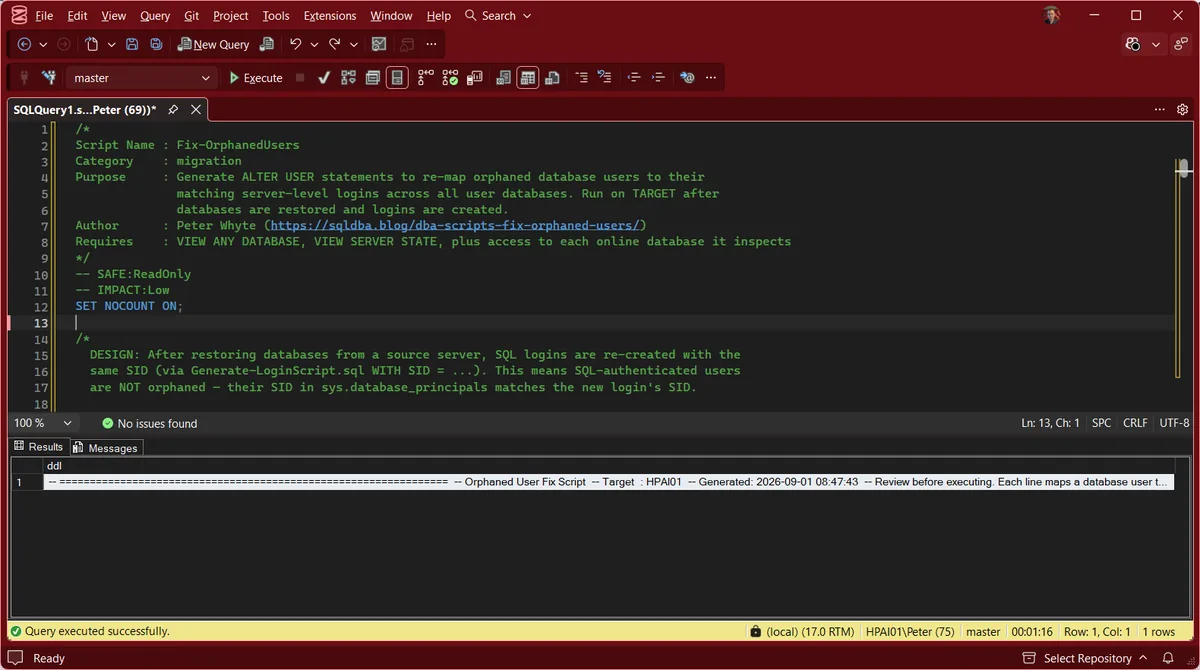
Every line the generated script can contain, and what each one is telling you:
-- DatabaseName: N orphan(s)ALTER USER [x] WITH LOGIN = [x];QUOTENAME, so a name containing a bracket still produces valid SQL.Act when it fails with Msg 33018. That login already has a different user in this database, so keep one of the two users and map it by hand (FAQ).-- Cannot auto-fix: no login named [x] found.-- NOTE: DatabaseName is READ_ONLY.READ_WRITE before the ALTER USER beneath this note can run.-- !! NOT A COMPLETE SCAN-- No orphaned users found.VIEW ANY DEFINITION. Run with CONNECT ANY DATABASE alone, it printed this line over 428 orphaned users.After You Run the Output
Run the generated script with the Messages tab in view. Two errors can come back, and each one leaves its user orphaned:
Msg 3906 is the read-only database the NOTE line warned about. Msg 33018 is the fresh-user case above. Then run Fix-OrphanedUsers again: every user it no longer lists now carries its login’s SID, with its role memberships and schema ownership unchanged, and whatever it still lists did not take.
Best Practices
- Always review the generated script before running any of it. The name-matching assumption (login name equals user name) is the common case, not a guarantee.
- Treat the output as a script to read, not a result to trust. The generator emits
ALTER USERstatements as text and never runs them, so the review step is the only safety there is. - Run it on the TARGET server after logins have been created, not before. An orphan with no matching login is a signal to go create the login, not a script bug.
- Re-run after creating any missing logins to confirm the remaining output is genuinely empty.
Frequently Asked Questions
Does running this script change anything?
No. It returns the ALTER USER statements as text and stops. The single EXEC sp_executesql inside it runs the query that collects the orphan list, not a fix, which is why it is classed SAFE:ReadOnly. You copy the output into a new window and run it yourself.
Why does it say “cannot auto-fix” instead of just fixing it?
Because it maps users to logins by name, and where no login of that name exists there is nothing safe to map to. Guessing a different login would hand one person’s permissions to another. Create the missing login and re-run, or map that user by hand.
What about read-only databases?
They are scanned, and their orphans are listed with a note that the database must be set READ_WRITE before the ALTER USER will run. Earlier versions skipped them, which quietly hid real orphans on readable secondaries and archive copies.
Should I use sp_change_users_login instead?
No. Microsoft’s documentation for sp_change_users_login states that the feature “will be removed in a future version of SQL Server” and to “use ALTER USER instead”. That is what this script generates.
Why are some users never reported as orphaned?
It only checks SQL users: principals whose authentication_type_desc is INSTANCE, the same filter as the query in MS Docs’ orphaned users troubleshooting page. Windows users and groups report WINDOWS, contained users DATABASE and WITHOUT LOGIN users NONE, so none of them are listed. A Windows user with no login of its own can still connect through a Windows group login. If its login really is missing, CREATE LOGIN [DOMAIN\name] FROM WINDOWS brings it back on the same AD SID and the user maps itself, no ALTER USER needed.
Why does ALTER USER fail with “Cannot remap user to login, because the login is already mapped to a user in the database”?
That is Msg 33018. Someone created a new user for the login after the restore, so the login already has a user in this database and cannot take a second. Decide which user to keep: usually the restored one, because it owns the permissions and schemas. Drop the newer user, then run the ALTER USER ... WITH LOGIN line again, and it maps.
How do I fix a user marked “Cannot auto-fix”?
Create the login with the user’s own SID, read from sys.database_principals in that database: CREATE LOGIN [name] WITH PASSWORD = '...', SID = 0x...;. The user maps to it the moment the login exists, with no ALTER USER, and keeps its roles and schemas. Use a real password, because CHECK_POLICY will not always catch a placeholder: CHANGE_ME was accepted with CHECK_POLICY on, and the login could sign in with it. Dropping the user instead loses its permissions, and fails with Msg 15138 if it owns a schema.
What permissions does the script need?
sysadmin, or VIEW ANY DEFINITION plus CONNECT ANY DATABASE. Less than that hides rows instead of raising an error: with CONNECT ANY DATABASE alone it reported “No orphaned users found” over 428 orphaned users, and with VIEW DEFINITION in one database every user there came out as “Cannot auto-fix”, mapped ones included. A database it cannot connect to is named under NOT A COMPLETE SCAN.
Summary
Fix-OrphanedUsers turns “you have orphaned users” into a reviewable script, not a chore done user by user across every restored database. It generates the fix where a fix is safe to generate, and says exactly why it can’t where it isn’t, the same honest distinction this post’s own real output demonstrates.
Pair it with Get Orphaned Users for detection and this script for the remediation script, and run both as a standing step after any migration or restore where login SIDs weren’t guaranteed to carry over.
Related
You may also find these useful:
- DBA Scripts: SQL Server Migration Script Generators
- Generate Agent Job Script
- Generate Linked Server Script
- Generate Login Script
- Generate Restore With Move Script
- Generate User Mapping Script
- Get Orphaned Users
- User, Group or Role Already Exists in the Current Database (Error 15023), the error that sends people here after a restore
- Get Version Upgrade Readiness
- Get Edition Feature Usage
- Get Migration Login Audit and Post-Migration Validation
- Get Migration Risk Assessment
- DBA Scripts: Security, the pillar this sits under
- Get Login Migration Parity, compare login attributes between the source and target after the transfer
- CREATE USER WITHOUT LOGIN vs Contained Database Users, why one of them cannot be scripted at all
- DBA Scripts: The Complete Guide, the map across every script on this site
Leave a Reply