
Recreating Linked Servers and Login Mappings for a Migration
If linked server queries fail on the new server after a migration, with Msg 7416 Access to the remote server is denied because no login-mapping exists or Msg 18456 for the remote login, the linked servers came across without their login mappings or passwords. This script writes the sp_addlinkedserver and sp_addlinkedsrvlogin calls for every linked server on the source, for you to review and run on the target. Stored passwords can’t be read back out, so those mappings come with an ENTER_PASSWORD_HERE placeholder.
Why a Generated Linked Server Script Matters
- Login mappings are easy to get wrong by hand, especially telling an impersonation mapping from an explicit remote login.
- You review the exact
sp_addlinkedserverandsp_addlinkedsrvlogincalls before anything runs. - It’s a generator, not a migration tool. It doesn’t move data or run the cutover.
When to Run This Script
- Migrating databases to new hardware or a new SQL Server version, on a source instance that has linked servers configured
- Consolidating several instances onto one server
- Standing up a DR or failover target that needs the same linked server topology as production
The Script
Run it as sysadmin, or with both ALTER ANY LINKED SERVER and VIEW ANY DEFINITION; with less it stops with an error rather than writing a wrong script.
ALTER ANY LINKED SERVER, provider_string reads NULL (MS Docs), and without VIEW ANY DEFINITION a mapping for one login cannot be named, so either way the output would be wrong./*
Script Name : Generate-LinkedServerScript
Category : migration
Purpose : Generate sp_addlinkedserver + sp_serveroption + sp_addlinkedsrvlogin DDL for all linked servers.
Run on SOURCE server. Execute the output on TARGET after migration.
Author : Peter Whyte (https://sqldba.blog/dba-scripts-generate-linked-server-script/)
Requires : CONTROL SERVER (sysadmin has it), or ALTER ANY LINKED SERVER plus VIEW ANY DEFINITION.
Without ALTER ANY LINKED SERVER provider_string reads NULL; without principal visibility
a per-login mapping cannot be named. Either would emit wrong DDL, so the script stops.
Notes : Every sp_serveroption value is scripted explicitly, because sp_addlinkedserver
defaults differ by product (the 'SQL Server' form starts with rpc and rpc out on).
A source with no default mapping ("Not be made") gets sp_droplinkedsrvlogin
@locallogin = NULL, otherwise the target would let every login through.
Stored remote passwords cannot be scripted: those lines carry ENTER_PASSWORD_HERE.
Run unedited, the mapping is created with that literal password and the first
query through the linked server fails with Msg 18456.
A linked server that already exists on the target is skipped, not altered.
*/
-- SAFE:ReadOnly
-- IMPACT:Low
SET NOCOUNT ON;
SET QUOTED_IDENTIFIER ON;
/*
DESIGN: Linked server login mappings with stored remote credentials cannot have passwords
scripted, SQL Server does not expose them. Mappings using stored credentials are scripted
with an ENTER_PASSWORD_HERE placeholder and a clear comment. Re-enter the remote password
manually on the target for each HIGH-risk mapping flagged by Get-LinkedServerSecurity.sql.
Impersonation mappings (useself = 1) and no-credential mappings are scripted exactly.
*/
-- With less than this the output is wrong with no error: provider strings drop out, and a
-- per-login mapping whose login cannot be seen is written as a mapping for EVERY login.
IF HAS_PERMS_BY_NAME(NULL, NULL, N'ALTER ANY LINKED SERVER') <> 1
OR EXISTS (SELECT 1 FROM sys.linked_logins ll
WHERE ll.local_principal_id <> 0
AND NOT EXISTS (SELECT 1 FROM sys.server_principals sp WHERE sp.principal_id = ll.local_principal_id))
BEGIN
RAISERROR(N'Generate-LinkedServerScript needs CONTROL SERVER (or ALTER ANY LINKED SERVER plus VIEW ANY DEFINITION). Without it provider strings read as NULL and per-login mappings cannot be named, so the generated script would be wrong.', 16, 1);
RETURN;
END;
DECLARE @ddl NVARCHAR(MAX) = N'';
DECLARE @crlf NCHAR(2) = CHAR(13) + CHAR(10);
SET @ddl = @ddl
+ N'-- ================================================================' + @crlf
+ N'-- Linked Server Migration Script' + @crlf
+ N'-- Source : ' + @@SERVERNAME + @crlf
+ N'-- Generated: ' + CONVERT(NVARCHAR(30), GETDATE(), 120) + @crlf
+ N'-- IMPORTANT: Stored credentials (remote_login / rmtpassword) cannot' + @crlf
+ N'-- be scripted. Lines marked ENTER_PASSWORD_HERE require manual entry.' + @crlf
+ N'-- Run Get-LinkedServerSecurity.sql to identify HIGH-risk mappings.' + @crlf
+ N'-- ================================================================' + @crlf + @crlf;
-- ── One block per linked server ───────────────────────────────────────────────
DECLARE @ls_name NVARCHAR(128);
DECLARE @ls_q NVARCHAR(300);
DECLARE @ls_product NVARCHAR(128);
DECLARE @ls_provider NVARCHAR(128);
DECLARE @ls_datasrc NVARCHAR(4000);
DECLARE @ls_location NVARCHAR(4000);
DECLARE @ls_provstr NVARCHAR(4000);
DECLARE @ls_catalog NVARCHAR(128);
DECLARE @ls_rpc bit;
DECLARE @ls_rpc_out bit;
DECLARE @ls_data bit;
DECLARE @ls_collation bit;
DECLARE @ls_remcoll bit;
DECLARE @ls_lazy bit;
DECLARE @ls_promote bit;
DECLARE @ls_collname NVARCHAR(128);
DECLARE @ls_conn_to INT;
DECLARE @ls_query_to INT;
DECLARE @ls_default bit;
DECLARE ls_cur CURSOR LOCAL FAST_FORWARD FOR
SELECT
s.name,
ISNULL(s.product, N''),
ISNULL(s.provider, N'SQLNCLI'),
ISNULL(s.data_source, N''),
ISNULL(CAST(s.location AS NVARCHAR(4000)), N''),
ISNULL(CAST(s.provider_string AS NVARCHAR(4000)), N''),
ISNULL(s.catalog, N''),
s.is_remote_login_enabled,
s.is_rpc_out_enabled,
s.is_data_access_enabled,
s.is_collation_compatible,
s.uses_remote_collation,
s.lazy_schema_validation,
s.is_remote_proc_transaction_promotion_enabled,
s.collation_name,
s.connect_timeout,
s.query_timeout,
CASE WHEN EXISTS (SELECT 1 FROM sys.linked_logins d
WHERE d.server_id = s.server_id AND d.local_principal_id = 0)
THEN 1 ELSE 0 END
FROM sys.servers s
WHERE s.is_linked = 1
ORDER BY s.name;
OPEN ls_cur;
FETCH NEXT FROM ls_cur INTO
@ls_name, @ls_product, @ls_provider, @ls_datasrc, @ls_location, @ls_provstr, @ls_catalog,
@ls_rpc, @ls_rpc_out, @ls_data, @ls_collation, @ls_remcoll, @ls_lazy, @ls_promote,
@ls_collname, @ls_conn_to, @ls_query_to, @ls_default;
WHILE @@FETCH_STATUS = 0
BEGIN
SET @ls_q = REPLACE(@ls_name, N'''', N'''''');
SET @ddl = @ddl
+ N'-- Linked Server: ' + @ls_name + @crlf
+ N'IF NOT EXISTS (SELECT 1 FROM sys.servers WHERE name = N''' + @ls_q + N''' AND is_linked = 1)' + @crlf
+ N'BEGIN' + @crlf
+ N' EXEC sp_addlinkedserver' + @crlf
+ N' @server = N''' + @ls_q + N''',' + @crlf
-- The 'SQL Server' form takes no provider or properties (Msg 15428 if it gets any)
+ CASE WHEN @ls_product = N'SQL Server'
THEN N' @srvproduct = N''SQL Server''' + @crlf
ELSE N' @srvproduct = N''' + REPLACE(@ls_product, N'''', N'''''') + N''',' + @crlf
+ N' @provider = N''' + REPLACE(@ls_provider, N'''', N'''''') + N''',' + @crlf
+ N' @datasrc = N''' + REPLACE(@ls_datasrc, N'''', N'''''') + N'''' + @crlf
+ CASE WHEN @ls_location <> N''
THEN N' ,@location = N''' + REPLACE(@ls_location, N'''', N'''''') + N'''' + @crlf
ELSE N'' END
+ CASE WHEN @ls_provstr <> N''
THEN N' ,@provstr = N''' + REPLACE(@ls_provstr, N'''', N'''''') + N'''' + @crlf
ELSE N'' END
+ CASE WHEN @ls_catalog <> N''
THEN N' ,@catalog = N''' + REPLACE(@ls_catalog, N'''', N'''''') + N'''' + @crlf
ELSE N'' END
END
+ N' ;' + @crlf + @crlf;
-- Options: every one scripted, because the defaults differ by product
SET @ddl = @ddl
+ N' EXEC sp_serveroption @server = N''' + @ls_q + N''', @optname = N''rpc'', @optvalue = N''' + CASE @ls_rpc WHEN 1 THEN N'true' ELSE N'false' END + N''';' + @crlf
+ N' EXEC sp_serveroption @server = N''' + @ls_q + N''', @optname = N''rpc out'', @optvalue = N''' + CASE @ls_rpc_out WHEN 1 THEN N'true' ELSE N'false' END + N''';' + @crlf
+ N' EXEC sp_serveroption @server = N''' + @ls_q + N''', @optname = N''data access'', @optvalue = N''' + CASE @ls_data WHEN 1 THEN N'true' ELSE N'false' END + N''';' + @crlf
+ N' EXEC sp_serveroption @server = N''' + @ls_q + N''', @optname = N''collation compatible'', @optvalue = N''' + CASE @ls_collation WHEN 1 THEN N'true' ELSE N'false' END + N''';' + @crlf
+ N' EXEC sp_serveroption @server = N''' + @ls_q + N''', @optname = N''use remote collation'', @optvalue = N''' + CASE @ls_remcoll WHEN 1 THEN N'true' ELSE N'false' END + N''';' + @crlf
+ CASE WHEN @ls_collname IS NOT NULL
THEN N' EXEC sp_serveroption @server = N''' + @ls_q + N''', @optname = N''collation name'', @optvalue = N''' + @ls_collname + N''';' + @crlf
ELSE N'' END
+ N' EXEC sp_serveroption @server = N''' + @ls_q + N''', @optname = N''lazy schema validation'', @optvalue = N''' + CASE @ls_lazy WHEN 1 THEN N'true' ELSE N'false' END + N''';' + @crlf
+ N' EXEC sp_serveroption @server = N''' + @ls_q + N''', @optname = N''remote proc transaction promotion'', @optvalue = N''' + CASE @ls_promote WHEN 1 THEN N'true' ELSE N'false' END + N''';' + @crlf
+ N' EXEC sp_serveroption @server = N''' + @ls_q + N''', @optname = N''connect timeout'', @optvalue = N''' + CAST(@ls_conn_to AS NVARCHAR(10)) + N''';' + @crlf
+ N' EXEC sp_serveroption @server = N''' + @ls_q + N''', @optname = N''query timeout'', @optvalue = N''' + CAST(@ls_query_to AS NVARCHAR(10)) + N''';' + @crlf;
-- sp_addlinkedserver always creates a default mapping for every login. Remove it if the source has none.
IF @ls_default = 0
SET @ddl = @ddl + @crlf
+ N' -- No default mapping on the source: logins not listed below cannot connect ("Not be made")' + @crlf
+ N' EXEC sp_droplinkedsrvlogin @rmtsrvname = N''' + @ls_q + N''', @locallogin = NULL;' + @crlf;
-- Login mappings for this linked server
DECLARE @ll_local NVARCHAR(128);
DECLARE @ll_remote NVARCHAR(128);
DECLARE @ll_useself bit;
DECLARE ll_cur CURSOR LOCAL FAST_FORWARD FOR
SELECT
ISNULL(sp.name, N''),
ISNULL(ll.remote_name, N''),
ll.uses_self_credential
FROM sys.linked_logins ll
INNER JOIN sys.servers s2 ON ll.server_id = s2.server_id
LEFT JOIN sys.server_principals sp ON ll.local_principal_id = sp.principal_id
WHERE s2.name = @ls_name
ORDER BY sp.name;
OPEN ll_cur;
FETCH NEXT FROM ll_cur INTO @ll_local, @ll_remote, @ll_useself;
WHILE @@FETCH_STATUS = 0
BEGIN
SET @ddl = @ddl + @crlf
+ CASE
WHEN @ll_useself = 1 THEN
CASE WHEN @ll_local <> N''
THEN N' -- Impersonation mapping (self credentials) for one login' + @crlf
ELSE N' -- Default for every other login: its own credentials ("Be made using the login''s current security context")' + @crlf END +
N' EXEC sp_addlinkedsrvlogin' + @crlf +
N' @rmtsrvname = N''' + @ls_q + N''',' + @crlf +
N' @useself = N''True''' + @crlf +
CASE WHEN @ll_local <> N''
THEN N' ,@locallogin = N''' + REPLACE(@ll_local, N'''', N'''''') + N'''' + @crlf
ELSE N'' END +
N' ;' + @crlf
WHEN @ll_remote <> N'' AND @ll_local = N'' THEN
N' -- Catch-all mapping - ENTER_PASSWORD_HERE (stored credential, cannot be scripted)' + @crlf +
N' EXEC sp_addlinkedsrvlogin' + @crlf +
N' @rmtsrvname = N''' + @ls_q + N''',' + @crlf +
N' @useself = N''False'',' + @crlf +
N' @locallogin = NULL,' + @crlf +
N' @rmtuser = N''' + REPLACE(@ll_remote, N'''', N'''''') + N''',' + @crlf +
N' @rmtpassword = N''ENTER_PASSWORD_HERE'';' + @crlf
WHEN @ll_remote <> N'' THEN
N' -- Explicit mapping - ENTER_PASSWORD_HERE (stored credential, cannot be scripted)' + @crlf +
N' EXEC sp_addlinkedsrvlogin' + @crlf +
N' @rmtsrvname = N''' + @ls_q + N''',' + @crlf +
N' @useself = N''False'',' + @crlf +
N' @locallogin = N''' + REPLACE(@ll_local, N'''', N'''''') + N''',' + @crlf +
N' @rmtuser = N''' + REPLACE(@ll_remote, N'''', N'''''') + N''',' + @crlf +
N' @rmtpassword = N''ENTER_PASSWORD_HERE'';' + @crlf
WHEN @ll_local = N'' THEN
N' -- Default for every other login: no security context ("Be made without using a security context")' + @crlf +
N' EXEC sp_addlinkedsrvlogin' + @crlf +
N' @rmtsrvname = N''' + @ls_q + N''',' + @crlf +
N' @useself = N''False'',' + @crlf +
N' @locallogin = NULL,' + @crlf +
N' @rmtuser = NULL,' + @crlf +
N' @rmtpassword = NULL;' + @crlf
ELSE
N' -- One login connects without a security context (no remote credentials)' + @crlf +
N' EXEC sp_addlinkedsrvlogin' + @crlf +
N' @rmtsrvname = N''' + @ls_q + N''',' + @crlf +
N' @useself = N''False'',' + @crlf +
N' @locallogin = N''' + REPLACE(@ll_local, N'''', N'''''') + N''',' + @crlf +
N' @rmtuser = NULL,' + @crlf +
N' @rmtpassword = NULL;' + @crlf
END;
FETCH NEXT FROM ll_cur INTO @ll_local, @ll_remote, @ll_useself;
END
CLOSE ll_cur;
DEALLOCATE ll_cur;
SET @ddl = @ddl + N'END' + @crlf + N'GO' + @crlf + @crlf;
FETCH NEXT FROM ls_cur INTO
@ls_name, @ls_product, @ls_provider, @ls_datasrc, @ls_location, @ls_provstr, @ls_catalog,
@ls_rpc, @ls_rpc_out, @ls_data, @ls_collation, @ls_remcoll, @ls_lazy, @ls_promote,
@ls_collname, @ls_conn_to, @ls_query_to, @ls_default;
END
CLOSE ls_cur;
DEALLOCATE ls_cur;
IF NOT EXISTS (SELECT 1 FROM sys.servers WHERE is_linked = 1)
SET @ddl = @ddl + N'-- No linked servers found on ' + @@SERVERNAME + @crlf;
SELECT @ddl AS ddl;How To Run From The Repo
# Clone dba-tools repo:
git clone https://github.com/peterwhyte-lgtm/dba-tools

# Initialize environment:
cd dba-tools
.\Initialize-Environment.ps1

# Set the source server for the session:
.\tools\local-sql\Set-SqlConnection.ps1 -ServerInstance PROD01\SQL2019

# Generate the DDL, review the output before running it on the target:
.\powershell\migration\Generate-LinkedServerScript.ps1

# Output: output-files\migration\*.sql
This script lives in the repo at:
Example Output
The whole script comes back as one value, so run it with results to text; in the grid you only see its first line. Long output can stop short, raise the maximum characters if it does. The capture is the end of the output on the lab instance, the block for REPORTING01:

Every server option is written out, not only the ones that differ from a default, because sp_addlinkedserver starts each product with different defaults. The last call keeps the source’s default for every other login, here their own credentials. A source that refuses unlisted logins gets the opposite, sp_droplinkedsrvlogin @locallogin = NULL with a comment above it saying why.
To test the output, I set up four throwaway linked servers and ran their blocks back on the same instance under new names: one with a single mapped login and no access for anyone else, one with RPC Out on, data access off and timeouts of 30 and 120 seconds, one created the short way with @srvproduct = N'SQL Server', and one mapping a login to no remote user. Every block ran without a message. All four came back with the same provider, provider string, catalog and mappings, and the server options matched field for field. A login with no mapping on the first was refused on the copy as on the original, with Msg 7416.
What to Check in the Generated Script
Every ENTER_PASSWORD_HERE is replaced. Stored remote passwords cannot be read back out, so explicit mappings carry a placeholder. Left in, the call succeeds and stores that text as the password, and nothing fails until the first query through the linked server:
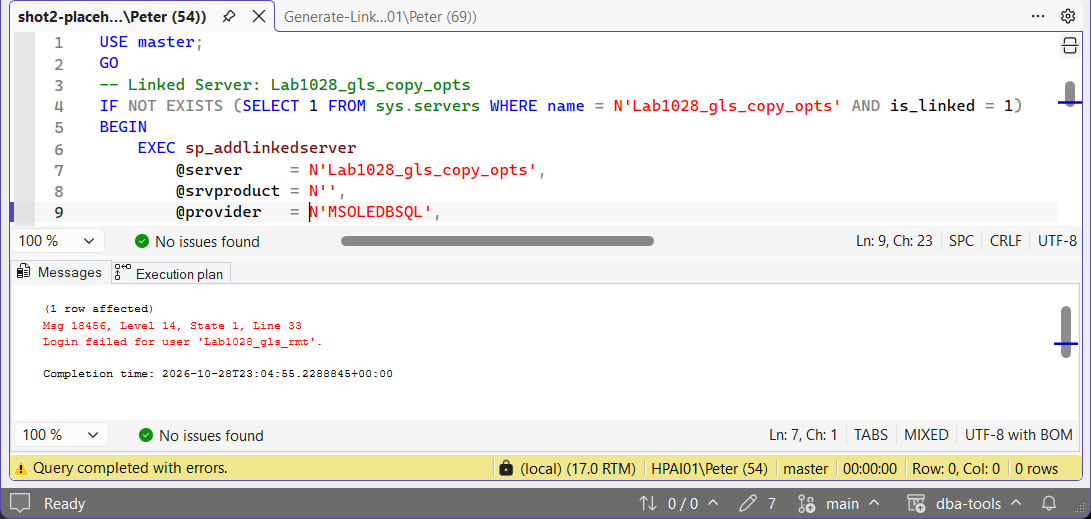
Run that one sp_addlinkedsrvlogin call again with the real password and the next query goes through; it replaces the stored mapping.
The target did not already have one by that name. Each block sits inside IF NOT EXISTS, so a linked server already on the target is skipped with no message, and its options and mappings stay as they were. Running the lab blocks a second time changed nothing and said nothing.
The target has the logins the mappings name. A mapping for a local login the target does not have fails, so script the logins across first.
Best Practices
- Always review the generated DDL before running it on the target. Nothing here executes automatically.
- Replace every
ENTER_PASSWORD_HEREplaceholder in the output by hand. Stored remote credentials can’t be scripted. - Run this after the target’s own logins exist. A mapping for a login the target doesn’t have fails with Msg 15007 and the linked server is left without it (see Generate Login Script).
- Test connectivity through each recreated linked server after migration. A linked server that creates without error can still fail its first real query if a mapping was missed.
MS Docs covers sys.servers, sys.linked_logins and sys.server_principals in full.
Frequently Asked Questions
Why can’t remote login passwords be scripted?
SQL Server never exposes stored linked server credentials in a readable form. They’re stored encrypted and only used internally at connection time, so the generator writes an ENTER_PASSWORD_HERE placeholder and a comment in their place.
What’s the difference between an impersonation mapping and an explicit login mapping?
Impersonation (uses_self_credential = 1) passes the local login’s own credentials through to the remote server, no password needed. An explicit mapping connects as a specific remote login with its own stored password, which is exactly the credential that can’t be scripted and needs ENTER_PASSWORD_HERE filled in by hand.
Why do linked server queries fail with Msg 18456 after running the script?
An ENTER_PASSWORD_HERE line was run as it stands. sp_addlinkedsrvlogin accepts it and stores that text as the remote password, so the linked server is created cleanly and the failure only shows up on the first query through it. Run that one sp_addlinkedsrvlogin call again with the real password; it replaces the stored mapping.
Why does the script need ALTER ANY LINKED SERVER?
Without it, provider_string in sys.servers reads NULL, so settings such as TrustServerCertificate=yes would drop out of the generated script. Without VIEW ANY DEFINITION as well, the logins named in each mapping cannot be seen. Rather than write that wrong script, it stops with Msg 50000 and says what it needs. sysadmin has both.
Why is there no local_login_name column in sys.linked_logins?
The view stores the local side as local_principal_id, with 0 meaning the mapping applies to every login, and the self-credential flag is uses_self_credential, singular. A query written against local_login_name or uses_self_credentials fails with Msg 207. Join local_principal_id to sys.server_principals to get the login name.
Summary
One generator, one job: recreate every linked server and its login mappings on the target. Check each block against the list above before you run it, and replace the password placeholders by hand. That part can’t be automated.
Related
- Linked Server: Login Failed for User NT AUTHORITY\ANONYMOUS LOGON, and Error 7391 Distributed Transactions, the mapping option this script writes back out
- Generate Agent Job Script
- Get Linked Servers
- Fix “Msg 207: Invalid Column Name”
- Create a Linked Server to Another SQL Server, what the generated script is actually doing, and why it may fail
- DBA Scripts: The Complete Guide, the map across every script on this site
Leave a Reply