
Choose the linked-server check you need
Start with Get-LinkedServerConnectivity to check whether a linked server is reachable and see the returned error detail. For a migration pre-check, run Get-LinkedServerAndJobInventory for logins, linked servers, and SQL Agent jobs. Use Get-LinkedServerInventory to inspect provider and access options, or Get-LinkedServerSecurity to review login mappings and credential context.
Why Linked Server Auditing Matters
- A linked server with a catch-all credential mapping (any local login maps to one stored remote identity) is a real security exposure, anyone who can query the linked server inherits that remote identity
- Before a migration, linked servers are dependencies that need to exist on the target server too, missing one breaks whatever process depends on it, often silently until that process runs, and Generate Linked Server Script writes out the definitions you need to recreate
- A linked server can be configured but unreachable, DNS changes, firewall rules, and decommissioned remote servers all leave stale linked server definitions behind
sys.linked_serversis not a SQL Server catalog view at all, since linked servers live insys.servers(MS Docs), so a script written against that name fails withMsg 208, Invalid object name ‘sys.linked_servers’; all four scripts here readsys.servers WHERE is_linked = 1instead
When to Run These Scripts
- Get-LinkedServerInventory, a quick “what’s linked here” check, first thing when reviewing an unfamiliar server
- Get-LinkedServerAndJobInventory, before a migration, alongside a login and job audit, to see the full pre-migration dependency picture in one run
- Get-LinkedServerSecurity, a periodic security review, or immediately after inheriting a server, to check for catch-all credential mappings
- Get-LinkedServerConnectivity, when troubleshooting a process that depends on a linked server, or as a pre-migration sanity check that every linked server the target needs is actually reachable
The Scripts
1. Get-LinkedServerInventory: Plain Inventory
- Tested on: SQL Server 2025 (RTM CU8), Windows lab instance
- Last verified: 2026-10-23 (all 4 scripts on this page run against an instance with a linked server configured, saved output from real runs)
- Permissions: nothing beyond CONNECT SQL for Get-LinkedServerInventory, because the default login mapping to public makes every linked server visible (ALTER ANY LINKED SERVER once that mapping has been removed) · VIEW ANY DEFINITION plus db_datareader on msdb for Get-LinkedServerAndJobInventory · VIEW ANY DEFINITION, which sysadmin and securityadmin hold implicitly, for Get-LinkedServerSecurity · sysadmin or ALTER ANY LINKED SERVER for Get-LinkedServerConnectivity, because sp_testlinkedserver opens a real connection
- Safety: read-only, impact low
/*
Script Name : Get-LinkedServerInventory
Category    : migration
Purpose     : Inventory linked servers for migration and connectivity dependency mapping.
Author      : Peter Whyte (https://sqldba.blog/dba-scripts-get-linked-servers/)
Requires    : none beyond CONNECT SQL (the default login mapping to public makes every linked server visible); ALTER ANY LINKED SERVER once that mapping has been removed
*/
-- SAFE:ReadOnly
-- IMPACT:Low
SET NOCOUNT ON;
SET QUOTED_IDENTIFIER ON;
SELECT
    s.name AS linked_server_name,
    s.product,
    s.provider,
    s.data_source,
    s.location,
    s.catalog,
    s.is_data_access_enabled,
    s.is_rpc_out_enabled,
    CASE WHEN s.is_linked = 1 THEN 'Linked' ELSE 'Local' END AS status
FROM sys.servers AS s
WHERE s.is_linked = 1
ORDER BY s.name;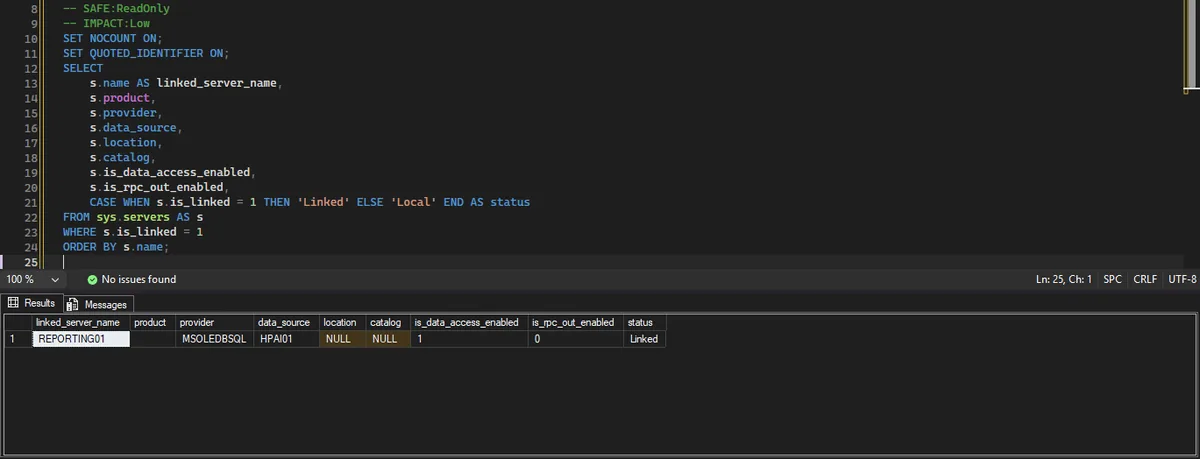
The row above is the inventory for one linked server. product is blank because sp_addlinkedserver leaves it empty for a SQL Server target, the provider is MSOLEDBSQL, and is_rpc_out_enabled is 0, which is the default a new linked server gets.
2. Get-LinkedServerAndJobInventory: Migration Pre-Check (Logins + Linked Servers + Jobs)
/*
Script Name : Get-LinkedServerAndJobInventory
Category    : configuration-and-environment
Purpose     : Inventory logins, linked servers, and SQL Agent jobs for pre-migration reviews.
Author      : Peter Whyte (https://sqldba.blog/dba-scripts-get-linked-servers/)
Requires    : VIEW ANY DEFINITION, db_datareader on msdb
Notes       : Returns three result sets (logins, linked servers, jobs) with the same four
              columns: object_type, name, detail, state. state reads Enabled/Disabled for
              logins and jobs and Data access on/off for linked servers (it was a column
              named status holding 0/1 for logins and the data source for linked servers).
              Run in SSMS or use the individual focused scripts for CSV export.
*/
-- SAFE:ReadOnly
-- IMPACT:Low
SET NOCOUNT ON;
SET QUOTED_IDENTIFIER ON;

SELECT
    'LOGIN' AS object_type,
    sp.name AS name,
    sp.type_desc AS detail,
    CASE sp.is_disabled WHEN 1 THEN 'Disabled' ELSE 'Enabled' END AS state
FROM sys.server_principals AS sp
WHERE sp.type IN ('S', 'U', 'G')
  AND sp.name NOT LIKE '##%'
  AND sp.name NOT LIKE 'NT AUTHORITY%'
  AND sp.name NOT LIKE 'NT SERVICE%'
ORDER BY sp.name;

SELECT
    'LINKED SERVER' AS object_type,
    s.name AS name,
    ISNULL(NULLIF(s.product, ''), '(not set)') + ' / ' + s.provider + ' -> ' + ISNULL(s.data_source, '(no data source)') AS detail,
    CASE s.is_data_access_enabled WHEN 1 THEN 'Data access on' ELSE 'Data access off' END AS state
FROM sys.servers AS s
WHERE s.is_linked = 1
ORDER BY s.name;

SELECT
    'JOB' AS object_type,
    j.name AS name,
    ISNULL(sp.name, '(unknown)') AS detail,
    CASE j.enabled WHEN 1 THEN 'Enabled' ELSE 'Disabled' END AS state
FROM msdb.dbo.sysjobs AS j
LEFT JOIN sys.server_principals AS sp ON j.owner_sid = sp.sid
ORDER BY j.name;
This one returns three result sets in a single run, logins, linked servers, and jobs, because those three together are what a pre-migration review actually needs: who can log in, what’s linked, and what’s scheduled to run. Run it in SSMS, or use the three focused scripts individually for clean CSV export. In the login set, state reads Enabled or Disabled straight from is_disabled, so a Disabled login still sitting in the list is worth a second look during any migration or access review.
3. Get-LinkedServerSecurity: Security Context and Risk Level
/*
Script Name : Get-LinkedServerSecurity
Category    : security
Purpose     : Lists linked servers with their security context — how local logins are
              mapped to remote logins. Catch-all mappings with stored credentials are
              the highest-risk configuration.
Author      : Peter Whyte (https://sqldba.blog/dba-scripts-get-linked-servers/)
Requires    : VIEW ANY DEFINITION or sysadmin
HealthCheck : Yes
*/
-- SAFE:ReadOnly
-- IMPACT:Low
SET NOCOUNT ON;
SET QUOTED_IDENTIFIER ON;

/*
  DESIGN: sys.linked_logins contains one row per mapping. local_principal_id = 0
  means the mapping applies to any login without a specific mapping (catch-all).
  There is no local_login_name column; the local login is resolved with SUSER_SNAME.
  Risk assessment:
    HIGH — catch-all or specific mapping with stored remote credentials
    MEDIUM — self-credentials (impersonation) mapping
    LOW — a mapping row with uses_self_credential = 0 and no remote_name, which is what
          sp_addlinkedsrvlogin @useself = 'FALSE' with no @rmtuser stores ("Be made without
          using a security context"). It connects with no credentials; it is not a missing mapping.
          LOW, not NONE: nothing is stored to leak, and a SQL Server target refuses it
          (Msg 7399 "Authentication failed"), but a source that accepts anonymous connections
          (a file or ODBC provider) would be open to every local login, so it is worth seeing.
    NONE — no sys.linked_logins row at all for the server ("Not be made"): the LEFT JOIN
          leaves every ll column NULL and every connection is refused (Msg 7416).
    UNKNOWN — any row that matches none of the above.
*/

SELECT
    s.name AS linked_server,
    s.product,
    s.provider,
    s.data_source,
    ISNULL(s.catalog, '') AS remote_catalog,
    CASE
        WHEN ll.server_id IS NULL THEN '(no login mappings)'
        ELSE ISNULL(SUSER_SNAME(NULLIF(ll.local_principal_id, 0)), '(any login)')
    END AS local_login,
    CASE
        WHEN ll.uses_self_credential = 1
            THEN 'Impersonate - context of the calling login'
        WHEN ll.remote_name IS NOT NULL AND ll.local_principal_id = 0
            THEN 'Catch-all mapping -> ' + ll.remote_name
        WHEN ll.remote_name IS NOT NULL
            THEN 'Explicit mapping -> ' + ll.remote_name
        WHEN ll.server_id IS NULL
            THEN 'Not be made - no login mappings, connections are refused'
        ELSE 'No security context - connects with no credentials'
    END AS security_context,
    ll.uses_self_credential,
    ll.remote_name AS remote_login,
    CASE
        WHEN ll.remote_name IS NOT NULL AND ll.local_principal_id = 0
            THEN 'HIGH - catch-all with stored credentials'
        WHEN ll.remote_name IS NOT NULL AND ll.local_principal_id != 0
            THEN 'HIGH - explicit mapping with stored credentials'
        WHEN ll.uses_self_credential = 1
            THEN 'MEDIUM - impersonation (caller context)'
        WHEN ll.remote_name IS NULL AND ll.uses_self_credential = 0
            THEN 'LOW - no security context (connects with no credentials)'
        WHEN ll.server_id IS NULL
            THEN 'NONE - no login mappings (all connections refused)'
        ELSE 'UNKNOWN'
    END AS risk_level,
    s.is_remote_login_enabled,
    s.is_rpc_out_enabled,
    s.modify_date AS last_modified
FROM sys.servers s
LEFT JOIN sys.linked_logins ll ON ll.server_id = s.server_id
WHERE s.is_linked = 1
ORDER BY
    CASE
        WHEN ll.remote_name IS NOT NULL AND ll.local_principal_id = 0 THEN 1
        WHEN ll.remote_name IS NOT NULL THEN 2
        WHEN ll.uses_self_credential = 1 THEN 3
        ELSE 4
    END,
    s.name,
    ll.local_principal_id;
This is the one that matters most for security review. A catch-all mapping (local_principal_id = 0) with stored credentials means any login on this server that doesn’t have its own explicit mapping falls through to one shared remote identity, that’s the highest-risk configuration this script flags.
4. Get-LinkedServerConnectivity: Live Connectivity Test
/*
Script Name : Get-LinkedServerConnectivity
Category    : monitoring
Purpose     : Inventories all linked servers and tests each one for connectivity using sp_testlinkedserver.
Author      : Peter Whyte (https://sqldba.blog/dba-scripts-get-linked-servers/)
Requires    : sysadmin or ALTER ANY LINKED SERVER
*/
-- SAFE:ReadOnly
-- IMPACT:Low
SET NOCOUNT ON;
SET QUOTED_IDENTIFIER ON;

/* Note: sys.linked_servers was removed in SQL Server 2025 — use sys.servers WHERE is_linked = 1 */

IF OBJECT_ID('tempdb..#LSResults') IS NOT NULL DROP TABLE #LSResults;
CREATE TABLE #LSResults (
    linked_server_name NVARCHAR(128) NOT NULL,
    product NVARCHAR(128),
    provider NVARCHAR(128),
    data_source NVARCHAR(4000),
    is_rpc_out_enabled BIT,
    is_remote_login_enabled BIT,
    modify_date DATETIME,
    connectivity VARCHAR(15) NOT NULL DEFAULT 'UNTESTED',
    error_detail NVARCHAR(2000)
);

INSERT INTO #LSResults (linked_server_name, product, provider, data_source,
                        is_rpc_out_enabled, is_remote_login_enabled, modify_date)
SELECT
    name,
    product,
    provider,
    data_source,
    is_rpc_out_enabled,
    is_remote_login_enabled,
    modify_date
FROM sys.servers
WHERE is_linked = 1;

/* ── Test connectivity for each linked server ────────────────────────────── */
DECLARE @ls NVARCHAR(128);
DECLARE @err NVARCHAR(2000);

DECLARE ls_cur CURSOR FAST_FORWARD FOR
    SELECT linked_server_name FROM #LSResults ORDER BY linked_server_name;

OPEN ls_cur; FETCH NEXT FROM ls_cur INTO @ls;
WHILE @@FETCH_STATUS = 0
BEGIN
    BEGIN TRY
        EXEC sp_testlinkedserver @ls;
        UPDATE #LSResults SET connectivity = 'REACHABLE' WHERE linked_server_name = @ls;
    END TRY
    BEGIN CATCH
        SET @err = LEFT(ERROR_MESSAGE(), 2000);
        UPDATE #LSResults
        SET connectivity = 'UNREACHABLE', error_detail = @err
        WHERE linked_server_name = @ls;
    END CATCH;
    FETCH NEXT FROM ls_cur INTO @ls;
END;
CLOSE ls_cur; DEALLOCATE ls_cur;

SELECT
    linked_server_name,
    product,
    provider,
    data_source,
    connectivity,
    is_rpc_out_enabled,
    is_remote_login_enabled,
    modify_date,
    error_detail
FROM #LSResults
ORDER BY CASE connectivity WHEN 'UNREACHABLE' THEN 1 WHEN 'REACHABLE' THEN 2 ELSE 3 END,
         linked_server_name;

DROP TABLE #LSResults;
This one actually calls sp_testlinkedserver for each linked server found, wrapped in TRY/CATCH so one unreachable server doesn’t stop the rest from being tested. error_detail captures the real connection failure message, useful for handing straight to a network or firewall investigation.
How To Run From The Repo
Clone DBA Tools, initialize and run whichever script answers your question:
# Clone dba-tools repo:
git clone https://github.com/peterwhyte-lgtm/dba-tools

# Initialize environment:
cd dba-tools
.\Initialize-Environment.ps1

# Plain linked server inventory:
.\run.ps1 Get-LinkedServerInventory

# Migration pre-check: logins + linked servers + jobs:
.\run.ps1 Get-LinkedServerAndJobInventory

# Security context and risk level for each linked server:
.\run.ps1 Get-LinkedServerSecurity

# Live connectivity test:
.\run.ps1 Get-LinkedServerConnectivity

# Any of these against a remote server:
.\run.ps1 Get-LinkedServerSecurity -ServerInstance SQLSERVER01
These scripts live in the repo at:
sql/inventory/Get-LinkedServerInventory.sqlsql/inventory/Get-LinkedServerAndJobInventory.sqlsql/security/Get-LinkedServerSecurity.sqlsql/monitoring/Get-LinkedServerConnectivity.sql
Example Output
Run against a lab instance with one linked server configured. Get-LinkedServerSecurity is the one to read first, because it is the only one of the four that shows the credential mapping. The row below is the real output; the two cells that decide what you do next are local_login reading (any login) and security_context reading Impersonate, which together mean every caller crosses with their own credentials.
One row, and it is already enough to answer the question the script exists to answer. local_login reads (any login), so this is a catch-all: every login with no mapping of its own falls through to it. What makes it the safe kind of catch-all rather than the dangerous one is the next two columns. uses_self_credential is 1 and remote_login is NULL, so each login arrives on the remote side as itself instead of as one shared stored account, and risk_level reads MEDIUM rather than HIGH because of it. The row to worry about is the same catch-all with a name sitting in remote_login.
Impersonation has a failure of its own, and it is not one anything on this page can see: it needs the remote server to accept a delegated Windows identity, and when that is missing the query comes back as NT AUTHORITY\ANONYMOUS LOGON rather than as a configuration error.
is_rpc_out_enabled is 0, which is the default a new linked server gets and the one that catches people out. Four-part-name SELECT statements still work, because reading is enabled separately, but EXEC ('SELECT 1') AT REPORTING01 fails with Msg 7411, Server ‘REPORTING01’ is not configured for RPC. Create a Linked Server to Another SQL Server covers that one, and the provider question behind it.
Understanding the Results
providerproductMSOLEDBSQL; SQLNCLI is the retired name and still turns up on definitions carried forward from older instances, which is worth noticing before a migration rather than after. product is very often blank, because the statement that creates a SQL Server linked server passes an empty product name, so do not read an empty cell as missing data.data_sourcelocal_loginsecurity_contextremote_loginlocal_login showing (any login) means the mapping has no specific local login attached to it, so it is the fallback every unmapped login uses. (no login mappings) means there is no mapping at all, the Not be made setting. security_context then says what that fallback does: impersonate the caller, or connect as the stored remote_login. The four mappings a DBA sees on the Security page of the linked server dialog all land in these three columns, and what each one fails with is a different error per mapping.uses_self_credential1 means the mapping passes the caller’s own identity through to the remote server, 0 means it uses a stored credential. The 1 case is the safer design and the more fragile one to run, because passing a Windows identity from a client, through this server, on to a third is the double hop, and it needs delegation configured for the service account.Act when uses_self_credential is 1 and queries through the linked server fail for users but work when you run them yourself. That pattern is delegation, not permissions, and it is the ANONYMOUS LOGON failure rather than anything this script can flag.risk_levelHIGH is a stored remote credential, whether it is the catch-all or an explicit mapping. MEDIUM is impersonation. LOW is the Be made without using a security context option: a mapping row that stores no credentials, so security_context reads No security context - connects with no credentials. A SQL Server on the other end refuses it, but a provider that accepts anonymous connections would let every local login through, which is why it is still worth seeing. NONE is the Not be made option: the linked server has no mapping rows at all, local_login reads (no login mappings), and every connection through it is refused. UNKNOWN is kept for a row that matches none of those. It is a ranking to read the output by, not a verdict on your environment.Act when a row reads HIGH with (any login) in local_login. That is the catch-all with a stored credential: anyone who can query through this linked server inherits that remote identity, whether or not they were ever meant to.is_rpc_out_enabledis_remote_login_enabledEXEC (…) AT; without it that call fails with Msg 7411 while four-part-name SELECT statements through the same linked server keep working, because reading is governed by the separate is_data_access_enabled option that Get-LinkedServerInventory reports.connectivityerror_detailREACHABLE means sp_testlinkedserver opened a connection and came back. UNREACHABLE puts the real failure in error_detail, which is usually the sentence you want to hand straight to whoever owns the network or the remote instance: a login failure names the remote login it tried, a name resolution failure names the host.Act when connectivity is UNREACHABLE but nobody has reported a problem. A linked server nothing uses any more is still a credential and a firewall hole, and it is easier to remove while it is quiet than during the incident that finally notices it.An empty result from the inventory script is worth checking once rather than assuming: run Get-LinkedServerInventory on its own before concluding that a server genuinely has none, because the other three scripts all read the same is_linked = 1 filter and will agree with it whether it is right or wrong.
Best Practices
- Run
Get-LinkedServerInventoryfirst as a quick sanity check, then reach for the security or connectivity scripts only if linked servers actually exist - Treat any catch-all credential mapping (
risk_level = HIGH) as a finding to resolve, not just document, scope the mapping to specific logins or remove the stored credential entirely - Before a migration, run
Get-LinkedServerAndJobInventoryalongside a full login and job audit, missing a linked server dependency on the target is a common, avoidable migration gap - Re-run
Get-LinkedServerConnectivityafter any network change (firewall rule, DNS update, remote server maintenance) that could affect a linked server’s reachability
MS Docs: sys.servers · sys.linked_logins · sp_testlinkedserver · sys.server_principals
Frequently Asked Questions
Why four scripts instead of one combined script?
Each answers a genuinely different question, plain inventory, migration pre-check, security risk, and live connectivity are different enough in scope and permission requirements (Get-LinkedServerConnectivity needs sysadmin or ALTER ANY LINKED SERVER, the others don’t) that combining them into one script would mean over-requesting permissions or silently skipping sections.
My script just failed with Msg 208, invalid object name sys.linked_servers. What should it read?
sys.servers WHERE is_linked = 1, and the swap is usually the only change needed. sys.linked_servers has never been a catalog view in SQL Server, so the name fails on every version and the failure is a plain Msg 208 rather than anything to do with the linked server itself. All four scripts on this page already read sys.servers.
Does a catch-all mapping always mean a problem?
Not automatically, some environments deliberately use one shared service account for simplicity. But it does mean anyone with access to run a query through that linked server inherits that identity’s full permissions on the remote side, worth confirming it’s an intentional choice, not a forgotten default.
Four-part-name queries work but EXEC AT fails. Is the linked server broken?
No, those are two different options. Reading through a linked server is governed by is_data_access_enabled, which Get-LinkedServerInventory reports, and running a statement on the remote side with EXEC (…) AT is governed by is_rpc_out_enabled, which Get-LinkedServerSecurity and Get-LinkedServerConnectivity both report. RPC Out is off on a newly created linked server, so the second one fails with Msg 7411 while the first keeps working. Create a Linked Server to Another SQL Server has the fix.
The security script says the mapping impersonates the caller, so why do my users get login failed for NT AUTHORITY\ANONYMOUS LOGON?
Because the mapping is correct and the delegation behind it is not. uses_self_credential = 1 tells this server to pass the caller’s own Windows identity on to the remote one, which is a second hop, and a Windows identity does not survive a second hop unless the service account is trusted to delegate. The giveaway is that the same query works when you run it on the server itself and fails from a client. Login Failed for User NT AUTHORITY\ANONYMOUS LOGON walks through it, and nothing in these four scripts can see it, because the configuration they read is fine.
Summary
Linked servers are easy to forget about until a migration or a security review forces the question. These four scripts cover the question from every angle that matters: what’s linked, what else is tied to it for migration purposes, how risky the credential mapping is, and whether it’s actually reachable right now.
Run Get-LinkedServerInventory as a first pass on any server, then Get-LinkedServerSecurity for the credential mapping, which is the column set that decides whether what you found is a note or a finding.
Related
You may also find these useful:
- Linked Server Login Failed for NT AUTHORITY\ANONYMOUS LOGON, what the login mapping failures this script surfaces actually look like
- DBA Scripts: Server Inventory
- Get Version and Edition
- Get OS and Hardware Info
- Get Migration Risk Assessment
- Get Audit Specifications, DDL Triggers, and Proxy Credentials
- Get Database Snapshot Inventory
- Get Login and Job Inventory
- Get Active Connections by Database
- Get Database Inventory
- Get Database Summary
- Create a Linked Server to Another SQL Server, the two statements that create one, and the certificate error MSOLEDBSQL gives you by default
- Generate Linked Server Script, writes the definitions back out so the target server can be built to match
- DBA Scripts: Security, where the credential-mapping script also sits
- DBA Scripts: The Complete Guide, the map across every script on this site
Leave a Reply