
The Check Before You Take Anything Offline
Taking a database offline, whether for a decommission, a restore, or a maintenance operation that needs exclusive access, starts with the same question: is anyone actually using it right now? Guessing wrong means an unexpected outage for whoever was still connected.
This script answers that in one pass across every database at once: session count, active requests, open transactions, and blocked sessions, so you can see at a glance which databases are genuinely quiet and which ones aren’t.
Why Active Connections by Database Matters
- A database can look unused from the application side (no recent deploys, no known active project) while still carrying real, active sessions from a forgotten integration or a scheduled job
open_transactionscatches something a simple session count can’t: a database with an open transaction sitting idle is not safe to touch, even if nothing is actively running against itoldest_conn_minsurfaces long-lived connections, useful for spotting connection pool leaks or an application that isn’t cycling its connections as expected- Checking every database in one pass, rather than one at a time, is what makes this practical to run routinely rather than only during an incident
When to Run This Script
- Immediately before taking any database offline, restoring over it, or starting a decommission
- Investigating unexpected connection counts or a suspected connection leak
- Routine health checks, to build a baseline sense of which databases are quiet and which are genuinely busy
- Before a maintenance window that needs exclusive database access, to confirm the window will actually be uncontested
The Script
- Tested on: SQL Server 2025 (RTM CU8), Windows lab instance
- Last verified: 2026-10-16 (script unchanged, clean run on the lab); screenshot from the 2026-08-30 run
- Permissions: VIEW SERVER STATE
- Safety: read-only, impact low
/*
Script Name : Get-ActiveConnectionsByDatabase
Category    : monitoring
Purpose     : Session count, active requests, open transactions, and blocked sessions grouped by database — essential check before taking any database offline or starting a decommission.
Author      : Peter Whyte (https://sqldba.blog/dba-scripts-get-active-connections-by-database/)
Requires    : VIEW SERVER STATE
*/
-- SAFE:ReadOnly
-- IMPACT:Low
SET NOCOUNT ON;

SELECT
    DB_NAME(s.database_id) AS database_name,
    COUNT(*) AS total_sessions,
    SUM(CASE WHEN s.status = 'running' THEN 1 ELSE 0 END) AS active_requests,
    SUM(CASE WHEN s.open_transaction_count > 0 THEN 1 ELSE 0 END) AS open_transactions,
    SUM(CASE WHEN r.blocking_session_id > 0 THEN 1 ELSE 0 END) AS blocked_sessions,
    COUNT(DISTINCT s.login_name) AS distinct_logins,
    MAX(DATEDIFF(MINUTE, s.login_time, GETDATE())) AS oldest_conn_min,
    MIN(s.login_time) AS oldest_login_time
FROM sys.dm_exec_sessions s
LEFT JOIN sys.dm_exec_requests r ON r.session_id = s.session_id
WHERE s.is_user_process = 1
  AND s.database_id > 0
GROUP BY s.database_id
ORDER BY total_sessions DESC, active_requests DESC;
is_user_process = 1 filters out SQL Server’s own background and system sessions, so the counts reflect real application and user activity only.
How To Run From The Repo
Clone DBA Tools, initialize and run the script:
# Clone dba-tools repo:
git clone https://github.com/peterwhyte-lgtm/dba-tools

# Initialize environment:
cd dba-tools
.\Initialize-Environment.ps1

# Session counts and activity, grouped by database:
.\run.ps1 Get-ActiveConnectionsByDatabase

# To run against a remote sql server:
.\run.ps1 Get-ActiveConnectionsByDatabase -ServerInstance SQLSERVER01
This script lives in the repo at:
Example Output
Six databases with user sessions, and the first row is the one that would stop a maintenance window. DemoDatabase has 5 sessions, 4 of them holding open transactions and 3 of them blocked, which is a database in the middle of doing something, not one waiting quietly to be taken offline.
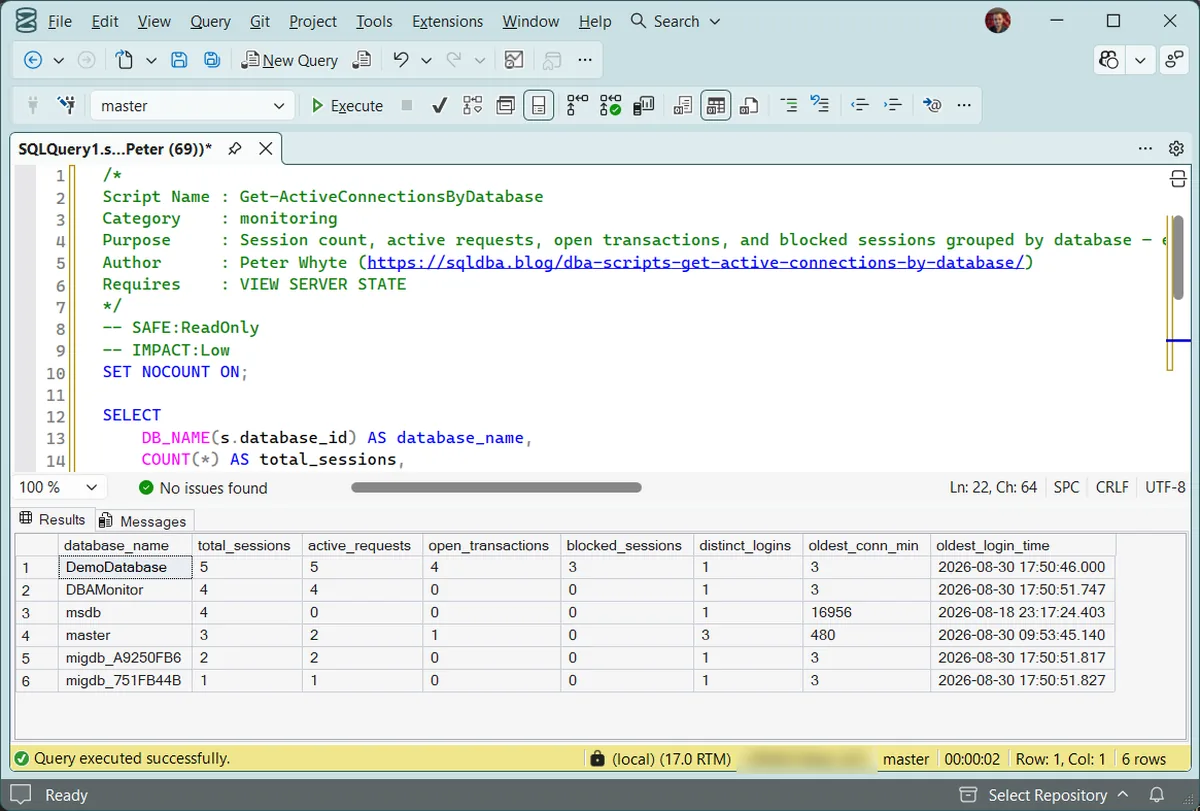
The contrast in the rest of the table is the useful part. DBAMonitor has 4 sessions, all 4 running and none holding a transaction: busy, but with nothing in flight that an offline or restore would cut through. And msdb’s oldest connection is over 16,000 minutes old, which sounds alarming until you recognise it as SQL Agent, which usually holds the oldest connection to msdb: long-running tooling connections are normal, and knowing which is which is the difference between planning around a real constraint and postponing for a phantom one.
Understanding the Results
database_nametotal_sessionsactive_requestsopen_transactionsblocked_sessionsdistinct_loginsoldest_conn_minoldest_login_timeBest Practices
- Run this immediately before any operation requiring exclusive database access. Don’t rely on assumptions about which databases are “known to be unused”
- Treat any nonzero
open_transactionsas a blocker, not just a number to note. Confirm what’s holding it open before proceeding - Build a routine baseline of normal connection patterns per database, so an unusual spike or an unexpectedly quiet database both stand out
- Cross-reference a surprising result with Server Inventory scripts if a database shows activity nobody expected
Microsoft’s reference covers sys.dm_exec_sessions and sys.dm_exec_requests in full.
Frequently Asked Questions
Is a database with zero active sessions definitely safe to take offline?
It’s the strongest signal available from this script, but confirm there isn’t a scheduled job or integration that connects only periodically. A quiet snapshot at the moment you check doesn’t guarantee nothing will connect 5 minutes later. Pair this with knowledge of the database’s actual scheduled workload.
Why does open_transactions matter more than active_requests?
active_requests only shows sessions currently executing a statement. A session can hold an open transaction while sitting idle between statements, showing as sleeping rather than running, but still holding locks and blocking cleanup. open_transactions counts those sessions, from open_transaction_count in sys.dm_exec_sessions, so it catches that case specifically.
Summary
“Is anyone using this database” is a question worth answering with data, not an assumption, before any operation that needs exclusive access. This script answers it across every database in one pass, and the open_transactions column catches the specific case a simple connection count would miss: a session sitting idle while still holding a transaction open.
Run it immediately before any decommission, restore, or exclusive-access maintenance window, and treat any nonzero open transaction as a hard stop until you know what’s holding it.
Related
You may also find these scripts useful:
- Blocking and Locking (hub), every blocking and locking script on the site
- Database Snapshot Inventory, snapshots that will block a restore over the source database
- The Database Could Not Be Exclusively Locked (Error 5030), the error this check exists to prevent
- DBA Scripts: The Complete Guide, the map across every script on this site
Leave a Reply