
Recreating Every SQL Agent Job for a Migration, in the Right Order
The new server is up and its SQL Agent jobs are not, or a DR target needs the same jobs as production before cutover. This script reads msdb on the source and writes one block per job (header, steps, start step, schedules, target server) for you to review and run on the target. It only writes text. It creates any custom job category that is missing on the target, but not the operators, proxies or owner logins the jobs point at, so those go on the target first.
Why a Generated Job Recreation Script Matters
- Job, steps, start step, and schedule have a required creation order. Getting it wrong by hand across a maintenance window is exactly when a job silently ends up broken
- Generated DDL means you review the exact
sp_add_jobandsp_add_jobstepcalls before they run, not a black-box migration tool doing it for you - This is a generator, not a full migration platform. It doesn’t move data or orchestrate cutover, it solves the specific problem of recreating job definitions correctly on the target
When to Run This Script
- Migrating databases to new hardware or a new SQL Server version
- Consolidating several instances onto one server
- Standing up a DR or failover target that needs the same job schedule as production
- Building a side-by-side test environment before a cutover
The Script
Produces sp_add_job / sp_add_jobstep / sp_add_schedule DDL for every job on the source instance, in the order needed to recreate it correctly on the target: job header, then steps, then start step, then schedule, then attach to (local). It needs db_datareader on msdb or sysadmin: with only SQLAgentReaderRole or SQLAgentOperatorRole it stops with an error that says so, rather than returning a script with no jobs in it.
/*
Script Name : Generate-AgentJobScript
Category    : migration
Purpose     : Generate sp_add_job DDL to recreate all SQL Agent jobs on the target server.
Author      : Peter Whyte (https://sqldba.blog/dba-scripts-generate-agent-job-script/)
Requires    : db_datareader on msdb (or sysadmin); SQLAgentReaderRole and SQLAgentOperatorRole alone cannot SELECT the msdb job tables.
              Without it the script stops with an error instead of returning an empty script.
Notes       : Steps and schedules are built with STRING_AGG, not SELECT @var = @var + ... ORDER BY,
              which MS Docs calls nondeterministic. Needs SQL Server 2017 or later.
              Custom job categories are created on the target if missing. A missing operator or
              owner login still stops sp_add_job, and the rest of that job's block is then
              skipped rather than leaving an unattached schedule behind.
              A schedule is reused only when its name AND definition match, so two schedules
              that share a name on the source stay two schedules on the target.
              NOT scripted: operators, proxies, alerts, job history. Create operators and
              proxies on the target first; a step that ran under a proxy needs @proxy_name added.
*/
-- SAFE:ReadOnly
-- IMPACT:Low
SET NOCOUNT ON;
SET QUOTED_IDENTIFIER ON;

-- Without SELECT on these msdb tables the cursor never opens and the result is a header with no jobs,
-- while the errors sit in the Messages pane. Fail loudly instead.
IF ISNULL(HAS_PERMS_BY_NAME(N'msdb.dbo.sysjobs',         N'OBJECT', N'SELECT'), 0) <> 1
   OR ISNULL(HAS_PERMS_BY_NAME(N'msdb.dbo.sysjobsteps',     N'OBJECT', N'SELECT'), 0) <> 1
   OR ISNULL(HAS_PERMS_BY_NAME(N'msdb.dbo.sysjobschedules', N'OBJECT', N'SELECT'), 0) <> 1
   OR ISNULL(HAS_PERMS_BY_NAME(N'msdb.dbo.sysschedules',    N'OBJECT', N'SELECT'), 0) <> 1
   OR ISNULL(HAS_PERMS_BY_NAME(N'msdb.dbo.syscategories',   N'OBJECT', N'SELECT'), 0) <> 1
   OR ISNULL(HAS_PERMS_BY_NAME(N'msdb.dbo.sysoperators',    N'OBJECT', N'SELECT'), 0) <> 1
BEGIN
    RAISERROR(N'Generate-AgentJobScript needs SELECT on the msdb job tables (db_datareader on msdb, or sysadmin). SQLAgentReaderRole and SQLAgentOperatorRole are not enough, and the generated script would contain no jobs.', 16, 1);
    RETURN;
END;

DECLARE @ddl  NVARCHAR(MAX) = N'';
DECLARE @crlf NCHAR(2)      = CHAR(13) + CHAR(10);

SET @ddl = @ddl
    + N'-- ================================================================' + @crlf
    + N'-- SQL Agent Job Migration Script' + @crlf
    + N'-- Source  : ' + @@SERVERNAME + @crlf
    + N'-- Generated: ' + CONVERT(NVARCHAR(30), GETDATE(), 120) + @crlf
    + N'-- Review owner_login_name values - map to valid logins on target.' + @crlf
    + N'-- NOT included: operators, proxies, alerts. Create them on the target first.' + @crlf
    + N'-- ================================================================' + @crlf + @crlf
    + N'USE msdb;' + @crlf + N'GO' + @crlf + @crlf;

-- ── Per job ───────────────────────────────────────────────────────────────────

DECLARE @job_id    UNIQUEIDENTIFIER;
DECLARE @job_name  NVARCHAR(128);
DECLARE @enabled   TINYINT;
DECLARE @desc      NVARCHAR(512);
DECLARE @category  NVARCHAR(128);
DECLARE @cat_id    INT;
DECLARE @cat_type  INT;
DECLARE @owner     NVARCHAR(128);
DECLARE @owner_sid NVARCHAR(200);
DECLARE @start_step INT;
DECLARE @nl_email  INT; DECLARE @nl_netsend INT; DECLARE @nl_page INT; DECLARE @nl_eventlog INT;
DECLARE @op_email  NVARCHAR(128); DECLARE @op_netsend NVARCHAR(128); DECLARE @op_page NVARCHAR(128);
DECLARE @q_job     NVARCHAR(300);

DECLARE job_cur CURSOR LOCAL FAST_FORWARD FOR
    SELECT
        j.job_id,
        j.name,
        j.enabled,
        ISNULL(j.description, N''),
        ISNULL(c.name, N'[Uncategorized (Local)]'),
        ISNULL(c.category_id, 0),
        ISNULL(c.category_type, 1),
        SUSER_SNAME(j.owner_sid),
        CONVERT(NVARCHAR(200), j.owner_sid, 1),
        j.start_step_id,
        j.notify_level_email,
        j.notify_level_netsend,
        j.notify_level_page,
        j.notify_level_eventlog,
        ISNULL(CAST(n_email.name  AS NVARCHAR(128)), N''),
        ISNULL(CAST(n_ns.name     AS NVARCHAR(128)), N''),
        ISNULL(CAST(n_page.name   AS NVARCHAR(128)), N'')
    FROM msdb.dbo.sysjobs j
    LEFT JOIN msdb.dbo.syscategories c ON j.category_id = c.category_id
    LEFT JOIN msdb.dbo.sysoperators n_email ON j.notify_email_operator_id   = n_email.id
    LEFT JOIN msdb.dbo.sysoperators n_ns    ON j.notify_netsend_operator_id = n_ns.id
    LEFT JOIN msdb.dbo.sysoperators n_page  ON j.notify_page_operator_id    = n_page.id
    ORDER BY j.name;

OPEN job_cur;
FETCH NEXT FROM job_cur INTO
    @job_id, @job_name, @enabled, @desc, @category, @cat_id, @cat_type, @owner, @owner_sid, @start_step,
    @nl_email, @nl_netsend, @nl_page, @nl_eventlog,
    @op_email, @op_netsend, @op_page;

WHILE @@FETCH_STATUS = 0
BEGIN
    SET @q_job = N'N''' + REPLACE(@job_name, N'''', N'''''') + N'''';

    -- ── Job header ────────────────────────────────────────────────────────────
    SET @ddl = @ddl
        + N'-- Job: ' + @job_name + @crlf
        + CASE WHEN @owner IS NULL
               THEN N'-- MANUAL: the owner SID ' + @owner_sid + N' matches no login on the source, so @owner_login_name is sa. Change it if sa should not own this job.' + @crlf
               ELSE N'' END
        + N'IF NOT EXISTS (SELECT 1 FROM msdb.dbo.sysjobs WHERE name = ' + @q_job + N')' + @crlf
        + N'BEGIN' + @crlf
        + N'    DECLARE @job_id UNIQUEIDENTIFIER, @schedule_id INT;' + @crlf
        + CASE WHEN @cat_id >= 100
               THEN N'    IF NOT EXISTS (SELECT 1 FROM msdb.dbo.syscategories WHERE category_class = 1 AND name = N''' + REPLACE(@category, N'''', N'''''') + N''')' + @crlf
                  + N'        EXEC msdb.dbo.sp_add_category @class = N''JOB'', @type = N''' + CASE WHEN @cat_type = 2 THEN N'MULTI-SERVER' ELSE N'LOCAL' END + N''', @name = N''' + REPLACE(@category, N'''', N'''''') + N''';' + @crlf
               ELSE N'' END
        + N'    EXEC msdb.dbo.sp_add_job' + @crlf
        + N'        @job_name              = ' + @q_job + N',' + @crlf
        + N'        @enabled               = '    + CAST(@enabled AS NVARCHAR(1)) + N',' + @crlf
        + N'        @description           = N''' + REPLACE(@desc,     N'''', N'''''') + N''',' + @crlf
        + N'        @category_name         = N''' + REPLACE(@category, N'''', N'''''') + N''',' + @crlf
        + N'        @owner_login_name      = N''' + REPLACE(ISNULL(@owner, N'sa'), N'''', N'''''') + N''',' + @crlf
        + N'        @notify_level_eventlog = '    + CAST(@nl_eventlog  AS NVARCHAR(1)) + N',' + @crlf
        + N'        @notify_level_email    = '    + CAST(@nl_email     AS NVARCHAR(1)) + N',' + @crlf
        + N'        @notify_level_netsend  = '    + CAST(@nl_netsend   AS NVARCHAR(1)) + N',' + @crlf
        + N'        @notify_level_page     = '    + CAST(@nl_page      AS NVARCHAR(1)) + @crlf
        + CASE WHEN @op_email   <> N'' THEN N'       ,@notify_email_operator_name   = N''' + REPLACE(@op_email,   N'''',N'''''') + N'''' + @crlf ELSE N'' END
        + CASE WHEN @op_netsend <> N'' THEN N'       ,@notify_netsend_operator_name = N''' + REPLACE(@op_netsend, N'''',N'''''') + N'''' + @crlf ELSE N'' END
        + CASE WHEN @op_page    <> N'' THEN N'       ,@notify_page_operator_name    = N''' + REPLACE(@op_page,    N'''',N'''''') + N'''' + @crlf ELSE N'' END
        + N'        ,@job_id = @job_id OUTPUT;' + @crlf
        + N'    IF @job_id IS NULL RETURN;  -- sp_add_job failed (see the error above), so skip the rest of this job' + @crlf + @crlf;

    -- ── Job steps (STRING_AGG keeps every step, in step_id order) ────────────
    SELECT @ddl = @ddl + ISNULL(STRING_AGG(CAST(
          N'    EXEC msdb.dbo.sp_add_jobstep' + @crlf
        + N'        @job_id          = @job_id,' + @crlf
        + N'        @step_id         = '    + CAST(s.step_id          AS NVARCHAR(11)) + N',' + @crlf
        + N'        @step_name       = N''' + REPLACE(s.step_name,    N'''', N'''''') + N''',' + @crlf
        + N'        @subsystem       = N''' + s.subsystem                               + N''',' + @crlf
        + N'        @command         = N''' + REPLACE(ISNULL(s.command, N''), N'''', N'''''') + N''',' + @crlf
        + N'        @database_name   = N''' + REPLACE(ISNULL(s.database_name, N'master'), N'''', N'''''') + N''',' + @crlf
        + CASE WHEN s.database_user_name IS NOT NULL
               THEN N'        @database_user_name = N''' + REPLACE(s.database_user_name, N'''', N'''''') + N''',' + @crlf ELSE N'' END
        + CASE WHEN s.subsystem = N'CmdExec'
               THEN N'        @cmdexec_success_code = ' + CAST(s.cmdexec_success_code AS NVARCHAR(11)) + N',' + @crlf ELSE N'' END
        + CASE WHEN s.output_file_name IS NOT NULL
               THEN N'        @output_file_name = N''' + REPLACE(s.output_file_name, N'''', N'''''') + N''',' + @crlf ELSE N'' END
        + N'        @flags           = '    + CAST(s.flags             AS NVARCHAR(11)) + N',' + @crlf
        + N'        @on_success_action = '  + CAST(s.on_success_action AS NVARCHAR(1))  + N',' + @crlf
        + N'        @on_success_step_id= '  + CAST(s.on_success_step_id AS NVARCHAR(11)) + N',' + @crlf
        + N'        @on_fail_action  = '    + CAST(s.on_fail_action    AS NVARCHAR(1))  + N',' + @crlf
        + N'        @on_fail_step_id = '    + CAST(s.on_fail_step_id   AS NVARCHAR(11))  + N',' + @crlf
        + N'        @retry_attempts  = '    + CAST(s.retry_attempts    AS NVARCHAR(11))  + N',' + @crlf
        + N'        @retry_interval  = '    + CAST(s.retry_interval    AS NVARCHAR(11))  + N';' + @crlf + @crlf
        AS NVARCHAR(MAX)), N'') WITHIN GROUP (ORDER BY s.step_id), N'')
    FROM msdb.dbo.sysjobsteps s
    WHERE s.job_id = @job_id;

    -- ── Set start step ────────────────────────────────────────────────────────
    SET @ddl = @ddl
        + N'    EXEC msdb.dbo.sp_update_job @job_id = @job_id, @start_step_id = ' + CAST(@start_step AS NVARCHAR(11)) + N';' + @crlf + @crlf;

    -- ── Schedules: reuse one only when name AND definition match, attach by id ─
    SELECT @ddl = @ddl + ISNULL(STRING_AGG(CAST(
          N'    SET @schedule_id = NULL;' + @crlf
        + N'    SELECT TOP (1) @schedule_id = schedule_id FROM msdb.dbo.sysschedules' + @crlf
        + N'     WHERE name = N''' + REPLACE(sc.name, N'''', N'''''') + N''' AND enabled = ' + CAST(sc.enabled AS NVARCHAR(1))
        + N' AND freq_type = ' + CAST(sc.freq_type AS NVARCHAR(10)) + N' AND freq_interval = ' + CAST(sc.freq_interval AS NVARCHAR(10)) + @crlf
        + N'       AND freq_subday_type = ' + CAST(sc.freq_subday_type AS NVARCHAR(10)) + N' AND freq_subday_interval = ' + CAST(sc.freq_subday_interval AS NVARCHAR(10))
        + N' AND freq_relative_interval = ' + CAST(sc.freq_relative_interval AS NVARCHAR(10)) + N' AND freq_recurrence_factor = ' + CAST(sc.freq_recurrence_factor AS NVARCHAR(10)) + @crlf
        + N'       AND active_start_date = ' + CAST(sc.active_start_date AS NVARCHAR(10)) + N' AND active_end_date = ' + CAST(sc.active_end_date AS NVARCHAR(10))
        + N' AND active_start_time = ' + CAST(sc.active_start_time AS NVARCHAR(10)) + N' AND active_end_time = ' + CAST(sc.active_end_time AS NVARCHAR(10)) + @crlf
        + N'     ORDER BY schedule_id;' + @crlf
        + N'    IF @schedule_id IS NULL' + @crlf
        + N'        EXEC msdb.dbo.sp_add_schedule' + @crlf
        + N'            @schedule_name       = N''' + REPLACE(sc.name, N'''', N'''''')     + N''',' + @crlf
        + N'            @enabled             = '    + CAST(sc.enabled            AS NVARCHAR(1))  + N',' + @crlf
        + N'            @freq_type           = '    + CAST(sc.freq_type          AS NVARCHAR(10)) + N',' + @crlf
        + N'            @freq_interval       = '    + CAST(sc.freq_interval      AS NVARCHAR(10)) + N',' + @crlf
        + N'            @freq_subday_type    = '    + CAST(sc.freq_subday_type   AS NVARCHAR(10)) + N',' + @crlf
        + N'            @freq_subday_interval= '    + CAST(sc.freq_subday_interval AS NVARCHAR(10))+ N',' + @crlf
        + N'            @freq_relative_interval='   + CAST(sc.freq_relative_interval AS NVARCHAR(10))+N',' + @crlf
        + N'            @freq_recurrence_factor='   + CAST(sc.freq_recurrence_factor AS NVARCHAR(10))+N',' + @crlf
        + N'            @active_start_date   = '    + CAST(sc.active_start_date  AS NVARCHAR(10)) + N',' + @crlf
        + N'            @active_end_date     = '    + CAST(sc.active_end_date    AS NVARCHAR(10)) + N',' + @crlf
        + N'            @active_start_time   = '    + CAST(sc.active_start_time  AS NVARCHAR(10)) + N',' + @crlf
        + N'            @active_end_time     = '    + CAST(sc.active_end_time    AS NVARCHAR(10)) + N',' + @crlf
        + N'            @schedule_id         = @schedule_id OUTPUT;' + @crlf
        + N'    EXEC msdb.dbo.sp_attach_schedule @job_id = @job_id, @schedule_id = @schedule_id;' + @crlf + @crlf
        AS NVARCHAR(MAX)), N'') WITHIN GROUP (ORDER BY sc.name, sc.schedule_id), N'')
    FROM msdb.dbo.sysjobschedules js
    INNER JOIN msdb.dbo.sysschedules sc ON js.schedule_id = sc.schedule_id
    WHERE js.job_id = @job_id;

    -- ── Add to local server ───────────────────────────────────────────────────
    SET @ddl = @ddl
        + N'    EXEC msdb.dbo.sp_add_jobserver @job_id = @job_id, @server_name = N''(local)'';' + @crlf
        + N'END' + @crlf + N'GO' + @crlf + @crlf;

    FETCH NEXT FROM job_cur INTO
        @job_id, @job_name, @enabled, @desc, @category, @cat_id, @cat_type, @owner, @owner_sid, @start_step,
        @nl_email, @nl_netsend, @nl_page, @nl_eventlog,
        @op_email, @op_netsend, @op_page;
END

CLOSE job_cur;
DEALLOCATE job_cur;

SELECT @ddl AS ddl;
How To Run From The Repo
# Clone dba-tools repo:
git clone https://github.com/peterwhyte-lgtm/dba-tools

# Initialize environment:
cd dba-tools
.\Initialize-Environment.ps1

# Set the source server for the session:
.\tools\local-sql\Set-SqlConnection.ps1 -ServerInstance PROD01\SQL2019

# Generate the DDL, review the output before running it on the target:
.\powershell\migration\Generate-AgentJobScript.ps1

# Output: output-files\migration\*.sql
This script lives in the repo at:
Example Output
Run it with results to text (Ctrl+T), because the whole script comes back as one column; if the end is cut off, raise the limit as in How to Increase Maximum Characters Displayed in SSMS. On the lab instance it scripted all 44 jobs in 11 seconds. The capture shows the guard each block now carries, IF @job_id IS NULL RETURN;, which skips the rest of a job whose sp_add_job failed, then that job’s first step with its settings written out:

One value in those step settings used to break this script: @retry_attempts = 2147483647. CDC creates its capture job with that many retries, the step fields were cast to five characters, and the value overflowed with Msg 8115. The output then had the capture job with every one of its steps missing, and nothing in the generated script to show it, only a Msg 8115 in the Messages pane. The current script casts those fields wide enough, and on the lab it writes 46 of the 46 steps in msdb. If you run an older copy against a server with CDC, count the steps before you trust it.
To test the output, I set up five throwaway jobs and ran their blocks back on the same instance under new names: one with a ] in its name, a single quote in its description, an output file and table logging on a T-SQL step, a CmdExec step and a custom category; two jobs each with their own schedule called Daily, at 01:30 and 03:00; one that emails an operator; and one owned by a SID that matches no login. Four of the five came back with the same steps, command text, success and failure actions, retries, start step, owner and schedules, field for field. The fifth is the operator case below.
What to Check in the Generated Script
Each job’s operators and owner exist on the target. The script names them but does not create them. A missing one stops sp_add_job, and the block then skips the rest of that job, so nothing half-built is left behind: no steps, and no schedule attached to nothing. The operator job’s block, run on a target without the operator, stopped at one error:
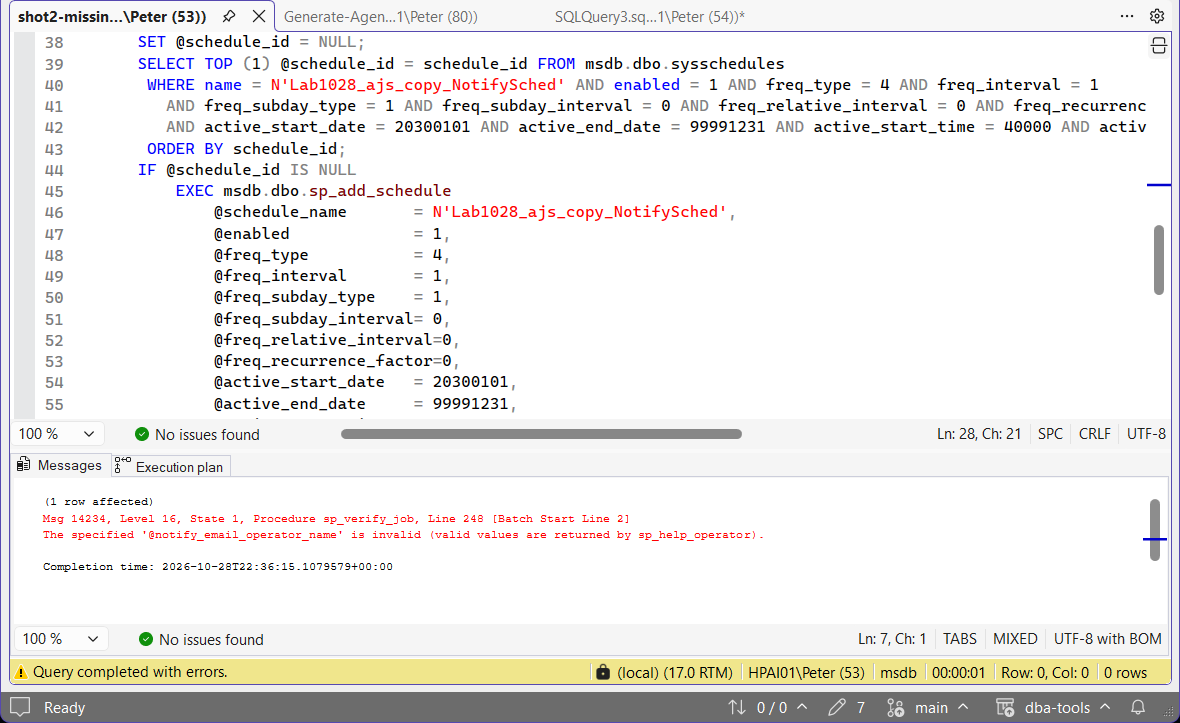
Create the operator, or the owner login, which fails the same way on @owner_login_name, and run that job’s block again. Custom job categories are different: the script creates any that is missing, and on the lab the copied category was created and the job went into it.
Proxies are added by hand. Output files and the step logging options come across: the lab job’s output file and its log-to-table flag (8) came back as they were. @proxy_name does not, and a step with no proxy runs as the SQL Server Agent service account, per MS Docs.
Schedules that share a name stay separate. A schedule is reused only when its name and its whole definition match, then attached by id, so the two Daily schedules came back as two, at 01:30 and 03:00, each on its own job.
No owner reads sa unless it should. When the owner’s SID matches no login on the source, for example in an msdb restored from another server, the script writes sa and says so above the block: -- MANUAL: the owner SID ... matches no login on the source, so @owner_login_name is sa. Change it if sa should not own this job. Search the output for MANUAL before you run it.
Every step and schedule is there. Count the sp_add_jobstep lines against msdb.dbo.sysjobsteps and the sp_attach_schedule lines against msdb.dbo.sysjobschedules. On the lab that was 46 of 46 and 32 of 32.
It ran with enough permission. Without SELECT on the msdb job tables it stops instead of returning an empty script. A lab login with only SQLAgentReaderRole was denied five of the six tables and got Msg 50000: Generate-AgentJobScript needs SELECT on the msdb job tables (db_datareader on msdb, or sysadmin). SQLAgentReaderRole and SQLAgentOperatorRole are not enough, and the generated script would contain no jobs.
Best Practices
- Always review the generated DDL before running it on the target. Nothing here executes automatically.
- Map any
owner_login_namevalues in the output to real logins that exist on the target before running it, if the source job owner doesn’t exist on the target, job creation fails with Msg 14234. - Run this after Generate Login Script, so job owners already resolve on the target.
- Disable the recreated jobs on the target until cutover with Enable or Disable All SQL Agent Jobs, so the same job does not run on both servers.
- Confirm job success after migration with Get Maintenance Job Status, recreated doesn’t automatically mean succeeding on the new schedule.
MS Docs covers sp_add_job, sp_add_jobstep, sp_add_schedule and sp_attach_schedule in full.
Frequently Asked Questions
What happens if a job’s owner login doesn’t exist on the target?
sp_add_job fails with Msg 14234 (The specified ‘@owner_login_name’ is invalid) and the job is not created. Run Generate Login Script first so every job owner already resolves on the target, or change @owner_login_name in that block.
Does this recreate job history, or just the job definitions?
Just the definitions, job, steps, start step, and schedule. Job history is operational data, not configuration, and isn’t something you’d want carried over from the source instance anyway.
Two jobs have schedules with the same name. Will they share one on the target?
No. The script reuses a schedule only when the name and the whole definition match, then attaches it by id, so two different schedules called Daily come back as two. On the lab, jobs at 01:30 and 03:00 kept their own times.
One job’s block failed. What did it leave on the target?
Nothing for that job. When sp_add_job fails, usually on a missing operator or owner login (Msg 14234), the block skips the rest of that job, so there are no follow-on errors and no schedule attached to nothing. Fix that one error on the target and run the block again.
What permissions does the script need?
SELECT on the msdb job tables: db_datareader on msdb, or sysadmin. SQLAgentReaderRole and SQLAgentOperatorRole are not enough: they are denied most of those tables, and the script stops with an error that says so rather than returning a script with no jobs in it.
Does it copy operators, proxies and alerts?
No. It writes the operator names a job notifies but not the operators themselves, and it writes no @proxy_name and no alerts. Create operators and proxies on the target before you run the output, and add @proxy_name to any step that used one.
Summary
One generator, one job: recreate every SQL Agent job on the target in the order the pieces need to exist, job header, steps, start step, then schedule. Create the logins, operators and proxies on the target first, search the output for MANUAL, and count the steps and schedules in it before you run it.
Related Scripts
- Get Migration Risk Assessment
- SQL Agent Job Failure Summary
- SQL Server Maintenance Job Framework, the scripts that create the maintenance jobs in the first place
- DBA Scripts: The Complete Guide, the map across every script on this site
Leave a Reply