
Adding a filegroup is one of those jobs that looks like two lines of T-SQL and then quietly does not work. The two lines are correct. The problem is that SQL Server lets you get further than you should before it tells you something is missing.
Everything here was run on a SQL Server 2025 instance, including a result that contradicts the advice you will usually see.
Why Bother
Three reasons come up in practice. You want user data off PRIMARY, so that a full user filegroup cannot take out the database’s own metadata. You want a set of tables on different storage, whether that is faster disk or simply a different volume with room on it. Or you want piecemeal restore, where a filegroup can be brought back on its own rather than restoring everything.
The Two Statements
The filegroup first, then a file in it. Both are needed, and the order matters:
-- 1. the container (metadata only, no disk space used yet)
ALTER DATABASE YourDatabase ADD FILEGROUP FG_Data2;

-- 2. a file inside it, which is what actually holds the pages
ALTER DATABASE YourDatabase
ADD FILE (
    NAME       = N'YourDatabase_Data2',
    FILENAME   = N'D:\SQLData\YourDatabase_Data2.ndf',
    SIZE       = 512MB,
    FILEGROWTH = 256MB
)
TO FILEGROUP FG_Data2;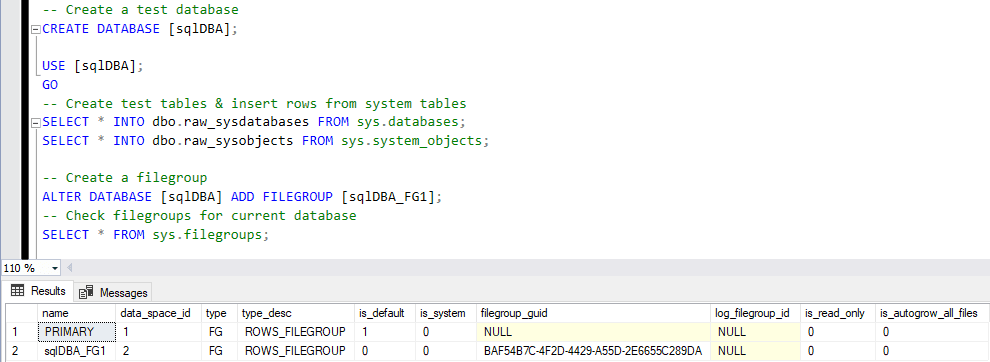
sys.filegroups confirms PRIMARY is still the default. What it does not show you is that the new one has no files yet.Set SIZE to something realistic rather than accepting the default and letting it
grow there in small steps. Use a fixed FILEGROWTH in MB, not a percentage, so growth
does not accelerate as the file gets larger.
Microsoft’s reference covers ALTER DATABASE file and filegroup options and Database files and filegroups in full.
The Trap: an Empty Filegroup Fails Late
Most write-ups say you cannot create a table on a filegroup that has no files. That is
not what happens. Tested on SQL Server 2025, CREATE TABLE ... ON FG_Empty
against a filegroup with no files succeeds. The table exists. Everything looks fine.
The failure is deferred to the first row you try to insert:
ALTER DATABASE YourDatabase ADD FILEGROUP FG_Empty;

CREATE TABLE dbo.Demo (id int) ON FG_Empty;   -- succeeds
INSERT INTO dbo.Demo (id) VALUES (1);         -- fails
Msg 622, Level 16, State 3
The filegroup "FG_Empty" has no files assigned to it. Tables, indexes, text columns,
ntext columns, and image columns cannot be populated on this filegroup until a file
is added.This error has its own Error Library entry with the full reproduction: The Filegroup Has No Files Assigned to It (Error 622).
This matters because of when it lands. A deployment script that creates the filegroup and the tables will run clean, and the error turns up later, in an application, in front of whoever is using it. Add the file in the same script, then insert a row and roll it back if you want proof:
BEGIN TRAN;
    INSERT INTO dbo.Demo (id) VALUES (-1);
ROLLBACK TRAN;   -- if this ran, the filegroup is genuinely usable
Putting Objects on It
Nothing moves by itself. New tables need an explicit ON clause:
CREATE TABLE dbo.Orders_Archive (
    OrderID   int NOT NULL,
    OrderDate datetime2(0) NOT NULL,
    CONSTRAINT PK_Orders_Archive PRIMARY KEY CLUSTERED (OrderID) ON FG_Data2
) ON FG_Data2;
An existing table moves by rebuilding its clustered index onto the new filegroup:
CREATE CLUSTERED INDEX PK_Orders_Archive
    ON dbo.Orders_Archive (OrderID)
    WITH (DROP_EXISTING = ON, ONLINE = OFF)
    ON FG_Data2;
That is a physical move of every page in the table. Check you have room for both copies while it runs, and treat it as a maintenance window job rather than something to try at four in the afternoon.
Making It the Default
If the goal is keeping user data off PRIMARY altogether, change the default so that anything
created without an ON clause lands in the right place:
ALTER DATABASE YourDatabase MODIFY FILEGROUP FG_Data2 DEFAULT;

SELECT name, is_default, is_read_only
FROM   YourDatabase.sys.filegroups;
Verified: the default moved from PRIMARY to the new filegroup, and a table created afterwards
with no ON clause landed on it. Worth writing down somewhere, because a year later
“why is this table not on PRIMARY” is a confusing question to answer from memory.
Checking Your Work
Two queries. What the filegroups and files look like, and where objects actually live:
SELECT  fg.name                AS filegroup_name,
        fg.is_default,
        f.name                 AS logical_file,
        f.physical_name,
        CAST(f.size / 128.0 AS decimal(18,1))    AS size_mb,
        CASE f.is_percent_growth WHEN 1 THEN CAST(f.growth AS varchar(10)) + ' %'
             ELSE CAST(f.growth / 128 AS varchar(10)) + ' MB' END AS growth
FROM    sys.filegroups fg
LEFT JOIN sys.database_files f ON f.data_space_id = fg.data_space_id
ORDER BY fg.name, f.name;

SELECT  t.name AS table_name, fg.name AS filegroup_name
FROM    sys.tables t
JOIN    sys.indexes i  ON i.object_id = t.object_id AND i.index_id IN (0, 1)
JOIN    sys.filegroups fg ON fg.data_space_id = i.data_space_id
ORDER BY fg.name, t.name;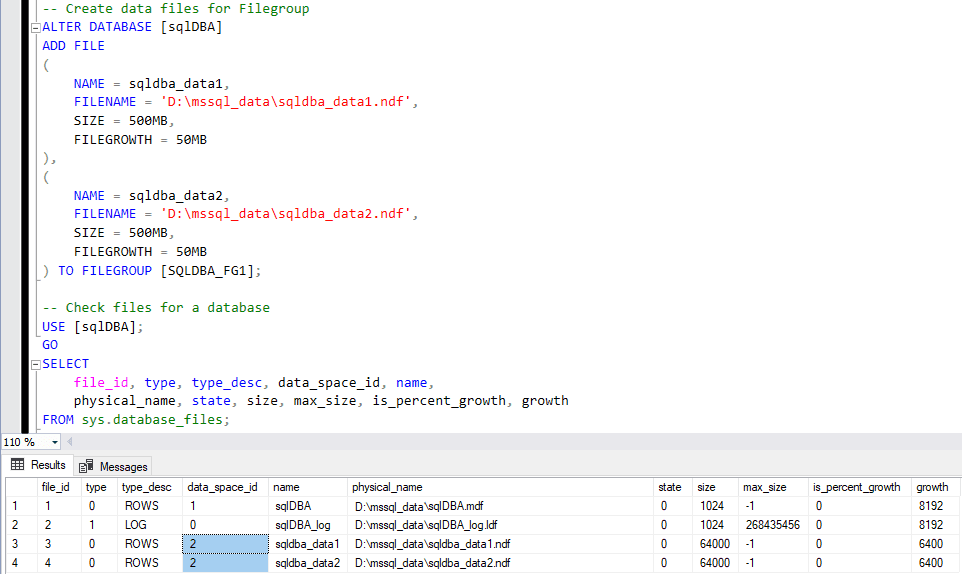
data_space_id, which is what makes them one container as far as your tables are concerned.A LEFT JOIN in the first one is deliberate. It is the query that shows you a
filegroup with no file, which is the state that causes Msg 622, and an inner join
would hide exactly the row you need to see.
Removing One
In reverse order, and only once it is empty:
ALTER DATABASE YourDatabase REMOVE FILE   YourDatabase_Data2;
ALTER DATABASE YourDatabase REMOVE FILEGROUP FG_Data2;
Try it with objects still there and you get Msg 5042, The filegroup "FG_Data2" cannot be
removed because it is not empty. If the file has data in it,
DBCC SHRINKFILE (..., EMPTYFILE) moves those pages to other files in the same
filegroup first.
Frequently Asked Questions
Do I have to add a file, or is the filegroup enough on its own?
You have to add a file, but SQL Server will not tell you that when you expect it to. ADD FILEGROUP creates metadata only. You can then create a table on that empty filegroup and it will succeed. The first INSERT is what fails, with Msg 622. Verified on SQL Server 2025.
What is the difference between a filegroup and a data file?
A filegroup is a named container; the files are what actually hold pages on disk. Objects are placed on a filegroup, never on a specific file, and SQL Server spreads writes across the files inside it using proportional fill. That indirection is the point: you can add capacity by adding a file without touching a single table definition.
Should I use multiple files in one filegroup?
If you want to spread a filegroup across more than one volume, or you are relieving a single hot file, then yes. Make them the same size with the same growth setting, or proportional fill will send most of the writes at whichever file has the most free space.
Can I move an existing table to the new filegroup?
Yes, by rebuilding its clustered index with ON [FG_Name]. That physically moves the table, so plan the space and the window: you need room for both copies during the rebuild. A heap has to get a clustered index first, or be moved by other means.
Why will my filegroup not drop?
Because something is still on it. REMOVE FILEGROUP against a non-empty filegroup fails with Msg 5042, The filegroup cannot be removed because it is not empty. Move or drop the objects, remove the files with REMOVE FILE, then remove the filegroup.
Can I make the new filegroup the default?
Yes: ALTER DATABASE ... MODIFY FILEGROUP [FG_Name] DEFAULT. Tested, the default moved off PRIMARY and a table created with no ON clause landed on the new filegroup. That is a real technique for keeping user data out of PRIMARY, and it is also easy to forget you did it.
Related
- The Filegroup Has No Files Assigned to It (Error 622)
- The Filegroup Cannot Be Removed Because It Is Not Empty (Error 5042)
- Could Not Allocate Space Because the Filegroup Is Full (Error 1105)
- DBA Scripts: Get Filegroup Space
- How to Right-Size SQL Server Database Files
- Get Database File Names and Paths in SQL Server
- DBA Scripts: The Complete Guide
Summary
ADD FILEGROUP then ADD FILE ... TO FILEGROUP, and do not stop after
the first one. An empty filegroup will happily accept a CREATE TABLE and only fail at
the first INSERT with Msg 622, so prove it works with a rolled back
insert rather than trusting a clean deployment. Objects do not move on their own: new tables need
an ON clause, existing ones need a clustered index rebuild, and
MODIFY FILEGROUP ... DEFAULT handles everything created afterwards.
Leave a Reply