
ADD FILEGROUP and never ran ADD FILE. One statement fixes it, and the reason it caught you out is that the error arrives much later than the mistake.This error is late, and that is what makes it confusing. Creating the table on an empty filegroup does not fail. Reproduced on SQL Server 2025: CREATE TABLE ... ON FG_Empty against a filegroup with no files succeeds, the table appears in Object Explorer, and the deployment script finishes clean. The first row anyone tries to insert is what breaks.
So the person who sees this error is usually not the person who caused it, and the change that caused it looks like it worked.
Reproducing It in Thirty Seconds
Worth doing once, because seeing the success before the failure is what makes it stick:
CREATE DATABASE FgDemo;
GO
USE FgDemo;
GO

ALTER DATABASE FgDemo ADD FILEGROUP FG_Empty;   -- metadata only, no file

CREATE TABLE dbo.Demo (id int) ON FG_Empty;     -- SUCCEEDS
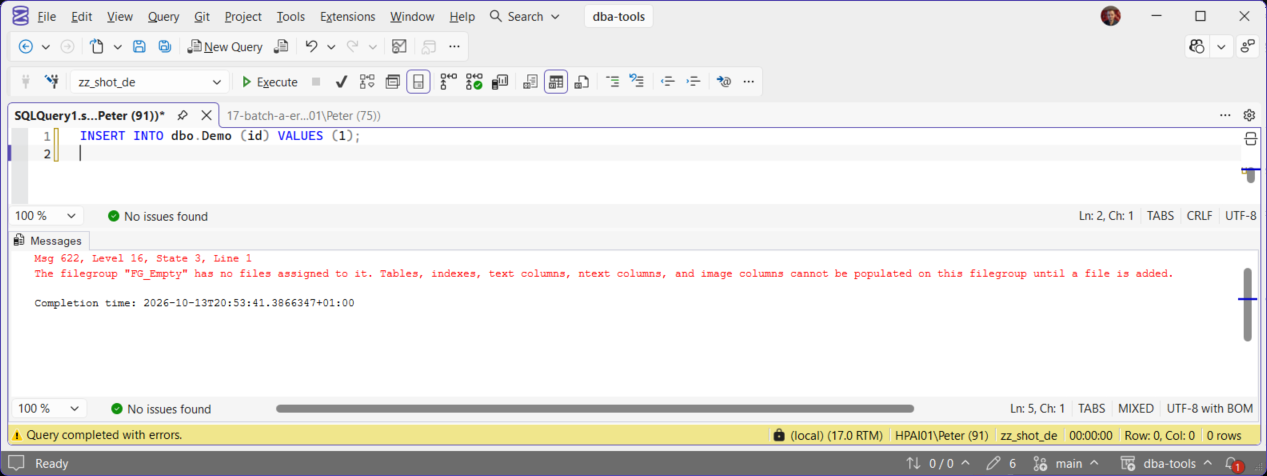
INSERT INTO dbo.Demo (id) VALUES (1);           -- Msg 622
The filegroup was real, the table was real, and nothing warned anybody until data arrived.
Microsoft’s reference covers ALTER DATABASE file and filegroup options and Database files and filegroups in full.
The Fix
Give the filegroup a file. That is the entire fix:
ALTER DATABASE FgDemo
ADD FILE (
    NAME       = N'FgDemo_Data2',
    FILENAME   = N'D:\SQLData\FgDemo_Data2.ndf',
    SIZE       = 512MB,
    FILEGROWTH = 256MB
)
TO FILEGROUP FG_Empty;
Nothing needs recreating. The table, its indexes and its permissions all survive; they simply had nowhere to write until now. Re-run the insert and it works.
Finding Every Empty Filegroup Before It Bites
If one deployment did this, others may have. This lists every filegroup in the current database and how many files it holds:
SELECT  fg.name                       AS filegroup_name,
        COUNT(f.file_id)                AS files,
        SUM(CAST(f.size AS bigint)) / 128.0 AS size_mb
FROM    sys.filegroups fg
LEFT JOIN sys.database_files f ON f.data_space_id = fg.data_space_id
GROUP BY fg.name
HAVING  COUNT(f.file_id) = 0;   -- anything listed here is a Msg 622 waiting to happen
The LEFT JOIN is the point. An inner join hides exactly the rows you are looking for, because those filegroups have no file rows to join to.
Stopping It Recurring
This is a deployment-script problem more than a DBA problem. 2 habits kill it off. First, never let ADD FILEGROUP and ADD FILE live in separate scripts or separate change requests, because the second one is what gets forgotten. Second, prove the filegroup works at the end of the script rather than assuming it:
BEGIN TRAN;
    INSERT INTO dbo.Demo (id) VALUES (-1);
ROLLBACK TRAN;   -- reaching here means the filegroup is genuinely usable
A rolled back insert costs nothing and turns a silent success into a real one.
Frequently Asked Questions
Do I have to drop and recreate the table?
Why did CREATE TABLE not fail?
Can this happen to an index rather than a table?
ON an empty filegroup hits the same wall as soon as it has rows to write, which for a populated table is at build time. On an empty table the CREATE INDEX succeeds too, measured on SQL Server 2025, so it is the same trap: nothing complains until data arrives.Is this the same as the filegroup being full?
Could I just put the table on PRIMARY instead?
Where To Go Next
- Get Filegroup Space, what every filegroup holds and how much room is left
- Filegroup Is Full (Error 1105), the other filegroup error, and how to tell them apart
- Get Database Sizes and Free Space, where every file stands right now
- SQL Server Errors: The Complete Guide, the rest of the library
- Add a Filegroup to a SQL Server Database, the filegroup and its first file in one go, so this error never fires
Leave a Reply