
The Filegroup That’s Actually About to Run Out
Database Free Space Summary tells you a database has plenty of room overall. That can still be wrong for a specific filegroup: a database on multiple filegroups can look comfortable in total while its PRIMARY filegroup, or a specific secondary filegroup an application actually writes to, is nearly full.
Autogrow acts at the file level, inside a filegroup, not at the database level. A database-wide free space number does not tell you which filegroup is about to hit that wall.
This script queries every online database and returns allocated, used, and free space per filegroup, ordered so the tightest filegroup across the whole instance is at the top.
Why Filegroup Space Matters
- Autogrow, and any failure to grow, happens per file within a filegroup, so a database-level free space total can hide a filegroup that’s genuinely out of room
- Multi-filegroup databases (common for partitioned or archived data) can have wildly different free space per filegroup, because they don’t fill evenly
- Read-only filegroups (
is_read_only) are worth knowing about separately: a “full” read-only filegroup is expected and not an incident - This is a cross-database, cross-filegroup view in one pass, ordered by lowest free % first, so the tightest spot on the whole instance surfaces immediately
When to Run This Script
- Routine SQL Server health checks, especially on instances using multiple filegroups
- Investigating an autogrow failure or insert error that Database Free Space Summary alone didn’t explain
- Before a bulk load or large index rebuild targeted at a specific filegroup
- Capacity planning for databases using filegroup-based partitioning or archiving
The Script
- Tested on: SQL Server 2025 (RTM CU8), Windows lab instance
- Last verified: 2026-10-12 (real run; the screenshot below is from it)
- Permissions: VIEW ANY DATABASE, VIEW DATABASE STATE
- Safety: read-only, impact low
/*
Script Name : Get-FilegroupSpace
Category    : monitoring
Purpose     : Allocated, used, and free space per filegroup across all online databases — ordered by lowest free percentage first.
Author      : Peter Whyte (https://sqldba.blog/dba-scripts-get-filegroup-space/)
Requires    : VIEW ANY DATABASE, VIEW DATABASE STATE
*/
-- SAFE:ReadOnly
-- IMPACT:Low
SET NOCOUNT ON;
SET QUOTED_IDENTIFIER ON;

IF OBJECT_ID('tempdb..#FgSpace') IS NOT NULL DROP TABLE #FgSpace;
CREATE TABLE #FgSpace (
    database_name NVARCHAR(128) NOT NULL,
    filegroup_name NVARCHAR(128) NOT NULL,
    filegroup_type VARCHAR(20) NOT NULL,
    is_default BIT NOT NULL,
    is_read_only BIT NOT NULL,
    file_count INT NOT NULL,
    size_mb DECIMAL(20,2) NOT NULL,
    used_mb DECIMAL(20,2) NULL      /* NULL for memory-optimized and FILESTREAM filegroups */
);

DECLARE @db NVARCHAR(128);
DECLARE @sql NVARCHAR(MAX);

DECLARE fg_cur CURSOR FAST_FORWARD FOR
    SELECT name FROM sys.databases
    WHERE state_desc = 'ONLINE'
      AND database_id <> 2 /* exclude tempdb — no meaningful filegroup data */
      AND HAS_DBACCESS(name) = 1
    ORDER BY name;

OPEN fg_cur; FETCH NEXT FROM fg_cur INTO @db;
WHILE @@FETCH_STATUS = 0
BEGIN
    SET @sql = N'USE ' + QUOTENAME(@db) + N';
    INSERT INTO #FgSpace (database_name, filegroup_name, filegroup_type,
                          is_default, is_read_only, file_count, size_mb, used_mb)
    SELECT
        DB_NAME(),
        fg.name,
        CASE fg.type
            WHEN ''FG'' THEN ''ROWS''
            WHEN ''FD'' THEN ''FILESTREAM''
            WHEN ''FX'' THEN ''MEMORY''
            ELSE fg.type
        END,
        fg.is_default,
        fg.is_read_only,
        COUNT(f.file_id),
        CAST(SUM(CAST(f.size AS BIGINT) * 8.0 / 1024) AS DECIMAL(20,2)),
        /* FILEPROPERTY returns NULL for memory-optimized (and FILESTREAM) filegroups; carry the NULL
           rather than print 0.00 and sort the row to the top as if it were full. */
        CASE WHEN MIN(FILEPROPERTY(f.name, ''SpaceUsed'')) IS NULL THEN NULL
             ELSE CAST(SUM(CAST(FILEPROPERTY(f.name, ''SpaceUsed'') AS BIGINT) * 8.0 / 1024) AS DECIMAL(20,2)) END
    FROM sys.filegroups fg
    JOIN sys.database_files f ON f.data_space_id = fg.data_space_id
    GROUP BY fg.name, fg.type, fg.is_default, fg.is_read_only;';
    BEGIN TRY EXEC sp_executesql @sql; END TRY BEGIN CATCH END CATCH;
    FETCH NEXT FROM fg_cur INTO @db;
END;
CLOSE fg_cur; DEALLOCATE fg_cur;

SELECT
    database_name,
    filegroup_name,
    filegroup_type,
    is_default,
    is_read_only,
    file_count,
    size_mb,
    used_mb,
    CAST(size_mb - used_mb AS DECIMAL(20,2)) AS free_mb,
    CAST(CASE WHEN size_mb > 0 AND used_mb IS NOT NULL THEN (size_mb - used_mb) * 100.0 / size_mb END AS DECIMAL(5,1)) AS free_pct
FROM #FgSpace
ORDER BY CASE WHEN used_mb IS NULL THEN 1 ELSE 0 END, free_pct ASC, database_name, filegroup_name;

DROP TABLE #FgSpace;
The database context switch happens per-database via a cursor because filegroup and file metadata only resolve correctly against the database they belong to. Results are ordered by free % ascending, so the single tightest filegroup on the instance is always the first row.
How To Run From The Repo
Clone DBA Tools, initialize and run the script:
# Clone dba-tools repo:
git clone https://github.com/peterwhyte-lgtm/dba-tools

# Initialize environment:
cd dba-tools
.\Initialize-Environment.ps1

# Free space per filegroup, across every online database:
.\run.ps1 Get-FilegroupSpace

# To run against a remote sql server:
.\run.ps1 Get-FilegroupSpace -ServerInstance SQLSERVER01
This script lives in the repo at:
Example Output
Run against a lab instance holding a database with 4 filegroups, one of them memory-optimized, and deliberately uneven fill. 28 filegroups come back across 25 online databases, tightest first.
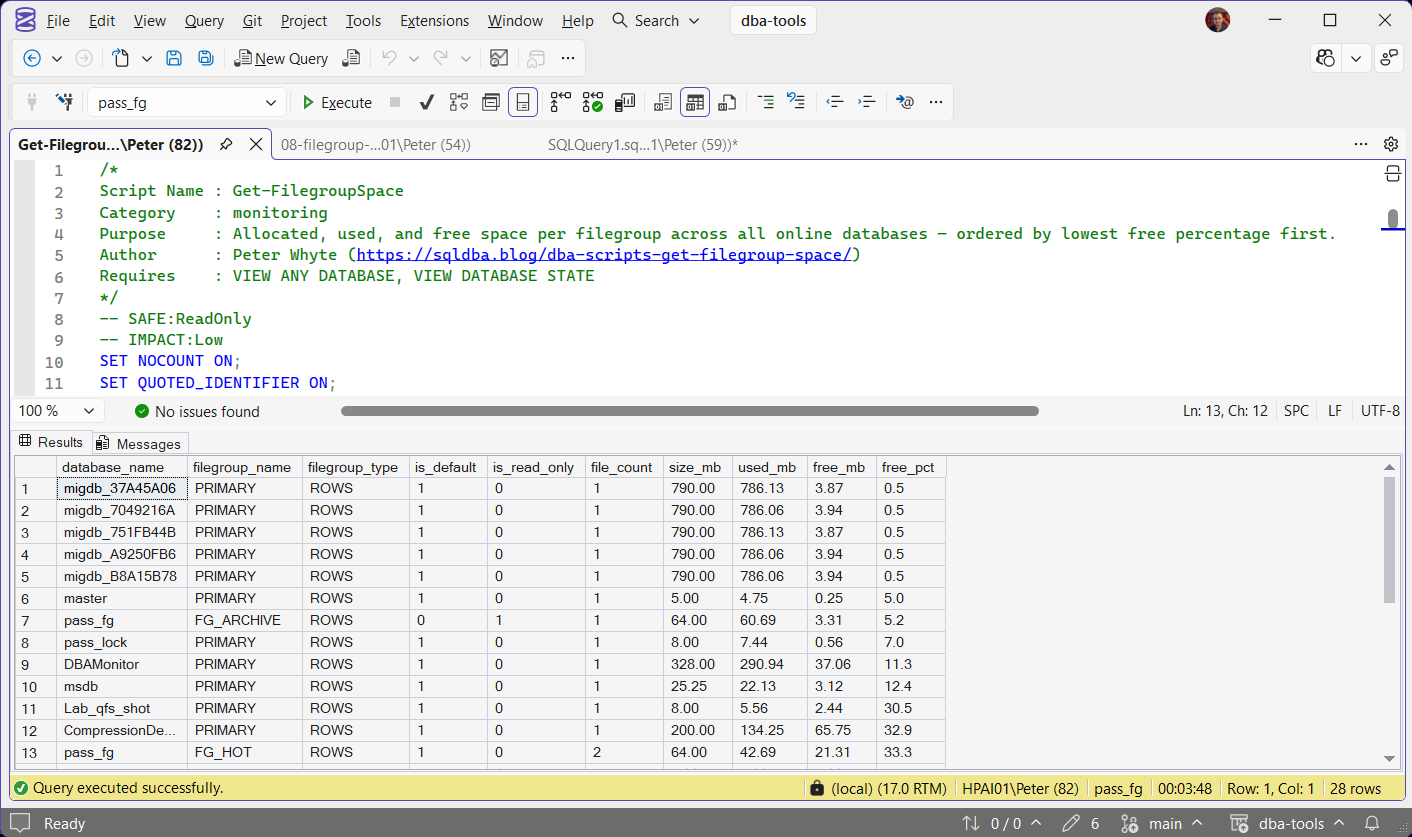
The 5 migdb_* rows at the top, at 0.5% free, are the real capacity finding on this instance: single-file PRIMARY filegroups with under 4 MB of headroom each, is_default 1, and no second filegroup to fall back on.
The next thing a database-level total would have hidden is pass_fg / FG_ARCHIVE, at 5.2% free with 3.31 MB of headroom in 64 MB. is_read_only is 1, so that is archive data sitting at whatever fill level it was closed at, and it is not an incident. The same database’s PRIMARY filegroup is at 92.9% free in the same result set, which is the whole argument for looking at this per filegroup.
pass_fg / FG_HOT returns file_count 2 and 33.3% free, and that number belongs to the filegroup, not to either file. The 2 files behind it hold 5.38 MB and 15.94 MB free, so one of them is 89% used while the filegroup reads comfortable. SQL Server spreads new allocations across the files in a filegroup in proportion to the free space each one has, so the filegroup total is the right number for whether the next insert fits. The per-file split starts to matter when a file cannot grow, and max size and autogrow are reported by Database File Details, not by this script.
Understanding the Results
database_namefilegroup_namePRIMARY shows exactly one row, so several rows for one name means it genuinely uses several filegroups.filegroup_typeROWS for ordinary data, FILESTREAM, and MEMORY for memory-optimized data. Read it before free_pct: a MEMORY filegroup has no sized data file, only a container, so used_mb and free_pct come back NULL and the script sorts it to the bottom rather than reporting it as full.is_defaultis_read_onlyON clause, which is why pressure there reaches further than it looks. A read-only filegroup sits at whatever it was left at. A memory-optimized filegroup also carries is_default 1, separately from the ROWS filegroup, so one database can show 2 rows claiming the default. The ROWS one is the one that receives new tables.Act when the default filegroup is tight. It affects every new object, not just the ones already there. A full read-only filegroup, by contrast, is usually archive data behaving exactly as intended and not an incident at all.file_countsize_mbused_mbfree_mbfree_pctPRIMARY. That is usually the most urgent thing a filegroup-level view can tell you, because PRIMARY holds the system objects and is very often the default filegroup as well.A database that is offline, restoring, or that the account cannot read is skipped silently rather than failing the run, so a name you expected and cannot find is worth chasing separately.
Best Practices
- Run this alongside Database Free Space Summary, not instead of it: database-level and filegroup-level free space answer different questions
- Pay closest attention to
is_default = 1filegroups with low free %: that’s where untargeted growth lands - On databases using filegroup-based partitioning or archiving, check this regularly, since fill rate can differ enormously between an active filegroup and an archive one
- Treat a near-zero free % on a single-file, single-filegroup database as equivalent in severity to a near-full disk volume, since there is no relief valve until the file grows
- When free % is low, read it next to Database File Details: this script shows the space inside the files and that one shows whether the files are allowed to grow into more of it
Microsoft’s reference covers sys.databases, sys.filegroups and sys.database_files in full.
Frequently Asked Questions
Why check filegroup space separately from database-level free space?
Autogrow and out-of-space errors happen at the file level, inside a specific filegroup. A database can show comfortable free space overall while one filegroup, often the default one receiving new objects, is nearly full. This script isolates that.
What does a read-only filegroup at low free % mean?
Usually nothing urgent. Read-only filegroups (common for archived partitions) are typically left at whatever fill level they were set read-only at, so check is_read_only before treating a low free % as a live capacity risk.
Why is used_mb NULL on one filegroup?
Check filegroup_type on that row. A memory-optimized filegroup holds a container rather than a sized data file, so there is nothing to measure used space against. The script returns NULL instead of a misleading 0.00, and sorts those rows to the bottom so they never sit above a filegroup that is genuinely running out.
The filegroup shows plenty free but one of its files is nearly full, which number matters?
The filegroup total, in almost every case. SQL Server spreads new allocations across the files in a filegroup in proportion to the free space each one has, so the emptier file takes the load and the filegroup only runs out when all of its files do. The per-file picture becomes the problem when a file is not allowed to absorb that load, which means a max size it has reached, autogrow turned off, or a volume with nothing left. Those are file-level and volume-level facts, and this script reports neither of them.
Does this work on Azure SQL Database?
No. The script switches database with USE inside a loop, which Azure SQL Database does not allow, so run the inner query in each database on its own there. Azure SQL Managed Instance runs the script as it is.
Summary
A healthy-looking database can still have one filegroup quietly running out of room, and that’s exactly the filegroup autogrow will fail against first. This script surfaces every filegroup across every online database in one pass, ordered so the tightest spot on the instance is always the first row.
Run it alongside a database-level free space check, not as a replacement for one, and treat any near-zero free % on a default, writable filegroup as worth acting on before autogrow does it the hard way.
Related
You may also find these useful:
- The Filegroup Has No Files Assigned to It (Error 622), what an empty filegroup does the first time somebody inserts into it
- The Filegroup Cannot Be Removed Because It Is Not Empty (Error 5042), why a filegroup you thought was empty refuses to go
- Could Not Allocate Space Because the Filegroup Is Full (Error 1105), the error this script tells you is coming
- DBA Scripts: Storage and Capacity
- Get Database Free Space Summary
- Get SQL Server Database File Details
- Get Database Sizes and Free Space
- Get Disk Space on SQL Server
- SQL Server Disk Is Full or the Log Will Not Truncate, where to go when the space that ran out is the volume rather than the filegroup
- Get Database Growth Risk and Forecast
- Add a Filegroup to a SQL Server Database, creating one, and the Msg 622 trap when it has no file
- DBA Scripts: The Complete Guide, the map across every script on this site
Leave a Reply