
You have an .mdf and no .ldf. A server died and only the data drive came back, someone tidied up a log folder, or a vendor sent just the data file. SQL Server can usually attach the database and build a new log for you. Whether it can depends on one thing: was the database shut down cleanly?
This post covers the clean case, what SQL Server quietly changes when it rebuilds the log, and error 1813 when the shutdown was not clean. Everything was run on SQL Server 2025.
.mdf (and any .ndf files) somewhere safe and work on the copy. Some of what follows is one-way.Before You Attach
The log can be rebuilt; data files cannot. If the database had secondary .ndf files, you need every one of them, listed in the attach. If you still have the original instance or its msdb, Get Database File Names and Paths in SQL Server gives you the file list.
Permissions are the other trap. SQL Server sets its own permissions on the data and log files whenever a database is detached or attached, which Microsoft’s CREATE DATABASE reference lists under permissions on data and log files. Files copied off another server, or detached by a different login, can come back with access denied. That failure is Unable to Open the Physical File (Error 5120).
Attach With FOR ATTACH_REBUILD_LOG
USE [master];
GO
CREATE DATABASE [SalesDB]
ON (FILENAME = N'D:\SQLData\SalesDB.mdf')
-- , (FILENAME = N'D:\SQLData\SalesDB_2.ndf')   -- list every data file
FOR ATTACH_REBUILD_LOG;
When it works, SQL Server reports File activation failure for the missing log, then New log file ... was created, and the database comes online:
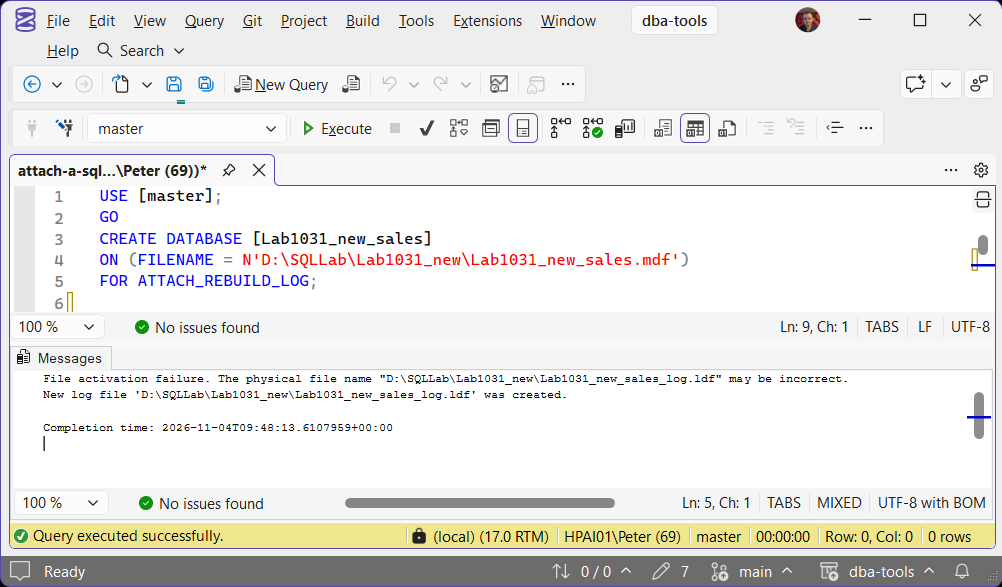
Plain FOR ATTACH does the same for a database with one missing log file: tested on SQL Server 2025, it rebuilt the log with exactly the same 2 messages. FOR ATTACH_REBUILD_LOG says what you mean, so it is the one to type. The old sp_attach_single_file_db still exists, but Microsoft has marked it for removal and points you to CREATE DATABASE ... FOR ATTACH.
What the Rebuild Changes
The database is back, but it is not the database you detached. These changed every time it was tested:
- The log is tiny. Well under 1 MB with 10% growth (768 KB in the capture below), whatever it was before. The test database went in with a 64 MB log growing by 64 MB.
- The recovery model is now SIMPLE. It went in as FULL. Log backup jobs for this database will start failing.
- The backup chain is broken. No log backup from before the rebuild can be applied after it, and Microsoft’s CREATE DATABASE reference says to take a full backup immediately.
The same reference says the rebuilt log is a new 1 MB file in the default log location. On SQL Server 2025 CU8 it came back at 768 KB, at the path the old log had, not in the instance default log folder, so check where it went before you resize it:
SELECT name, physical_name, size * 8 AS size_kb, growth, is_percent_growth
FROM   [SalesDB].sys.database_files;

SELECT name, state_desc, is_read_only, recovery_model_desc
FROM   sys.databases
WHERE  name = N'SalesDB';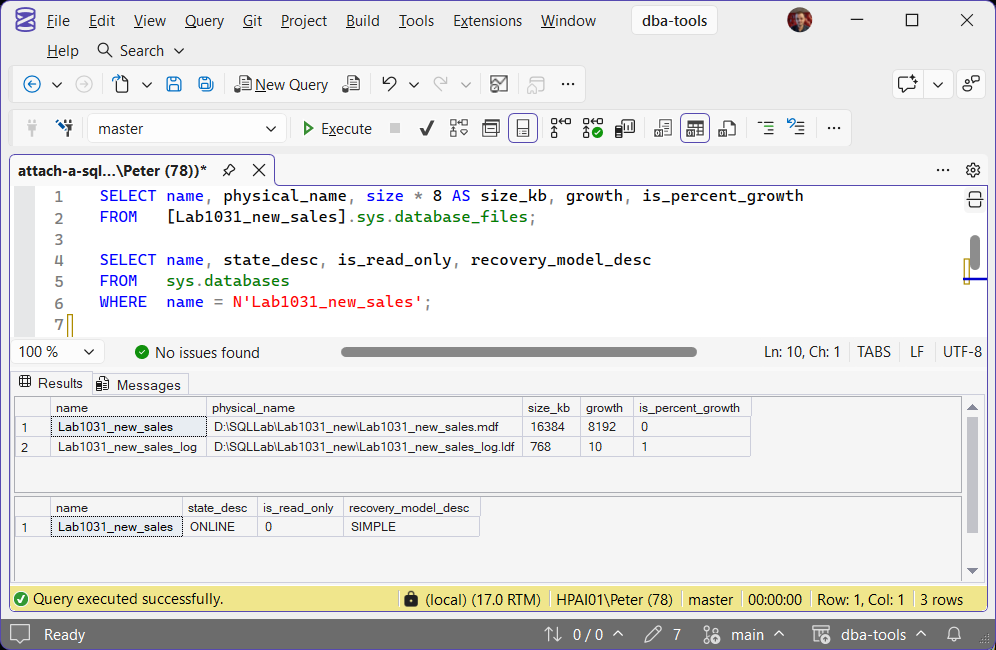
Then put it back the way it was, and take a full backup straight away so log backups have a new starting point:
ALTER DATABASE [SalesDB]
MODIFY FILE (NAME = N'SalesDB_log', SIZE = 4GB, FILEGROWTH = 1GB);

ALTER DATABASE [SalesDB] SET RECOVERY FULL;

BACKUP DATABASE [SalesDB]
TO DISK = N'D:\SQLBackups\SalesDB_FULL_after_attach.bak'
WITH CHECKSUM, COMPRESSION, INIT;
Check is_read_only too. A database set READ_ONLY and then detached came back read-write after the log was rebuilt, so set it back if it should be read-only.
Check It Worked
DBCC CHECKDB (N'SalesDB') WITH NO_INFOMSGS, ALL_ERRORMSGS;No output from CHECKDB with NO_INFOMSGS means no errors. After a clean shutdown nothing is lost: the test database came back with all 1,000 of its rows. If CHECKDB does report errors, DBCC CHECKDB Found Corruption covers what to do with its output.
When It Fails: Error 1813
If the database was not shut down cleanly, the attach refuses to build a new log:
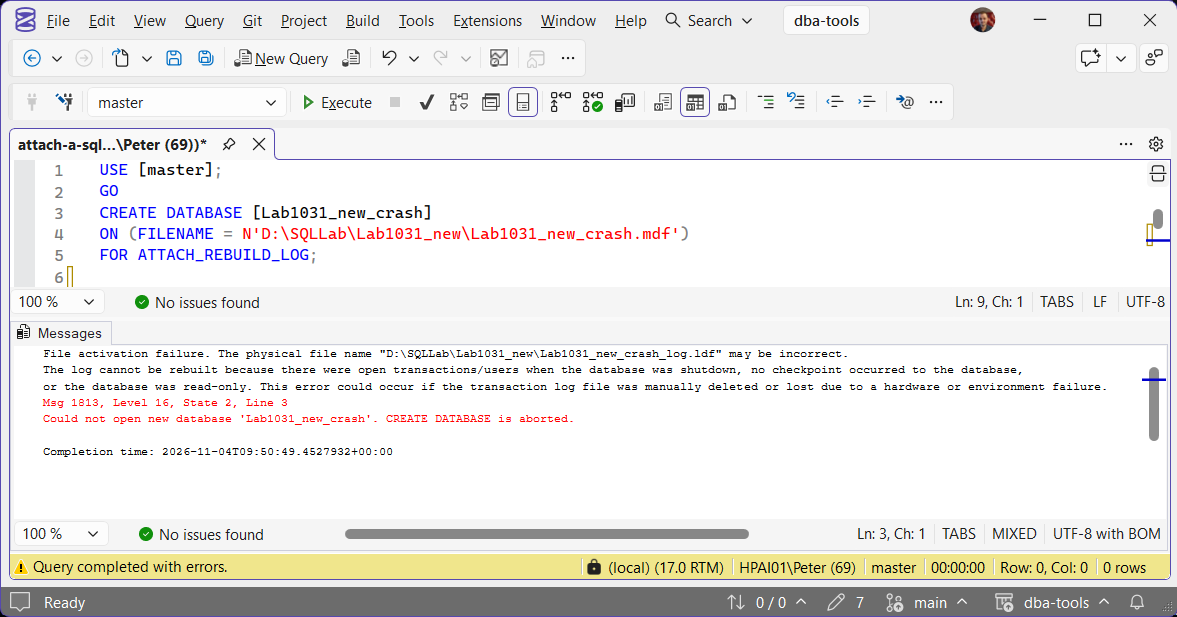
The capture is a data file from a database that never finished recovery. A crash, or a log lost while the database was running, leaves the same unclean state, which is what the message lists. That is SQL Server protecting you: the data file may hold changes that were only ever completed in the lost log, or half-finished ones that the log would have rolled back, so it is not known to be consistent.
The options, in order:
- Restore from backup. The last full plus the log backups gives a consistent database, even if the most recent changes are lost.
- Find the original log. The recycle bin, storage snapshots, the old SAN volume, VM backups.
- Emergency repair, as a last resort. EMERGENCY mode and
REPAIR_ALLOW_DATA_LOSScan bring it back, at a price. Database Cannot Be Opened (Error 945) runs it on a test database and shows exactly what it cost, and Database Marked Suspect (Error 926) covers the same route from a suspect database. Only on a copy, only with no backup, and only with the data owner agreeing to the loss.
Frequently Asked Questions
Will I lose data with ATTACH_REBUILD_LOG?
Why is my database in SIMPLE recovery after the attach?
The 1813 message mentions read-only. Does a read-only database always fail?
Can I just detach and re-attach to shrink a huge log?
Summary
Work on a copy, have every data file, and expect file permissions to matter. CREATE DATABASE ... FOR ATTACH_REBUILD_LOG brings a cleanly shut down database back with a new log, but one under 1 MB with 10% growth, in SIMPLE recovery, with the backup chain broken. Resize the log, set the recovery model back, take a full backup and run CHECKDB. Msg 1813 means the shutdown was not clean: backups first, the original log second, emergency repair last.
Leave a Reply