
VIEW DATABASE PERFORMANCE STATE is granted to a user in one database and does nothing in the next. Check a login with EXECUTE AS LOGIN and HAS_PERMS_BY_NAME across every database, grant it in each database the tool reads, or grant VIEW SERVER PERFORMANCE STATE once to cover every database the login has a user in.I needed this when a SQL login had to be checked before it could be used to configure AWS DMS. The question was simple, does this login have VIEW DATABASE PERFORMANCE STATE, and the answer was not easy enough to get. Listing grants shows only what was granted directly, and misses everything the login inherits.
A login without it gets this the moment it reads Query Store or a database-scoped DMV:
On this page
Check a Specific Login Across Every Database
Run this as sysadmin, swap in the login, and you get one row per database with the effective answer: direct grants, role membership, the server-level grant and db_owner all count, which a list of grants cannot tell you.
USE master;
EXECUTE AS LOGIN = N'dms_login';
SELECT d.name AS database_name,
       HAS_PERMS_BY_NAME(d.name, 'DATABASE', 'CONNECT') AS can_connect,
       HAS_PERMS_BY_NAME(d.name, 'DATABASE', 'VIEW DATABASE PERFORMANCE STATE') AS has_view_db_performance_state
FROM sys.databases AS d
WHERE d.state_desc = 'ONLINE'
ORDER BY d.name;
REVERT;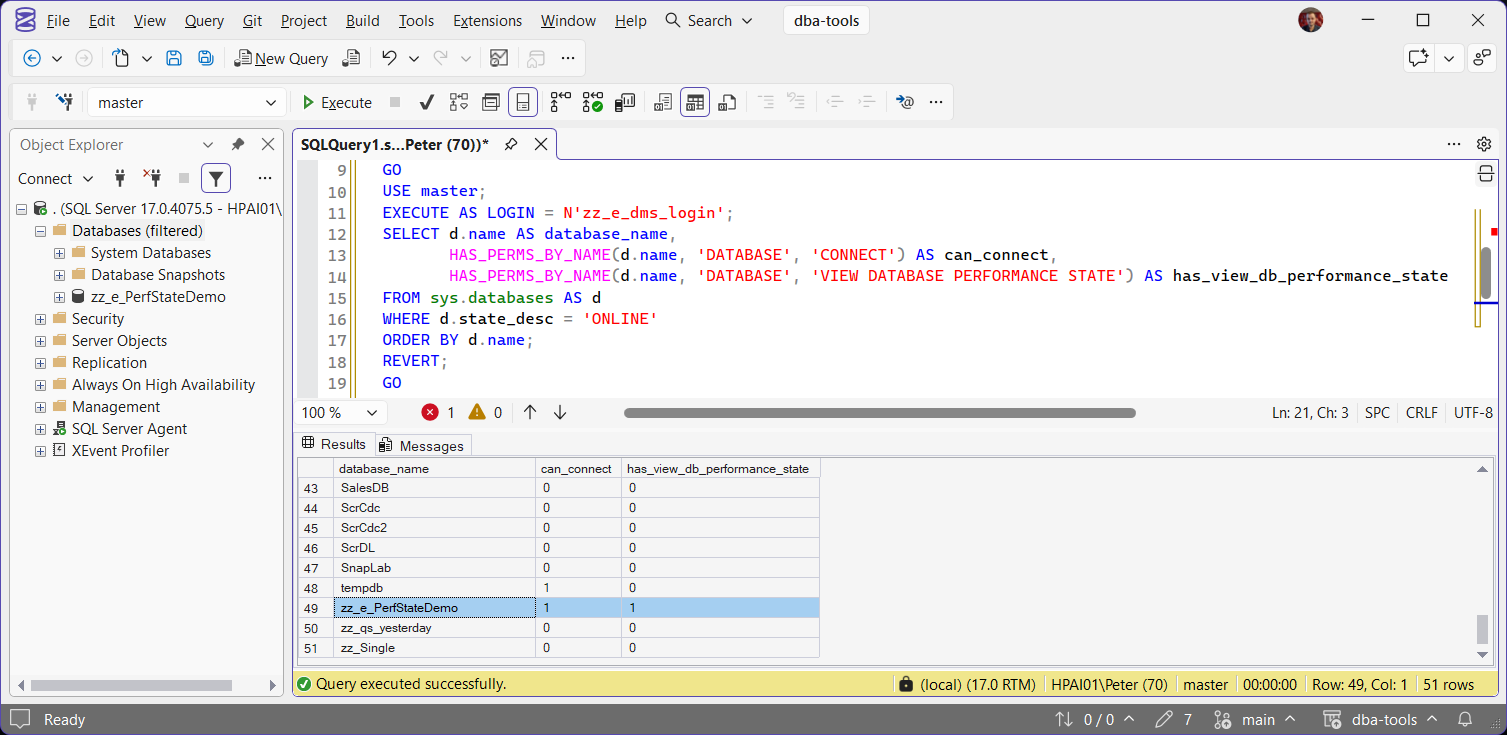
EXECUTE AS LOGIN needs sysadmin or IMPERSONATE on that login, and REVERT puts you back. A 0 in can_connect means the login has no user in that database, and no permission grant will help until it has one.
On my lab instance, the login granted the permission in zz_e_PerfStateDemo comes back 1 there and 0 for the permission in every other database, including master. tempdb shows 1 under can_connect because guest is enabled there by default, which is normal.
List Who Holds It
Explicit grants in the current database:
SELECT pr.name AS principal_name,
       pr.type_desc,
       pe.permission_name,
       pe.state_desc
FROM sys.database_permissions AS pe
JOIN sys.database_principals AS pr ON pr.principal_id = pe.grantee_principal_id
WHERE pe.class_desc = 'DATABASE'
  AND pe.permission_name IN ('VIEW DATABASE PERFORMANCE STATE', 'VIEW DATABASE STATE', 'CONTROL')
ORDER BY pr.name, pe.permission_name;
And the server-level grants and roles that cover it in every database the login can enter:
SELECT pr.name AS principal_name,
       pr.type_desc,
       pe.permission_name COLLATE DATABASE_DEFAULT AS granted_through,
       pe.state_desc
FROM sys.server_permissions AS pe
JOIN sys.server_principals AS pr ON pr.principal_id = pe.grantee_principal_id
WHERE pe.permission_name IN ('VIEW SERVER PERFORMANCE STATE', 'VIEW SERVER STATE', 'ALTER SERVER STATE', 'CONTROL SERVER')
UNION ALL
SELECT m.name, m.type_desc, r.name COLLATE DATABASE_DEFAULT, 'MEMBER'
FROM sys.server_role_members AS rm
JOIN sys.server_principals AS r ON r.principal_id = rm.role_principal_id
JOIN sys.server_principals AS m ON m.principal_id = rm.member_principal_id
WHERE r.name IN ('sysadmin', '##MS_ServerStateReader##', '##MS_ServerPerformanceStateReader##', '##MS_ServerStateManager##')
ORDER BY principal_name;
The COLLATE DATABASE_DEFAULT is there because the permission names and the role names use different collations, and the UNION ALL fails with Msg 451 without it. Members of db_owner also have it, through CONTROL on the database. For one login’s full picture, Get Permissions and Role Membership covers the rest of its access.
Grant It
The permission goes to the database user, not the login, so run it in the database the tool reads:
USE YourDatabase;
GRANT VIEW DATABASE PERFORMANCE STATE TO [dms_login];

-- To take it away again
REVOKE VIEW DATABASE PERFORMANCE STATE FROM [dms_login];
If the login has no user in that database, create one first with CREATE USER [dms_login] FOR LOGIN [dms_login];.
To cover every database at once, grant the server-level parent, or add the login to the built-in role that carries it:
GRANT VIEW SERVER PERFORMANCE STATE TO [dms_login];

-- Or the role
ALTER SERVER ROLE [##MS_ServerPerformanceStateReader##] ADD MEMBER [dms_login];
Both were tested on the lab, and both still need a user in each database. A login holding VIEW SERVER PERFORMANCE STATE with no user in a database came back 0 there, and the role member came back 1 only in the database where it had a user.
Database Scope Versus Server Scope
This is the part that catches people. VIEW DATABASE PERFORMANCE STATE unlocks a set of database-level views, but plenty of DMVs named sys.dm_db_ are still server-scoped on SQL Server and want VIEW SERVER PERFORMANCE STATE instead. Tested on SQL Server 2025 with a login holding only the database permission:
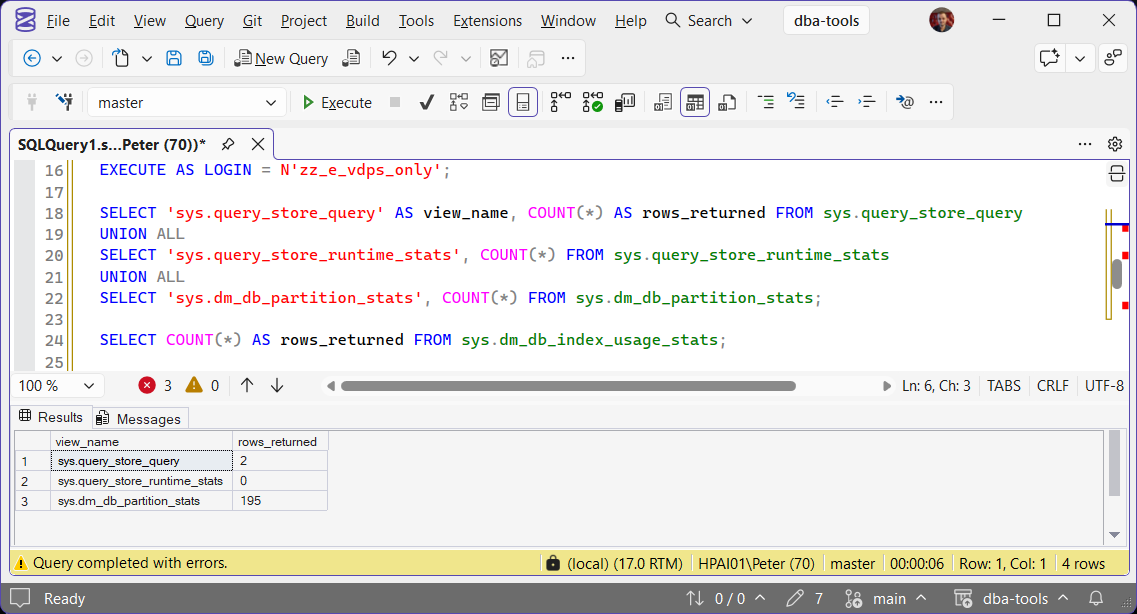
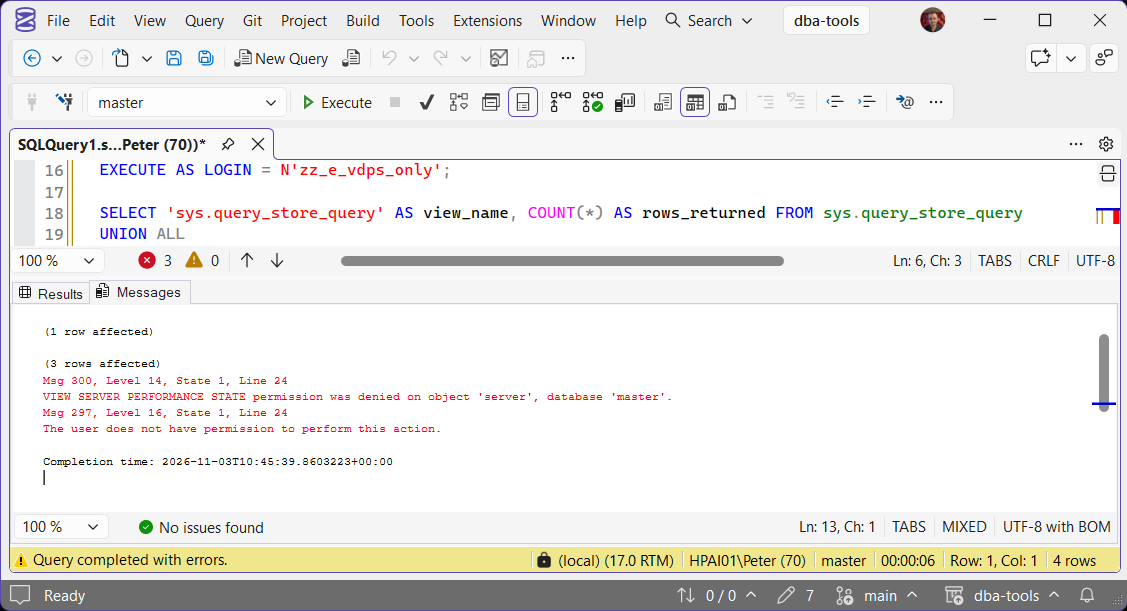
The login reads Query Store and sys.dm_db_partition_stats without an error. sys.query_store_runtime_stats shows 0 only because nothing had been flushed to it yet. The next query, against sys.dm_db_index_usage_stats, is the one that fails:
It opens Query Store (sys.query_store_query, sys.query_store_plan, sys.query_store_runtime_stats), sys.dm_db_partition_stats, sys.dm_db_index_physical_stats and sys.dm_db_index_operational_stats.
It does not open sys.dm_db_index_usage_stats, sys.dm_db_missing_index_details, sys.dm_db_file_space_usage, sys.dm_db_log_space_usage, sys.dm_db_log_info or sys.dm_tran_locks, which return Msg 300 and want VIEW SERVER PERFORMANCE STATE.
Without the permission, the Query Store views and sys.dm_db_partition_stats return Msg 262, while sys.dm_db_index_physical_stats returns the vaguer Msg 297, “The user does not have permission to perform this action”. So if a tool still fails after this grant and the message names the server, it wants VIEW SERVER PERFORMANCE STATE, which is covered in Grant VIEW SERVER STATE in SQL Server.
Microsoft lists which permission each object needs on its dynamic management views reference.
Why a Login Needs It
AWS DMS. This is where I met it. AWS documents the source login permissions on its SQL Server source page, and the premigration assessment checks for VIEW DATABASE STATE, which covers VIEW DATABASE PERFORMANCE STATE in the same database.
Monitoring tools. A tool that reads Query Store or index health per database, without server-wide rights, needs exactly this and nothing broader.
Tuning by people who are not sysadmin. A developer or app team who owns one database can read its Query Store with this grant, the way Get Query Store Top Queries does, without seeing anything on the rest of the instance.
Index checks. Fragmentation checks read sys.dm_db_index_physical_stats, so a non-sysadmin job running something like Get Index Fragmentation needs it in each database it checks.
SQL Server 2019 and Earlier
VIEW DATABASE PERFORMANCE STATE arrived in SQL Server 2022, as one of the two halves VIEW DATABASE STATE was split into. On 2019 and earlier the permission does not exist and the GRANT fails, so grant VIEW DATABASE STATE instead, which covers the same views there.
Is VIEW DATABASE PERFORMANCE STATE database scoped?
VIEW SERVER PERFORMANCE STATE covers it in every database the login has a user in.Does VIEW SERVER STATE include it?
VIEW SERVER STATE covers VIEW SERVER PERFORMANCE STATE, which covers VIEW DATABASE PERFORMANCE STATE. A lab login with only VIEW SERVER STATE came back 1 for all three.Does db_owner have it?
CONTROL on the database, which covers VIEW DATABASE STATE and so this permission. It does not reach the server-scoped views listed above.HAS_PERMS_BY_NAME says 1 but the tool still fails. Why?
VIEW SERVER PERFORMANCE STATE means it needs the server permission, not this one.Where To Go Next
Once the grant is in, these are the next stops.
- Grant VIEW SERVER STATE in SQL Server, the server-level parent and the DMVs it unlocks.
- CREATE DATABASE Permission Denied (Error 262), the same error number when a different database permission is missing.
- Get Permissions and Role Membership, one login’s effective access across the instance.
- Get Query Store Top Queries, the kind of read this permission exists for.
- SQL Server Security Scripts, permissions, logins and role membership auditing.
Leave a Reply